KissAssist
KissAssist
The most-used all class box assistant, for beginners and experts.
Authors: Maskoi, ctaylor22, anonymoushero, crystane, thenomadman, william12, TreeHuginDruid, Toadwart, kaen01, drwhomphd, sl968, vsab, jande, GPS_Soldier, zuesizgod, LrdDread • Config: Kissassist_name.ini, KissAssist_Info.ini
A short link to this manual: kissassist.com

KissAssist is a MacroQuest script designed to turn any EverQuest character into a personal assistant, like an advanced mercenary. It's a popular choice for multi-boxers due to its universal class handling, flexibility and easy-to-read configuration (.ini) files.
The latest version of KissAssist can be downloaded on the resource page. Other useful links include the .ini library, the discussion thread, the discussion forum, and the support forum.
Getting Started with KissAssist
Must Configure
KissAssist will not work without configuration. EverQuest presents too many obstacles for one configuration to work in all circumstances, so you'll need to adjust spells, buffs, and abilities accordingly. Fortunately, it's straightforward, and there are helpful shortcuts available, such as using other's configurations and a beginner's walkthrough.
Creating your KissAssist .ini
Without having a target selected, type /mac kissassist
KissAssist will generate an .ini file that looks like "KissAssist_Charactername.ini" in your config folder. Once the macro ends, you can proceed to edit the .ini using settings as a reference.
Multiple Characters With Same Name
If you have characters on different servers with the SAME NAME, you can maintain separate ini files for each character by renaming the KissAssist_ToonName.ini file to reflect the server.
Example
If you have two characters named Megamage, one on Xegony and one on Cazic Thule, rename the ini files to KissAssist_Xegony_Megamage.ini and KissAssist_Cazic_Megamage.ini.
Starting KissAssist
Basic usage
Target your main assist and type "/mac kissassist" and kissassist will automatically use your current target as the assist and use the predefined role set in your .ini. Alternately, you can make specifications on startup:
/mac kissassist [KissRole] [AssistsName] [AssistHealth%]
Example:
 /mac kissassist assist Bob

 /mac kissassist assist Bob 98

 /mac kissassist puller BobTank

 /mac kissassist tank
For tank characters, you can have them assist themselves, which will make the tank decide which mobs to target. It's generally a good idea to have your tank decide which mobs they're going to tank if a real player is not going to be the main assist. Characters with Tank Roles will default to themselves as MA. You should have only 1 character in your group set in a Tank role and all other characters should be in an Assist or Puller roll.
For all other characters, assist the main assist or your tank if they are the main assist.
The optional [KissRole] startup modifier is used to define which role you will be in when starting KissAssist. If you choose not to define a role, KissAssist will default to whatever role you have selected in your .ini file.
The optional [AssistsName] startup modifier is used to declare who you'll be assisting. This can either be someone else, or if using either puller or tank modes, you can declare yourself the main assist. You MUST have a target selected if you choose not to declare a main assist when starting Kiss.
The optional [AssistHealth%] startup modifier is used to define specific melee assist settings. By default (without using the modifier), it will be 95, or whatever your .ini defined values are in your Melee settings. This setting only applies to melee and /petattack.
Supported startup paramaters are: ma, assist, assistat, ini, debug, debugall, forcealias, manual, parse, scanini, autoload, path
Starting KissAssist for an entire group
Using DanNet you can create a social hotkey to automatically start your other characters in assist mode to assist your primary character:
/dgtell all /mac kissassist assist BobTank
Using EQBC you can create a social hotkey to automatically start your other characters in assist mode to assist your primary character:
/bca //mac kissassist assist BobTank
Specify an .ini file to use
You can also tell KissAssist to load a specific ini file. If your wizard has a separate ini to use ice nukes instead of fire nukes or your tank wants to run a DPS setup on easier content, you can just save another ini file and load that instead of your defaults:
/mac kissassist ini kissassist_Name_IceNukes.ini
[StartupCommands] (advanced)
This requires you to manually add the section to your ini file.
[StartupCommands]
CommandSize=5
Command1=/kisscommand
Command2=/aliasToUse
Command3=/EQCommand
Command4=/MQCommand
Command5=null
KissAssist checks for this section at macro startup and will execute each of the commands.
If you startup kiss and have kotkeys that you use everytime you startup kiss you can have the macro do it for you.
The routine uses the MQ /docommand to execute each of the commands.
You can also use conditions with the startup entries.
Manual Mode (everything off)
/mac kissassist manual
Starts KissAssist with everything turned off. You may then use commands to turn certain things on that you want kiss to control, such as /buffson, /healson, /dpson, etc.
More startup options can be found on the /mac kissassist page.
Settings
KissAssist uses several configuration files, but the most common are:
KissAssist_CharacterName.ini-
- holds character settings
KissAssist_Info.ini-
- holds settings for NPCs and zones
KissAssist_ToonName.ini setup
Once the INI has been created in your Config folder, edit it with your favorite text editor.
[General] Settings
- Role
Assist (default) -
Defines the role that the character will play. This setting can be overridden at startup.
Default. Assists Main Tank on mobs.
Role=AssistSets up tanking feature and will target and attack any aggressive mob that comes into defined melee range. Target (or declare) yourself as MA.
Role=TankThis role basically duplicates the oldie-but-goodie puller.mac. It will pull mobs within a certain radius back to camp for your party to kill. Target Main Assist for this role.
Role=PullerCombines pulling and tanking. The character pulls mobs back to camp, then engages them when within defined melee distance. Target yourself for Main Assist with this role.
Role=PullerTankThis role allows for a pet class (Mage/Necromancer/Beastlord) to ‘have their pet tank’.
Role=PetTankThis role allows for a pet class (Mage/Necromancer/Beastlord) to BOTH ‘pull and have their pet tank’.
Role=PullerPetTankDuplicates the old hunter mac. Runs your character around a zone and hunts any or predefined mobs within the pull radius.
Ignores any Mob HP % defined in your DPS section.
Role=HunterSame as Hunter but lets a pet class (Mage/Necromancer/Beastlord) have their pet tank while hunting.
Role=HunterPetTankMainly for Paladins, Rangers, Beastlords, and Shadow Knights assisting Mage pets tanking. It turns off melee so they just send in pets and cast.
Role=Petassist - KissAssistVer
- Tells KissAssist which INI version you're running, and will update this accordingly upon new version releases.
- CampRadius
(default 30) - Determines how far your characters interact based on your initial camp spot.
This should always be less than MeleeDistance.
- CampRadiusExceed
(default 400) - Disables
ReturnToCampwhen you're moved large distances from camp (summon, warp, teleport, etc.). - ReturnToCamp
0 = Off (default)| 1 = On - Determines if your characters return to the camp after each fight.
Requires
ChaseAssist=0to enable. - ChaseAssist
0 = Off (default) | 1 = On - Instead of returning to camp, follow the main assist everywhere.
Requires
ReturnToCamp=0to enable. - ChaseDistance
(default 25) - How close you want your character to follow the main assist.
- MedOn
0 = Off | 1 = On (default) - Toggles medding for mana or endurance based on the
MedStartandMedCombatsettings. - MedStart
(default 20) - What mana/endurance percentage to start medding at.
- MedCombat
0 = Off (default) | 1 = On - If enabled, your character will med to full during combat. Healers will still heal, but melee characters won't attack.
- LootOn
0 = Off | 1 = On - Turns looting on or off based on your
Loot.inifile. - RezAcceptOn
0 = Off / 1 = On |% - Enables MQ2Rez auto-accept. Append a number to set minimum rez % to accept.
RezAcceptOn=1|96 - AcceptInvitesOn
0 = Off | 1 = On (default) - Toggles automatic group invite acceptance while KissAssist is running.
- GroupWatchOn
0 = Off (default) / 1 = Group / 2 = Healers |% - Waits for party mana/end to reach 90 % before continuing, based on the chosen mode and threshold.
Parameters:
-0= Disabled
-1= Waits for entire group to get above 90%.
-2= Waits for healers to get above 90%.
-%= threshold (default 20). This means once mana/end are below 20%, the macro will wait until characters are at 90% mana/endurance before continuing.Example
When healers drop below 40% mana, kissassist will wait until they are at 90% mana before continuing.GroupWatchOn=2|40 - GroupWatchCheck
False | cond# - As part of the groupwatch routine, this will pause the macro when the specified condition evaluates to
True. The macro will continue when the condition evaluates to False.GroupWatchCheck=cond3 cond3=${Me.Snared}To use this option, you must have conditions enabled (ConOn=1) and have created a corresponding condition.
- CorpseRecoveryOn
0 = Off | 1 = On 0= Over ride for dragging corpse back to camp when pulling.
1= Check for group member corpses including your own and summon them. This requires Tiny Jade Inlaid Coffin to work. If you run out of coffins or just don't have any, summoning corpses is turned off but dragging corpses back to camp is still enabled. This can be used to turn on and off dragging corpses back to camp when pulling.Summoning corpses requires level 70+ and the appropriate spell/AA.
- EQBCOn
0 = Off (default) | 1 = On | 2 = Guild [|Channel] -
Broadcast mez/heal/pull/tank messages through MQ2EQBC. Higher values add guild/fellowship tell echoing. See MQ2EQBC.
0= Disabled1= Basic mode - broadcasts KA messages via/bc2|Channelsends to specific channel via/bct Channel
If both EQBC and DanNet are enabled, EQBC handles chat while DanNet does everything else.
- DanNetOn
0 = Off (default) | 1 = On | 2 = On [|PeerGroup] -
Same idea as EQBCOn, but uses DanNet’s
dgtellinstead of EQBC’sbc/bct.0= Disabled1= Basic mode – sends KA messages withdgtell all(broadcast to every DanNet peer)2= Sends withdgtell <PeerGroup>; add|YourGroupafter the 2 to limit traffic to that group, e.g.2|Melee
If both EQBCOn and DanNetOn are enabled, EQBC is used for chat messaging while DanNet handles everything else.
- IRCOn
0 = Off | 1 = On - Displays and listens to IRC commands.
- TwistOn
0 = Off | 1 = On - If
1, the bard will twist songs out of combat. If0, the bard will not twist out of combat (preventing song aggro). - TwistMed
0 / list of gem# - Fine-grained control over what song(s) a bard plays while medding.
•0- Sit and do not sing.
•5- Sing gem 5 only.
•5 6 7 8- Twist specified gems while standing.
•0 5 6 7 8- Preserve list but sit and do not sing. - TwistWhat
# #... - Specifies the order of song gems to twist when out of combat (or always, if
MeleeTwist=Continuous).Example
This will twist songs in the order of 1, 2, 4, and 6.TwistWhat=1 2 4 6 - GroupEscapeOn
0 = Off | 1 = On - Druids/Wizards will cast Exodus/Succor/Evacuate when the MA dies or is absent.
- CampfireOn
0 = None | 1 = Normal | 2... - Choose which fellowship campfire to use from the list of available campfires. 1 requires no items, while 2 and higher require the appropriate items.
Without appropriate items for 2 or higher, this setting defaults to 1.
- DPSMeter
0 = Off | 1 = On - Toggles the DPS meter display after each fight. Uses the MQ2DPSAdv plugin.
Closed window when starting Kiss
If you want the DPSAdv window closed when starting kissassist, use the new [StartupCommands] section and add an entry to close the window.Command1=/invoke ${Window[dpsadvwnd].DoClose} - CharInfo
- Basic info regarding the character's class, level, and account status (e.g., gold/silver), generated on INI creation.
- ScatterOn
0 = Off (default) | 1 = On - Randomizes the exact return-to-camp location.
- DefaultUI
TRUE / FALSE - Used internally to check if you are using the default UI. KissAssist will show a warning if you are not.
Non-default UIs may break KissAssist windows.
- LOSBeforeCombat
0 = Off | 1 = On - Attempts to move the character to gain Line of Sight (LOS) to the mob before attacking. This also works for DPS casters.
[Spells] Settings
- MiscGem
1-13 (default 8) - Spell Gem # Kiss uses to mem spells that need to be memmed (buffs, pet summons, etc).
- MiscGemLW
1-13 (default 0) - Similar to MiscGemRemem, however this is used for LONG MEMORIZATION / LONG RECAST time spells.
- MiscGemRemem
0 = Off | 1 = On (default) - Toggles rememming the original spell in MiscGem slot that was there when the macro was started.
- LoadSpellSet
0 = Off (default) | 1 | 2 - Controls spell loading behavior.
•0= Off
•1= LoadsSpellSetName
•2= Loads from [Spells] section
• If you have no [Spells] section defined and are using option 2 for LoadSpellSet, a default [Spells] section is created. See Misc section for more information on how to set up [Spells]. - SpellSetName
(default "KissAssist") - The name of the pre-saved spell set you want to use for kiss.
- CastingInterruptOn
0 = Off | 1 = On (default 0) -
Will try and interrupt casting to help save mana. Is used for healing, DPS, buffs, and Mez routines.
Advanced Options Available
You can now determine the interrupt(s) you want checked. Using 1 in the INI file turns on all Interrupts by defaulting CastingInterruptOn=62.
Each Interrupt check has been given a value:
Buffs = 2, Heals = 4, DPS = 8, Mez = 16 and Cures = 32
By doing this you are now able to control any of the interrupts you want turned on.
To turn on more than one interrupt simply add the values together.Example
To Interrupt Mezzing(16) and DPS(8) set CastingInterruptOn=24 To Interrupt Buffing(2) and Heals(4) set CastingInterruptOn=6 To Interrupt Just Mezzing(16) set CastingInterruptOn=16
Casting Interrupts for heal entries are ignored, if the HP% check is 65% or below. Another explanation is: If you have a heal entry that you want to cast when a characters HP drops to 65% or below. Then you want the heal to land and not get interrupted. So heal entries with an HP check of 66% or above will allow for interruption.
[Melee] Settings
- AssistAt
(default 95) - Mob health percentage (1-100) to assist/attack. This affects when you engage and is NOT specific to melee characters. e.g. Pet classes will send pets at this percentage.
- MeleeOn
0 = Off | 1 = On (default 0) - Toggles physical melee attacks.
Usually set this to 0 for casters or they will run in and melee.
- FaceMobOn
0 = Off (default) | 1 = On | 2 | 3 - Controls mob facing behavior.
•0= Off
•1= Will face mobs (includes casting spells)
•2= More realistic facing - toggles facing mob when incoming to camp and right before combat starts
•3= For Puller role only - will face mob just before attackingCasters should generally disable this setting.
- MeleeDistance
(default 75) - Maximum radius for mob engagement. Mobs outside this radius will not be engaged. Tank modes use this distance to decide if mobs should be engaged. Also applies to casters engaging with spells even when MeleeOn=0.
Stop the Jump
Setting this to the same value as CampRadius will prevent the Tank from taking that initial Jump at the mob on incoming, skipping any /moveto commands. RequiresUseMQ2Melee=0. - StickHow
0 | I | Stick option(s) (default snaproll) - Defines how character sticks to mob when fighting. Options include
!front,behindonce,snaproll rear,front. See MQ2MoveUtils for more information.
-I= Ignore sticking in combat. RequiresUseMQ2Melee=0. This keeps your melee character from moving. -0= Use just/stickwith no additional optionsMelee distance
Stick while in combat will try to use MAX melee distance. Use the % option in your StickHow command to move closer to the mob.StickHow=MoveBack 50% loose - MeleeTwistOn
0 = Off (default) | 1 = On | 2 - Controls melee twist behavior.
•0= No melee twist (default)
•1= Start melee twist when you engage your target in combat
•2= Start melee twist when there are mobs in the XTarget window - MeleeTwistWhat
# #... (Twist Order) | Continuous - Song order to twist during combat if MeleeTwistOn is enabled. If set to
Continuous, the bard will continue to twist the normal song order as defined inTwistWhatfrom the General Section. - AutoFireOn
0 = Off (default) | 1 = On - Toggles auto fire on/off. Ranged item and ammo must be equipped.
- UseMQ2Melee
0 = Off | 1 = On (default) | 2 - Controls MQ2Melee usage. See MQ2Melee for more information.
•0= Turn off and unload MQ2Melee
•1= Use MQ2Melee and let it auto control sticking (does NOT use the melee StickCMD)
•2= Use MQ2Melee and let it control sticking (uses the melee StickCMD) - Autohide
0 = Off (default) | 1 = On - Toggles auto Sneak/Hide for Rogues. Rogue will hide/sneak after every fight.
- TargetSwitchingOn
0 = Off (default) | 1 = On - Allows the MA to manually switch targets.
Can only be turned on if you're the MA. Ignored for any other character/role.
- PetTauntOverride
0 = Off (default) | 1 = On - Toggles manual control of the pet taunt function.
•0= Macro functions normally and controls/pet taunt
•1= Macro ignores/pet tauntstate
[DPS] Settings
- DPSOn
0 = Off (default) | 1 = Cascading | 2 = Sequential -
Controls DPS casting behavior.
•0= Off
•1= Cascading. Cast each spell when the mob's % health is less than the specified MobHealth%
•2= Sequential. Cast each spell in order using the MobHealth% tag to determine order. (ignores the mob's actual health)KissAssist will cast Spell/AA's starting when a Mob's health is less than the specified MobHealth%Timing Mechanics
As soon as a spell is cast the DPSInterval timer starts and will pause casting until the timer ends.
How the Snowball Effect Works
- Once the Mob's Health gets below a Spell/AA's MobHealth% percent, that Spell/AA is added to the rotation
- This creates a snowball of damage that gets bigger as the mob's health gets lower and more Spell/AA's are added to the rotation
- Dot's will be reapplied when they drop off the target
Example
First spell at 99, next at 98, then later in the rotation you might have 76, 75, 74. Once the target gets below 74, all spells will cast in order from highest MobHealth% to the lowest, trying to recast a spell if it gets resisted or interrupted to not break the sequence.
This mode is good for debuff stacking using the |Once flag. See DPS#= Flags
If you use the same MobHealth% value for multiple spells, they may not cast in the order you expect.
KissAssist will cast a chain of Spells/AAs, starting with the highest MobHealth% to the lowest. In other words, MobHealth% becomes Order#, with 100 being first and 1 being last.
Timing Mechanics
- No delay between individual spells, only between the entire spell chain.
- As soon as the chain of casting starts, the DPSInterval timer starts
- If it takes 12 seconds to cast all spells and DPSInterval is set to 10: no delay in recasting
- If DPSInterval is set to 20: there will be an 8 second delay/pause before the chain recasts
If the Mob dies in the middle of a chain, the chain starts over for the new target.
|Once Flag Behavior
- If the |Once flag is used with a Spell/AA, it will no longer be cast and will be skipped if the chain is cast a second or third time on the same target. See DPS#= Flags
- If the target is new, the Spell/AA will cast again, but only once for the new target
DOT Timing Considerations
If Dot's are used in the chain and they are still ticking on the target, there will be a delay in the chain as Kiss checks target for the Dot's and if present, it will skip the DOT before moving to the next Spell/AA. If the Dot ends, it will be recast as soon as the current Spell/AA finishes casting. This causes the order to be out of place when the chain is cast 2 or more times.
- DPSSize
(default 20) - Used to control the number of DPS#= entries available for configuration.
- DPSSkip
(default 20) - Stops casting DPS#= spells when the mob reaches this health percentage. Accepts values from 1-100.
Example
DPSSkip=20 - DPSInterval
(default 2) - Attaches a timer in seconds to DPS#= spells with 0 duration after they are cast. Increase this value to slow down nuking if casting too fast.
- DebuffAllOn
0 = Off (default) | 1 = DPS Priority | 2 = Debuff Priority - Enables debuffs to be cast on all targets in camp if the
debuffallflag is specified.
•0= Off. KissAssist will only debuff the primary kill target assigned by the MA. Recommended: If you turn DebuffAllOn off, setDPSOn=2for better results.
•1= Best Try, DPS Priority. KissAssist will attempt to cast each debuff on all mobs in camp, but will not wait for spells or AAs to become ready. If a debuff is ready, it will be cast; if not, it moves to the next. After trying to debuff a mob, it moves to the next mob, repeating the process until all mobs have been checked. DPS routines will run on the MA's current target between debuff attempts.
•2= Persistent, Debuffing Priority. KissAssist will spend more time ensuring all debuffs are cast on every mob, giving higher priority to debuffing than DPS. Note: Debuffs with long recast timers may be skipped.Only for spells flagged with
debuffall, see DPS Flags - DPS1-DPSSize
NULL (default) | Spell/AA|MobHealth%|[Flag] -
Defines individual DPS#= spells, disciplines, items, or AAs with their casting conditions. Very basic format:
DPS1=Spell/AA|MobHealth%It can be visually helpful to order your DPS list, though it makes no functional difference.
Example DPS entries
DPS1=Flaming Sword of Xuzl|99
DPS2=Bonds of Force|95|Once
DPS3=Shock of Magic|93
DPS4=Markar's Discord|30
DPS5=NULL
To disable a spell without deleting, Set MobHealth% to 0
DPS4=Markar's Discord|0DPS#= Flags and Modifiers
If you're ready for more advanced DPS flags, try the following:
debuffall, mash, feign, once, weave, Me / MA / MAOnce, DAMod, command:/…, Bandolier
DPS#= flags are added to the end of a DPS# entry. Here's the typical format:
DPS1=Spell/AA|MobHealth%|Tag- ambush
- Runs the entry before combat begins. Intended for Melee characters.
• Up to 5 ambush entries are parsed (replaces the old BeforeCombat in[Melee])DPS1=Slap in the face|99|ambush - debuffall
<type>|[always] - Forces the spell / AA to be cast on every mob in camp, instead of only on the main assist's target. Requires DebuffAllOn to be enabled.
type (required):slow | tash | malo | crip | snare | stripidentifies the type of debuff so Kiss can tell whether that type is already present on the mob.
always: forces the spell to cast even when a existing debuff of the same type is present. Be careful, always can cause spam if your spell will not overwrite or stack.
Syntax:
DPS#=Spell/AA|MobHealth%|debuffall|[slow | tash | malo | crip | snare | strip|always]KissAssist cannot automatically determine debuff types, so please specify the type of debuff (malo, slow, tash, etc.)
When mixing spells and AA debuffs, stagger them (AA after a spell) so the AA can fire while the spell is on GCD.
Class Examples
DPS1=Regenerating Counterbias|99|debuffall|slow|always DPS2=Malosenia|98|debuffall|maloDPS1=Malosenia|99|debuffall|malo|alwaysDPS1=Enunciation of Tashan|99|debuffall|tash|always DPS2=Dreary Deeds|98|debuffall|slow DPS3=Demolished Consciousness|97|debuffall|cripDPS1=Staff of Elemental Flux|99|debuffall|always - mash
- Fires an AA / discipline / combat-skill / item as soon as it is ready, completely ignoring normal DPS timers.
• Maximum 10 mash entries.
DPS1=Bash|99|mashDoes not work on spells
- feign
- Executes a Feign-Death spell or ability at the specified mob-health %, then automatically stands 10 s later (great for Necromancers to load up dots and FD).
DPS5=Improved Death Peace|70|feign - once
- Casts the entry one time per fight.
DPS1=Unswerving Hammer of Faith|99|once - weave
- “Weaves” instant-click or 0-GCD abilities/items between normal cooldown spells, adding extra DPS. Here's a magician using weave,
DPS1=Darksteel Malosenete|98 DPS2=Banestrike|96 DPS3=Force of Elements|94 DPS4=Twincast|92 DPS5=Bottled Essence of Vex|90|Weave DPS6=Remorseless Servant|88 DPS7=Bolt of Molten Shieldstone|86 DPS8=Summoned: Elemental Ice Fragment|84|Weave DPS9=Spear of Molten Shieldstone|82 DPS10=Spear of Blistersteel|80 DPS11=Traumatize Pet|78 - Me / MA / MAOnce
- This supports short duration spells frequently cast during combat that targets group members. Spells like Panther, Yaulp, short term damage shields, etc.
•Me- cast on yourself
•MA- cast on the main-assist
•MAOnce- same asMAbut only once per fight
DPS3=Talisman of the Tiger|90|Me DPS4=Untamed Growth|90|MA DPS5=Lethargy|90|MAOnce - DAMod
[+]# - Overrides the recast timer by adjusting
Spell.MyDuration.TotalSecondsby N seconds.
DPS1=Boastful Bellow|99|DAMod=25   ; fixed 25 s
DPS2=Boastful Bellow|99|DAMod=+2   ; TotalSeconds +2 s
DPS3=Boastful Bellow|99|DAMod=-2   ; TotalSeconds -2 s
Works on book spells and AAs only.
- command:/…
- Executes any MacroQuest or EverQuest command.
• Can be combined withmash,weave, orambushDPS1=command:/stopdisc|99|ambush DPS2=command:/removebuff levitation|99 DPS3=command:/stopdisc|99|mash DPS4=command:/bandolier activate shield|100Unlike other DPS flags, command:/ must be the first element in the DPS# entry.
- Bandolier
- Easier to explain with an example,
[DPS]
DPS1=Command:/bandolier activate 1hander|100|Cond1
DPS2=Command:/bandolier activate 2hander|100|Cond2
[KConditions]
Cond1=!${InvSlot[mainhand].Item.Name.Equal[Conflagrant Bastard Sword]} && ${SpawnCount[NPC radius 20 zradius 10 targetable]}>=2
Cond2=!${InvSlot[mainhand].Item.Name.Equal[Conflagrant Great Sword]} && ${SpawnCount[NPC radius 20 zradius 10 targetable]}<=1 && ${SpawnCount[NPC radius 20 zradius 10 targetable named]}==0
Dynamic Logic DPS (e.g.
cond|WatchedSpell) is deprecated.
[Buffs] Settings
KissAssist Buffing System
- KissAssist writes all current and blocked buffs to the
kissassist_buffs.inifile. KissAssist scans this file and compares it with the buffs that are listed in the character's Buffs section of their ini file. If another character is missing a buff, and it stacks, they will cast it on that character. - This addition works only with characters boxed on the same computer because it writes to a central ini file in the macro folder. The feature writes and scans every 60 seconds so there should not be any noticeable lag. The file is self cleaning so you won't end up with a 30 mb ini file.
- To allow other macros to work see the Buffing and Other Scripts section.
- To overcome the limitation of running all characters on the same computer, use DanNetOn=1.
- BuffsOn
0 = Off (default) | 1 = On | 2 = Group+Pets - Toggles the buff feature. DanNet must be on for Group+Pets mode.
•0= Off. Buff feature disabled.
•1= On. Standard buff mode.
•2= Group+Pets. Buffs group members and pets (requires DanNet). - RebuffOn
1 = On (default) | 0 = Off - Toggles rebuffing from spell worn off message.
•0= Off. No automatic rebuffing.
•1= On. When the caster gets the worn off message, they will drop the buff from themselves and recast it. - CheckBuffsTimer
# - Number in seconds to skip checking buffs/rebuffing.
- PowerSource
NULL (default) - Specify the name of the PowerSource you want to maintain being equipped and active in your PowerSource inventory slot, as well as destroy/remove used powersources. You can maintain the PowerSource by treating it as a summoned item. (See Summon Items modifier below).
- BuffsSize
20 (default) - Sets the number of Buff# to parse. Similar function to DPSSize. If BuffsSize=10, then Buff11, Buff12, etc. will be ignored.
- Buffs1-20
NULL (default) | SpellName|[Flag] -
What to buff. Accepts spell names, AA names, or item names.
Syntax:Buff#=Spell/AA/Item|OptionalTypeOfBuffMod|Flag/Modifier/Target
Target Flags:MA(1),!MA(2),Me(3),Melee(4),Caster(5),Class(6),!Class(7)- Main assist only. e.g.
Buffs3=Flameshield of Ro|MA - Everyone except the main assist.
- Only cast on self.
- Restricts single-target buffs to melee archetype classes. Useful for ensuring specific buffs are cast on melee characters like a Monk Puller who might be out of range during normal buff cycles.
Buffs6=Celerity|melee - Restricts single-target buffs to caster archetype classes. Ensures buffs are applied to appropriate characters.
Buffs6=Clarity|caster - Only cast on specific classes. Only supports single target spells. e.g.
Buffs6=Clarity|class|clr,dru,shm - Exclude specific classes from receiving buffs. e.g. Only supports single target spells.
Buffs6=Clarity|!class|war,shd,brd
Kiss automatically detects self-only buffs, but single target and group buffs can apply the
Meflag if you only want them cast on you. TheMAflag also works out of group.Examples
Buffs3=Flameshield of Ro #This will cast on everyone
Buffs3=Flameshield of Ro|MA #This will only cast on MA
Buffs3=Flameshield of Ro|CLASS|WAR,SK,PAL #This will only cast on Warrior, Shadow Knight, or Paladin
Conditions are supported.
Buffs#= Flags and Modifiers
When you're ready for more advanced flags, try the following:
dual, summon, end, mana, endgroup, managroup, aura, mount, cond, remove, mgb, begfor, alias
Flags are usually added to the end of a
Buffs#=entry. Here's the typical format:
Buffs#=Spell/AA|Flag|Parameters- dual
BuffRecourse|[Target] -
Allows for spells that have multiple parts, where the actual buff effect has a different name than the spell or ability used to cast it. Primarily designed for recourse type spells or newer spells that combine buffs, but can be used for various purposes.
BuffRecourse: The name of the buff effect that is actually being applied.
Target:MA,Class, and others defined in the Buffs section.Purpose of Dual Modifier
Without using the
|dualsyntax, KissAssist may rebuff certain effects too frequently (every 8-12 seconds) when other effects last much longer (hours). For example, withTalisman of Soul's Unity|dual|Exigent Focusing, this prevents unnecessary recasting.Target Flags are ignored for group buffs on your group but are useful for single-target buffs as well as buffing other groups.
Buffs1=Talisman of Soul's Unity|dual|Exigent Focusing - summon
<ItemSummoned>|<Quantity#> -
Used to summon items needed for combat or buffs. Useful for summoning ModRods, Mage Nuke objects, arrows, and Zerker axes. The quantity specifies how many to summon.
Set Lore items to 1.
Buffs6=Wand of Arcane Transvergence|summon|Rod of Arcane Transvergence|1 Buffs7=Huntsman's Ethereal Quiver|summon|Ethereal Arrow|500 Buffs8=Axe of the Savage|summon|Axe of the Savage|200 Buffs2=Sealed Pure Energeian Metal Orb|summon|Pure Energeian Orb|1 Buffs10=Mysterious Belt of Daggers|summon|Well Balanced Throwing Knife|300 Buffs11=Dusty Soriz Worker Pouch|summon|Shissar Fangs|500 - end
<End%> -
Used for endurance spells or disciplines, triggering when endurance levels fall below the specified percentage.
Buffs1=Respite|end|24 - mana
<Mana%>|[MinHealth%] -
Used for mana spells, triggering when mana levels fall below the specified percentage. The optional
MinHealth%is for spells that might kill the caster (like Cannibalize) and can be omitted for safer spells.Buffs1=Cannibalize|mana|90|20 Buffs2=Paragon of Spirit|mana|50 Buffs3=Mana Robe|mana|90|50 - endgroup
<End%> -
Used for group endurance spells, triggering based on group endurance levels below the specified percentage.
Buffs2=Focused Paragon of Spirits|endgroup|80 - managroup
<Mana%> -
Used for group mana spells, triggering when group mana levels fall below the specified percentage.
Buffs6=Quiet Miracle|managroup|20 - aura
-
Treats the spell as an aura instead of a regular buff. Supports up to 2 auras for Clerics and Enchanters if they have the required AAs.
Buffs7=Aura of the Poet|aura - mount
-
Treats the buff as a mount, ensuring KissAssist handles it appropriately.
Buffs1=Verdant Hedgerow Leaf|mount - cond
-
Used for conditional buff casting based on specific conditions defined in the configuration.
Beastlord (BST) Aura with Condition
Buffs1=command:/alt act 3709|Cond1 Cond1=!${Me.Buff[Pact of the Wurine].ID} - remove
-
Used to remove unwanted buffs or effects that might be cast on you or procced. Useful for illusions or other buffs that need to be clicked off to make room for others.
Combining with Dual for Mounts
Can be combined with the
|dualmodifier for mount blessings to dismount after receiving the mount blessing buff.Buffs6=Illusion: Plaguebringer|remove - mgb
-
Uses Mass Group Buff via Tranquil Blessing AA (not Mass Group Buff AA). Will not cast group-only spells (Group_V1). Requires active or resting combat state and the caster must not already have the buff.
Usage with Dual
When used with the
|dualflag,|mgbmust be the last flag on the line. - begfor
<##>|alias|<AliasName> -
- Used for begging for an item or buff from other players.
- ##: The number of items to beg for. 0 to skip the entry.
alias: required for next parameter- AliasName: The name of the item or buff to beg for
- items:
modrod,modrodp,modrods,icenuke
buffs:Symbol,Aego,Focus,Regen,Haste,Skin,clarity,Brells,Growth,Speed,Altbuff1,Altbuff2
Item Begging Limitation
Begging for items currently only works for items that do NOT need to be handed to other players.
Buffs1=Wand of Pelagic Transvergence|begfor|1|alias|modrodp
Buffs2=Summoned: Small Modulation Shard|begfor|1|alias|modrods
Buffs3=Wulthan Focusing|begfor|1|alias|focus
Buff Begging Logic
- Only characters in Group, Fellowship, Guild, or Friends can beg; all others are ignored.
Hotkeys for begging
/say KABeg for ${Me.CleanName} modrodp 0 /tell TheGiver KABeg for ${Me.CleanName} modrodp 0- Begging is expected only when the buff/item is needed—the caster performs no extra validation. Beggars should validate themselves.
|cond#on a begfor line is ignored when a request arrives.- For items the macro checks the quantity you have versus what is in the entry; and for buffs it checks if you have the buff or not.
- From the casters side the buff entry is looked at as a normal buff entry.
Both,
and
Buffs1=Shining Aegis|dual|Shining Defenseare processed identically in the buffs routine when the caster is checking buffs. You can also useBuffs1=Shining Aegis|dual|Shining Defense|alias|SymbolBuffs1=Shining Aegis|dual|Shining Defense|alias|Symbol|cond1and create a condition. The condition is checked in the normal buffing routine, but is ignored when casting on a character that begged for it.
- alias
<AliasName> -
Used for giving items or buffs to those who ask for them. Uses the same AliasName as
begfor.Single vs Group Buffs
Ensure to use the appropriate spell version (single-target or group) based on the context.
Buffs1=Summon Modulation Shard|summon|Summoned: Small Modulation Shard|1|alias|modrods
Buffs2=Mass Dark Transvergence|summon|Wand of Pelagic Transvergence|1|alias|modrodp
Buffs3=Wulthan Focusing|alias|focus #For Single Target
Buffs3=Unity of the Wulthan|dual|Wulthan Focusing|alias|focus #For Group
- Main assist only. e.g.
Buffing and Other Scripts
KissAssist characters keep track of buffs they have on by constantly writing and reading to macros/kissassistbuffs.inc
To make another macro do the same, add the following to the top of your script:
#include kissassistbuffs.inc
/call WriteBuffs
And ensure kissassistbuffs.inc exists in the macros folder.
[Heals] Settings
KissAssist Healing System
- KissAssist heal feature works by watching each group member's health and heals the member at lowest health.
- KissAssist will automatically detect single target and group spells and cast them accordingly.
- Kiss will treat Targeted AE heals like Shaman line Spiritual Surge as a Single Heal spell with the MA|Me|Pet flag.
- HealsOn
0 = Off (default) | 1 = On | 2 = Group | 3 = MA | 4 = Self - Toggles the healing feature.
•0= Off. Healing feature disabled.
•1= On. Standard healing mode.
•2= Group only. Heals only group members.
•3= MainAssist only. Heals only the main assist.
•4= Self only. Mainly used by SK's to not waste time checking others for heals. - HealInterval
0 (default) - Number of seconds to pause after exiting the Heal Routine. The macro doesn't pause, it just doesn't call the heal routine until the timer is exhausted.
- XTarHeal
0 = Off (default) | 1 = Group+XTargets | 2 = XTargets - Turns on and off XTarget Healing. Used in conjunction with XTarHealList.
•0= Off. Heal Group Only.
•1= On. Heal Group and XTargets.
•2= On. Heal XTargets only.
Note: Will heal self in all modes. - XTarHealList
null (default) | 1-15 | all - Specifies which XTarget slots to use for healing. Use
allto use all XTarget slots, or specify slot numbers separated by|. In this example, kiss will check XTargets 2, 5, 6, 10, and 11 for healing.XTarHealList=2|5|6|10|11It is not recommended to use XTarget slot 1, as KissAssist has some features that expect XTarget1 to be auto-hater.
XTargets on this list will also use rez checks.
If you add or remove entries to your XTarget window, you will need to restart KissAssist.
- AutoRezOn
0 = Off (default) | 1 = On | 2 = OOC - Turns on auto Rez feature. Will rez any character within a radius of 100 units of the rezzer.
•0= Off. Don't rez at all.
•1= On. Rez enabled.
•2= Out of combat only. Rez only when there is NO aggro.
See Heals1-15 for information on rez flags. - HealsSize
15 (default) - Number of Heals# entries to parse. Similar to DPSSize. If HealsSize=10, then Heals11, Heals12, etc. will be ignored.
- Heals1-15
NULL (default) | SpellName|%Health|[Flag] -
Will heal when target is below the specified health percentage. Flags are optional, will heal all group members if no flags are specified.
HEALS1=SpellName|%Health
Target flags:MA(1),!MA(2),Me(3),pet(4),Class(5),!Class(6)- Main assist only. e.g.
Heals2=Devout Light|70|MA - Everyone except the main assist.
- Only cast on self.
- Only cast on the pet.
- Only cast on specific classes. e.g.
Heals6=Focused Heal|80|class|clr,dru,shm - Exclude specific classes from receiving heals. e.g.
Heals6=Focused Heal|80|!class|war,shd,brd
Heals1-15
Heals1=Devout Elixir|75
Heals3=Devout Light|50
Conditions are supported.
Heals#= Flags and Modifiers
When you're ready for more advanced flags, try these:
tap, Mob, UAS, rez, rezooc, rezcombat
Heals#= flags are added to the end of a Heals# entry. Here's the typical format:
Heals2=SpellName|%Health|Flag- tap
- Applies to lifetap spells and drain spells. Forces KissAssist to target a mob to cast.
Heals4=Drain Soul|70|tap - Mob
- Applies to Heal Nuke spells.
Heals5=Frostbitten Gift|70|Mob - UAS
- Use As Single heal. To cast a Group spell on Single targets.
Heals8=Group Heal|60|UAS - rez
- Declare your rez spells/AAs/Items for use in and out of combat.
Heals6=Blessing of Resurrection|0|rez - rezooc
- Rez only when out of combat.
- rezcombat
- Rez only when in combat.
- Main assist only. e.g.
[Cures] Settings
- CuresOn
0 = Off (default) | 1 = On | 2 = Self | 3 = Group - Toggles the cure feature and determines who gets cured.
•0= Off. Cure feature disabled.
•1= On. Cure self and others.
•2= Self Only. Only cure yourself.
•3= Self and Group Only. Cure self and group members only. - CuresSize
5 (default) - Sets the number of Cures#= entries to parse. Similar function to DPSSize. If
CuresSize=3, then Cures4, Cures5, etc. will be ignored. - Cures1-5
NULL (default) | AA/Spell/Disc/Item|[DebuffType] -
What cures to use. Accepts spell names, AA names, disc names, or item names.
Syntax:Cures#=AA/Spell/Disc/Item|DebuffType
Valid DebuffTypes:Poison,Disease,Curse,Corruption,MezzedLeaving the DebuffType tag off will try to cure any debuff.
Examples
Cures1=Radiant Cure
Cures2=Remove Curse|Curse
Cures3=Unblemished Blood|Poison
Cures4=Ornate Stone Medicine Totem
Cures5=Ward of Purity|Corruption
Spell Memorization
You need to have your cure spells memmed if you're using spells. KissAssist won't memorize a cure to cast it.
Conditions are supported.
[Pet] Settings
- PetOn
0 = Off (default) | 1 = On - Toggles pet feature. This includes all features below. If PetOn=0 will not summon, shrink or buff pet.
- PetSpell
NULL (default) - Name of pet spell/item/AA to summon your pet.
- PetFocus
NULL (default) - If you have a pet focus item, list it here to equip it. Can also use Items or Spells.
PetFocus=Bonespike Earring|rightear PetFocus=Imprint of the Enhanced Minion|buff|Enhanced Minion - PetShrinkOn
0 = Off (default) | 1 = On - Toggles pet shrinking.
- PetShrinkSpell
Tiny Companion (default) - Pet shrink AA/Spell/Item.
- PetBuffsOn
0 = Off (default) | 1 = On - Toggles pet buffing.
- PetBuffsSize
8 (default) - Number of PetBuffs entries to parse. Similar to DPSSize.
- PetBuffs1-8
NULL (default) | SpellName|[Flag] - What to buff on your pet. The
|dual|tag from the buffs section can be used here as well.Conditions are supported.PetBuffs1=Iceflame Armor PetBuffs2=Focus of Primal Elements PetBuffs3=Burnout X PetBuffs4=Metamorph Totem: Night Harvest Scarecrow|Dual|Pet Illusion: Night Harvest Scarecrow - PetCombatOn
0 = Off (default) | 1 = On - Use to initiate pet combat for your pet class.
- PetAssistAt
95 (default) | 1-100 - Adjusts what % of the mob's health your pet should start attacking.
- PetToysSize
6 (default) - Number of PetToys# entries to parse. Similar to DPSSize.
- PetToysOn
0 = Off (default) | 1 = On - Toggles pet toy summoning and gives them to your pets.
Feature should handle all versions of items to give to pets including single, bags and folded bags.
Keeps track of what you give to pet (by pet name) and will reequip when you summon a new pet. - PetToys1-6
NULL (default) | SpellName|[Parameters] -
Pet weapons and items to give to your pet.
Syntax:PetToys#=Spell|Weapon 1|Weapon 2
To give specific items from a summoned bag:
Syntax:PetToys#=Spell|Item 1|Item 2|Item 3|Item 4Examples
PetToys1=Grant Visor of Gobeker
PetToys2=Grant Manaforged Armaments|Summoned: Manaforged Fireblade|Summoned: Manaforged Shortsword
PetToys3=Grant Frightforged Plate
PetToys4=Grant Nint's Heirlooms
You can now give items to your pet using the Inventory tag:
PetToys1=Inventory|Brightedge|Brightedge
PetToys2=Inventory|Armor Item1|Armor Item2|Armor Item3|Armor Item4|Armor Item5|...
Pet weapons in bags must be defined.
When pet returns items to you.
If the pet gives the items back to you, the character will try and place the items back in the bag/slot they were removed from and not delete the items. -- Notice the use of the word "try" --
Conditions are supported.
- PetToysGave
NULL (default) - Automatically updated by KissAssist to determine what toys your pet currently has. No need to edit this, typically.
- PetBreakMezSpell
NULL (default) - Spell to use to break mez when in PetTank or PullerPetTank roles.
- PetRampPullWait
0 = Off (default) | 1 = On - Wait until rampage/swarm pets drop before starting next pull. (Used for pet classes in PullerPetTank role).
- PetSuspend
0 = Off (default) | 1 = On - Toggles the function to determine if we have suspended pets / and unsuspend a pet if available when our current pet dies.
- MoveWhenHit
0 = Off (default) | 1 = On - Use to enable/disable movement away from mob when code for GotHit (mob beating on pet owner) is called for pet class roles of (pettank, pullerpettank, hunterpettank).
- PetForceHealOnMed
0 = Off (default) | 1 = On - This will cause the master to check the health level of his/her pet. If health level is low the master will heal/wait for pets health to recover.
- Requesting Pet Gear On Other Characters
-
Any character you box can request pet gear. Works with any box communication option, including MQ2EQBC and MQ2DanNet. EQBC Examples:
Pet toys: ability to request pettoys for all group's pets./bct magename //pettoysplz ${Me.Pet.Name} # Pet toys: ability to request pettoys on demand for any pet. /bct magename //pettoysplz GROUP # Pet toys: ability to request pettoys for all group's pets.Syntax:
/bct {Group.Member} //pettoysplz {MyPetName}
Example:/bct MegaMage //pettoysplz StinkyPetSyntax:
/bct {Group.Member} //pettoysplz GROUP
Example:/bct MegaMage //pettoysplz GROUP
[Mez] Settings
KissAssist Mezzing System
- KissAssist will single target mez all adds up to the #Mob count indicated in your MezAESpell tag. Once the add count gets to the #Mob count it will use your AE spell.
- If you set MezAESpell to less than 3, i.e. 2, it will fire your AE mez when there is a double pull and immediately single mez the add. That is why it is recommended to set it to 3 or more.
- MezOn
0 = Off (default) | 1 = Single & AE | 2 = Single | 3 = AE - Toggles the mez feature and determines which type of mezzing to use.
•0= Off. Mez feature disabled.
•1= Single & AE Mez. Uses both single target and AE mez spells.
•2= Single Mez only. Only uses single target mez spells.
•3= AE Mez only. Only uses AE mez spells. - MezRadius
50 (default) - Radius to detect mobs surrounding enchanter/bard.
- MezMinLevel
NULL (default) - Minimum level of mobs to mez within MezRadius.
- MezMaxLevel
NULL (default) - Maximum level of mobs to mez within MezRadius.
- MezStopHPs
80 (default) - Mob HPs percentage (1-100) to stop mezzing at.
- MezSpell
NULL (default) | SpellName|[MobCount] - Your single target mez spell or song.
Version 12.2.032 Enhancement
You can specify the number of mobs that need to be in camp to start single mezzing. The second parameter is optional and defaults to 2 if excluded.MezSpell=Mez Spell Name|2 - MezAESpell
NULL (default) | AESpellName|MobCount - AE Mez spell/song and the number of mobs to start AE mezzing.
MobCount: Number of mobs required to trigger AE mez. 3 is generally a good minimum value.MezAESpell=Wake of Subdual|3 - MezDebuffOnResist
0 = Off (default) | 1 = On - Toggles casting a debuff on mobs that resist mez.
•0= Off. No debuff casting on mez resists.
•1= On. Cast debuff spell when mez is resisted. - MezDebuffSpell
NULL (default) - Name of the debuff spell to cast when mez is resisted.
MezDebuffSpell=Bite of Tashani
[Merc] Settings
KissAssist Mercenary System
- This feature will keep your mercenary from attacking until mobs health hits a defined percentage.
- Requires you to turn off Auto Assist in Manage Mercenary Window, which is recommended to keep the merc from prematurely engaging mobs outside of group member radius.
- MercOn
0 = Off (default) | 1 = On - Toggles the
/callassistfeature for mercs.
•0= Off. Mercenary assist feature disabled.
•1= On. Mercenary will assist based on target health percentage. - MercAssistAt
92 (default) - Target health percentage for mercenary to assist at. Accepts values from 1-100.
[Pull] Settings
KissAssist Pulling System
- You can use the
/mapfilter castradius #command in-game to see how large your radius should be (KissAssist will readjust this when you start, it's not permanent) - MQ2Nav: MQ2Nav features can be used in Puller and Pullertank modes. This requires no additional settings in KissAssist to use. If you have the plugin loaded and the zone meshes generated, it should automatically be used. When troubleshooting, try
/nav reloadfirst!
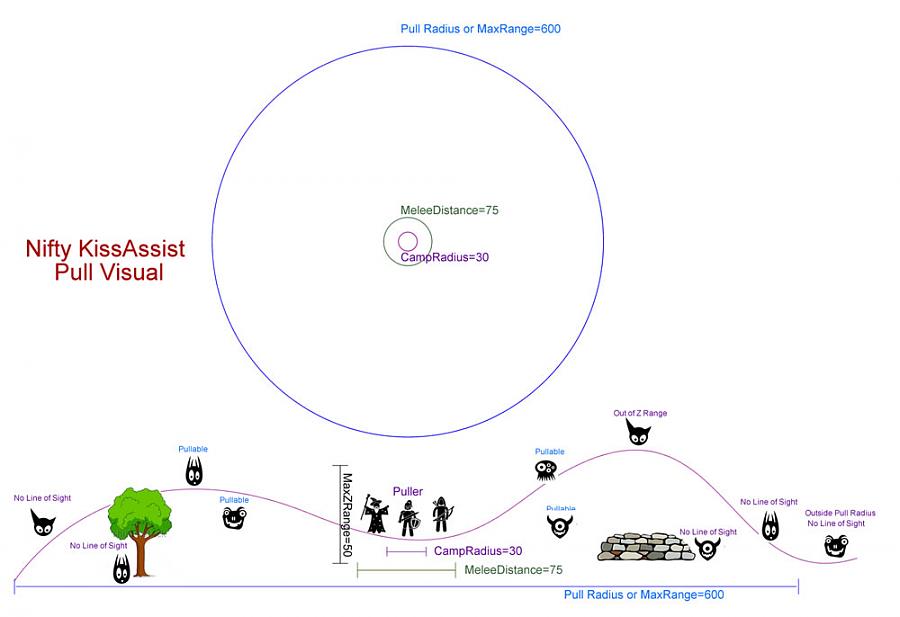 Overhead view (above) side view (below).
- PullWith
Melee (default) | Melee/AA/Pet/Spell/Disc/Ranged/Ammo - Specifies what method to use for pulling mobs.
• Melee - Will attack the mob to pull.
• Pet - Will pull with pet. Does not require LOS.
• AA/Spell/Disc - Will cast on the mob to pull.
• RangedItem|AmmoItem - Must define 2 arguments. Item to pull with and Ammo slot item. (Separated by |)Examples
PullWith=Dragon Force
PullWith=Summoned: Shuriken of Quellious|Summoned: Shuriken of Quellious
PullWith=Extravagant Infused Recurve Bow|Ethereal Arrow
PullWith=Pet
For ranged pulling, you can adjust how close you get to the mob. See
PullRadiusToUse. - MaxRadius
350 (default) - Radius in which you want to pull. See visual.
- MaxZRange
50 (default) - Z Axis Radius in which you want to pull. Default = 50 for hilly zones try 100-200. See visual.
- PullWait
5 (default) - Time in seconds to wait looking for mobs if no spawns are up (you killed everything). Used mostly for camping named so you aren't looking for mobs every second.
- PullRoleToggle
0 = Off (default) | 1 = On - Toggles puller tag in group window before pulls and turns it off once back in camp after a pull. You must be group leader to do this. Used to keep healer merc in camp during pulls.
Currently only active in PullerPetTank role
- PullTwistOn
0 (default) | 0 = Off | 1 = On - Bard Only - will turn off twisting before pulling if set to 0.
- ChainPull
0 = Off (default) | 1 = On - Toggles chain pulling. Chain pulling ONLY works in the Puller role, not PullerTank.
Chain Pulling Explained
Things you need to know about chain pulling, but you never thought to ask.-
Current DPS Mobs distance from camp.
This is important when chain pulling. If the current DPS mob is still up/alive when the next mob comes into camp, the new/incoming mob will stop and aggro the tank. If your using CC then the mob will get mezzed. The problem here is that each incoming mob gets mezzed a little farther from camp, causing a creeping effect of the tank. Gradually the Tank will be too far from camp, so there is a check for the Tank to be within 75 units of the puller's camp location. -
Is there a named in camp?
Well you guessed it. If there is a named in camp, then don't pull more mobs. -
Number of mobs on Xtarget/in camp.
There is a check done to not go and pull more mobs until you are left with 1 mob in camp and/or Autohater mobs on Xtarget. -
Current DPS Mobs HP%
This is extremely important and can make a big difference in how smooth your camp works. A big part of this has to do with your individual play style and your Tanks ability to maintain aggro. If your tank is having issues with keeping/maintaining aggro, it is better to have the Puller go pull your next mob sooner than later. So set your ChainPullHP to a higher number like 75 or above. This will help with keeping your puller from building up aggro. The downside to this method is it will contribute to the tank creeping out from camp more. Now if there is no issues with your Tank keeping aggro then set your ChainPullHP below 50%. You will need to play with the value to find, what you consider the sweet spot. But what you are looking for is the next mob to come into camp as the current mob is dying.
Things to keep in mind. The character that you use for pulling, and setting up their DPS entries, to use their abilities to reduce aggro. Like classes that can feign-death. Also the Aggro section in your ini, is your BESTEST friend here. The Aggro section is not just for increasing and keeping aggro, it can also be used to reduce/loose your aggro. -
Current Aggro PCT on Current DPS mob.
There is a check to NOT pull the next mob if your puller has 50% or more aggro.
Well this should be self explanatory, but if you have 50% or more aggro on your puller and he/she takes off, out of camp, to pull another mob. Guess who is going to follow? That's right. Not only that, but all your melee characters will be chasing the mob.
To help with this issue we added something for the tanks to use in the Aggro section. That's right the tank can now monitor the Secondary aggro level of the mob and try and do something about it. We added the "<<" tag for monitoring mobs secondary aggro level. -
How far away from camp is the next mob I am about to pull?
Why would I care? Well you may not, but if you're trying to level your puller you should care.
There is a limit on how far away you can be from a mob for you to get experience credit. The limit is around 400 units. So if the next mob to pull is greater than your PullRange plus 400 units, then we do NOT pull them.
Now if your pulling character is maxed out on everything, or you're just into depriving the working class of their just rewards. Then there is a flag for you. You can override this check by setting the PullXPCheck to zero(0).
Now you won't find this flag/entry in your ini file. LOL, did you run off and check your ini file before reading this? You have to either change it in the macro, or use a hot key or even better, use the new [StartupCommands] section.
Examples
Command1=/varset PullXPCheck 0
Command1=/togglevariable PullXPCheck 0
So now you're all set to start chain pulling, but things just aren't working as expected. The puller is not running out and pulling mobs like you expect. Well you're in luck, we added a way to see what the puller is doing. Or in your case, not doing.
Chain Pull Debug
You can now turn on/off chain pulling spam/debug messages. Use,
to start the messages and/debug ChainP 1to start the messages and/debug ChainP 1to turn them off./debug ChainP 0Chain Pull Failure messages explained
Chain Pull Failed 0:
Your role is not puller or you have ChainPull turned off.
Values after Message:${Role} ${ChainPull}Chain Pull Failed 1:
PullHold could be on, or there is a Named in camp or you have 2 or more mobs in camp
Values after Message:${PullHold} ${MobCount}<2 ${Me.XTarget[${XTSlot2}].ID} ${Target.Named}Chain Pull Failed 2:
Targeted Mobs HP is at or above ChainPullHP value.
Values after Message:${Target.ID} ${Target.PctHPs}<${ChainPullHP}Chain Pull Failed 3:
No mob found for next pull, or PullXPCheck on and Mob to far away, or I am the target of my target, or I have 50% or more aggro.
Values after Message:${Macro.Return} ${PullXPCheck} ${Spawn[${ChainPullTemp}].Distance}<${Math.Calc[${PullRange}+400]} ${Me.TargetOfTarget.Name} ${Me.PctAggro} -
- ChainPullHP
90 (default) | 1-100 - Mob HP level to start looking for another mob to pull.
- PullPause
30 (default) | #Minutes | #Minutes - Time in Minutes to pull mobs before Holding Pulls | How long in minutes after holding to resume pulls. Optional Cond# can be used to check if pulls should continue to be held.
Pulls will be held if condition returns true.Example
PullPause=30|2|cond1 cond1=${Me.Snared} - PullLevel
0|0 (default) | 0-200|0-200 - MinLevel|MaxLevel - 10|20 would set lowest level of mobs to pull to 10 and highest level to 20.
- PullMeleeStick
0 = Off (default) | 1 = On - Use this flag to stick to target when pulling with melee. Helps with mobs that are moving.
- UseWayPointZ
0 = Off (default) | 1 = On - Only used with Advanced Path. This feature will use the paths waypoint, not the Pullers, when checking mobs MaxZRange.
- PullRadiusToUse
90 (default) | 1-100 - The percentage, of the items range you want to use when determining when to stop and pull a mob. Basically you can use this to determine how close you want to get to mobs when pulling.
- PullArcWidth
0 (default) | 0-360 - The width in degrees on the compass. See /setpullarc.
- PullOnReturn
0 = Off (default) | 1 = On - If the puller fails to pull current target. Then on the way back to camp, the puller will search for another mob to pull.
[PullAdvanced] Settings
- PullLocsOn
0 = Off (default) | 1 = On - Turn on or off using the PullLocs areas in the KissAssist_Info.ini file for the zone. For more information see the KissAssist_info.ini Setup Instructions.
[Burn] Settings
Burn System
- This section is for boosting your groups DPS/Survivability based on named or triggered bind. It can be used as a DPS boost, send your tank into a crazy defensive frenzy or healers to pop all group heals. When the definable burn bind is called the character will give all priority to cast everything in the list.
- Adjust your
KissAssist_Info.inito define which mobs to burn.
- BurnSize
15 (default) - Number of Burn# entries to parse. Similar to DPSSize.
- BurnAllNamed
0 = Off (default) | 1 = On | 2 = Specified - Controls automatic burning behavior for named mobs.
•0= Off. No automatic burning.
•1= On. When enabled, this will burn ALL named mobs, ignoringkissassist_info.iniMobsToBurn entry.
•2= Specified. Will burn ONLY mobs listed in yourkissassist_info.iniMobsToBurn entry. - Burn1-15
NULL (default) | Spell/AA/Disc/Item|Target - What to use in the burn event. Mob, MA, Me, and Pet are valid target flags. Conditions are supported.
Example
[Burn]
BurnText=Decepticons Attack
BurnAllNamed=0
Burn1=Frenzied Burnout|pet
Burn2=Host of the Elements|Mob
Burn3=First Spire|Me
Burn4=Servant of Ro|Mob
Burn5=Ruthless Servant|mob
Burn6=NULL
Burn7=NULL
Burn8=NULL
Burn9=NULL
Burn10=NULL
Burn Command Usage
You can use the /burn command on each character, or /bc //burn for EQBC users and /dgge /burn for DanNet users. See the /burn command page for detailed usage.
[AFKTools] Settings
AFKTools System
- This feature can alert you if anyone is near while you are temporarily distracted with a bio break. It's a small feature that will beep if PCs come into defined range and will pause all macro actions other than killing adds in camp.
- Remember: EverQuest is a social game, if you're not interacting with others you should log off. Alternately, you can use the MacroQuest command
/mqpto pause until you return.
- AFKToolsOn
0 (default) - Controls whether AFKTools feature is enabled.
•0= Off
•1= On - AFKGMAction
1 (default) | 0-4 - Defines action to take when GM is detected.
•0= Off
•1= Pause Macro
•2= End Macro
•3= Unload MQ2
•4= /Quit Game - AFKPCRadius
150 (default) - Radius to detect PCs. Will alert you and pause all macro activity.
- CampOnDeath
0 (default) | 0-2 -
Controls camping behavior on character death.
•0= Off. Will stand around till the servers go down or connection is lost.
•1= Wait before camping. Waits on a 10 minute timer before camping in a non-camp zone.
•2= Camp immediately. No waiting to camp in a non-camp zone. If you weren't rezzed while hovering you will be camped out.CampOnDeath Notes
ClickBackToCamp should be turned off if you don't want the characters to use fellowship to zone back to camp zone. If ClickBackToCamp is on then CampOnDeath=2 may not work as described on first death.
- ClickBacktoCamp
0 (default) | 0-2 - Controls fellowship insignia usage to return to campfire.
•0= Off
•1= On - No wait
•2= On - Wait 10 seconds
[GoM] Settings
- GoMSize
3 (default) - Number of GoMSpell# entries to parse. Similar to DPSSize.
- GoMSpell1-3
NULL (default) | Spell Name|Target|[Flag] - Spells to cast during combat when Gift of Mana AA activates. Mob, MA, and Me are valid target flags. Conditions are supported.
Example
GoMSpell1=Gift of Mana Spell|Me
GoMSpell2=Gift of Mana Spell|Mob
[AE] Settings
Area effect settings for spells & abilities.
- AEOn
0 = Off (default) | 1 = On - Toggles AE on and off.
- AESize
10 (default) - Number of AE# entries to parse. Similar to DPSSize.
- AERadius
50 (default) - Radius around character to detect mobs.
- AE1-10
NULL (default) | Spell/AA/Disc/Item|Min#Mobs|[TargetFlag] - What to cast, minimum number of mobs in radius to activate, and target flag.
Valid target flags: Mob, MA, Me, Pet, Single.Single - Use an AE ability if there is only 1 mob in camp.Examples
AE1=Explosion of Spite|2|Mob AE1=Rain of Jerikor|1|SingleConditions are supported.Using the Single tag will also override the check for aggroing additional mobs in AE range. Use with caution.
[Aggro] Settings
- AggroOn
0 = Off (default) | 1 = On - Toggles aggro boosting or lowering mechanics settings.
- AggroSize
5 (default) - Number of Aggro# entries to parse. Similar to DPSSize.
- Aggro1-5
NULL (default) | AA/Disc/Item/Spell|% aggro|[Options] -
Defines what to use for aggro management based on your threat percentage.
Options:
• AA/Disc/Item/Spell = What to use for aggro management.
• % aggro = Percentage of aggro to use for the action.
•<= Increase or maintain aggro
•>= Decrease or avoid aggro
•<<= Check secondary aggro
Target Flags: Mob (default), Me, MA, Pet, INC (incoming mobs beyond MeleeDistance)
Conditions are supported.Aggro Examples
Gain Aggro:
Aggro1=Taunt|100|<
Aggro2=Terror of Kra`Du|100|<
Drop Aggro:
Aggro1=Sanctuary|80|>
Aggro2=Divine Peace|95|>
Secondary Aggro:
In the above example, "MobsHateThis" will be used if target's secondary aggro gets above 50%.Aggro1=MobsHateThis|50|<<Aggro Management Tips
- If TargetFlag is not provided, it defaults to Mob
- Use INC targetflag for incoming mobs that are further away than MeleeDistance
- Secondary aggro (
<<) checks threat levels of other group/raid members
Example
A Berserker .ini Example
[DPS]
DPSOn=2
DPSSkip=1
DPSInterval=2
DPS1=Cry Carnage|98
DPS2=Open Wound|99|Once
DPS3=Bubbling Rage|0
DPS4=Phantom Assailant|0
DPS5=Battle Stomp|98
DPS6=Frenzy|95
DPS7=Banestrike|90
DPS8=Juggernaut Surge|85|Me
DPS9=Demolishing Volley|83
DPS10=Demolishing Frenzy|81
DPS11=Axe of Numicia|79
DPS12=Binding Axe|86
DPS13=Dichotomic Rage|92|Mob
DPS14=NULL
DPS15=NULL

[Burn]
BurnText=Decepticons Attack
Burn1=Reckless Abandon
Burn2=Silent Strikes
Burn3=Fundament: Third Spire Of Savagery
Burn4=Distraction Attack
Burn5=NULL
Burn6=NULL
Burn7=NULL
Burn8=NULL
Burn9=NULL
Burn10=NULL
Burn11=NULL
Burn12=NULL
Burn13=NULL
Burn14=NULL
Burn15=NULL
UseTribute=0
BurnAllNamed=0

[AE]
AEOn=1
AERadius=45
AE1=Rampage|1|Single
AE2=Vicious Cyclone|1|Single
AE3=Blinding Fury|3|Me
AE4=Battle Cry of the Mastruq|3
AE5=Distraction Attack|3
AE6=Reckless Abandon|3
AE7=Silent Strikes|3
AE8=Fundament: Third Spire Of Savagery|3
AE9=NULL
AE10=NULL
AE11=NULL
AE12=NULL
AE13=NULL
AE14=NULL
AE15=NULL
[General] section, that means KissAssist will use the default [General] values.
KissAssist_info.ini
Per-zone keys
- MobsToPull – whitelist (supports * wildcards e.g. goblin* will pull any mob with goblin in their name)
- MobsToIgnore – blacklist
- MobsToBurn – up to 10 mobs that trigger the Burn routine
- MezImmune – mobs that should never be mezzed
- PullLocs1-5 – areas to avoid pulling from ⇒ Y,X|Range (whitelist overrides these)
Notes
- A new zone section is auto-created the first time you run KissAssist there.
- You can also predefine zone sections using zone shortnames.
- If mob's name begins with #, you should include the # in the name for MobsToPull, MobsToIgnore.
- Instanced zones add
_I(e.g.paludal_I). - Add
:after a mob name to raise its pull priority. See Pull Ranking (advanced) below.
Sample KissAssist_Info.ini
[cityofbronze]
MobsToPull=grendlaen,braxi,selyrah,oashim,bloodclaw,strangleweed
MobsToIgnore=a sentry stone,Leaf Pile,Tyzen,Faltar,A Rabid Selyrah
MobsToBurn=Deathsqueak,A_Raging_Braxi,Guggles
MezImmune=a green snake,a blue tiger,a wide eye ooze
PullLocsHelp=Y,X|Range
PullLocs1=0
PullLocs2=0
PullLocs3=0
PullLocs4=0
PullLocs5=0
Pull Ranking (advanced)
What is it and how does it work?
Pull Ranking lets you flag entries in MobsToPull as priority targets.
When the option is enabled, the pull routine looks for these priority mobs first.
Note
The feature is off by default.
Enable or disable it with the /setpullranking command.
Example base list
MobsToPull=Sergeant Korsh,#Sergeant Korsh,a Rallosian tactician,General Orrak,#General Orrak,a Rallosian highlance,Grenn Rustblade,#Grenn Rustblade,a Rallosian swiftblade
With Pull Ranking OFF – the list is used exactly as written.
Append a colon : to any mob you want prioritised:
Marking priority mobs
MobsToPull=Sergeant Korsh:,#Sergeant Korsh:,a Rallosian tactician,General Orrak:,#General Orrak:,a Rallosian highlance,Grenn Rustblade:,#Grenn Rustblade:,a Rallosian swiftblade
Behaviour
* Pull Ranking OFF – behaves like the base list.
* Pull Ranking ON – first searches for:
Sergeant Korsh,#Sergeant Korsh,General Orrak,#General Orrak,Grenn Rustblade,#Grenn Rustblade
then, only if none are found, looks for:
a Rallosian tactician,a Rallosian highlance. No other mobs are considered.
If every entry has a :
- Pull Ranking OFF – normal base-list behaviour.
- Pull Ranking ON – pulls all
:mobs first; once exhausted, it will pull any other valid mobs in range until a prioritised mob respawns.
Command syntax:
/setpullranking {0/1/on/off}
Notes
* Changes are queued—if issued mid-pull, the new state takes effect after the current pull cycle finishes.
* When travelling to a ranked mob, incidental aggro is handled normally; the puller returns to camp with whichever mob engaged.
* Like all KissAssist commands, the macro has to be running for the command to work.
Use KissAssist_Info.ini Commands and save yourself the headache of spelling mob names.
Commands
KissAssist Must Be Running For Commands To Work
The following commands are used for on-the-fly changes while KissAssist is running. Most of these commands mirror values in your KissAssist_Info.ini or KissAssist_ToonName.ini. Changed values are persisted to your ini configuration.
/addfriend
- Adds current target to MQ2Posse list, which is used in AFKTools. Basically it performs a
/posse save
/afktoolson
- Toggles usage of your AFKTools entries on/off. Note: AFKTools utilizes MQ2Posse
.ini section:[AFKTools]
/assistat <#>
- Sets/resets Mob HP% assist at setting e.g.
/assistat 50will assist at 50% Mob HP
.ini section:[Melee]
/autofireon
/autorezon
/backoff [on|off]
- Controls "backing off". Will toggle with no parameters. ON = stop attacking. OFF = resume attacking. Backing off turns off attack, melee, stick, and if ReturnToCamp is set, it will also return to camp. This is a great way to stop your puller without having to pause or end the macro, see examples.
/buffgroup
/buffson
/burn on | off | <targetid#> [doburn | on]
-
With no parameters, will toggle [Burn] on or off. Burns are turned ON by default when starting the macro. So if you do a
/burn offon a character and then issue the /burn command, the character will NOT execute the burn routine.
/campfire [on|off]
- Turns campfire usage on/off. No parameter will toggle. "On" will summon campfire if 3 or more Fellowship members are in range and a campfire is not already present.
.ini section:[General]
/camphere [on|off]
- Turns on|off ReturnToCamp. No parameter will toggle. Turning on will reset your camp loc
.ini section:[General]
/campradius <#>
/chase [on|off] | [charname]
- ON will abandon camp and have your group follow the MA - good for manual pulling, or Hunter mode. CharcterName is optional, and can be used to change who you want to chase. The chase(WhoToChase) no longer has to be the MA.
.ini section:[General]
/chasedistance <#>
/chaseoff
/chaseon
/debug <command> [on|off] [log] | help
- Controls debugging for KissAssist. No parameter will toggle. See examples. Will load MQ2Log if necessary.
/dpsinterval <#>
- Attaches a timer in
<number>seconds to DPS spells with 0 duration after they are cast.
.ini section:[DPS]
/dpsmeter [on|off]
/dpson <0-2>
- Controls DPSOn setting. 0 is off, 1 is on, 2 is absolute descending order sorted by mob % health. See settings for more information.
.ini section:[DPS]
/dpsskip <#>
/dpswrite [on|off]
/healson <0-4>
/interrupton [on|off]
/kasettings load [<section> [0|1]]
- For reloading all or some sections of your ini file without restarting kissassist. The last parameter controls error skipping. See examples.
/kisscheck
/kissedit
- Edits .ini file in game, alias for
/notepad kissassist_${Me}.iniWill load MQ2Notepad if needed.
/looton [1|0]
- Turns Looting on/off, if you're not using advloot or another loot handling system. Useful for when KA turns off looting because your bags are full.
/mac kissassist [<role>] [<assist>] [<health%>] | [<options>]...
- KissAssist startup command. Can set the basic role, assist, and assist health %, but also advanced options such as using a custom .ini, debug mode, etc. See examples.
/makecamphere
/maxradius <#>
/maxzrange <#>
/medcombat [on|off]
/medstart <#>
/meleedistance <#>
/meleeon [on|off]
/mercassistat <#>
/mezon <0-3>
/movewhenhit [on|off]
/mycmd <command> [param]...
- Command to control any custom commands you or others have made. A detailed guide on adding custom commands can be found here.
/peton [on|off]
/pettoyson [on|off]
/pettoysplz
/rebuffon
/rezalloff
/rezallon
/setbackoff on|off
- Turn backoff on or off. See /backoff.
/setpullarc <anglewidth#> [<direction>]
- This command allows you to set your pull width and the direction you want to pull from. An angle width of 0 will disable directional pulling. Valid directions are n,ne,e,se,s,sw,w,nw, or any number from 1 - 360. If you leave the direction blank your current heading is used.
/stayhere
/switchnow [0/1] [#]
- Switch to your MA's Current Target. First parameter is for locking onto(1)/releasing(0) the target. 0 is default. Second parameter can be a spawn ID. Both parameters are optional
/tbmanager add|remove [<spawn#>]
-
Manage characters you want to buff in special situations. If no character
<spawn#>is given, it will use your current target.
/togglevariable <setting> [1|0]
/trackmedown <stickoff#> <usenavonly#> <ignoredistance#>
-
Runs to the current WhoToChase Target. When in range, /chase is activated. See examples.
Quick Setup Commands
Set up large swaths of your .ini files with minimal effort.
/setae gem# [gem# …]
/setae (spell gem# | disc slot# | item | aa ###)
- Fast AE setup. Quickly writes spells, AAs, discs, or items on your character to the
AE#=keys in the[AE]section of your .ini.
Existing entries are overwritten.
/setaggro gem# [gem# …]
/setaggro (spell gem# | disc slot# | item | aa ###)
- Fast Aggro setup. Quickly writes spells, AAs, discs, or items on your character to the
Aggro#=keys in the[Aggro]section of your .ini.
Existing entries are overwritten.
/setbuffs gem# [gem# …]
/setbuffs (spell gem# | disc slot# | item | aa ###)
- Fast Buffs setup. Quickly writes spells, AAs, discs, or items on your character to the
Buffs#=keys in the[Buffs]section of your .ini.
Existing entries are overwritten.
/setburn gem# [gem# …]
/setburn (spell gem# | disc slot# | item | aa ###)
- Fast Burn setup. Quickly writes spells, AAs, discs, or items on your character to the
Burn#=keys in the[Burn]section of your .ini.
Existing entries are overwritten.
/setcure gem# [gem# …]
/setcure (spell gem# | disc slot# | item | aa ###)
- Fast cure setup. Quickly writes spells, AAs, discs, or items on your character to the
Cures#=keys in the[Cures]section of your .ini.
Existing entries are overwritten.
/setdps gem# [gem# …]
/setdps (spell gem# | disc slot# | item | aa ###)
- Fast DPS setup. Quickly writes spells, AAs, discs, or items on your character to the
DPS#=keys in the[DPS]section of your .ini.
Existing entries are overwritten.
/setheals gem# [gem# …]
/setheals (spell gem# | disc slot# | item | aa ###)
- Fast Heals setup. Quickly writes spells, AAs, discs, or items on your character to the
Heals#=keys in the[Heals]section of your .ini.
Existing entries are overwritten.
/memmyspells
- Reads the entries from your [Spells] section and mems the spells to your current spell set.
.ini section:[Spells]
/writespells
KissAssist_Info.ini Commands
Purely for the KissAssist_Info.ini config, which is for zone and mob targets.
/addignore [<text>] | [<spawnid#> [1|0]]
- Adds target,
<text>or<spawnid#>to the MobsToIgnore list - accepts partial names and checks against Spawn. "Double quotes" are required when passing names with spaces. For spawnid#, see examples.
ModifiesKissAssist_Info.ini
/addimmune <text>
- Adds
<text>to the MezImmune list - accepts partial names and checks against Spawn. "Double quotes" are required when passing names with spaces. ModifiesKissAssist_Info.ini
/addpull <text>
- Adds
<text>to the MobsToPull list - accepts partial names and checks against Spawn. "Double quotes" are required when passing names with spaces. ModifiesKissAssist_Info.ini
/setpullranking {0/1/on/off}
- 1/On to turn on. 0/Off to turn off. Note: This command is not a toggle and requires the argument. See the Pull Ranking section under KissAssist_info for details.
/zoneinfo
Discussions that link here
- Can you tweak it to allow 2 pullers?
- Hi, just introducing myself
- WIZ ini lvl 120
- What is the max distance between caster and MA's target?
- Can't get any kissassist macros to work
- Can you automate Thief's Vengeance?
- Items triggering on low HP
- Turning on and off cures on the fly? Adding a non-curable debuff to some list?
- Chain pull doesn't work after patch?
- DPS Mod DAMod=+2 Doesnt Seem to work