/hotbutton
Syntax
/hotbutton <name> [<color>] [<text>]
Description
Create or edit a hotbutton named <name>, optionally change the color <0-19> and/or the body <text>.
MacroQuest's version of /hotbutton
/hotbutton <name> [<color>] [<line>:][<cursor>:][<text>]
Extends the built in /hotbutton command with multiple lines support, cursor attachment, and "names with spaces" (in quotes) support.
Options
- name
- The name of the hotbutton
- color
- Any number from 0 to 19.
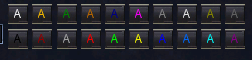
- text
- The text to include in the hotbutton
Example
/hotbutton PULL 14 /g %t incoming!- Create a hotbutton named "PULL", bright green, that contains the text: /g %t incoming!
See also
Discussions that link here
This command is added by EverQuest.