MQ2OTD
MQ2OTD
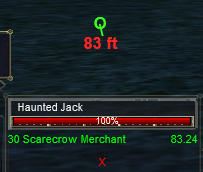
Displays a compass to your target, aka overhead target direction
Authors: Omnictrl, Knightly • Config: MQ2OTD.ini
Adds an icon to the HUD indicating where your target is located in relation to you and how far away it is.
Commands
/otd [on|off|range|reload|drawtight|getloc] | [moveto <x y>] | [moveby <x y>]
FAQ
I can't seem to get it to display?
Press F-11 to ensure your "lag meter" is displayed. Ensure you /otd on.
How to move display position on screen?
Use /otd moveby x y to move the display incrementally by x,y pixels.
Settings
Example MQ2OTD.ini, you can set per character or globally.
[Bobby]
VISIBLE=1
BASE_X=600
BASE_Y=300
RANGE_ON=1
[GLOBAL]
DRAW_TIGHT=0