• You've discovered RedGuides, an EverQuest multi-boxing and scripting community 🧙‍♀️⚙️. We want you to play several EQ characters at once, come join us and say hello! 👋

  • A TLP without truebox has thawed (Very Vanilla ready)
    Frostreaver
RedGuides Launcher

RedGuides Launcher 1.1.0

No permission to download
Did a reboot? Excluded for AV and firewall? for the instructions here to install:
Getting Started / Returning user

Welcome to RedGuides, fellow EQ multi-boxing enthusiast!

The best place to begin is our "New User Guide" video series, click this TV to watch:


This step-by-step series will teach absolute beginners how to control 6 characters at once while highlighting Nav, AutoLogin, and DanNet, which are fundamental plugins that will enhance every aspect of your game.

Returning users check out - MacroQuest Release Party: https://www.redguides.com/community/threads/macroquest-release-party.80628/ for information about changes from the legacy MQ2 to the new and awesome MQ


I dont have a slicked PC to try it on, but it doesnt seem to be a global issue.
 
turned out to be the browser i guess , or the router not sure did um both again an it finally worked thanks all for the help //..
 
Hi,

So many things are included in the "Very Vanilla", but I can't find those listed in anywhere?
Launcher should have plugins included listed, me thinks.
It is kinda too much for a new user trying to get to know all Plugins, if no clue theyre ever exsisted?
Well, don't wanna be too much trouble, just saying something...
 
Plugins tab only lists paid plugins youve purchased. Just start from the getting started videos and it'll introduce some plugins, branch out from there.
 
Hi,

So many things are included in the "Very Vanilla", but I can't find those listed in anywhere?
Launcher should have plugins included listed, me thinks.
It is kinda too much for a new user trying to get to know all Plugins, if no clue theyre ever exsisted?
Well, don't wanna be too much trouble, just saying something...
The only plugins there are plugins to "manage" which are currently only "premium" (paid for) plugins. All other plugins are already downloaded and nothing to manage
 
Hi,

So many things are included in the "Very Vanilla", but I can't find those listed in anywhere?
Launcher should have plugins included listed, me thinks.
It is kinda too much for a new user trying to get to know all Plugins, if no clue theyre ever exsisted?
Well, don't wanna be too much trouble, just saying something...
/plugin mq2pluginmanager

green ones are loaded, red ones are not

search for the ones you want to know more about, should have a own thread on the forums.
 
/plugin mq2pluginmanager

green ones are loaded, red ones are not

search for the ones you want to know more about, should have a own thread on the forums.
Just this. I know (now) that these are included. Took a while, to realize, that there is a LIST, that you can activate by command, that is not mentioned, when you install this launcher. And even that, you can apply them by just clicking the name, with mouse buttons. And there's colors an all, green for enabled, and red not enabled things.
There was no mention in launcher downloding page about this.
And there is no direct links to the page of the things that is mentioned in Pluginmanager. List like, I mean. Not in game, not in launcher.
You actually have to search each item, mentioned in /plugin mq2pluginmanager. Just to find out what they do, actually.
Maybe add a clickable link on these items in /plugin mq2pluginmanager? Or somesort of Quick info, mouse hover on?
Or something, that would help on getting to know all these addons, or functions, that are included in RedGuides Launcher. If I am totally on trees with this, lemme know.
I know it's lots of work, but would help ALOT! ..us new, or returning peoples.
 
that's not super practical or functionally something that would be as simple as one might think.

The new launcher will show some more information about things, however
That's good news :)
I mean the new launcher functions!
And what comes to one's thinking, I don't really know anything about how to make these thing's to happen. Just missing something in pluginmanager, and in launcher, that is obious nowadays, in web pages and so on. That informative hover on... what you don't realize, untill its missing.
Thanks for not flattening me on this... I am just trying to make points, not just plainly ordering functions, or something like that. Trying not to... *gasp*
 
Woot, I love new toys! Can't wait!

@Pwentti - While you likely have seen this already, days like today are great for learning more about this site and what the devs/community has made available for us. They did give us a list of things available, but it sure is a ton to take in. I know I was overwhelmed when I joined. I did take a few days though and went to the links below;

1689778306846.png

It lists each plugin, Lua, and macro avavilable. Yes, it's a ton of reading and I had to go over them several times, but I was able to read a description of what each one did and mark ones I wanted to add and check out when I was in game. I actually think it was better to be able to read about them outside of the game and then add each plugin I wanted to check out when I logged in and test them in appropriate places. That being said, I also did not find much in my search for new/returning users about pluginman either so I plan to add a link to it when greeting new/returing players. Great suggestion!
 
Last edited:
I'm having problems downloading the launcher. It launches the wizard after DLing the folder, and says "The installer has encountered an unexpected error installing this package. This may indicate a problem with this package. This error code is 2503." I click ok and it gives me the same error message but with the error code being 2502. Then it says it ended prematurely, and closes the wizard, with nothing to go off of. Any suggestions? Brand new laptops and may have, but don't remember having the problem with other laptops doing the same thing.
 
Was updating laucher and recieved message as follows. The process can not acess C:ProgramData\RedGuides\DesktopUtility\downloads\RedGuides_VeryVanilla.zip' because it is being used by another process. Please report this to management. so I am now trying to report it and need to know what to do next.
Thank You
Grrizz
 
Was updating laucher and recieved message as follows. The process can not acess C:ProgramData\RedGuides\DesktopUtility\downloads\RedGuides_VeryVanilla.zip' because it is being used by another process. Please report this to management. so I am now trying to report it and need to know what to do next.
Thank You
Grrizz
Sounds like your antivirus
 
Hi, im not sure if this is the forum to ask this question. sorry if not.

Everquest works perfectly on my old PC

I been trying to run Redguides launcher on a windows 7 64 bits machine, but cannot authenticate from forums (tried with all browsers i got and no works

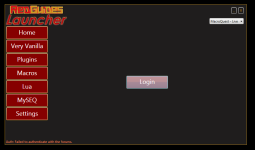
I have downloaded "RGResourceManager.Installer.msi" from: https://www.redguides.com/community/resources/redguides-launcher.1255/
without problem.
"Capture"
Capture.PNG

I run from dashboard the Redguides Launcher... it worked i can see the redguides screen, but cannot loggin form forums, when i click on "loggin button" redirects me to a web page:
none of the buttons do nothing
Capture 2
Capture2.PNG
Anyone can help me , thanks in advance, please let me know if u need/want more information.
 
Hi, im not sure if this is the forum to ask this question. sorry if not.

Everquest works perfectly on my old PC

I been trying to run Redguides launcher on a windows 7 64 bits machine, but cannot authenticate from forums (tried with all browsers i got and no works

I have downloaded "RGResourceManager.Installer.msi" from: https://www.redguides.com/community/resources/redguides-launcher.1255/
without problem.
"Capture"
View attachment 50298

I run from dashboard the Redguides Launcher... it worked i can see the redguides screen, but cannot loggin form forums, when i click on "loggin button" redirects me to a web page:
none of the buttons do nothing
Capture 2
View attachment 50299
Anyone can help me , thanks in advance, please let me know if u need/want more information.
Windows 7 is not a supported is for the launcher or for mq.

You need an actual is that you can update. Windows 7 is discontinued
 
Windows 7 is not a supported is for the launcher or for mq.

You need an actual is that you can update. Windows 7 is discontinued
TY, much was thinking requirements are same as Everquest, so theres nothing i can do?
Was trying to raise UP my old-vacational PC while im on holidays...
 
TY, much was thinking requirements are same as Everquest, so theres nothing i can do?
Was trying to raise UP my old-vacational PC while im on holidays...
You can update to a supported os.

Keep in mind, windows 7 has been dead a LONG time. That PC is vulnerable. Update the os
 
I had rebooted computer before posting this and did not fix problem. I looked at antivius after you posted it. Did not know what to look for but did not find anything at what I did look into. I then completely shut down computer and let it sit for about 10 minutes off. when I rebooted it then let me update with no errors will be setting up group and hunting on my days off. but it seems to be fixed. Thank you all for the help.
 
Zero reason to run Windows 7 for anything current. If possible, just make the jump to Windows 11 if your hardware supports it (or bypass requirements if it doesn't) so you don't have to think about things for awhile. Just go to any online key retailer to get a cheap activation key and you are all set. I think last time I got one, I paid around $30.
 
Zero reason to run Windows 7 for anything current. If possible, just make the jump to Windows 11 if your hardware supports it (or bypass requirements if it doesn't) so you don't have to think about things for awhile. Just go to any online key retailer to get a cheap activation key and you are all set. I think last time I got one, I paid around $30.
I just paid $13 for a windows 11 pro key. It is cheap
 
MQ2 Very Vanilla was running fine before yesterday's patch. Now I'm getting this error when trying to install new version of Macroquest. Any help greatly appreciated :)
 
MQ2 Very Vanilla was running fine before yesterday's patch. Now I'm getting this error when trying to install new version of Macroquest. Any help greatly appreciated :)
Make sure your antivirus isn't hanging anything up
 
i went to mmobugs and downloaded mq2 from. was playing and decided that i didnt like certain features that i felt were a bit much and moved here. i uninstalled mmobugs version through their uninstaller and DL redguides launcher....i hadn't restarted the computer....so i restarted the computer and when i pull up redguides launcher the update button is instead a reinsall button. is this correct? when i open MQ folder it goes to the folder but the icon and file name in the beginners video is different than what i see....is there a way for me to start at square one...tried system restore but i have a new computer and have not set any restore points.
 
i went to mmobugs and downloaded mq2 from. was playing and decided that i didnt like certain features that i felt were a bit much and moved here. i uninstalled mmobugs version through their uninstaller and DL redguides launcher....i hadn't restarted the computer....so i restarted the computer and when i pull up redguides launcher the update button is instead a reinsall button. is this correct? when i open MQ folder it goes to the folder but the icon and file name in the beginners video is different than what i see....is there a way for me to start at square one...tried system restore but i have a new computer and have not set any restore points.
I would just start over following the RG new user vids. Don't install them to a place already occupied with other stuff

Getting Started / Returning user

Welcome to RedGuides, fellow EQ multi-boxing enthusiast!

The best place to begin is our "New User Guide" video series, click this TV to watch:


This step-by-step series will teach absolute beginners how to control 6 characters at once while highlighting Nav, AutoLogin, and DanNet, which are fundamental plugins that will enhance every aspect of your game.

Returning users check out - MacroQuest Release Party: https://www.redguides.com/community/threads/macroquest-release-party.80628/ for information about changes from the legacy MQ2 to the new and awesome MQ
 
redguidsnoplugins.png
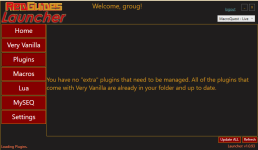
Here is my issues Shows no plugin watched the Video on how to install watched a few different ones thinking I was the problem but did everything sic said.

I also though it was my computer since I had a Free mq2 installed but though Redguides would be easier
so I reformatted my computer Did a fresh install of windows 10 updated drivers and now tried again to install again no Plugins
if anyone can tell me what im doing wrong Do I even need the plug ins?? also how do i use the macros on this one do i just type /mac NAMEOFmacro?
 
View attachment 50576
Here is my issues Shows no plugin watched the Video on how to install watched a few different ones thinking I was the problem but did everything sic said.

I also though it was my computer since I had a Free mq2 installed but though Redguides would be easier
so I reformatted my computer Did a fresh install of windows 10 updated drivers and now tried again to install again no Plugins
if anyone can tell me what im doing wrong Do I even need the plug ins?? also how do i use the macros on this one do i just type /mac NAMEOFmacro
There are no plugins that will show here, currently, outside of "premium" plugins. If you had a license to mq2grind or one of the cwtn class plugins you would see them there.

Everything else you have downloaded already, as it says.

so have you "Watched" any plugins?
There are no plugins you can "watch" to appear here
 
There are no plugins that will show here, currently, outside of "premium" plugins. If you had a license to mq2grind or one of the cwtn class plugins you would see them there.

Everything else you have downloaded already, as it says.


There are no plugins you can "watch" to appear here
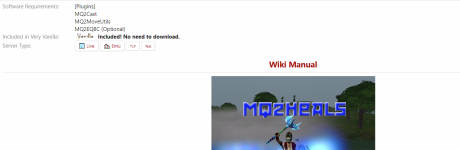
So than what is something like mean? if there zero plugins but says its included???1693370782861.png
 
That plugin is in the compil.
The plugin tab is for bought plugins. That's why you don't see it. MQ2heals is a free plugin.
 
groug

This is where the reading and research part comes into play. Here is a suggestion on where to start. Go to the "Lua" section of these forums and scroll down through them til you find one that peaks your interest. Like Lootly for instance then click on it. When the Lootly page pops up look in the upper right corner of the page and find where it says "Watch". Click watch and the very next time you fire up MQ login go down to the Lua button and click it. There you will see Lootly and yes it has been installed into MQ (well not totally but follow the instructions to install Lootly hehe bad example). But that is how you install plugins, Lua's, macro's into MQ. Then you have to use "run" commands once you log in to the game. Once you get used to it, it becomes second nature.

Vrak
 
So than what is something like mean? if there zero plugins but says its included???View attachment 50577
Do what now? You seem real hung up on something that has been answered.

There are no plugins to manage on that tab unless you have purchased licenses for premium plugins - like cwtn class plugins, or mq2grind as examples.

Everything else is already included and downloaded, as it says - "all plugins that come with very vanilla are already in your folder and up to date".

Any of those plugins you want to load, you can load with /plugin name
 
Welcome to MQ2 groug.

A plugin is a DLL file that you can find in the 'plugins' folder in your MQNext installation folder. If you look there, you will find a large number of plugins (my folder has 109 of them), including MQ2Heals.dll. These plugins are all 'included' - they get installed with MQ2 and will be updated each time you update via the launcher.

Being 'included' does not mean that they are all loaded and running. You can see the plugins that are currently running using the command '/plugin list'. Or you can bring up the plugin manager plugin via '/plugin MQ2pluginmanager load'. This will show you a window with a list of all the plugins you have (if the window does not show up right away you can try '/loadskin default'), and whether they are loaded (green) or not loaded (red). Clicking a name loads it, right-clicking unloads it.

As others have said, the Plugin tab of the Launcher shows you only the optional / premium plugins that are not installed with MQ2.
 
Question or suggestion for the Launcher:

I would love to see a checkbox on the Lua / macro pages that would allow you to see the Lua scripts that were updated AFTER the last updated date/time. Especially on the Lua Page, but it would be helpful on both pages. Either that, or the ability to sort the items by the last updated date. Thanks!
 
RedGuides Launcher

Users who are viewing this thread

Back
Top
Cart