• You've discovered RedGuides, an EverQuest multi-boxing and scripting community 🧙‍♀️⚙️. We want you to play several EQ characters at once, come join us and say hello! 👋

  • A TLP without truebox has thawed (Very Vanilla ready)
    Frostreaver
RedGuides Launcher

RedGuides Launcher 1.1.0

No permission to download
ok so i started and got that new window like in your video so......i guess ill watch more videos to see what to do next....and thanks again for your help sorry for all the attention
 
UX Request: Would it be possible to have the Update button (for Lua scripts) change to acknowledge its doing something? Maybe change from "Update" to "Wait..." then finally when done to "Reinstall".

The Very Vanilla Update button responds quickly, confirming I clicked the right thing and its working.
The Lua Update button does not give any confirmation that its been clicked until several seconds later and the status messages in bottom left start scrolling.

Thanks,
 
Hello

I bought a new computer (Finally) and I installed Everquest on my D:\ drive. Directory D:/Everquest

Then installed Redguides launcher on my D:\ Drive . D:\Redguides

Then I ran the launcher and it asked me to make a select a path or go with default path. So I copied the same type of path as my old computer and made a path

D:\Users\zak\Appdata\Local\VeryVanilla\MacroQuest\Release\

When I run click LANCH MQ on Red Guides launcher I get this Message ::

XX Eqgame.exe - Entry Point Not Found

X The Procedure entry point
?SetNextWindowSizeConstraints@lmGui@@YAXAEBUImVec2
Z@std@@@Z could not be located in dynamic link library
D:\Users\AppData\Local\VeryVanilla\MacroQuest\Release\MQ2Main.dll.

Please if anyone can help me find a solution to this problem in most simplistic way I would really appreciate it. ( Not super computer literate )

 
Hello

I bought a new computer (Finally) and I installed Everquest on my D:\ drive. Directory D:/Everquest

Then installed Redguides launcher on my D:\ Drive . D:\Redguides

Then I ran the launcher and it asked me to make a select a path or go with default path. So I copied the same type of path as my old computer and made a path

D:\Users\zak\Appdata\Local\VeryVanilla\MacroQuest\Release\

When I run click LANCH MQ on Red Guides launcher I get this Message ::

XX Eqgame.exe - Entry Point Not Found

X The Procedure entry point
?SetNextWindowSizeConstraints@lmGui@@YAXAEBUImVec2
Z@std@@@Z could not be located in dynamic link library
D:\Users\AppData\Local\VeryVanilla\MacroQuest\Release\MQ2Main.dll.

Please if anyone can help me find a solution to this problem in most simplistic way I would really appreciate it. ( Not super computer literate )


^ hit that vid there and follow the instructions.

based on your information above the location you said you told it to do and the location it is at is not the same. (users\zak\appdata vs users\appdata)

I'd double-check if you're using a custom directory, that it is what you want it to be, and then make sure to install.

if you haven't considered whitelisting your mq/eq/rg folders from AV, you might want to do that.
 
Hello

I bought a new computer (Finally) and I installed Everquest on my D:\ drive. Directory D:/Everquest

Then installed Redguides launcher on my D:\ Drive . D:\Redguides

Then I ran the launcher and it asked me to make a select a path or go with default path. So I copied the same type of path as my old computer and made a path

D:\Users\zak\Appdata\Local\VeryVanilla\MacroQuest\Release\

When I run click LANCH MQ on Red Guides launcher I get this Message ::

XX Eqgame.exe - Entry Point Not Found

X The Procedure entry point
?SetNextWindowSizeConstraints@lmGui@@YAXAEBUImVec2
Z@std@@@Z could not be located in dynamic link library
D:\Users\AppData\Local\VeryVanilla\MacroQuest\Release\MQ2Main.dll.

Please if anyone can help me find a solution to this problem in most simplistic way I would really appreciate it. ( Not super computer literate )
 
Hello

I bought a new computer (Finally) and I installed Everquest on my D:\ drive. Directory D:/Everquest

Then installed Redguides launcher on my D:\ Drive . D:\Redguides

Then I ran the launcher and it asked me to make a select a path or go with default path. So I copied the same type of path as my old computer and made a path

D:\Users\zak\Appdata\Local\VeryVanilla\MacroQuest\Release\

When I run click LANCH MQ on Red Guides launcher I get this Message ::

XX Eqgame.exe - Entry Point Not Found

X The Procedure entry point
?SetNextWindowSizeConstraints@lmGui@@YAXAEBUImVec2
Z@std@@@Z could not be located in dynamic link library
D:\Users\AppData\Local\VeryVanilla\MacroQuest\Release\MQ2Main.dll.

Please if anyone can help me find a solution to this problem in most simplistic way I would really appreciate it. ( Not super computer literate )

Hulkman, no need to repost. I moved your post to the launcher thread, because you're asking a question about using the launcher to setup your RG install. and i responded to you.

you also copy/pasted your message you posted, which leads me to believe you are aware that happened.


^ hit that vid there and follow the instructions.

based on your information above the location you said you told it to do and the location it is at is not the same. (users\zak\appdata vs users\appdata)

I'd double-check if you're using a custom directory, that it is what you want it to be, and then make sure to install.

if you haven't considered whitelisting your mq/eq/rg folders from AV, you might want to do that.
 
@Hulkman
1697993370821.png

no, there is no problem with RG, your posts aren't being removed - but they are being relocated.

I'm even replying to you, so your little notification says you have a response and then clicking it would take you here
 
if you're interested - I'm available atm to remote in and see if i can get you rolling (if so pm me and we can coordinate
Hey I am having the same issue trying to start up the 2nd install and says firewall or proxy. I am having issues getting passed that part as well and can use some help. Tried everything I know. Can you help?
 
I am having issues with the launcher. I do not have everything installed. I have the red guide launcher saying connected then as I click the login. The website opens up to click all boxes to load the 2nd part. I am getting an error at this stage. I have checked all my setting to check firewall and proxy. It has a box asking me about a URL web number off the website. I can use some help to get this downloaded. This seems like a good thread to ask for help?
 
@BisonV if you have RG EQ and MQ whitelisted from your windows firewall and any other 3rd party firewall you may use as Sic has suggested then here is how you launch from MQ

Also with the Redguides launcher up and running make sure under the Very Vanilla section make sure after its done updating you select Launch MQ , it is located to the far right just under where you select install latest update .. once you know you clicked that Launch MQ .. go to next step ...

on your taskbar there should be a big MQ purple button right next to the clock or cloud thingy .. if for some reason you do not see it check the up arrow ^ thingy where a smaller window will pop up with the other overflow programs run that wont fit on the taskbar ..

if you've made it that far right click the big purple MQ icon and another side window will appear and give you a bunch of choices you want to scroll up to profiles and you can either do 2 things here select [Create New] or [launch clean]

I would suggest [create new] this will create a new profile for you im guessing you do not have any saved profiles already .. once you hit create new i character window will pop up asking you like 8 questions regarding your accnt and toon this is for autologin purposes if you dont want to put in all your accnt /toon info then just go back and [Launch Clean] Launch clean launches EQ clean and you will have to manually input your account user name and password .. believe me making a profile and putting in your account info toon name makes loggin in multiple accounts a breeze ..

So if you want to make the auto profiles then continue by entereing in the 8 info questions it asks you first one will be

Profile set: > this is going to basically be the name of your profile if you box say 2 other toons (3 total) your going to be filling this box out 3 times (make sure to save it each time .. Profile set will remain the same on each toon you do this for

Login: > this is question #2 .. EQ path should be auto filled in for you (it was for me) Login is your user ID for the account you want to autologin

Password: > the password for said user account .. now dont forget these are your EQ user names and Pw's ..

Server: > the server you are playing on .. ie Cazic , bertox , Vox etc..

Char Name : > the name of the toon you want loaded in .. this will load your toon into game automatically

Class : > is optional not necessary however its a drop down list so you can choose what class the toon is

Level: > is also optional i do it cause i like to see all the spaces filled in ..

Hotkey: > this is important this is the hotkey combo that will let you switch between windows .. I used to use Isboxr and they used the cntrl alt 1- 0 keys to swtch between instances .. thats what I use so i just kept it the same remember you dont want any conflicts once in game ..

once done with all that times however many toons you want in this profile and you hit save on each toon then just hit the close button ..

now go back to that BIG purple MQ button right click it go up to where it says profiles then go down to bottom of that next window and your Profile that you set should be listed, hover over that profile set and a side popup window will show up with all the toons you created whether it was just your 1 toon or 3 toons or 10 toons.

now you'll see a load all option or unload .. highlight the load all and click it make sure each toon you want loaded has a Check mark next to its name .. if it doesnt right click each name that does not have a check next to it and select check ..

I hope this helps
 
Hey guys, having an issue with Linux and Wine getting the Redguides to work correctly. Everything loads up and i can login. the issue is that when i click VeryVanilla button, it closed the client down (No error shows) but i cant update MQ without it nor launch MQ. I guess, if i cant fix the client issue, can i still run MQ, and the class MQ only without using the client? this is even before eq is loaded and thus has nothing to do with eq. This all works fine on my windows computer but my linux i have to use MMOBugs client otherwise i dont get MQ2. reason i need my linux box to work is because its the only one strong enough to run a group of character by it self and i use Redguides for the enchanter class plugin.
 
Hey I am having the same issue trying to start up the 2nd install and says firewall or proxy. I am having issues getting passed that part as well and can use some help. Tried everything I know. Can you help?
you quoted me from 2 and a half years ago

you'll want to figure out your firewall/proxy issues
 
you quoted me from 2 and a half years ago

you'll want to figure out your firewall/proxy issues
I did turn both of them all and my Norton 360 to try and get the 2nd part to download and its keeps asking me for URL#.

I did turn both of them all and my Norton 360 to try and get the 2nd part to download and its keeps asking me for URL#.
I am wandering if the install is on the wrong drive as my EQ launcher is my issue? I have turned off proxy, firewall and my Norton 360. They only thing I have not tried yet was to remove it and install on the same drive as my EQ game launches from. Just not sure what to do as the auto download did not work for me after checking all boxes to ok them all.
 
I did turn both of them all and my Norton 360 to try and get the 2nd part to download and its keeps asking me for URL#.


I am wandering if the install is on the wrong drive as my EQ launcher is my issue? I have turned off proxy, firewall and my Norton 360. They only thing I have not tried yet was to remove it and install on the same drive as my EQ game launches from. Just not sure what to do as the auto download did not work for me after checking all boxes to ok them all.
per PMs it appears windows 8.1 is your issue (which ended all support from microsoft Jan 23). You will need to run a "modern" OS like win 10/11 - something that is actively supported and updated by microsoft
 
I logged off yesterday and came back to a launcher that won't launch. I've tried clearing my browser cookies and restarting - nothing. Then I noticed I had over 200GB in logs on 4 different logs on my MQ folder that were literally stopping my computer from running because there was no more HD space. I deleted those, too, and restarted. No dice. As a last-ditch effort, I uninstalled and re-installed the launcher. Nothing.

What happens when I click the launcher shortcut is Windows does its dumb "do you actually want to run this program?" thing, the spinny wheel goes for about 1 second, then nothing.

I can manually launch MQ and obviously I can log in to the site, but I'm not sure where to go from here for troubleshooting.

HALP! :)
 
I logged off yesterday and came back to a launcher that won't launch. I've tried clearing my browser cookies and restarting - nothing. Then I noticed I had over 200GB in logs on 4 different logs on my MQ folder that were literally stopping my computer from running because there was no more HD space. I deleted those, too, and restarted. No dice. As a last-ditch effort, I uninstalled and re-installed the launcher. Nothing.

What happens when I click the launcher shortcut is Windows does its dumb "do you actually want to run this program?" thing, the spinny wheel goes for about 1 second, then nothing.

I can manually launch MQ and obviously I can log in to the site, but I'm not sure where to go from here for troubleshooting.

HALP! :)
would double check you're not AV scanning your mq/eq/rg folders - it might be holding it hostage, or it might not be allowed on your windows depending on windows settings.
other thing worth checking is:

Check these locations in your registry for anything eq/mq related and delete.
Code:
HKEY_CURRENT_USER\Software\Microsoft\WindowsNT\CurrentVersion\AppCompatFlags\Layers
and 
HKEY_LOCAL_MACHINE\Software\Microsoft\WindowsNT\CurrentVersion\AppCompatFlags\Layers
 
would double check you're not AV scanning your mq/eq/rg folders - it might be holding it hostage, or it might not be allowed on your windows depending on windows settings.
other thing worth checking is:

Check these locations in your registry for anything eq/mq related and delete.
Code:
HKEY_CURRENT_USER\Software\Microsoft\WindowsNT\CurrentVersion\AppCompatFlags\Layers
and
HKEY_LOCAL_MACHINE\Software\Microsoft\WindowsNT\CurrentVersion\AppCompatFlags\Layers
It doesn't appear that either of those suggestions have solved the issue. There are no eq/mq entries in the registry locations you indicated. My AV hasn't caused an issue before, but I added EQ, MQ, RG to the exclusions list and I'm still getting a big fat nothin'. Any other ideas? :|
 
mq throwing the no mq2grind i have removed it from my directory and still on every toon i load it pops up lol
If you have already checked the RG Launcher Plugin Tab then read the following:
- The RG Launcher is unable to *delete* old files.
-- This means you will get an error box if you don't have a current plugin that matches the mq build
-- your options are:
--- a: purchase a license
--- b: delete the old .dll in your plugin folder, and/or
--- c: change your macroquest.ini to MQ2PluginName=0 under [Plugins]

the build *seems* to have not updated a few plugins that might need to be, but in the mean time check the above snip
 
Is there some way to see if/what any errors are being thrown when I try to run the launcher? Sort of like the debug console, but for the launcher? I'm not a super nerd - I use CWTN because I don't even want to worry about figuring out .ini's lol so I'm kinda lost here :-p
 
Wrong forum
Hello-

Ever since the latest redguides update, the redguides launcher does not load now. I double click it, and it asks for the program to make changes as usual then it minimizes and disappears.
 
Hello-

Ever since the latest redguides update, the redguides launcher does not load now. I double click it, and it asks for the program to make changes as usual then it minimizes and disappears.

hello arribone,

sorry to hear you're having issues.

please make sure to post in the correct location - the redguides launcher has a discussion thread.

your issue is most often caused by AntiVirus (or windows firewall) blocking / not allowing a program.

you should check to see if your AV has blocked anything, and then correct that (and then restart - perhaps considering whitelisting eq/rg/mq folders)
you should check to see if windows / windows firewall is blocking programs.

rarely, but sometimes windows will add things to compat layers

Check these locations in your registry for anything eq/mq related and delete.
[
HKEY_CURRENT_USER\Software\Microsoft\WindowsNT\CurrentVersion\AppCompatFlags\Layers
and
HKEY_LOCAL_MACHINE\Software\Microsoft\WindowsNT\CurrentVersion\AppCompatFlags\Layers
 
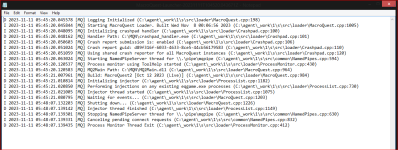
I worked on it yesterday with no luck. I took a screenshot of the logs. Not sure if this will help with helping figure this out.

1699787223943.png
 
Interesting that yours says "Build: MacroQuest2 [Oct 12 2023 (Live)]
1699792656250.png
Because mine says "Build: MacroQuest [Oct 12 2023 (Live)]
1699792668892.png

Did you happen to install MacroQuest over your old MacroQuest 2 folder?

Also, I'd like to point out that's Macroquest Launcher not the Redguides Launcher. Are you having issues with the Redguides launcher or the macroquest launcher?
 
The redguides launcher will not open up. It prompts me to allow it to make changes as normal. I select yes as normal and for a brief second the box pops up like its going to open the launcher and it does not.
I did all the swapping out of the old mq2 to the new mq2 a long time ago when it was released. I followed the instructions that were given. I have had no problems with running any of it until the recent update on redguides. i logged on the launcher as normal and then seen there was an update. clicked update and after that it froze up and have not been able to load the launcher since. It vanishes and does not load.
 
The redguides launcher will not open up. It prompts me to allow it to make changes as normal. I select yes as normal and for a brief second the box pops up like its going to open the launcher and it does not.
I did all the swapping out of the old mq2 to the new mq2 a long time ago when it was released. I followed the instructions that were given. I have had no problems with running any of it until the recent update on redguides. i logged on the launcher as normal and then seen there was an update. clicked update and after that it froze up and have not been able to load the launcher since. It vanishes and does not load.
did you skip all the stuff i responded to you with? or you checked/did them and just decided not to include that on this response?

the MQ launcher and the RG launcher are two different things.

the MQ log you showed above doesn't really show anything useful at all, and it doesn't have anything to do with the redguide's launcher

but these DO sound like a permission issue.

I would go back and check what i previously responded with
 
I do not run any av's. I did not skip anything. Thanks for asking though. RG launcher will not launch. Nothing has changed on my side since I have been running mq2.

1699795354309.png
 
Wrong forum
hello, tittle say it all.

I double click on my icon.

The first windows appear, with the little sound. RGResourceManager

I click "yes"

And nothing. the launcher doesnt appear.

Any ideas?

regards

gerard
 
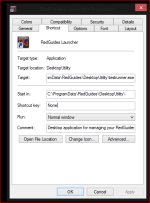
I do not run any av's. I did not skip anything. Thanks for asking though. RG launcher will not launch. Nothing has changed on my side since I have been running mq2.

View attachment 52980
oh ok, because no one is a mind reader and you didn't say that you checked any of the places previously suggested, so I apologize that i didn't know you already did that stuff.

I have no idea what you think that image is showing/communicating - except maybe the install location being programdata (this goes back to my thought about permissions)

so let's recap on the things you did (but didn't say you did)
- checked you don't have AV blocking anything (you don't run AV --- i assume you still checked defender anyhow since you said you checked everything and didn't ask any followups).
- checked that windows is allowing programs to run
- checked that windows firewall isn't blocking anything
- checked that you don't have anything in your compat layers

since you already went through all of that stuff and it didn't turn up anything, I would suggest reinstalling the RG launcher in a more "root" drive location - instead of the default. something like c:\RedGuidesLauncher (and not in programdata), because as i mentioned it sounds like it could be a permission issue.
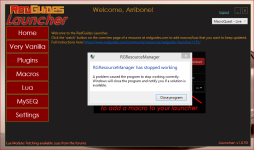
 
hello, tittle say it all.

I double click on my icon.

The first windows appear, with the little sound. RGResourceManager

I click "yes"

And nothing. the launcher doesnt appear.

Any ideas?

regards

gerard
please make sure to post in the correct location and look for existing threads/conversations about things.

Each resource on RG has an Overview / Discussion Thread and either a link to their wiki or tabs with FAQ, Commands, Etc.
Please make sure to post in the respective discussion thread, and check the FAQ/Commands/Wiki for information before posting.

there is a launcher thread - and heavy patch times this isn't super uncommon.

it usually ends up being something like a: antivirus seeing it change so holding it hostage, b: firewall/windows permission issue

if you look at some of the previous responses in here, that might guide you.
things like:

- checked you don't have AV blocking anything
- checked that windows is allowing programs to run
- checked that windows firewall isn't blocking anything (this is often a problem for eqbcs)
- checked that you don't have anything in your compat layers

Code:
HKEY_CURRENT_USER\Software\Microsoft\WindowsNT\CurrentVersion\AppCompatFlags\Layers
and
HKEY_LOCAL_MACHINE\Software\Microsoft\WindowsNT\CurrentVersion\AppCompatFlags\Layers

as a good general suggestion - make sure to restart your pc if you end up finding any of the things above being an issue, and then try patching etc

we find many folks tend to end up skipping a lot of the help we give, and the resolution ends up being "reinstall RG in a location outside of the programdata default location so you don't end up having any windows permission problems" because of a combination of the things previously mentioned.

I'd recommend doing just that - install the launcher/mq in a more "root" location like C:\RedGuidesLauncher or something
 
oh ok, because no one is a mind reader and you didn't say that you checked any of the places previously suggested, so I apologize that i didn't know you already did that stuff.

I have no idea what you think that image is showing/communicating - except maybe the install location being programdata (this goes back to my thought about permissions)

so let's recap on the things you did (but didn't say you did)
- checked you don't have AV blocking anything (you don't run AV --- i assume you still checked defender anyhow since you said you checked everything and didn't ask any followups).
- checked that windows is allowing programs to run
- checked that windows firewall isn't blocking anything
- checked that you don't have anything in your compat layers

since you already went through all of that stuff and it didn't turn up anything, I would suggest reinstalling the RG launcher in a more "root" drive location - instead of the default. something like c:\RedGuidesLauncher (and not in programdata), because as i mentioned it sounds like it could be a permission issue.
--Defender has nothing blocked.
--Firewall is allowing eq/eqbcs/rgresourcemanager
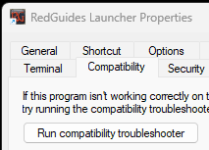
--Not sure what you mean compat layers. If you mean compatibility tab, then nothing is checked off
--Installed new launcher, redirected to c:\ instead of programdata. This is getting us closer though I think. Now I can see the launcher but boots out as it loads. Restarted computer after install and this is the error.
1699800929862.png
 
--Not sure what you mean compat layers. If you mean compatibility tab, then nothing is checked off

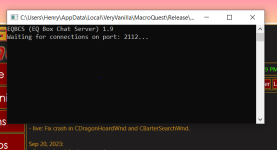
1. The launcher depends on Dot.Net. Run Windows updates and ensure PC is completely patched including optional Dot.Net packages.
2. Reboot.
3. Do the compatibility layer check in the registry as documented by @Sic .
4. Try launching by right-clicking the shortcut and choose the Run As Administrator option.
5. Run the Compatibility Troubleshooter on one of the tabs of the shortcut.
1699802832170.png
 
RedGuides Launcher

Users who are viewing this thread

Back
Top
Cart