• You've discovered RedGuides, an EverQuest multi-boxing and scripting community 🧙‍♀️⚙️. We want you to play several EQ characters at once, come join us and say hello! 👋

  • A TLP without truebox has thawed (Very Vanilla ready)
    Frostreaver
Resource icon

Release MQNearby

ChatWithThisName

⚔️🛡️🗡️
Moderator
Joined
Dec 29, 2017
RedCents
24,100¢
ChatWithThisName submitted a new resource:

MQNearby - The map you didn't know you wanted.

Sat down 4 days ago with no real plan in mind. Originally it was going to just list all the spawns and be searchable. But Sic was like "you should make a map"...so I did.

View attachment 70080

So it's an imgui map. It addresses some immediate issues. MQ2Map showing labels causes other portions of EQ's UI to fail. Text not showing up in the chat boxes. Bags having contents appear to vanish before your eyes. etc.

I'm about 5 days into this at the time of posting this. But I've...

Read more about this resource...
 
It's not yet available to be used by others. But I've made really good progress on it, so I wanted to share that it's coming.
It's here.
 
Last edited:
Ok, dumb question...how do I load MQNearby?

/plugin mqnearby load

I suspect there will be commands to show the UI etc. when the notes are provided but that works for now. If you click the window off, it is still loaded and I'm not sure how to show the window again. For now, unloading and reloading works though.
 
That doesn't seem to work, perhaps its not on the test server yet?
 
Last edited by a moderator:
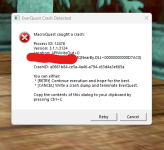
I loaded this, and it completely froze my screen. After about 5 minutes, I wound up going to Task Manager and ending task.
 
That's pretty weird


The instructions were in the message
You would think that the instructions were in the message, but I cannot find how to get into the settings to do this.
 
This is pretty cool. It is nice to be able to clear up some space on my screen. However, it keeps freezing up on me and I have to use task manager to exit and restart.

Only 1 of the 5 accounts I have running freezes though.

Is anyone else having this issue?
 
This is pretty cool. It is nice to be able to clear up some space on my screen. However, it keeps freezing up on me and I have to use task manager to exit and restart.

Only 1 of the 5 accounts I have running freezes though.

Is anyone else having this issue?
To me, sounds more like a potential overlay or resource issue - do you have external overlays running like Nahimic or afterburner, overwolf, etc?
 
This is pretty cool. It is nice to be able to clear up some space on my screen. However, it keeps freezing up on me and I have to use task manager to exit and restart.

Only 1 of the 5 accounts I have running freezes though.

Is anyone else having this issue?
Tis odd. Nothing in it says "stay in a loop forever" so I can't see a reason it'd be hanging like that.
The 1 of 5 accounts that is doing it, does it freeze up without the plugin loaded?
 
To me, sounds more like a potential overlay or resource issue - do you have external overlays running like Nahimic or afterburner, overwolf, etc?
I do not have any other overlays running.

Tis odd. Nothing in it says "stay in a loop forever" so I can't see a reason it'd be hanging like that.
The 1 of 5 accounts that is doing it, does it freeze up without the plugin loaded?
I do not normally have issues the any of my accounts freezing up. It just started when I loaded this. It was doing fine, and i switched over to spawns, and that is when it froze up this time. The first time it froze up was when I first loaded it in.
 
I do not have any other overlays running.


I do not normally have issues the any of my accounts freezing up. It just started when I loaded this. It was doing fine, and i switched over to spawns, and that is when it froze up this time. The first time it froze up was when I first loaded it in.
Okay, just loaded up and switched to the NPC tab and it locked up on me. So perhaps your computer isn't crazy.
 
So... Is there something I need to do to get the map lines on the screen? Don't see anything in the ui to point to map directory. Also, if you close it out with the X, is there a way to get the interface back up without unloading and loading?
 
So... Is there something I need to do to get the map lines on the screen? Don't see anything in the ui to point to map directory. Also, if you close it out with the X, is there a way to get the interface back up without unloading and loading?
It's fairly bare bones.
I need to add an option to choose another directory for the map - the logic is there, just not the code to choose anything other than default. So you'll want to copy files from your custom folders "brewalls" or whatever into the default maps folder.

You need to unload and reload to get the window back. I haven't added the toggle for that. But will do so.
 
I've only had a quick play with this as I've been out all day but it already looks very useful and it is obviously going to be great!

So, thank you!

I realise that you have more plans to work on already but, when you are ready for any suggestions, I do have two (in case these are not on your list):

1. Would it be possible to place the options on a separate tab to the map? It would just save window real estate for those of us that don't use two monitors.

2. How difficult would it be to give an option to reduce the size of the arrows? They are nice (and I love that they show the direction the spawn is facing) but sometimes I think half the size might work better still for me.

However, even without these, this is going to be very useful - I can tell!
 
(Unreleased changes as of 6/15/2025 4:15pm CST (Wait for a build after that)
1750021758387.png

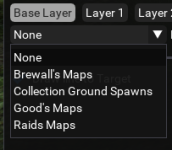
Okay, so I added the option to select custom map folder. Just select from dropdown and it'll automatically load the new map.

I've also added a command (/nearby) which will allow toggle/show for the visibility of the window.

1. Would it be possible to place the options on a separate tab to the map? It would just save window real estate for those of us that don't use two monitors.

2. How difficult would it be to give an option to reduce the size of the arrows? They are nice (and I love that they show the direction the spawn is facing) but sometimes I think half the size might work better still for me.
1. Yes. But I'm probably going to do something like an auto collapsing or collapse toggle (briefly discussed prior to release).

2. I considered that the triangles would be cumbersome for some (You can right click on them by the way and they needed to be big enough to do so). I planned to add an option to just do a dot like you get in current MQ2Map as a way to show the spawns location, but not clutter the location. Perhaps an option to change the size of the arrows would be reasonable. I'll have a think on it.
 
1. Yes. But I'm probably going to do something like an auto collapsing or collapse toggle (briefly discussed prior to release).

2. I considered that the triangles would be cumbersome for some (You can right click on them by the way and they needed to be big enough to do so). I planned to add an option to just do a dot like you get in current MQ2Map as a way to show the spawns location, but not clutter the location. Perhaps an option to change the size of the arrows would be reasonable. I'll have a think on it.

Good ideas! Thank you!
 
ChatWithThisName updated MQNearby with a new update entry:

6/16/2025

- Change default arrow size to 8
- Arrow now rotates centered on spawn instead of around it
- Added Target Line - Will draw a line to your current target
- Added the option to change the size of the spawn arrow
- Added the ability to use custom maps folder
- Added your X, Y, Z location to a separator in the options panel.

Read the rest of this update entry...
 
Release MQNearby

Users who are viewing this thread

Back
Top
Cart