Oops, my apologies! I don't see the named mobs on the bottom left-hand options panel when I'm not using the map as an overlay. I only see the coordinates there. The nameds were showing up as normal on the bottom left last week.I'm afraid I had to remove your screenshot because names were visible through the map window.
I can look at this. The overlay to be clear is the pop out overlay - The named would show at the bottom of the window on the left hand options panel if you're not using the map as an overlay.
Are you referring to the overlay or the not overlay?

-
 Hail, we're RedGuides. We want you to play six (yes, 6!) EverQuest characters at once. We have scripts and a friendly community to help, please join our playstyle and say hello! 👋
You are using an out of date browser. It may not display this or other websites correctly.
You should upgrade or use an alternative browser.
You should upgrade or use an alternative browser.
Resource icon
Release MQNearby (2 Viewers)
- Thread starter ChatWithThisName
- Start date
It is working now. I am not sure what happened. I appreciate you guys for all these great plugins.I'm afraid I had to remove your screenshot because names were visible through the map window.
I can look at this. The overlay to be clear is the pop out overlay - The named would show at the bottom of the window on the left hand options panel if you're not using the map as an overlay.
Are you referring to the overlay or the not overlay?
I cannot get the MQ Search or the MQ Nearby screens to close or minimize on my cleric's UI. His is the same as the other 5 and they close naturally as well as minimize.
I have camped him, reset and done what I know to do, but the MQsearch screen blocks his inventory and pop-ups. Not game breaking, but I have to close MQ to manage him. Hope someone has a clue on how to override this issue.
Thanks
I have camped him, reset and done what I know to do, but the MQsearch screen blocks his inventory and pop-ups. Not game breaking, but I have to close MQ to manage him. Hope someone has a clue on how to override this issue.
Thanks

for future purposes, you should post in the individual resource that you need help withI cannot get the MQ Search or the MQ Nearby screens to close or minimize on my cleric's UI. His is the same as the other 5 and they close naturally as well as minimize.
I have camped him, reset and done what I know to do, but the MQsearch screen blocks his inventory and pop-ups. Not game breaking, but I have to close MQ to manage him. Hope someone has a clue on how to override this issue.
Thanks
> Here's how to find out where to post in the right area :) <
it sounds like you might have docked them to the top of your mq window
/mqsettings -> overlay -> "Require Shift To Dock" enabled might help prevent that - i keep that turned on for me
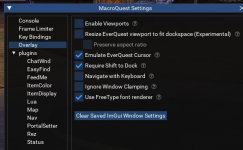
in the meantime you can either:
/mqoverlay reload which will then reset all your imgui windowsor if you can grab the

and then drag it off of being docked to the top of your screen


- Commits
- 191
ChatWithThisName updated MQNearby with a new update entry:
08/29/2026b
Read the rest of this update entry...
08/29/2026b
- [EMU] corrected issue that would cause a silent crash after "time for a rebuild"
Read the rest of this update entry...
This is the first time I have tried the Nearby maps and so far I love it! I got a couple of questions though. 1) When I toggle the full screen overlay, It comes up with the black background. Is there a way to make it clear? Also Is there a way to make the "Toggle Fullscreen/Click though" a hotkey? When I have the full screen overlay up the only way to close it is to hit the X in the upper right corner.
2) I like to keep the small map window open in my lower right corner rather than the game map. Problem here is a lot of the lines that are black are hidden by the black background. Can you either make the background darkness gradable/adjustable so to make the black lines visible or ability to change the color of the black lines. I did try the custom line colors, However that makes all the lines the same color.
2) I like to keep the small map window open in my lower right corner rather than the game map. Problem here is a lot of the lines that are black are hidden by the black background. Can you either make the background darkness gradable/adjustable so to make the black lines visible or ability to change the color of the black lines. I did try the custom line colors, However that makes all the lines the same color.
- Commits
- 191
1. Sounds like you're in edit mode (allows you to resize the overlay so it doesn't overlap windows or to place it in a specific spot on the screen etc.) You'll just need to stop editing it in the options panels.This is the first time I have tried the Nearby maps and so far I love it! I got a couple of questions though. 1) When I toggle the full screen overlay, It comes up with the black background. Is there a way to make it clear? Also Is there a way to make the "Toggle Fullscreen/Click though" a hotkey? When I have the full screen overlay up the only way to close it is to hit the X in the upper right corner.
2) I like to keep the small map window open in my lower right corner rather than the game map. Problem here is a lot of the lines that are black are hidden by the black background. Can you either make the background darkness gradable/adjustable so to make the black lines visible or ability to change the color of the black lines. I did try the custom line colors, However that makes all the lines the same color.
1b. Also, you may want
/nearby overlay to toggle the overlay2. There is an option to change the colors of the lines and labels to handle this issue. The downside is you lose the ability for lines to be multiple colors.
Thank you for the information. I did notice that once I logged back in the map was working as it should have. So you were correct about being in edit mode.1. Sounds like you're in edit mode (allows you to resize the overlay so it doesn't overlap windows or to place it in a specific spot on the screen etc.) You'll just need to stop editing it in the options panels.
1b. Also, you may want/nearby overlayto toggle the overlay
2. There is an option to change the colors of the lines and labels to handle this issue. The downside is you lose the ability for lines to be multiple colors.
Users who are viewing this thread
Total: 3 (members: 0, guests: 3)
Share: