• Hail, we're RedGuides. We want you to play six (yes, 6!) EverQuest characters at once. We have scripts and a friendly community to help, please join our playstyle and say hello! 👋
  • We've added LLM sections to our Terms & Rules and Resource Rules, for everyone's sanity & in-game safety.
    Read more
    a. Do not replace your voice with an LLM. This goes for your posts and your scripts. Drafting and editing with a tool is fine, but don't take you out of what you share.
    b. Do not replace your EQ character's voice with an LLM. We don't want scripts that speak over /ooc, /shout or other public channels. This has been an unwritten rule that's kept casino scripts off the site for decades, but we're now compelled to make it clear: keep automated communication private.

    Why Does RG Review Scripts?
    Nearly every LLM-written Lua script we see is making your character do impossible things, and rarely in a way that's beneficial to you. We've seen heavy server hammering, /target over impossible distances when /nav spawn would passively accomplish the same thing, a spawn search that fires 20+ times per second, and other pointless actions that are likely annoying GMs.

    You are welcome to use LLMs as a tool to structure, draft, and edit your work, but please read critically before hitting /lua run
MQ2Nav Meshes

💾Software MQ2Nav Meshes 2019-11-13

Not sure whether I am doing something wrong (I did update my meshes and even deleted the old one) but the mesh for Boldven's Hideout (guildhallsng) isn't working for me. Is it just me?
 
Not sure whether I am doing something wrong (I did update my meshes and even deleted the old one) but the mesh for Boldven's Hideout (guildhallsng) isn't working for me. Is it just me?
Show the snippet of the error

Take an easy screen snip:
  1. Shift+Windows Key+S
  2. Select the area you wish to copy
  3. Control+V to paste it into a forum message
 
Show the snippet of the error

Take an easy screen snip:
  1. Shift+Windows Key+S
  2. Select the area you wish to copy
  3. Control+V to paste it into a forum message

Hard to do without toon names in the pic. Basically, what I get is text to say "Chase Assist mode requires a mesh for the zone you are in. Switching to Manual Mode".

I think there is something odd with zone names for this instance so it may be something fairly simple. Not sure, so thought I'd ask in case anyone else had an issue or had overcome it.
Do a /nav reload and then share that error messages
 
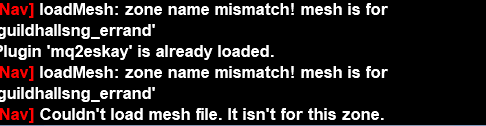
OK - the first line was on zoning in. Ignore the MQ2Eskay line. The last line follows a /nav reload.

I think this means it's a bad mesh? I just redownloaded from wired420's site to make sure I had the latest. To be honest, it isn't the end of the world as it's a very small zone and easy to manage just using /follow and assist keys.

1745185728375.png
 
OK - the first line was on zoning in. Ignore the MQ2Eskay line. The last line follows a /nav reload.

I think this means it's a bad mesh? I just redownloaded from wired420's site to make sure I had the latest. To be honest, it isn't the end of the world as it's a very small zone and easy to manage just using /follow and assist keys.

View attachment 69446
You're using an incorrect mesh file.you need to delete the guilhjallsng_errand file and download the correct, updated mesh
 
Thanks. I can see the _errand file in the download. I've deleted it which will hopefully let it use the (also freshly downloaded) guildhallsng.navmesh (that looks like it is newer). I'll try it tomorrow.

EDIT: It's now "tomorrow" and I have it all working now - thanks for the help.
 
Last edited:
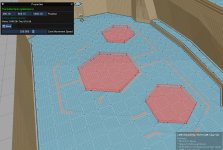
Fixes the Ground spawn area behind the posts in the JC table room.

This also blocks a door to the center from the north. Without it, Toons will just run into the door. The mission unlocks both doors after you kill the south mobs.
 

Attachments

Fixes the Ground spawn area behind the posts in the JC table room.

This also blocks a door to the center from the north. Without it, Toons will just run into the door. The mission unlocks both doors after you kill the south mobs.
You already know you can send to me and I'll update it. Posting here isn't how to do that
 
💾Software MQ2Nav Meshes

Users who are viewing this thread

Back
Top
Cart