
-
 Hail, we're RedGuides. We want you to play six (yes, 6!) EverQuest characters at once. We have scripts and a friendly community to help, please join our playstyle and say hello! 👋
You are using an out of date browser. It may not display this or other websites correctly.
You should upgrade or use an alternative browser.
You should upgrade or use an alternative browser.

Release MQ2DPSAdv
- Thread starter Teichou
- Start date

Sorry if this isn't the correct place, but I have a quick question. The DPS adv window isn't showing up for me at all, and I looked through my VV installation as well as EQ and don't see a custom UI folder. Can anyone point me in the right direction?
/plugin mq2dpsadv load - then a /dpsadv show to show the window - if this is your first time running it you will need a /reload or a /loadskin defaultWorks great, thank you. Awesome plugin./plugin mq2dpsadv load- then a/dpsadv showto show the window - if this is your first time running it you will need a/reloador a/loadskin default

Boring
Well-known member
With this latest update, I am getting an error "Incorrect UI File in use. Please update to latest and reload again." I went to the UI folder for MQ2, copied the MQ2DPSAdv file and pasted it into my custom UI (which I have used for years) and it still says that even reloading the plugin. (It worked yesterday before this latest patch). The UI window looks like the older one which does not show the use TBMK numbers checkbox instead of exact figures as an option. ALSO even weirder, my SK on the same computer does NOT have this error and IS showing the current correct window?? They are both running the same custom UI. This character (Berserker) is also having issues with CWTN mq2berzerker window too .. any coincidence?
i responded to you in the other thread.With this latest update, I am getting an error "Incorrect UI File in use. Please update to latest and reload again." I went to the UI folder for MQ2, copied the MQ2DPSAdv file and pasted it into my custom UI (which I have used for years) and it still says that even reloading the plugin. (It worked yesterday before this latest patch). The UI window looks like the older one which does not show the use TBMK numbers checkbox instead of exact figures as an option. ALSO even weirder, my SK on the same computer does NOT have this error and IS showing the current correct window?? They are both running the same custom UI. This character (Berserker) is also having issues with CWTN mq2berzerker window too .. any coincidence?
if you have duplicate ui files it will load from your custom/default eq folder before it loads from your mq2 folder - so you either need to delete those old ones, or replace them with the new ones.
Boring
Well-known member
Hi Sic ty for replying to both threads. I did replace every MQUI XML document in my custom UI with the MQ2 default ones. What else would I need to do? I put a copy into the default UI and my custom UI folder. When I deleted the berserker file that fixed him, but the Rogue and dps adv UI files are still not working. Sorry to be a pain!
the cwtn plugins all use the exact same window - sounds like you need to do a /reload on your uiHi Sic ty for replying to both threads. I did replace every MQUI XML document in my custom UI with the MQ2 default ones. What else would I need to do? I put a copy into the default UI and my custom UI folder. When I deleted the berserker file that fixed him, but the Rogue and dps adv UI files are still not working. Sorry to be a pain!
Hello everyone, so I got the DPS Advanced window up and working for the most part but for some reason the window cuts off at dps and wont show time or %, I made the window it self bigger and noticed I can adjust the columns #, Name, Total, but not the DPS column. was wondering if anyone knows a fix.
Thanks for any help
Thanks for any help
is it possible you don't have the updated file? like you copied the file to your default or a custom ui folder and not automatically loading from your mq2 folder?Hello everyone, so I got the DPS Advanced window up and working for the most part but for some reason the window cuts off at dps and wont show time or %, I made the window it self bigger and noticed I can adjust the columns #, Name, Total, but not the DPS column. was wondering if anyone knows a fix.
Thanks for any help
I can adjust mine
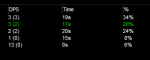
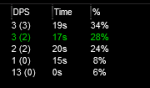
I did notice that when I open the UI files folder in MQ2/Release file that it has a bunch of XML documents that show are outdated but when I go into the Default folder inside the UIfiles folder it has updated versions, should I delete the XML files that are not updated?is it possible you don't have the updated file? like you copied the file to your default or a custom ui folder and not automatically loading from your mq2 folder?
I can adjust mine
View attachment 21922
View attachment 21923
Here is a picture of what I mean
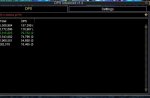 you can see where it cuts off just after dps
Last edited:

(moving this from the MQ2Monk thread)
My original deduction is that this happened because my pet, via rename potion, had the same name as my Cleric. I would try to make people's parses look funny by pointing out that my cleric was doing backstab damage.
If the pet took a riposte and died, or de-summoned after the mob died, it would generally crash my other characters. I was able to reproduce this to occur within 1-3 mobs, a complete crash of all other EQ clients (except the Cleric) with no crash messages, no dump files, just a disappearance of the EQ clients.
To resolve this, I just stopped using the hammer pet. Case closed?
I joined a raiding guild on one of my characters, and was crashing every 6-12 seconds when we had combat. My first raid was not at all pretty. One time I crashed the same second that I logged back into the raid zone. It was then that I realized MQ2DPSAdv was the culprit, and turning the plugin off resolved everything. Now I can use the hammer pet without problems.
I tried using the default UI, but there might have been something else I was missing, as a requirement of the MQ2DPSAdv plugin.
Any thoughts, Chat?
I was originally running into the problem back in May, just two months ago. I had, after a lot of troubleshooting, deduced that I only crashed when using my Cleric's hammer pet - part of my KissAssist routine, and not part of IHC. It crashed everyone else in my cleric's group, but not my cleric.@BlankStare I revived DPSAdv from the dead a year or more ago to get it to work when DBG changes all the text outputs so that DPSAdv would actually parse the DPS. So in a way it is a CWTN plugin. With that said, without a dump of the crash I wouldn't be able to track down your issue that causes the crash. You need to crash again to get a updated dmp file that you can send me so I can look at what is causing it and implement a fix for it. But the conversation for that should be moved to the DPSAdv discussion thread.
Personally I don't crash running DPSAdv and I run it 100% of the time on all characters. Not to say you don't crash, just that I've not experienced it when I played. Can't fix something if I don't know it's not working correctly.
My original deduction is that this happened because my pet, via rename potion, had the same name as my Cleric. I would try to make people's parses look funny by pointing out that my cleric was doing backstab damage.
If the pet took a riposte and died, or de-summoned after the mob died, it would generally crash my other characters. I was able to reproduce this to occur within 1-3 mobs, a complete crash of all other EQ clients (except the Cleric) with no crash messages, no dump files, just a disappearance of the EQ clients.
To resolve this, I just stopped using the hammer pet. Case closed?
I joined a raiding guild on one of my characters, and was crashing every 6-12 seconds when we had combat. My first raid was not at all pretty. One time I crashed the same second that I logged back into the raid zone. It was then that I realized MQ2DPSAdv was the culprit, and turning the plugin off resolved everything. Now I can use the hammer pet without problems.
I tried using the default UI, but there might have been something else I was missing, as a requirement of the MQ2DPSAdv plugin.
Any thoughts, Chat?

- Commits
- 191
as per the quoted post. Send me a dmp file.

If I recall correctly, that's all done by chat color and there are some text splits on your name. So the issue of having your pet as your name is probably a text splitting issue where it's trying to use the same code for pets who are named "Soandso's pet" as well as "Kibober" and doesn't account for that. Although, it's also possible for crashing other clients that they do a spawn search...find the name of your cleric...and then, expecting that there is only one try to perform NPC operations on a PC.
For the crashing in combat, if it's that reproducible, I'd say clear out your combat logs...turn logging on, and save the log that crashes. Can just run it through the same functions and see what happens. (But as CWTN said, a dump file will point directly at it).
For the crashing in combat, if it's that reproducible, I'd say clear out your combat logs...turn logging on, and save the log that crashes. Can just run it through the same functions and see what happens. (But as CWTN said, a dump file will point directly at it).

No logs needed.works best with HitModes set to For You Hit Other: Normal, Abbreviated
Would someone explain this statement in more detail please??
Also, does this plugin work better with logs turned on or off?
The normal abbreviated means you need your hits mode (right click on ur chat window). I suggest nornal. Using numbers only would make the plugin not function correctly.
- Commits
- 191
Redbot updated MQ2DPSAdv with a new update entry:
SDPS Fix
Read the rest of this update entry...
SDPS Fix
Code cleanup, corrects an issue where sometimes SDPS would show 0 erroneously.
Read the rest of this update entry...


Redbot updated MQ2DPSAdv with a new update entry:
8/22/2020
Read the rest of this update entry...
8/22/2020
Fix naming collision where a non-PC having the same name as a PC would crash
Add HistoryLimit setting to the ini which allows you to specify how many mobs for which to keep a DPS history.
This should help in those times where running the plugin for long periods of time eventually slows down or
crashes. The default is 25.
Add /dps limit command to set the history limit for that character
Read the rest of this update entry...

Redbot updated MQ2DPSAdv with a new update entry:
UI Changes and Crash Fixes
Read the rest of this update entry...
UI Changes and Crash Fixes
- Further cleans up MQ2DPSAdv (type setting, etc) where I noticed it while looking for the other crashes
- Adds some future TODOs for other items I noticed
- Adds UI option for History Limit (thank you Sic for pointing out my failures)
- Fixes the ini setting of History Limit to 1 (sorry, you'll have to fix that yourself)
- Fixes a previous crash that I made happen a lot more frequently (dangling pointer)
Read the rest of this update entry...




Smokeybear72
Only YOU can prevent forest fires !
re-run the patcher (might have to reinstall latest update) - the correct xml was added to the zip about an hour ago
SIC, can you help us further on this? I only see as latest version.. how is Robban seeing a newer version ?

What XML file are we looking for? I seem to be crashing since I updated on 1 account.
diff time zone.SIC, can you help us further on this? I only see as latest version.. how is Robban seeing a newer version ?
View attachment 24451
What XML file are we looking for? I seem to be crashing since I updated on 1 account.
try hitting the reinstall button - it just has the updated xml.
if you have dmps send to knightly
also - cwtn plugins don't do anything with mq2dpsadv - if you have mq2dpsadv dmps send them to knightly, howeverSince patch ive been crashing after loading mq2dpsadv but its only with toons using chatwithme plugins
Smokeybear72
Only YOU can prevent forest fires !
How can I get rid of MQ2DPSAdv ?
I wiped ... again at seeking the Sorcerer, as in 1 of 2 attempts either the Tank or the Healer gets an client crash right after first fight starts. After the last patch, It felt a little better, but today at first attempt my Tank crashet not mkore than 5 seconds into the fight.
After I had recovered the crew at Horasug, I used "/Plugin mq2dpsadv unload" on all accounts to unload the plugin. On all accounts I got the Message of a successful unload.
Than I zoned into the ini. On all accounts the dps-window showed up again. A second time I used "/Plugin mq2dpsadv unload" on all accounts to unload the plugin. Again on all accounts I got the message of successful unload, which leads me to the conclusion, that the plugin somehow had been loaded while zoning.
Nevertheless during the fight, the dps-windows showed up again, but atleast without causing new trouble.
If this plugin would work in a decent manner I would love it.
Even when its working at its best (on my 3 years old I7-System) atleast once an our I have to /reloadui as, while its running its slowing down the UI-refresh. usually already after a view minutes, at the pullers screen I cant reply to any questions in group or guild, as the refresh of all windows ist slowed down in a manner, that only some lines are shown orelse they are completely blank. After a while,maby 60 Minutes ish, lags start to increase. That's the point when I usually use the hotbutton for /reloadui, as at this points no text aion any of the windows is shown, including the mq2 window. The Accounts which are most of the time "in front" (have the focus) are those, where the "whiteout" of all windows progresses much faster, than in the dps-accounts which are seldom on focus. This gives me the impresssion, that the plugin at the account at front keeps consuming ressoruces while in front.
Unless there isn't a version which doesn't cause problems, I would like to know, what I shall do to be shure it isn't loaded anymore.
Til today I thought a "/plugin xxx unload" is all what's needed, to unload and deactivate a plugin.
I wiped ... again at seeking the Sorcerer, as in 1 of 2 attempts either the Tank or the Healer gets an client crash right after first fight starts. After the last patch, It felt a little better, but today at first attempt my Tank crashet not mkore than 5 seconds into the fight.
After I had recovered the crew at Horasug, I used "/Plugin mq2dpsadv unload" on all accounts to unload the plugin. On all accounts I got the Message of a successful unload.
Than I zoned into the ini. On all accounts the dps-window showed up again. A second time I used "/Plugin mq2dpsadv unload" on all accounts to unload the plugin. Again on all accounts I got the message of successful unload, which leads me to the conclusion, that the plugin somehow had been loaded while zoning.
Nevertheless during the fight, the dps-windows showed up again, but atleast without causing new trouble.
If this plugin would work in a decent manner I would love it.
Even when its working at its best (on my 3 years old I7-System) atleast once an our I have to /reloadui as, while its running its slowing down the UI-refresh. usually already after a view minutes, at the pullers screen I cant reply to any questions in group or guild, as the refresh of all windows ist slowed down in a manner, that only some lines are shown orelse they are completely blank. After a while,maby 60 Minutes ish, lags start to increase. That's the point when I usually use the hotbutton for /reloadui, as at this points no text aion any of the windows is shown, including the mq2 window. The Accounts which are most of the time "in front" (have the focus) are those, where the "whiteout" of all windows progresses much faster, than in the dps-accounts which are seldom on focus. This gives me the impresssion, that the plugin at the account at front keeps consuming ressoruces while in front.
Unless there isn't a version which doesn't cause problems, I would like to know, what I shall do to be shure it isn't loaded anymore.
Til today I thought a "/plugin xxx unload" is all what's needed, to unload and deactivate a plugin.
Smokeybear72
Only YOU can prevent forest fires !
How can I get rid ofMQ2DPSAdv ?
I wiped ... again at seeking the Sorcerer, as in 1 of 2 attempts either the Tank or the Healer gets an client crash right after first fight starts. After the last patch, It felt a little better, but today at first attempt my Tank crashet not mkore than 5 seconds into the fight.
After I had recovered the crew at Horasug, I used "/Plugin mq2dpsadv unload" on all accounts to unload the plugin. On all accounts I got the Message of a successful unload.
Than I zoned into the ini. On all accounts the dps-window showed up again. A second time I used "/Plugin mq2dpsadv unload" on all accounts to unload the plugin. Again on all accounts I got the message of successful unload, which leads me to the conclusion, that the plugin somehow had been loaded while zoning.
Nevertheless during the fight, the dps-windows showed up again, but atleast without causing new trouble.
If this plugin would work in a decent manner I would love it.
Even when its working at its best (on my 3 years old I7-System) atleast once an our I have to /reloadui as, while its running its slowing down the UI-refresh. usually already after a view minutes, at the pullers screen I cant reply to any questions in group or guild, as the refresh of all windows ist slowed down in a manner, that only some lines are shown orelse they are completely blank. After a while,maby 60 Minutes ish, lags start to increase. That's the point when I usually use the hotbutton for /reloadui, as at this points no text aion any of the windows is shown, including the mq2 window. The Accounts which are most of the time "in front" (have the focus) are those, where the "whiteout" of all windows progresses much faster, than in the dps-accounts which are seldom on focus. This gives me the impresssion, that the plugin at the account at front keeps consuming ressoruces while in front.
Unless there isn't a version which doesn't cause problems, I would like to know, what I shall do to be shure it isn't loaded anymore.
Til today I thought a "/plugin xxx unload" is all what's needed, to unload and deactivate a plugin.
/bcaa //plugin mq2dpsadv unload
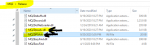
To get totally rid of this one: Delete these two items in release folder
Users who are viewing this thread
Total: 1 (members: 0, guests: 1)
Share: