Robban
Ultimate seasoned veteran member
did you start it?Is this lua not working anymore? when i type /easy ui it comes up with the EasyFind menu instead
/Lua run easy



/ooc, /shout or other public channels. This has been an unwritten rule that's kept casino scripts off the site for decades, but we're now compelled to make it clear: keep automated communication private./target over impossible distances when /nav spawn would passively accomplish the same thing, a spawn search that fires 20+ times per second, and other pointless actions that are likely annoying GMs./lua run

did you start it?Is this lua not working anymore? when i type /easy ui it comes up with the EasyFind menu instead


should i turn my computer on first?did you start it?
/lua run easy
 Whenever loading it gets immedialy unloaded. I read back a couple pages now and I see now that the plugin is being unloaded due to a conflict with CWTN. Hopefully the big brains in here come together and play nice in the sandbox, it was a handy little Lua.
Did you unload it or something?Is this lua not working anymore? when i type /easy ui it comes up with the EasyFind menu instead

CWTN Plugins unload Easy.Lua , they said it conflicts with their plugin. Nothing has changed with Easy.Lua other than all automations are off by default.Upon reboot (and MQ updates, plugins, mac and lua, etc) its not opening for me as well. CWTN plugins groups. Still runs perfectly on my bard. I don;t use the combat features, should be able to work?
Try Lua run easyIs this lua not working anymore? when i type /easy ui it comes up with the EasyFind menu instead
Easy.Lua works fine. Typing /easy ui is an easyfind command to open the easyfind ui. If you run /Lua run easy (starts the easy.Lua) and then type /easy for a list easy.Lua commandsIs this lua not working anymore? when i type /easy ui it comes up with the EasyFind menu instead
That's highly unlikely that /Lua run easy will open your easy find./lua run easy = easy find opens for me. easy hasn't worked for me for at least a few days if not a week or so
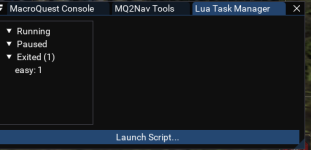
When i type /Lua gui it opens the Lua task manager. Then if i type /Lua run easy it shows it exited easy.That's highly unlikely that /lua run easy will open your easy find.
type /lua gui and see is easy is running. if not type /lua run easy
You must be running a plugin that unloads it.When i type /lua gui it opens the lua task manager. Then if i type /lua run easy it shows it exited easy.
Just did a bunch of different toons and the only one that it will work on is my KA Bard, all the plugin toons it wont run on.You must be running a plugin that unloads it.
that's because easy now has some combat automation that can conflict with the CWTN plugs so they unload itJust did a bunch of different toons and the only one that it will work on is my KA Bard, all the plugin toons it wont run on.
is there a fix for it or?that's because easy now has some combat automation that can conflict with the CWTN plugs so they unload it
don't run one or the other?is there a fix for it or?
Unfortunately there is nothing to fix here. If the creator of the plugin commands the unloading of other scripts then that is something you would need to work out with the plugin.is there a fix for it or?
Added to the Class options when using burn routines.
Added a check in each burn routing for Back Item / Damage shield buff and Charm / Geomantra. Will cast these buff items if you don't have the buff and have the item equipped.
Added the base starter routine for MNK Burn (will need tweaked as did not have a 120 Monk to actually test)
Added Intimidation to the classes that use it.
Missed the request for adding Pick Pockets.
Under the options tab there is a checkbox for auto Pick Pockets.
Nevermind! I see the others in the thread with that same issue!Hi team!
I know that I must be doing something wrong with my Toons that are running CWTN Plugins, but the LUA script ends when I try to /lua run easy on each of these characters.
Could someone give me some insight on what I am doing wrong?
My toons that are not running CWTN plugins have Easy Lua working perfect
You are on top of it sir . Thank you.Cannonballdex updated Easy.lua with a new update entry:
Update
Read the rest of this update entry...

Yah unfortunately it has to be in the left mouse chat tab in the primary windowThe teach function is switching languages, but the actual language used isnt changing. I know if you set languages in the wrong window it wont work, but on mine it just keeps speaking common. I can see where it changes language, but the result isnt changing.
If you are just looking to max the skill. Takes about a minute or two. Run this in POK.Can you add a option for Pick Locks please sir
I figured it would be more simple to add a pick lock option into the easy Lua instead of running the macroIf you are just looking to max the skill. Takes about a minute or two. Run this in POK.
No Problem. I was actually just going to remove the whole script.@Cannonballdex
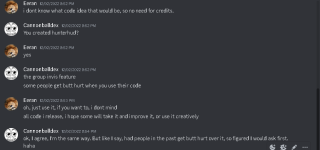
I would like you remove hunterhud from Easy, you asked permission to use the code to show if you or your team was invis, never asked about putting my entire lua into your project, i didnt say anything at the time, cause i didnt know what to think, but now i would like you to respect my project and remove it from yours.
No Problem. I was actually just going to remove the whole script.
Canon doesn't currently have plans to update or maintain this resource, which is why it is listed as unmaintainedWould you be able to add in a section to this lua for ranger and enchanter burns ? Also I'm running into a problem with the mage burn section where it continuously keeps trying to cast illusionary spikes non stop when it has a ranger damage shield buff on ( I think)
no, the cwtn plugins unload it due to the very large number of conflicting behaviorsThis doesn't work with CWTN plugins? I just want to use it to revive my merc if it gets killed, can't seem to find any way to do it outside of this, but I do use the CWTN plugins.

I know this is old BUT,Thanks Sic. Would you happen to know if there's a way to revive a merc automatically if it dies?
local mq = require('mq')
------------------ Revive Mercenary -------------
-------------------------------------------------
local function ReviveMerc()
    if mq.TLO.Mercenary.State() == 'DEAD' and mq.TLO.Window('MMGW_ManageWnd/MMGW_SuspendButton').Enabled() and not mq.TLO.Me.Hovering() and Alive() then
        mq.cmd('/nomodkey /notify MMGW_ManageWnd MMGW_SuspendButton LeftMouseUp')
        print(easy, '\agReviving Mercenary')
    end
end
local function main()
    while true do -- mainloop
        ReviveMerc()
        mq.delay('1s')
    end
end
Easy.lua BETA v10.0
Big update. Easy has been rebuilt from one giant file into modules, burns have been reworked across every class, and a number of long standing bugs are fixed.
Before you update
- Delete your old lua\Easy folder first, then unzip the new easy folder into your lua folder. Run it with /lua run easy.
- Settings have moved to config\easy\ in your MacroQuest folder. Each character gets its own...