• You've discovered RedGuides, an EverQuest multi-boxing and scripting community 🧙‍♀️⚙️. We want you to play several EQ characters at once, come join us and say hello! 👋

  • A TLP without truebox has thawed (Very Vanilla ready)
    Frostreaver
RedGuides Launcher

RedGuides Launcher (3 Viewers) 1.1.0

No permission to download
The title says the bulk of it - I just got a new rig. Pulled down the launcher - and it takes forever to launch. When it finally does, it works fine, but man it is slower than I expected.

Any ideas?
 
AV program and computer updates still going on.

One of mine took 3 days to cycle all the updates. I tried to speed it up by just turning in on and off. Might have helped?
 
The title says the bulk of it - I just got a new rig. Pulled down the launcher - and it takes forever to launch. When it finally does, it works fine, but man it is slower than I expected.

Any ideas?
RG launcher? Mq?

You posted a brand new post instead of in a resource discussion so hard to guess which one you mean
 
Whatever launcher you are talking about, try adding exclusions to your AV for Everquest, Macroquest, and Redguides folders. To prevent a live scan when you execute / interact with anything from within these folders.
 
Sorry - I stink at serious posts.

The RG launcher has been really slow to actually load up and update. Once I launch MQ itself, that part goes just fine.

I will look into the exclusions list - been so long since I set everything up on my retired rig I honestly cant remember if I did that or not.
 
I used the wrong thread. Sorry all - I normally do goofy posts.

Sorry Home Alone GIF by filmeditor


I did try the creating exclusions for all of the executables related and it did not seem to help. Is there more I should do here? It is the same AV I have on the previous rig as well.
Restarted the machine, which is about a week old - so I do not believe it is still pulling down updates at this stage. Stat wise the new rig is a beast - I can post stats if that will help, just concerned that double click to actual open of the Launcher panel is several minutes, any updates within the launcher ( macro list, plug-ins, etc) are also very very slow to update.

I am sure it's me - just not sure what I did :(
 
I used the wrong thread. Sorry all - I normally do goofy posts.

Sorry Home Alone GIF by filmeditor


I did try the creating exclusions for all of the executables related and it did not seem to help. Is there more I should do here? It is the same AV I have on the previous rig as well.
Restarted the machine, which is about a week old - so I do not believe it is still pulling down updates at this stage. Stat wise the new rig is a beast - I can post stats if that will help, just concerned that double click to actual open of the Launcher panel is several minutes, any updates within the launcher ( macro list, plug-ins, etc) are also very very slow to update.

I am sure it's me - just not sure what I did :(

I'm on rather slow DSL Internet and when I start the Launcher it usually takes about 45 seconds before the Lua and Macro screens will populate. The Launcher appears to download around 3 to 5 MB of data each time you run it. Based on your report that would indicate to me that your rig has an Internet (or local networking) problem not related to MQ or EQ.
 
I'm on rather slow DSL Internet and when I start the Launcher it usually takes about 45 seconds before the Lua and Macro screens will populate. The Launcher appears to download around 3 to 5 MB of data each time you run it. Based on your report that would indicate to me that your rig has an Internet (or local networking) problem not related to MQ or EQ.
Will run speed check when I get home - I am on a pretty reliable fiber connection, but again, new system - the card may be sub-par
 
Need help please. Getting an error upon running launcher.
that is almost always due to file locking created by issues with antivirus or file syncing (like one drive).

I would take a look if you have anything like that running, take care of it, and then try again.
 
Today the launcher reinstalled all my Lua scripts, without being told to reinstall my Lua scripts. My expectation based on historical usage is that if there was a Lua update, I would have to click update to install it, however today, it overwrote all my Lua scripts, even ones that haven't been updated on redguides for months/years, which caught me by surprise and overwrote my local edits to many scripts.

Any idea why the launcher did this now, and can I shut that off?
 
Today the launcher reinstalled all my lua scripts, without being told to reinstall my lua scripts. My expectation based on historical usage is that if there was a lua update, I would have to click update to install it, however today, it overwrote all my lua scripts, even ones that haven't been updated on redguides for months/years, which caught me by surprise and overwrote my local edits to many scripts.

Any idea why the launcher did this now, and can I shut that off?
Haven’t personally had that happen, but fear of that is why I rename everything I customize.
 
Today the launcher reinstalled all my lua scripts, without being told to reinstall my lua scripts. My expectation based on historical usage is that if there was a lua update, I would have to click update to install it, however today, it overwrote all my lua scripts, even ones that haven't been updated on redguides for months/years, which caught me by surprise and overwrote my local edits to many scripts.

Any idea why the launcher did this now, and can I shut that off?
Agree with Darkwynd.....if you self modify something....make a copy of it. I've had that happen with Lootly (which I've modified quite a bit). Sometimes when there is a bigger update, everything is set to go through an update cycle rather than just VV.
 
Hi folks, looking forward to jumping back into EQ. After a long hiatus I always forget how to setup all the tools.

I tried to run the RedGuides Launcher and it shows the Login button. I'm already logged into RG in my browser. When I click the button it takes me to a new page in the browswer saying "go back to the app".

Nothing changes in the app though. Should I re-download the launcher?

Thanks. Sorry for the noob question haha.
 
It sends you back to the app to login and then back to the launcher if it's not recognizing you it could be you've changed browsers in a year, changed any little thing that throws off the process I think a clean download would be worth a shot.

Also as a welcome back gift you get your first month of level two access on me.
 
Hi folks, looking forward to jumping back into EQ. After a long hiatus I always forget how to setup all the tools.

I tried to run the RedGuides Launcher and it shows the Login button. I'm already logged into RG in my browser. When I click the button it takes me to a new page in the browswer saying "go back to the app".

Nothing changes in the app though. Should I re-download the launcher?

Thanks. Sorry for the noob question haha.
Welcome back!!!!

Never hurts to clear the cookies and do a fresh install of the launcher. Can always use a backup of the config folder or pull necessary items from it if you saved one
 
Wrong forum
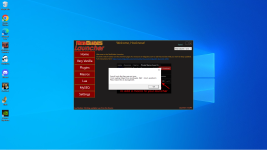
This is what I get a few seconds after trying to update the Redguides Launcher, I do not have any instances of EQ running.


---------------------------

---------------------------
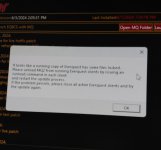
It looks like a running copy of Everquest has some files locked.
Please unload MQ2 from running Everquest clients by issuing an /unload command in each client
and restart the update process.
If the problem persists, please close all active Everquest clients and try the update again.
---------------------------
OK
---------------------------
 
Make sure you don't have any EQ sessions running.
Exclude your MQ/EQ folders from AV scanning
Reboot PC, just to clear things if all else fails, and then try updating again.
 
This is what I get a few seconds after trying to update the Redguides Launcher, I do not have any instances of EQ running.


---------------------------

---------------------------
It looks like a running copy of Everquest has some files locked.
Please unload MQ2 from running Everquest clients by issuing an /unload command in each client
and restart the update process.
If the problem persists, please close all active Everquest clients and try the update again.
---------------------------
OK
---------------------------
yep what zues said.

almost always due to Antivirus or file syncing
 
Wrong forum
so i click my launcher, it pops up, it goes to the usual screen, but once i hit the button to get to the launch it just fully shuts down. ive used the installer to repair, ive deleted and reinstalled, ive restarted... what am i missing?! new xpac release on my server today... could use this to help with my dps peeps :P lol
 
Ive totaly messed up my Macroquest clicking on the settings tab, the the three dots ... it eleminated directory?
says macroquest.exe is installed as a questioin? How can i get back to square one? i tried to reload the launcher no luck, and repair as well. What a disaster
 
Ive totaly messed up my Macroquest clicking on the settings tab, the the three dots ... it eleminated directory?
says macroquest.exe is installed as a questioin? How can i get back to square one? i tried to reload the launcher no luck, and repair as well. What a disaster
The best thing to do is click the 3 dots and then navigate to where you have mq installed.

Otherwise setup a new directory somewhere and see the 3 dots to that location and install there (you'll be restarting all settings and such if you do that)
 
Ive totaly messed up my Macroquest clicking on the settings tab, the the three dots ... it eleminated directory?
says macroquest.exe is installed as a questioin? How can i get back to square one? i tried to reload the launcher no luck, and repair as well. What a disaster
to caveat, the default location of MQ is often hidden. So you may need to root around a bit for it if you didnt install it somewhere easy to find
 
The best thing to do is click the 3 dots and then navigate to where you have mq installed.

Otherwise setup a new directory somewhere and see the 3 dots to that location and install there (you'll be restarting all settings and such if you do that)
Ok found the correct location macroquest directory. I made the same mistake with MYSEQ Directory. so i used same file path as macroquest directory. So i checked graphics driver and it was set to the very smallest possible resolution, i changed to the largest, and was able to launch normal eq. but as you can probably guess, macroquest doesnt launch from very vanilla now, it is auto launching within normal eq- which now functions. what should the file path be on MYSEQ Directory?
 
Hi, sorry for this but I’m not tech savvy. I rebooted my pc and now when I try to open redguides launcher my windows icon will act busy for a moment then nothing. If I look at task manager the launcher shows up under programs for a split second then vanishes everytime I try to open it..

I tried reinstalling the launcher and the same thing happened.. I do have windows defender running but it’s always been running while I play..

Thank you for your time!!
 
I'm trying RG's version of MQ (finally after all these years). I'm using the Launcher. Some cool stuff I admit.

All seems to be running OK for now, but I noticed one inconvenience. For MySEQ when I click Reinstall (for the INI File) the file is downloaded in .zip format to my MySEQ location (where I specified it in the Launcher settings). Then the message says the INI was updated, but not really. I must unzip that file myself.

Since I've used MySEQ for years, I knew how/where to manually update the INI, but I think the Launcher is a bit misleading when it says the INI has been installed. I wonder if the issue is related to the fact that I have WinZIP installed on my system.

Otherwise, no other issues.
 
I'm trying RG's version of MQ (finally after all these years). I'm using the Launcher. Some cool stuff I admit.

All seems to be running OK for now, but I noticed one inconvenience. For MySEQ when I click Reinstall (for the INI File) the file is downloaded in .zip format to my MySEQ location (where I specified it in the Launcher settings). Then the message says the INI was updated, but not really. I must unzip that file myself.

Since I've used MySEQ for years, I knew how/where to manually update the INI, but I think the Launcher is a bit misleading when it says the INI has been installed. I wonder if the issue is related to the fact that I have WinZIP installed on my system.

Otherwise, no other issues.
Might be my fault with the zip on myseq, I'll check thanks
 
Might be my fault with the zip on myseq, I'll check thanks
I suggest you don't zip that file. It's such a small and simple ASCII file, I would just download it unzipped, which eliminates an installation step making the installation logic simpler.
 
After reading through the last few pages on this thread I am having the same issue as others that never seemed to get answered. I have been running MQ for a few years now, and was even using it today. Now after a computer restart RG launcher won't even start up. I double click it, get the popup window about making changes, get a very short spin on mouse cursor and then nothin. Here are the steps I have attempted thus far. 1. I ran the repair module from the RG downloader, 2. I restarted my computer. 3. I uninstalled RG then reinstalled. 4. Downloaded the RG manager beta, got confused by it, then uninstalled it. When trying to launce the .exe in the file folder I get a message about using the shortcut for my safety. I am out of ideas on where to go next.
 
After reading through the last few pages on this thread I am having the same issue as others that never seemed to get answered. I have been running MQ for a few years now, and was even using it today. Now after a computer restart RG launcher won't even start up. I double click it, get the popup window about making changes, get a very short spin on mouse cursor and then nothin. Here are the steps I have attempted thus far. 1. I ran the repair module from the RG downloader, 2. I restarted my computer. 3. I uninstalled RG then reinstalled. 4. Downloaded the RG manager beta, got confused by it, then uninstalled it. When trying to launce the .exe in the file folder I get a message about using the shortcut for my safety. I am out of ideas on where to go next.
Almost always either a windows permission issue, or antivirus
 
Sic, via the RG Launcher, not sure if you changed and/or fixed the way myseqserver.ini is installed/updated, but I ran a reinstall/update and this time everything worked without incident.

Thank you.

P. S. Launcher pretty cool.
 
Sic, via the RG Launcher, not sure if you changed and/or fixed the way myseqserver.ini is installed/updated, but I ran a reinstall/update and this time everything worked without incident.

Thank you.

P. S. Launcher pretty cool.
you're welcome.

it was because last upload i zipped it
 
Trying to update MQ2 under red guides launcher >> very vanilla >> update button. Then getting prompt "plugins modjule: successfully loaded, but last installed is months ago dated. What do i do?
 
now getting told to do an /unload command for each client, where do you do this, cause its not a command in EQ
 
Getting quite tired of seeing this every time I try to do the update, particularly when I don't have any characters logged in. So, what's going on? I come back Several hours later or the next day and it works just fine. Any reason why I wouldn't be able to update when an update is available?
 

Attachments

  • 20240604_131033.jpg
    20240604_131033.jpg
    867.5 KB · Views: 0
RedGuides Launcher

Users who are viewing this thread

Back
Top
Cart