
-
 Hail, we're RedGuides. We want you to play six (yes, 6!) EverQuest characters at once. We have scripts and a friendly community to help, please join our playstyle and say hello! 👋
 -
 We've added LLM sections to our Terms & Rules and Resource Rules, for everyone's sanity & in-game safety.
Read more
a. Do not replace your voice with an LLM. This goes for your posts and your scripts. Drafting and editing with a tool is fine, but don't take you out of what you share.
b. Do not replace your EQ character's voice with an LLM. We don't want scripts that speak over/ooc,/shoutor other public channels. This has been an unwritten rule that's kept casino scripts off the site for decades, but we're now compelled to make it clear: keep automated communication private.
Why Does RG Review Scripts?
Nearly every LLM-written Lua script we see is making your character do impossible things, and rarely in a way that's beneficial to you. We've seen heavy server hammering,/targetover impossible distances when/nav spawnwould passively accomplish the same thing, a spawn search that fires 20+ times per second, and other pointless actions that are likely annoying GMs.
You are welcome to use LLMs as a tool to structure, draft, and edit your work, but please read critically before hitting/lua run
You are using an out of date browser. It may not display this or other websites correctly.
You should upgrade or use an alternative browser.
You should upgrade or use an alternative browser.

RedGuides Launcher (1 Viewer) 1.1.0
- Thread starter r1pt1de
- Start date


Are you sure you didn't just set it to another location?Yeah it wiped it out to default settings. Man this sucks.
It wouldn't overwrite configs and such, as there is nothing to override, and the launcher doesn't have a method to delete at all, so there is no way it to delete something
I would check your settings tab, that the location you have it pointing to is the same as the one from before

Kuhle
Sergeant
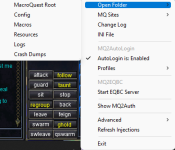
Just something I would try, start up mq, right click the icon at the bottom right and on the top there is the ability to open the specific folder that mq is pulling from. And then go to where you think mq was installed before the update and see if it's the same location. Like I said I'm not doubting what you're saying, just something I would tryYeah the settings tab hasn't changed. Not sure what happened it was there before the upgrade and gone after.

DrmChld
Member
My last install was 3/10 and the latest version is 3/19/22. The moment I try to update very vanilla the launcher crashes.
This happens to me when I try and update and still have EQBC server running. Make sure to close everything MQ related before updating
I will give it a try and if it doesn't work its not the end of the world. I built it once I can rebuild it again.Just something I would try, start up mq, right click the icon at the bottom right and on the top there is the ability to open the specific folder that mq is pulling from. And then go to where you think mq was installed before the update and see if it's the same location. Like I said I'm not doubting what you're saying, just something I would try
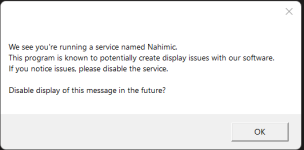
Anyone mind to explain, how to hide Nahimic Warning?
@Sic lately it seems you are always on to help all with there questions. In many threads I opened I saw you aswering questions right after the posted questions, befor I even noticed them. Either coincidence or you are seemingly always connected to be at hand to help out. Many thanks for your dedication.
Kiltmedead1
New member
My last install was 3/29. The latest version is 3/30/2022, when I click to install the update the launcher is crashing. All plugins updated fine.
Any help would be appreciated.
I just found the post to restart the computer.... basics right? It worked, on with the slaying!!
Any help would be appreciated.
I just found the post to restart the computer.... basics right? It worked, on with the slaying!!
For now clicking OK on this popup will hide the message in the future, cancel will allow it to continue showing. The next release it will be a checkbox instead. Just needed something in quick.
The launcher should be stopping and restarting the service. I will go back through and see whats failing around that. Anyone else thats having the crashing issue also running EQBC as a service?This happens to me when I try and update and still have EQBC server running. Make sure to close everything MQ related before updating
Your downloads show you've downloaded everything.Evening.
Trying to update/refresh my plugins and macros... however, the hamster wheel just keeps spinning without updating. I've restarted my pc and updated launcher. I'm running latest version and latest update.
Any tips?
Are you sure the location you're installing to is the location you're trying to launch mq from?
You can check on the settings tab of the launcher for the directory it is installed to.

were you using the latest version of the launcher? i see you downloaded v1.0.87 last nightBeen crashing on me when i hit update since the last eq patch shrugs.
if you haven't already - make sure to restart your computer after updating to the new version
were you using the latest version of the launcher? i see you downloaded v1.0.87 last night
if you haven't already - make sure to restart your computer after updating to the new version
Restarting fixed it.
restart your pcIs this ready to be updated yet by the reguide's launcher ? everytime I click "update" it just closes.. but never updates ?
Middleman850
Member
I cant even get the update to go through, my launcher crashes every time i hit update
restart your pc plzI cant even get the update to go through, my launcher crashes every time i hit update
This is a current bug that is being worked on.
If you restart your computer, you will likely be able to launch the launcher without issue.
Sometimes just ensuring that you have exited macroquest.exe allows you to without restarting, but if you continue to have an issue, or don't know how to exit macroquest.exe, just restart
> RG Launcher Discussion Thread <
If you restart your computer, you will likely be able to launch the launcher without issue.
Sometimes just ensuring that you have exited macroquest.exe allows you to without restarting, but if you continue to have an issue, or don't know how to exit macroquest.exe, just restart
> RG Launcher Discussion Thread <
Last edited:

I had this happen a bunch over last couple months. Rebooting and all that never helped me. Finally I just went in when had this issue and deleted the mq exe file and reloaded RG and it patched it right up. Worked every timeI cant even get the update to go through, my launcher crashes every time i hit update
r1pt1de updated RedGuides Launcher with a new update entry:
Fixed crash when updating MacroQuest
Read the rest of this update entry...
Fixed crash when updating MacroQuest
- The crashing issue when updating MacroQuest, while MacroQuest was running should now be fixed.
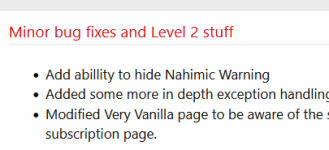
- The Nahimic message should now actually be hide-able
Read the rest of this update entry...
Many thanks, the Nahimic Messagebox for me showed the expected buttons 

I ended up investigating a bit once I started seeing the Nahimic message. What it was and where it came from.
I ended up going through a process to completely remove Nahimic since it was essentially worthless for me to have.
I wouldn't go so far as to say it's malware as this article describes it, but it was an nuisance and I never installed it to my knowledge.
How to remove Nahimic Service
I ended up going through a process to completely remove Nahimic since it was essentially worthless for me to have.
I wouldn't go so far as to say it's malware as this article describes it, but it was an nuisance and I never installed it to my knowledge.
How to remove Nahimic Service
same here since update the launcher crashesIs this ready to be updated yet by the reguide's launcher ? everytime I click "update" it just closes.. but never updates ?
i tryed to restart x 20 , reinstall the launcher x 10 , nothing helped
same here since update the launcher crashes
i tryed to restart x 20 , reinstall the launcher x 10 , nothing helped
Launcher problems?
 Sorry to hear that.
you can try these steps and install the new launcher
1 - delete your AppData - paste this in windows explorer search window (any folder) %LocalAppData%\RedGuides and %LocalAppData%\RGResourceManager and then delete the contents in that folders
1b - Did you skip step 1? if you did, go back and do step 1

2 - then go to add/remove programs, and remove the redguide's launcher
3 - reinstall the launcher
4 - open launcher
5 - point the re-install to your existing mq directory
6 - boom - back in business
7 - get a snack/drink - you earned it!
I had to edit my post, can you do the steps again with particular attention tostill not working
it crashes when i start redguides launcher
1 - delete your AppData - paste this in windows explorer search window (any folder)
%LocalAppData%\RedGuides and %LocalAppData%\RGResourceManager and then delete the contents in that foldersboth those locations
Hello RG Community,
At least 75% of the time my RG Launcher won't load plugins or macros or Lua's. The Very Vanilla screen loads fine (almost 100% of the time but even that has been blank a time or two) but it won't pull down anything else. I have to close and re-launch multiple times before it finally loads everything.
It's gone through multiple updates, some re-installs as well. It wasn't always like this but it's been going on for a while now (a couple of months) so I can't pinpoint when exactly it happened nor do I have any idea what caused it.
Does anyone else see this? Anyone know of a fix for it?
Thanks.
~S
At least 75% of the time my RG Launcher won't load plugins or macros or Lua's. The Very Vanilla screen loads fine (almost 100% of the time but even that has been blank a time or two) but it won't pull down anything else. I have to close and re-launch multiple times before it finally loads everything.
It's gone through multiple updates, some re-installs as well. It wasn't always like this but it's been going on for a while now (a couple of months) so I can't pinpoint when exactly it happened nor do I have any idea what caused it.
Does anyone else see this? Anyone know of a fix for it?
Thanks.
~S
i would make sure you don't have antivirus or any kind of file syncing locking your files or holding them hostage.Hello RG Community,
At least 75% of the time my RG Launcher won't load plugins or macros or lua's. The Very Vanilla screen loads fine (almost 100% of the time but even that has been blank a time or two) but it won't pull down anything else. I have to close and re-launch multiple times before it finally loads everything.
It's gone through multiple updates, some re-installs as well. It wasn't always like this but it's been going on for a while now (a couple of months) so I can't pinpoint when exactly it happened nor do I have any idea what caused it.
Does anyone else see this? Anyone know of a fix for it?
Thanks.
~S
this is often antivirus or things like one-drive etc
Users who are viewing this thread
Total: 2 (members: 0, guests: 2)
Share: