• You've discovered RedGuides, an EverQuest multi-boxing and scripting community 🧙‍♀️⚙️. We want you to play several EQ characters at once, come join us and say hello! 👋

  • A TLP without truebox has thawed (Very Vanilla ready)
    Frostreaver
RedGuides Launcher

RedGuides Launcher (4 Viewers) 1.1.0

No permission to download
Oh, that's unfortunate. I can't right now, unfortunately and will be some time until able to do so.
Thanks for the quick answer though.
Gave you a little lvl 2 - Welcome to RedGuides
you can keep your lvl 2 rolling with just > REDCENTS < so don't be shy and definitely participate in the community
 
You can earn your level 2 each month. There are these things called red cents and if you give them out to other's posts then you in turn earn some. They don't come off your totals. If you post something of interest then others can "red cent" your post and you earn them that way also.

Welcome to the jungle!
 
You can earn your level 2 each month. There are these things called red cents and if you give them out to other's posts then you in turn earn some. They don't come off your totals. If you post something of interest then others can "red cent" your post and you earn them that way also.

Welcome to the jungle!

Thanks for the welcome and the added info!
 
Hey. Everyone is eating tacos inside this thread. Don't you think that's some information I would like to know?

I like tacos!

You invited Sic? I thought Sic gave you the creeps.
 
Hey. Everyone is eating tacos inside this thread. Don't you think that's some information I would like to know?

I like tacos!

You invited Sic? I thought Sic gave you the creeps.

Don't remember the commercial, but ...

Mmm, tacos
 
you can still participate in the lvl 1 sections of the area and earn redcents

Thanks, I'll check that out. I didn't realize there was another area/content, as the link took me to the download area right off. Thanks again.
 
I just updated to the newest update and now I am getting a DLL error for my CWTN Plugins basically that the new updates do not match the eq DLL files. How can i revert back to the previous update?
 
I just updated to the newest update and now I am getting a DLL error for my CWTN Plugins basically that the new updates do not match the eq DLL files. How can i revert back to the previous update?
this means you need to check the plugin tab of your launcher and ensure you have them downloaded
1615001376161.png
 
I am having thte same issue. I get all my plugins updated, mt macros, and MySEQ all pdate fine. But when I try to update the launcher and MQ2 I get the :
"Sorry looks like there was an issue:
End of Central Directory could not be found.
Please report this to management."
box.
Help...I am drowning here.
I patched the EQ files with EQ patcher...no problems. I deleted the old MQ2 file. Waiting for it to be updated.
 
I am having thte same issue. I get all my plugins updated, mt macros, and MySEQ all pdate fine. But when I try to update the launcher and MQ2 I get the :
"Sorry looks like there was an issue:
End of Central Directory could not be found.
Please report this to management."
box.
Help...I am drowning here.
I patched the EQ files with EQ patcher...no problems. I deleted the old MQ2 file. Waiting for it to be updated.
restart your computer and try again.
also ensure you don't have something getting held up by your antivirus.
 
I did restart the computer. I made sure firewall and AV allow redguides apps. I also deleted and reinstalled the RG launcher. Still get the same message. I am however able to launch MQ2 with the updated info..(I think) at least it has MQ2boxr in the pluginmanager. Not sure what else to do.
 
I did restart the computer. I made sure firewall and AV allow redguides apps. I also deleted and reinstalled the RG launcher. Still get the same message. I am however able to launch MQ2 with the updated info..(I think) at least it has MQ2boxr in the pluginmanager. Not sure what else to do.
the end of central directory is usually either a: an issue with the download - like it got corrupt on connection issue, or b: something is holding it up - like antivirus like i mentioned before.

but if you're saying your mq2 did, in fact, update and is running in game?

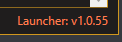
if you're trying to update the launcher itself, there hasn't been an update and it is still v1.0.55
1615448917610.png
1615448930099.png

if your current launcher version and your installed launcher version both say 1.0.55, then your launcher is fine
 
current launcher version is still V.1.0.55. Verified....But the last version date is 3/10/21 11:45:22 am Last installed 3/1/21 7:19:36 (In red characters. When I hit update, nothing happens in the lower left corner for about 5 minutes...then it says Loading Updates (After it updates my plugins and macros. But I did forget to download the navmeshes (doing that now).) Checked and double checked my AV and windws firewall....they seemed to be inorder.
 
Just FYI, I noticed today after running the update to Launcher 1.0.56 that there was a folder left on my Windows Desktop called "LaunchPad.libs". I confirmed this on a 2nd PC. I deleted the folder and LaunchPad still seems to work fine without it so I'm assuming it was only used for the update process.
 
So i want to be able to run mq2 on both test and live at the same time is this possible with use of one launcher or do i have to have two seperate launchers to do that and can i even run two diffrent mq2s at the same time
 
So i want to be able to run mq2 on both test and live at the same time is this possible with use of one launcher or do i have to have two seperate launchers to do that and can i even run two diffrent mq2s at the same time
you will want to have two directories.

otherwise when you patch live, it will overwrite your test stuff and vice versa

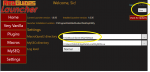
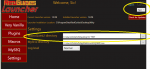
you can utilize the settings tab on the launcher, and point to a different location for test/live/emu etc
 
you will want to have two directories.

otherwise when you patch live, it will overwrite your test stuff and vice versa

you can utilize the settings tab on the launcher, and point to a different location for test/live/emu etc
directorys is easy. ill see about that. but i dont need two seperate launchers?
 
when i switch to live
1616190020874.png

and then over to test
1616190051582.png

this allows you to manage whatever install version you like from the single launcher and able to swap around by just changing your drop down
 
so did this. and i cant get test Mq2 to launch at the same time Live Mq2 is loaded. Anyone else try??
I'm not sure if this is still the case, but you used to have to:

1. load up whatever your first set is - like mq2 live and your live toons
2. once in game - exit mq2 live on your taskbar
3. load up next set - like mq2 test and your test toons
4. good to go

if your files aren't up to date, the patcher is going to have issue with you having stuff running AND wanting to update

you can also just go into the respective drive and run the macroquest2.exe from the version you want
 
I'm not sure if this is still the case, but you used to have to:

1. load up whatever your first set is - like mq2 live and your live toons
2. once in game - exit mq2 live on your taskbar
3. load up next set - like mq2 test and your test toons
4. good to go

if your files aren't up to date, the patcher is going to have issue with you having stuff running AND wanting to update

you can also just go into the respective drive and run the macroquest2.exe from the version you want

God bless your soul. it sliped my mind that you could unload the mq2 app and then reload it
 
I'm not sure if this is still the case, but you used to have to:

1. load up whatever your first set is - like mq2 live and your live toons
2. once in game - exit mq2 live on your taskbar
3. load up next set - like mq2 test and your test toons
4. good to go

if your files aren't up to date, the patcher is going to have issue with you having stuff running AND wanting to update

you can also just go into the respective drive and run the macroquest2.exe from the version you want

That's no longer the case. To load both, you just run both. Simple :)

If you're having issues, inspect your MacroQuest.ini in your test folder. If you see the following, MacroQuestWinClassName=__MacroQuestTray customize the name to something else, such as MacroQuestWinClassName=__MacroQuestTrayTest (This is how Very Vanilla comes by default, but you may have changed it or loaded someone else's ini)

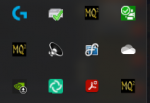
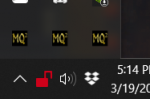
Test & Live & Emu running in harmony:
1616191936851.png
 
That's no longer the case. To load both, you just run both. Simple :)

If you're having issues, inspect your MacroQuest.ini in your test folder. If you see the following, MacroQuestWinClassName=__MacroQuestTray customize the name to something else, such as MacroQuestWinClassName=__MacroQuestTrayTest (This is how Very Vanilla comes by default, but you may have changed it or loaded someone else's ini)

Test & Live & Emu running in harmony:
View attachment 29038

I love this community. always so helping
 
That's no longer the case. To load both, you just run both. Simple :)

If you're having issues, inspect your MacroQuest.ini in your test folder. If you see the following, MacroQuestWinClassName=__MacroQuestTray customize the name to something else, such as MacroQuestWinClassName=__MacroQuestTrayTest (This is how Very Vanilla comes by default, but you may have changed it or loaded someone else's ini)

Test & Live & Emu running in harmony:
View attachment 29038
*slightly* bothered they're next to each other... you heathen!
 
RedGuides Launcher

Users who are viewing this thread

Back
Top
Cart