• You've discovered RedGuides, an EverQuest multi-boxing and scripting community 🧙‍♀️⚙️. We want you to play several EQ characters at once, come join us and say hello! 👋

  • A TLP without truebox has thawed (Very Vanilla ready)
    Frostreaver
RedGuides Launcher

RedGuides Launcher (2 Viewers) 1.1.0

No permission to download
Hello im just returning to EQ, and last week i downloaded the Launcher and macros and everything was working fine. The next day i went to load the launcher and and soon as it opens up it instantly crashes. I have tried uninstalling it and reinstalling the launcher many times and it just keep crashing as soon as it loads. I was able to go and download Very Vanilla Manually and setup MQ2 and kissassist the old way before we had launcher, but i cannot download and use EQ2Monk without launcher. Please need some help this is driving me insane!
 
Hello im just returning to EQ, and last week i downloaded the Launcher and macros and everything was working fine. The next day i went to load the launcher and and soon as it opens up it instantly crashes. I have tried uninstalling it and reinstalling the launcher many times and it just keep crashing as soon as it loads. I was able to go and download Very Vanilla Manually and setup MQ2 and kissassist the old way before we had launcher, but i cannot download and use EQ2Monk without launcher. Please need some help this is driving me insane!
howdy krunix84 - sorry to hear about your launcher issues.

you mentioned you uninstalled it - but did you uninstall AND delete your appdata information?

Code:
1 - delete your AppData - paste this in windows explorer search window (any folder) %LocalAppData%\RedGuides and then delete the contents in that folder
1b - Did you skip step 1? if you did, go back and do step 1 :)
2 - then go to add/remove programs, and remove the redguide's launcher
3 - reinstall the launcher
4 - open launcher
5 - point the re-install to your existing mq2 directory
6 - boom - back in business
7 - get a snack/drink - you earned it!

its also possible trying a different default web browser might help if your browser has some issues with it (sometimes happens with old/non-updated browsers)

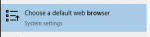
you can press your WindowsKey and then type browser
1610306358496.png

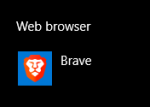
Then find "Web browser"

1610306369136.png

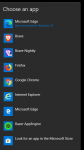
and then try a diff one (despite windows recommending edge, I wouldn't personally recommend it =p)
1610306388249.png


as far as mq2monk goes - you will want to have a subscription to mq2monk to be able to use it (unless you're on test or emu - which appears you download live server so you'll want to get a subscription license)
 
Last edited:
howdy krunix84 - sorry to hear about your launcher issues.

you mentioned you uninstalled it - but did you uninstall AND delete your appdata information?

Code:
1 - delete your AppData - paste this in windows explorer search window (any folder) %LocalAppData%\RedGuides and then delete the contents in that folder
1b - Did you skip step 1? if you did, go back and do step 1 :)
2 - then go to add/remove programs, and remove the redguide's launcher
3 - reinstall the launcher
4 - open launcher
5 - point the re-install to your existing mq2 directory
6 - boom - back in business
7 - get a snack/drink - you earned it!

its also possible trying a different default web browser might help if your browser has some issues with it (sometimes happens with old/non-updated browsers)

you can press your WindowsKey and then type browser
View attachment 27309

Then find "Web browser"

View attachment 27310

and then try a diff one (despite windows recommending edge, I wouldn't personally recommend it =p)
View attachment 27311


as far as mq2monk goes - you will want to have a subscription to mq2monk to be able to use it (unless you're on test or emu - which appears you download live server so you'll want to get a subscription license)


SIC YOU ARE AN ABSOLUTE GENIOUS!!! THANK YOU IT WORKED BEAUTIFULLY!!!!!!
 
one point for the wish-list: "nice to have"
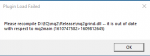
- If a plugin is dropped from VV-inclusion, it would be great if the launcher would eliminate the outdated now-nonfunctional plugin. This eliminate the need to find and delete it manually to stop the error-messages.

Error-mq2grind.png
 
Heya,

Ok, I updater via launcher and then closed logger into eq manual signed in and validated assets. I went all the way to char select then logged out. I turned on mq2 and I get the error. I tried three times. I uninstalled launcher and reinstalled incase that was it. I reinstalled and still no dice. The bottom left seems to stop at a plugin like MQ2Eskay updated successfully. Am I missing something? I do have live selected in the top right.
 
Heya,

Ok, I updater via launcher and then closed logger into eq manual signed in and validated assets. I went all the way to char select then logged out. I turned on mq2 and I get the error. I tried three times. I uninstalled launcher and reinstalled incase that was it. I reinstalled and still no dice. The bottom left seems to stop at a plugin like MQ2Eskay updated successfully. Am I missing something? I do have live selected in the top right.
well which does it say ?

if it says either of them say december - then that is the one that is out of date.
 
It should be the one in the release file?
some users end up installing macroquest 2 to multiple locations - if you have your installer updating a location that is different from the macroquest2 you are trying to run, then you will not be updated.

> i explain it here <
 
Ok, I think the problem is the one drive thing. I think it stored it. I'll have to sync update and maybe uninstall and reinstall it?


TY SO Much for your help!!! I'll let you know how it turns out.
 
Ok, for the computer impaired. The one drive forced my files to the cloud, so mark them as not allowed to do that. The fix then is delete Macroquest2 and run installer. Brought to you by your local village idiot!!!!
 
Well crap looks like I lost everything launcher is gone downloaded it and it wont install. Looks like I am spending the day tomorrow re installing everything all over again. Wished there was an easier way of doing that but I cant see any other way
 
Well crap looks like I lost everything launcher is gone downloaded it and it wont install. Looks like I am spending the day tomorrow re installing everything all over again. Wished there was an easier way of doing that but I cant see any other way
even if you reinstall the launcher application your files and such don't disappear unless you completely deleted your mq2 folder or your harddrive went up in smoke.

I would double-check that you are unloaded on everything mq2 related when you try and run the patcher (particularly and especially eqbc).

if you re-install you can just point the new install to your existing mq2 directory on the settings tab
 
after this latest patch i had the usual date conflict error ....being new to VV i asked in discord for assistance and everyone was very helpful and was able to get my main pc up and running BUT i tried the same fix with my alt pc with no luck ...then tried a soft uninstall and reload with same error and tried a complete uninstall and still having the same error ...i have updated EQ and with new VV install it was updated i am sure but updated it anyway just to be sure .....it also gives an error <unable to access buff.ini> on update.... any help would be great ..if i need to change a setting in the code please be clear about how to do it ..i know code <some> but am visually impaired ..thank you in advance <aka nila/steviee <discord>>
 
after this latest patch i had the usual date conflict error ....being new to VV i asked in discord for assistance and everyone was very helpful and was able to get my main pc up and running BUT i tried the same fix with my alt pc with no luck ...then tried a soft uninstall and reload with same error and tried a complete uninstall and still having the same error ...i have updated EQ and with new VV install it was updated i am sure but updated it anyway just to be sure .....it also gives an error <unable to access buff.ini> on update.... any help would be great ..if i need to change a setting in the code please be clear about how to do it ..i know code <some> but am visually impaired ..thank you in advance <aka nila/steviee <discord>>
not being able to access a file - like with your error with unable to access buff.ini means 1 of a few things

either you have the file currently open in an editor - notepad/notepadd++ etc, or your antivirus has a file hostage
 
Did you install via the Launcher?
If so, click the shortcut on your desktop, go to the Very Vanilla tab, and hit "Update". If there's no new version, the button will read "Reinstall"

If you have more than one MQ2 folder, sic has a video here that explains how to change which folder the Launcher points to.
 
Did you install via the Launcher?
If so, click the shortcut on your desktop, go to the Very Vanilla tab, and hit "Update". If there's no new version, the button will read "Reinstall"

If you have more than one MQ2 folder, sic has a video here that explains how to change which folder the Launcher points to.
I didnt initially use launcher to download. Would it be easier to copy my ini files then delete and go through launcher to install then put my ini files back in?
 
I didnt initially use launcher to download. Would it be easier to copy my ini files then delete and go through launcher to install then put my ini files back in?
The RG Launcher is compatible with literally any MQ2 install. Go to the "Settings" tab and enter your preferred "MacroQuest2 Directory" and you're set.

If you'd like to see a video on how this is done, watch Sic:
 
The RG Launcher is compatible with literally any MQ2 install. Go to the "Settings" tab and enter your preferred "MacroQuest2 Directory" and you're set.

If you'd like to see a video on how this is done, watch Sic:

Thank you for the help appreciate it
 
I open my launcher and it just closes few seconds later automatically. I Uninstaller launcher and reinstalled but still does same thing. I remember why I didn't use launcher in first place now.
 
Sorry to hear you're having launcher app issues!

The best bet is to check out the following things:

1. - Start with a restart of your computer, sometimes the launcher gets hung up if you leave it open.
2. - If that doesn't work, you might need to reinstall the launcher after deleting your AppData by following these instructions

Code:
1 - Delete your AppData - paste this in windows explorer window (any folder) %LocalAppData%\RedGuides and then delete the contents in that folder
1b - Did you skip step 1? if you did, go back and do step 1 :)
2 - Next, go to add/remove programs, and remove the RedGuide's launcher
3 - Reinstall the launcher
4 - Open launcher
5 - Point the re-install to your existing mq2 directory
6 - Boom - back in business
7 - Get a snack/drink - you earned it!

> RedGuides Launcher Link < <--- here's the link to re-download the app so you don't have to go searching for it
 
Last edited:
not being able to access a file - like with your error with unable to access buff.ini means 1 of a few things

either you have the file currently open in an editor - notepad/notepadd++ etc, or your antivirus has a file hostage
checked all of that even turned off antivirus and restarted pc and still have the same error and the same error with launch prog ...it all seems to be linked and locked even after reinstall
 
83F53559-8D0C-479D-B70C-13F29194BFC5.jpeg
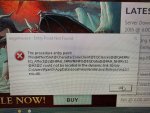
Stops me from auto login for every client that gets launched I’ve uninstalled reinstalled checked location not sure what this is I have everything on another pc and it launches fine everything works once I manually get everything loaded any advice would be appreciated
 
Last edited by a moderator:
View attachment 27619
Stops me from auto login for every client that gets launched I’ve uninstalled reinstalled checked location not sure what this is I have everything on another pc and it launches fine everything works once I manually get everything loaded any advice would be appreciated
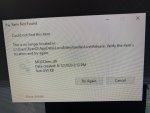
this means you're trying to load a wrong mq2cleric - like you copy pasted a test mq2cleric into your live folder.

you should delete that file, and then let the launcher download stuff - you shouldn't be moving files around - or changing your folder version
 
this means you're trying to load a wrong mq2cleric - like you copy pasted a test mq2cleric into your live folder.

you should delete that file, and then let the launcher download stuff - you shouldn't be moving files around - or changing your folder version
Thanks for getting back quickly, I took a break for about 6 months and was using free mq2cleric never moved any files or anything this file isn’t in very vanilla folder I searched for it and it doesn’t show me where it’s located and won’t let me delete it I’m at a loss
 

Attachments

  • 9E086500-17A4-4A82-B8C8-F9BF1C8760A1.jpeg
    9E086500-17A4-4A82-B8C8-F9BF1C8760A1.jpeg
    8.8 MB · Views: 2
Thanks for getting back quickly, I took a break for about 6 months and was using free mq2cleric never moved any files or anything this file isn’t in very vanilla folder I searched for it and it doesn’t show me where it’s located and won’t let me delete it I’m at a loss
you have 1 of 2 solutions.

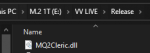
go into your mq2 -> release folder and find the mq2cleric.dll and delete the file
1611507472173.png

or 2:

go into your macroquest2.ini and change mq2cleric=1 to mq2cleric=0
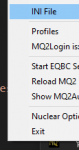
you can get there easily by right clicking your macroquest2 icon and then selecting INI File
go down to the [Plugins] section and find the mq2cleric and set that to 0
1611507442315.png
 
you have 1 of 2 solutions.

go into your mq2 -> release folder and find the mq2cleric.dll and delete the file
View attachment 27668

or 2:

go into your macroquest2.ini and change mq2cleric=1 to mq2cleric=0
you can get there easily by right clicking your macroquest2 icon and then selecting INI File
go down to the [Plugins] section and find the mq2cleric and set that to 0
View attachment 27667
Awesome found it thanks
 
r1pt1de updated RedGuides Launcher with a new update entry:

Crash fixes

  • Crashes during application start should be fixed. This appears to have been caused by a failure to properly process the data files.
  • Crashes during the process of updating Very Vanilla should now be fixed. Certain applications in the MacroQuest2 folder can not be accessed by the launcher. This was causing the update process to crash. Warnings have been put in place to close said applications before proceeding and will persist until the applications are closed.

Read the rest of this update entry...
 
It gives me the option to not allow but it wont start up when I don't allow.
Read information (forums, threads, posts) with your account's permissions
  • Post contents (threads, posts) on behalf of you
  • Change your account settings
  • Read and start/reply to your conversations
 
I am going to have to hit my dispensary stash and read this a few more times :)
 
It gives me the option to not allow but it wont start up when I don't allow.
Read information (forums, threads, posts) with your account's permissions
  • Post contents (threads, posts) on behalf of you
  • Change your account settings
  • Read and start/reply to your conversations
what are you asking about? the redguide's launcher maybe?
 
I keep getting an Access denied to path EQBCS-eqmule.exe. Can someone explain what I need to do to gain access?
 
I keep getting an Access denied to path EQBCS-eqmule.exe. Can someone explain what I need to do to gain access?
is this when you are trying to patch?

it means you need to exit from your eqbcs-eqmule.exe so the launcher can update
 
RedGuides Launcher

Users who are viewing this thread

Back
Top
Cart