• You've discovered RedGuides, an EverQuest multi-boxing and scripting community 🧙‍♀️⚙️. We want you to play several EQ characters at once, come join us and say hello! 👋

  • A TLP without truebox has thawed (Very Vanilla ready)
    Frostreaver
RedGuides Launcher

RedGuides Launcher (8 Viewers) 1.1.0

No permission to download
Oh, also, I run RGL as admin and even open Mozilla Firefox prior to trying to run RGL. Some days it works just fine, others I have to do the %LocalAppData%\RedGuides reset instructions. Also RGL and MQ2 load different versions of my profile lists whenever I redo the install. (not all log ins are posted when I try to log into EQ either). I still enjoy it just trying to help figure out the cause. lol. The antivirus is Trend Micro Internet Security.

What version of Windows are you on? If its Windows 10, are you getting any messages from Windows about being logged in to a temporary profile? I can't for the life of me reproduce the issue, but I know quite a few people are seeing it so trying to figure it out.
 
What version of Windows are you on? If its Windows 10, are you getting any messages from Windows about being logged in to a temporary profile? I can't for the life of me reproduce the issue, but I know quite a few people are seeing it so trying to figure it out.
Windows 10 and no I am not getting any messages. Yeah it was strange how it started happening.
 
I am in the process of reinstalling the launcher and VV. I get as far as running the Launcher and have this error in the lower left corner of the launcher - "Auth: Failed to authenticate with the Forums".

Is the Launcher trying to use an old password?
 
I am in the process of reinstalling the launcher and VV. I get as far as running the Launcher and have this error in the lower left corner of the launcher - "Auth: Failed to authenticate with the Forums".

Is the Launcher trying to use an old password?
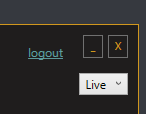
Possibly. Try pressing the "logout" button on the launcher.
 
I tried that as well, and removed any RedGuides login from both Chrome and Firefox - unfortunately I still get the same error message.
Still having the issue with the launcher login - "Auth: Failed to authenticate with the Forums". Are the creds for connecting back to RedGuides stored in a hidden file somewhere that I may have missed while cleaning up the old installation?
 
I don't have a 'logout' button. Just the minimize/close at the top right and all the normal menu buttons on the left.
I hadn't logged onto the website for ideas since my last post, however I did notice the logout in the upper right and hit that before closing the app. Since then I have had ZERO issues with the app. I figured it was something easy and obvious lol.
 
I hadn't logged onto the website for ideas since my last post, however I did notice the logout in the upper right and hit that before closing the app. Since then I have had ZERO issues with the app. I figured it was something easy and obvious lol.
I am not getting logged in to get to the "logout" button on the Launcher.
 

Attachments

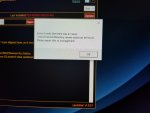
  • Launcher_Auth_Error.png
    Launcher_Auth_Error.png
    46 KB · Views: 5
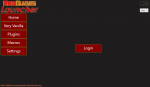
None of that works. I think everyone is assuming I am getting logged into the forums when I am not. I click "Login" and I get the auth error which I posted previously. If I click "Settings" I don't get anything. If I click any of the menus/buttons on the left hand side of the Launcher window nothing happens.
Then you may need to reinstall the launcher

Delete your appdata - paste this in windows explorer search window (any folder) %LocalAppData%\RedGuides and then delete the contents in that folder
then go to add/remove programs, and remove the redguide's launcher
reinstall the launcher after downloading from > HERE <
open launcher
point the re-install to your existing mq2 directory
boom - back in business
 
Then you may need to reinstall the launcher

Delete your appdata - paste this in windows explorer search window (any folder) %LocalAppData%\RedGuides and then delete the contents in that folder
then go to add/remove programs, and remove the redguide's launcher
reinstall the launcher after downloading from > HERE <
open launcher
point the re-install to your existing mq2 directory
boom - back in business
Unfortunately, that didn't work either. I am still getting "Auth: Failed to authenticate with the Forums" on the launcher when I click "Login". The %LocalAppData%\RedGuides folder didn't exist. I tried creating it and reinstalling but that didn't work. I have disabled the firewall and AV (Windows Defender) still get the same auth error.

Thanks everyone for the suggestions. I am going to just run VV and skip the launcher.

Thanks again all.
 
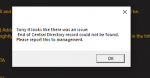
Looks like there was a launcher update. I'm trying to update and it keeps giving error message about some center directory cant be found and wont update.
 
Launcher update or VV update? It's not the same thing. Recent update was VV.
If it's VV then try:
Delete your appdata - paste this in windows explorer search window (any folder) %LocalAppData%\RedGuides and then delete the contents in that folder.
this usually means you got a bad download - often due to slow internet. I would give a restart to your computer and perhaps your router and give it another try.
 
Hi, I went to update my version last night after patch and it states that everquest has locked files that I need to /unload. It also says that I have outdated version of mq2 or everquest after last nights test server patch. Any ideas? thx
 
i am getting an error the dates dont match up. How can i remedy this?
mq2tracking has been removed as kaen said, you need to delete the .dll from your release folder or edit your macroquest2.ini entry to mq2tracking=0

if you just mean "mq2 and eq" dates don't match - it means you need to patch either your game or your mq2.
 
mq2tracking has been removed as kaen said, you need to delete the .dll from your release folder or edit your macroquest2.ini entry to mq2tracking=0

if you just mean "mq2 and eq" dates don't match - it means you need to patch either your game or your mq2.
Yeah the MQ2 and EQ dates dont match. I have patched EQ. Been using the updater for red guides but all it says is reinstall.
 
Yeah the MQ2 and EQ dates dont match. I have patched EQ. Been using the updater for red guides but all it says is reinstall.
if this is for test - it is because test is still down. it has been down for several days as DBG has been having patcher issues
 
if this is for test - it is because test is still down. it has been down for several days as DBG has been having patcher issues
Test is patched and working again. I got on this morning for the first time since like Tuesday.
 
Test is patched and working again. I got on this morning for the first time since like Tuesday.
it is now, but it has been down for several days. MQ2 for test was only patched recently, and red is re-building VV for test as we speak. (the VV patched was accidentally turned on pre-maturely, so likely why --- test VV needs to be rebuilt before it would connect to test server)
 
Hi guys, im trying to run my team on test but when i select "test" on the pulldown menu and try to update MQ2 it just closes the program. Ive tried it without trying to update mq2 with no success. Ive been looking all over for some info on what im doing wrong and ive yet to find anything. Any help will be greatly appreciated, thanks guys.
 
Hi guys, im trying to run my team on test but when i select "test" on the pulldown menu and try to update MQ2 it just closes the program. Ive tried it without trying to update mq2 with no success. Ive been looking all over for some info on what im doing wrong and ive yet to find anything. Any help will be greatly appreciated, thanks guys.
The RG Launcher worked fine for me for updating test. Maybe try restarting your computer. Then launch RG and try again.
 
Hi guys, im trying to run my team on test but when i select "test" on the pulldown menu and try to update MQ2 it just closes the program. Ive tried it without trying to update mq2 with no success. Ive been looking all over for some info on what im doing wrong and ive yet to find anything. Any help will be greatly appreciated, thanks guys.
sometimes folks need to reinstall their launcher for various reasons


Delete your appdata - paste this in windows explorer search window (any folder) %LocalAppData%\RedGuides and then delete the contents in that folder
then go to add/remove programs, and remove the redguide's launcher
reinstall the launcher
open launcher
point the re-install to your existing mq2 directory
boom - back in business
 
RedGuides Launcher

Users who are viewing this thread

Back
Top
Cart