• You've discovered RedGuides, an EverQuest multi-boxing and scripting community 🧙‍♀️⚙️. We want you to play several EQ characters at once, come join us and say hello! 👋

  • A TLP without truebox has thawed (Very Vanilla ready)
    Frostreaver
RedGuides Launcher

RedGuides Launcher (2 Viewers) 1.1.0

No permission to download
Got it fixed. I was trying to load on MQ2 without having the EQ patch update being done. I loaded a toon the regular way and let the patch up date run, logged out and did a reinstall on the MQ2 launcher. Everything updated fine and was able to log in. This was the first patch since I started using MQ2 still learning. :)
 
OK, I have watched the launcher video several times. I donated to the cause, and still I run the app, get to the "login screen" I have my browser up and logged in to the website. I hit the "Login" button and get redirected to an authentication page. I click on "authorize access" and then get redirected to a page that is "404". So am wondering what is it that I am doing wrong. I did reinstalled the launcher several times and still get the same results.
Any ideas?
 
are you talking about the everquest launcher or the red guides launcher?
 
Being this is the thread of the redguides launcher, and none of the steps taken above are done in the EQ launcher, I'm going to assume they're referring to the redguides launcher.
 
are you talking about the everquest launcher or the red guides launcher?
REDGUIDES launcher. I just saw the announcement that a new version of MQ2 was coming out in an hour or so....So will wait until everything is updated before whining and crying and throw temper tantrums and putting my fist through my computer. May do that anyway since I can no longer do the "alt-tab" thing with any fluidity of changing character windows. Wiped twice on trash mobs...couldn't heal fast enough. LOL..... You guys made coming back to EQ so much fun. Keep up the good work.
 
REDGUIDES launcher. I just saw the announcement that a new version of MQ2 was coming out in an hour or so....So will wait until everything is updated before whining and crying and throw temper tantrums and putting my fist through my computer. May do that anyway since I can no longer do the "alt-tab" thing with any fluidity of changing character windows. Wiped twice on trash mobs...couldn't heal fast enough. LOL..... You guys made coming back to EQ so much fun. Keep up the good work.

Try a different default browser, and if you have a web-monitoring antivir consider disabling it temporarily.

 
Try a different default browser, and if you have a web-monitoring antivir consider disabling it temporarily.

Well I will be damned....it worked. Not sure why MS browser wouldn't let me authenticate. But it now works...on to the next step. Thank you so much.
 
Sorry I have been out of touch lately everyone. Work is really hectic right now, has us working 70-80 hour weeks. I am trying to keep up with anything that breaks everyone, and will get to the one/two off issues as soon as I can. Just don't want you guys to think I am ignoring anyone.
 
I got problem, because i had changed my driver from E to D.
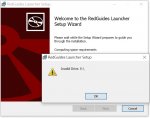
Now i can''t update launcher, it always show invalid driver(because there is no E now), I can't uninstall too.
how can i do ? where can i change setup ?
 
I got problem, because i had changed my driver from E to D.
Now i can''t update launcher, it always show invalid driver(because there is no E now), I can't uninstall too.
how can i do ? where can i change setup ?
you just need to point your launcher to your new macroquest directory
>> HERE << is a video where i explain how to check where you have the launcher looking
 
you just need to point your launcher to your new macroquest directory
>> HERE << is a video where i explain how to check where you have the launcher looking

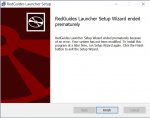
Thanks for video, but my problem is when i run launcher.msi, it just show up invalid driver then only finish icon, no any other option to change driver.
I also tried update in launcher GUI, not working too.
then I tired to uninstall in win10, still fail, invalid driver. so i stucked ....
 

Attachments

  • L1.jpg
    L1.jpg
    102.1 KB · Views: 5
  • L2.jpg
    L2.jpg
    105.8 KB · Views: 5
Thanks for video, but my problem is when i run launcher.msi, it just show up invalid driver then only finish icon, no any other option to change driver.
I also tried update in launcher GUI, not working too.
then I tired to uninstall in win10, still fail, invalid driver. so i stucked ....
I misunderstood, my apologies - i thought when you said driver, it was a typo for drive
 
@Flexbus download this zip, un zip it, run the reg file inside, and click the yes buttons. That will reset the redguides launcher install directory so its not looking for an drive that is no longer valid.
 

Attachments

@Flexbus download this zip, un zip it, run the reg file inside, and click the yes buttons. That will reset the redguides launcher install directory so its not looking for an drive that is no longer valid.

Thank you so much, the problem resolved.
 
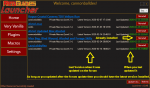
I check almost daily to see if there are any updated macros, and every day for a weeks or two the Hatchery.mac and Bazaar.mac / Bazaar2.mac are listed as being updated. Last night I even deleted the macros and re-downloaded them from the patcher. They still show up as being updated? Any suggestions?

This was after grabbing the new version of the patcher yesterday.
 
I think every time you do an update the old versions are included in the update. Then the new updates need to be reinstalled. Not sure, but that is how I noticed it with my updater.
 
I think every time you do an update the old versions are included in the update. Then the new updates need to be reinstalled. Not sure, but that is how I noticed it with my updater.
I click the reinstall button on the two macs everyday.
 
You shouldn't have to click reinstall, it's already installed. If it says install, then you would need to install it.
If you update the updater, you may have to click install again, but if it says reinstall then it should already be installed.
 

Attachments

  • one.png
    one.png
    72.4 KB · Views: 7
Playing around with this, not in reference to your issue, It looks like the macros that show up in this section are watched threads?

Found the answer. :)
Launcher
 
Last edited:
So just ran the launcher to update test, then did the update to install Hatchery and KissAssist12. Shutdown the launcher and restarted. Hatchery is showing and needing to be updated. I removed the Bazaar mac for watch today and it's no longer showing up as needed to be updated,

1582847132475.png
 
So just ran the launcher to update test, then did the update to install Hatchery and KissAssist12. Shutdown the launcher and restarted. Hatchery is showing and needing to be updated. I removed the Bazaar mac for watch today and it's no longer showing up as needed to be updated,

So it looks like the Hatchery.mac file has been updated a couple times in the last couple weeks and it looks like you last update on 12-28-2019

Two things to check. Either you haven't updated since then or maybe your have your setting saving the macro to the wrong folder
 
So it looks like the Hatchery.mac file has been updated a couple times in the last couple weeks and it looks like you last update on 12-28-2019

Two things to check. Either you haven't updated since then or maybe your have your setting saving the macro to the wrong folder
have been updating the macro every day for two weeks also updated the kissassist 12 macro tonight it went to the correct place.
 
Try un-watching then re-watch the thread? Not sure how the watching thread works, but maybe watching the thread with the old file in it? if its even possible.
 
So just ran the launcher to update test, then did the update to install Hatchery and KissAssist12. Shutdown the launcher and restarted. Hatchery is showing and needing to be updated. I removed the Bazaar mac for watch today and it's no longer showing up as needed to be updated,

View attachment 20028
Go to your macro folder, right-click Hatchery.mac and check to see if it's read-only, or if there's something odd about its permissions.
 
Go to your macro folder, right-click Hatchery.mac and check to see if it's read-only, or if there's something odd about its permissions.
It's not read only.

I just did an unwatch on hatchery.

Then launched the updater, I saw that there was an update to Heroism mac so updated that, the hatchery didn't show up as needing to be updated.
Closed the updater and checked the file date on the Heroism mac it had been updated.

Then went back into Reds and clicked watch on the hatchery mac again. Launched the updater now both Hero and hatch show they need to be updated.


1582852481331.png

1582852524775.png
 
I haven't been playing lately but was going to today, when I tried to update my stuff by logging in through the Redguides launcher it opens a web browser and tries to connect to redguides, but after a few seconds just fails out and redirects to localhost/127.0.0.1 and says it can't connect. I've seen a few threads suggesting similar issues, but I'm not getting the same error messages I've seen in some of the other threads. The closest I get to an explanation is an error message in the network tab of my browser that says: strict-origin-when-cross-origin. I know some browsers changed some security settings along those lines in the last few months, any help would be appreciated.
 
I haven't been playing lately but was going to today, when I tried to update my stuff by logging in through the Redguides launcher it opens a web browser and tries to connect to redguides, but after a few seconds just fails out and redirects to localhost/127.0.0.1 and says it can't connect. I've seen a few threads suggesting similar issues, but I'm not getting the same error messages I've seen in some of the other threads. The closest I get to an explanation is an error message in the network tab of my browser that says: strict-origin-when-cross-origin. I know some browsers changed some security settings along those lines in the last few months, any help would be appreciated.
howdy @hector_red sorry for your problems

I have a few minutes free if you wanted i could try and get you patched up - I'll shoot you a PM
 
Ok - no problem.

I haven't seen your specific issue - maybe @r1pt1de can chime in. it sounds like you might want to change default browser to another browser and try that
 
I've tried installing the launcher to a few different locations (including just a folder right off root of c drive), have tried this with all the major browsers chrome/edge/firefox/legacy internet explorer etc. Same problem after all that.
 
I ran this command in an elevated powershell terminal (can use cmd prompt):

netsh http add iplisten 127.0.0.1

And it was able to log me in, so this is no longer an issue.
 
I ran this command in an elevated powershell terminal (can use cmd prompt):

netsh http add iplisten 127.0.0.1

And it was able to log me in, so this is no longer an issue.
@hector_red awesome!

any info on what lead you to that? so so i can help others in case they run into similar things
 
Hey guys sorry, just now getting to the PC today. Glad you were able to get it working Hector, sorry you were having issues.
 
@Sic my main thought was that for some reason it was the redirect to 127.0.0.1 that was causing it to crap out. I've been doing a lot of work on my home PC (I'm a software engineer), including some web development, and I had a weird suspicion that perhaps some weird setting or configuration I have on my environment was causing the issue. I did a little research and it sounds like in a normal situation the http iplisten list is "empty", but I had some other addresses in there for some other stuff I do, and it seems like if you've explicitly added other IPs to this it can cause issues if you didn't readd 127.0.0.1/localhost. Not sure it was anything beyond weird quirk with my home PC environment. I'm not a network guy so don't fully understand it, but it's all working for now :).
 
RedGuides Launcher

Users who are viewing this thread

Back
Top
Cart