
-
 Hail, we're RedGuides. We want you to play six (yes, 6!) EverQuest characters at once. We have scripts and a friendly community to help, please join our playstyle and say hello! 👋
-
 We've added LLM sections to our Terms & Rules and Resource Rules, for everyone's sanity & in-game safety.
Read more
a. Do not replace your voice with an LLM. This goes for your posts and your scripts. Drafting and editing with a tool is fine, but don't take you out of what you share.
b. Do not replace your EQ character's voice with an LLM. We don't want scripts that speak over/ooc,/shoutor other public channels. This has been an unwritten rule that's kept casino scripts off the site for decades, but we're now compelled to make it clear: keep automated communication private.
Why Does RG Review Scripts?
Nearly every LLM-written Lua script we see is making your character do impossible things, and rarely in a way that's beneficial to you. We've seen heavy server hammering,/targetover impossible distances when/nav spawnwould passively accomplish the same thing, a spawn search that fires 20+ times per second, and other pointless actions that are likely annoying GMs.
You are welcome to use LLMs as a tool to structure, draft, and edit your work, but please read critically before hitting/lua run
You are using an out of date browser. It may not display this or other websites correctly.
You should upgrade or use an alternative browser.
You should upgrade or use an alternative browser.

RedGuides Launcher (5 Viewers) 1.1.0
- Thread starter r1pt1de
- Start date
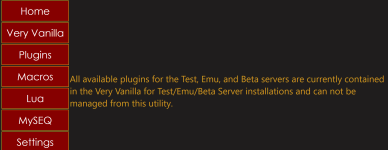

This means you have test or emu very vanilla build selected, and not live.When I went to plugins this is what I got instead of a list of plugins available - never accessed for Beta Test or emu
View attachment 73993
thanksThis means you have test or emu very vanilla build selected, and not live.

Greetings! Just got a new system for Christmas and went to install the RedGuides Launcher and got to say that you might want to look at it again. First off it works. Now for the nit picking. All the box for the text are not right. Some cover other boxes or cover half of them. There is no way to change the size of the launcher window so some text ends at the far right and does not rap around so can't read all the text. Now not saying that it looks fine on other systems, but it could be just my system and the settings I have. I like the video for it. Been awhile since I watched it.
someone had this issue a couple years ago - I'm trying to remember what the issue was - but it was a computer issue like scaling or something.Greetings! Just got a new system for Christmas and went to install the RedGuides Launcher and got to say that you might want to look at it again. First off it works. Now for the nit picking. All the box for the text are not right. Some cover other boxes or cover half of them. There is no way to change the size of the launcher window so some text ends at the far right and does not rap around so can't read all the text. Now not saying that it looks fine on other systems, but it could be just my system and the settings I have. I like the video for it. Been awhile since I watched it.
anyhow, the RG launcher is soon the way of the do-do, you should check out RedFetch

yes, was because of native resolution or something, Brainiac gave the fix..someone had this issue a couple years ago - I'm trying to remember what the issue was - but it was a computer issue like scaling or something.
anyhow, the RG launcher is soon the way of the do-do, you should check out RedFetch
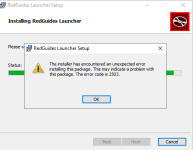
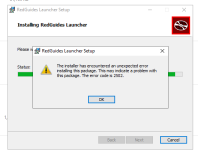
Howdy war,When i try to install the launcher I get these error, how can I fix this?
No clue on those errors - are you running windows 10/11?
Since you're just starting out I'd suggest using redfetch, the RG launcher will be going away soon
windows 10,i also try to install redfetch but a command prompt just flashes on my screen and make some soundsHowdy war,
No clue on those errors - are you running windows 10/11?
Since you're just starting out I'd suggest using redfetch, the RG launcher will be going away soon

Redbot updated RedGuides Launcher with a new update entry:
oauth2 release
Read the rest of this update entry...
oauth2 release
RG Launcher now uses oauth2 rather than an API key. Older versions will stop working soon, so please update or switch to redfetch.
Read the rest of this update entry...
Redbot updated RedGuides Launcher with a new update entry:
version 1.1.0
Read the rest of this update entry...
version 1.1.0
- Should quite a bit faster now that it's using our new api endpoints
- The "not level 2" screen will no longer show when the server is having issues
- I don't have any more features or fixes planned for this project as many of its libraries are unmaintained, so please use redfetch instead
Read the rest of this update entry...



BrianGragg
Well-known member
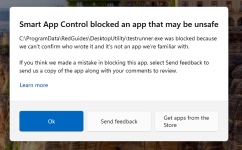
Its because the file you are trying to run doesn't have a proper digital signature. I'm not sure you can disable that functionality currently but update to windows soon will allow it if its not there already. It gets enabled on a fresh install of windows 11.

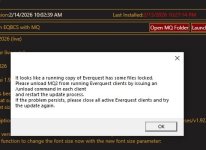
A: please use redfetch and not the RG launcherHowdy, all EQ clients are shutdown/not running i even checked for anything "eq" in task manager.. yet im getting this error when trying to update.
B: that can happen if your A/V or file syncing has files tied up.
When in doubt:
- restart
- check a/v
- check file syncing
- restart again if you unblocked/whitelisted w/e
- then try updating with redfetch
the command-line nature of redfetch (at least from a glance at it) is what turns me off. if i get this error again, ill try it out. Is the RG launcher not as safe or something?
 but the one you can run as a plain uncompiled script is probably harder to detect.
It is not maintainable in the ways we want to have our user experience be.the command-line nature of redfetch (at least from a glance at it) is what turns me off. if i get this error again, ill try it out. Is the RG launcher not as safe or something?
I personally think RG launcher should be nuked, but red is a softy to people who hate change and don't want a good experience. Red is also too modest about how great redfetch is.
Downloaded redfetch and it worked. I played for a couple hours. I logged off and just tried to log back in and im getting this same thing again. My computer is up to date. any ideas how to run redfetch? Thanks!!
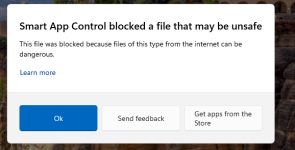
Update....I just turned that smart app control off. It works now
Update....I just turned that smart app control off. It works now
I'm reading up on Smart App Control, thanks for letting us knowDownloaded redfetch and it worked. I played for a couple hours. I logged off and just tried to log back in and im getting this same thing again. My computer is up to date. any ideas how to run redfetch? Thanks!!
View attachment 75385
Update....I just turned that smart app control off. It works now
where do we get that btwAre you using redfetch or launcher? if launcher swap to redfetch fosho
please use redfetchI am having same issue
Try switching your default browser. Your current browser may have an extension that hijacks new tabs.the app works fine on my pc at home but when im on my laptop like right now when i hit login it opens the webpage that says go back to my app and then opens the forums for me but it never actually logs in to the app... any suggestions?
redfetch ftwI am having same issue

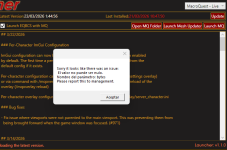


This link not work, cant download fileThey switched to Redfetch. The resource is here.

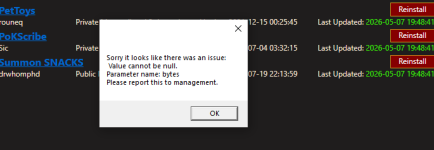

Howdy kraszus sorry you're having probsIs there an issue with the website / launcher?
Please use redfetch
The RG launcher is deprecated
Users who are viewing this thread
Total: 6 (members: 0, guests: 6)
Share: