• You've discovered RedGuides, an EverQuest multi-boxing and scripting community 🧙‍♀️⚙️. We want you to play several EQ characters at once, come join us and say hello! 👋

  • A TLP without truebox has thawed (Very Vanilla ready)
    Frostreaver
Resource icon

Release MQNearby (1 Viewer)

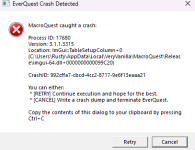
Every time I type /nearby show since yesterday 9/17/2025, it closes my account down. I am not getting any error messages or anything, just my EQ window closes. I have gone in and made sure everything is updated.

I take that back, I tried it on a different character and got a crash error.

24b2dfc2-ae67-4165-9d70-4bd872dcb34d
 
Every time I type /nearby show since yesterday 9/17/2025, it closes my account down. I am not getting any error messages or anything, just my EQ window closes. I have gone in and made sure everything is updated.

I take that back, I tried it on a different character and got a crash error.

24b2dfc2-ae67-4165-9d70-4bd872dcb34d
Yep.

Should have a fix for it this afternoon

Sorry about that
 
As soon as I log into one of my characters, I get a instant crash message. My other 2 accounts are fine. I've done everything I can think of to fix it and nothing works. As soon as I load MQ, that toon crashes. It's a warrior, if that matters. Would appreciate any help. Thanks.


CRASJ.png
 
As soon as I log into one of my characters, I get a instant crash message. My other 2 accounts are fine. I've done everything I can think of to fix it and nothing works. As soon as I load MQ, that toon crashes. It's a warrior, if that matters. Would appreciate any help. Thanks.
That's my bad. MQNearby is crashing on the spawnlist tab. I've submitted a fix, should be implemented later this evening. Apologies.
 
this isn't a crash log, it has nothing to dow ith an in-game crash

you need to control+c your crash popup window and then provide that crash id if you are getting one.

the mq debug log you shared shows what crashid it would/should use if it generated a crash - but checking that id i don't see one

I don't know of any mq2mage crashes (and you didn't even post in the mq2mage thread) and based on the stuff above, absolutely no indication that is what it is.

without a crash id folks can only guess

- AV
- Permissions
- New UI Engine
Also crashing every time I bring my Wiz on a couple others been crashing too I think the War but I haven't been able to come on at all.
Thank you for any help
---------------------------
EverQuest Crash Detected
---------------------------
MacroQuest caught a crash:

Process ID: 3120
Version: 3.1.1.3315
Location: ImGui::TableSetupColumn+0 (C:\Program Files (x86)\MQNext\imgui-64.dll+0000000000099C20)

CrashID: ab6e815c-1cec-40c8-a5a3-a124655f58b8

You can either:
* [RETRY] Continue execution and hope for the best.
* [CANCEL] Write a crash dump and terminate EverQuest.

Copy the contents of this dialog to your clipboard by pressing Ctrl+C

---------------------------
Retry Cancel
---------------------------
 
Also crashing every time I bring my Wiz on a couple others been crashing too I think the War but I haven't been able to come on at all.
Thank you for any help
---------------------------
EverQuest Crash Detected
---------------------------
MacroQuest caught a crash:

Process ID: 3120
Version: 3.1.1.3315
Location: ImGui::TableSetupColumn+0 (C:\Program Files (x86)\MQNext\imgui-64.dll+0000000000099C20)

CrashID: ab6e815c-1cec-40c8-a5a3-a124655f58b8

You can either:
* [RETRY] Continue execution and hope for the best.
* [CANCEL] Write a crash dump and terminate EverQuest.

Copy the contents of this dialog to your clipboard by pressing Ctrl+C

---------------------------
Retry Cancel
---------------------------
Please update - Your crash is MQNearby. https://www.redguides.com/community/threads/mqnearby.94455/post-652232
 
Also crashing every time I bring my Wiz on a couple others been crashing too I think the War but I haven't been able to come on at all.
Thank you for any help
---------------------------
EverQuest Crash Detected
---------------------------
MacroQuest caught a crash:

Process ID: 3120
Version: 3.1.1.3315
Location: ImGui::TableSetupColumn+0 (C:\Program Files (x86)\MQNext\imgui-64.dll+0000000000099C20)

CrashID: ab6e815c-1cec-40c8-a5a3-a124655f58b8

You can either:
* [RETRY] Continue execution and hope for the best.
* [CANCEL] Write a crash dump and terminate EverQuest.

Copy the contents of this dialog to your clipboard by pressing Ctrl+C

---------------------------
Retry Cancel
---------------------------
this is a nearby crash, please update it is fixed (also, please dont' just randomly bump older and unrelated crash threads)
 
this is a nearby crash, please update it is fixed (also, please dont' just randomly bump older and unrelated crash threads)
I thought they update when I run the updater..
Sorry I seem to be lost finding what I should do and where, mostly I just wait and hope something happens and it fixes itself.
I saw what seemed to be a recent crash thread and thought that would be better than starting new ones.
Guessed wrong again...
 
I thought they update when I run the updater..
Sorry I seem to be lost finding what I should do and where, mostly I just wait and hope something happens and it fixes itself.
I saw what seemed to be a recent crash thread and thought that would be better than starting new ones.
Guessed wrong again...
i just built with the update

re: older threads - chances are if you're bumping a crash from a different month it is *probably* different, and since there are newer crash reports that match what you posted in the recently posted threads there would be best --- it isn't the end of the world
 
i just built with the update

re: older threads - chances are if you're bumping a crash from a different month it is *probably* different, and since there are newer crash reports that match what you posted in the recently posted threads there would be best --- it isn't the end of the world
Thank you
 
crashID? anything?
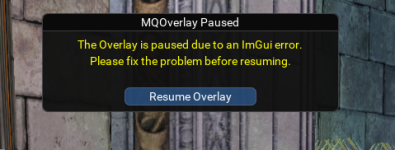
Sorry, no crash ID. Below screenshot is what I get anytime I try and load Nearby. Resume Overlay will not work after trying to load Nearby.

1758821015461.png
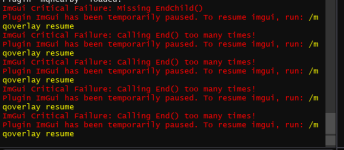
This is the error in my MQ output:
1758821225520.png

The only fix that has worked to resume overlay right now is unloading Nearby.
 
The *best* would be none crashes :p
ha ... as long as there are users there will be crashes you can not explain :P

Every day I ask my self "How the actual fuck did they do that?"
 
Was wondering if there is a way to keep our spawn optioned save. I like to set my group colors to something bright, so that I can make sure they are following like they're supposed to. But it's a setting I seem to have to redo each time I re log in. Other than that MQNearby has been extremely useful =)
 
Was wondering if there is a way to keep our spawn optioned save. I like to set my group colors to something bright, so that I can make sure they are following like they're supposed to. But it's a setting I seem to have to redo each time I re log in. Other than that MQNearby has been extremely useful =)
They should be getting saved. Is it not saving and subsequently loading for anyone else?
 
Last edited:
The transparency of the overlay mode changed between this and the previous build. Is that because its not saving preferences correctly?
I'm unsure what you mean by the transparency of the overlay changed.
The background has an opacity of 0.
I believe if you've resized the overlay to off the EQ window it removes (makes it 255) that, but that's the only thing I know of that would affect the transparency.
Try editing your overlay position to ensure it's completely within the bounds of EQ.
 
FWIW the INI is in configs\MQNearby_PlayerName_ServerShortName.ini

If it has "Show" "Show Label" "Use Con Color" and "Color" settings then it's been saved to the INI.
I just looked at the code and no change to the INI file in use has been made and they match.

I skittered through the individual window options and they all appear to be coded to save as expected.
 
FWIW the INI is in configs\MQNearby_PlayerName_ServerShortName.ini

If it has "Show" "Show Label" "Use Con Color" and "Color" settings then it's been saved to the INI.
I just looked at the code and no change to the INI file in use has been made and they match.

I skittered through the individual window options and they all appear to be coded to save as expected.
Thanks! I'll check when test comes back up.
 
They should be getting saved. Is it not saving and subsequently loading for anyone else?
I'm not sure why it wasn't getting saved. But I logged in this morning and my colors are the color I chose for them. I did have a couple Lua's and plugins that where updated this morning, so maybe it was a conflict with a plugin.
 
Is there any way to pull over the waypoints for quest and stuff I have added to maps?
Hmm, I thought I answered this question -

Define waypoints? If you're referring to the points you generate on a map within EQ - then yes. I pull in all the points and lines from the map files. I don't have a way to create new points from within MQNearby and you'd still need to use the Everquest map to do that. But I do read the file and generate the points, their labels, and all lines from the map files.

If you're talking about some other waypoint that I'm not familiar with, then no.
 
Release MQNearby

Users who are viewing this thread

Back
Top
Cart