- Commits
- 191
I also updated the overview page with some updated screenshots of what to expect from the plugin.



/ooc, /shout or other public channels. This has been an unwritten rule that's kept casino scripts off the site for decades, but we're now compelled to make it clear: keep automated communication private./target over impossible distances when /nav spawn would passively accomplish the same thing, a spawn search that fires 20+ times per second, and other pointless actions that are likely annoying GMs./lua run
justIs there a command to bring up the map window? I have tried unloading and reloading, but I cannot get the map to come up for me.

Thank you, I was typing /mqnearby show. That didn't work.just
/nearby toggle
or
/nearby show
Not currently.Is there a way to show the CWTN camp and pull radius on it?
As of now they simply have (Named) at the front of their name.Named are showing under the named mob list on the menu, but are not showing on the actual map at their spawn point.
Despite reaching out the two people that have contacted me regarding issues with Nearby on EMU, it seems that we're unable to get together at a time when we're both available to allow me to look into the issue in an effective manner. I loaded into EMU and tried it for myself using the VV build available to everyone and it worked for me. So I'm unable to personally reproduce the issue at this time.I am still unable to use /nearby toggle or /nearby show to produce the imgui map on screen. I play on Lazarus EMU. Someone else had same exact problem on EMU, AMS maybe?
Every time we discuss, you ask if I've put anything in the discussion thread and I never get around to it. I've been keeping all my RG stuff up to date using Redfetch as well.
Despite reaching out the two people that have contacted me regarding issues with Nearby on EMU, it seems that we're unable to get together at a time when we're both available to allow me to look into the issue in an effective manner. I loaded into EMU and tried it for myself using the VV build available to everyone and it worked for me. So I'm unable to personally reproduce the issue at this time.
I am still unable to use /nearby toggle or /nearby show to produce the imgui map on screen. I play on Lazarus EMU. Someone else had same exact problem on EMU, AMS maybe?
Every time we discuss, you ask if I've put anything in the discussion thread and I never get around to it. I've been keeping all my RG stuff up to date using Redfetch as well.
Actually, good catch. I decided to double check this and found that you were actually 10000000% correct. Named were in fact not showing up.Named are showing under the named mob list on the menu, but are not showing on the actual map at their spawn point.
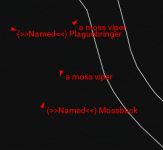
dude who knows as much about burgers as burgermeister does - how could you doubt himActually, good catch. I decided to double check this and found that you were actually 10000000% correct. Named were in fact not showing up.
- Fixed named mobs not showing up on the map.
- Added the ability to edit the overlay.
-- When the overlay is on, below the button to turn it on is a checkbox to enable editing.
-- Just resize and move it to the desired position, then hit the checkbox to disable editing.
- CWTN Plugins will now display their corresponding circles on the map. It will not currently
-- display the arc.
Main benefit would be that unlike mq2Map, it doesn't overload the text... ummmm thing, causing other windows to stop displaying text.Haven't loaded this, but was wondering in idiot terms, what does it do for me? Its a map of spawns, doesn't my map all ready do this? It can moved to a second screen it seems, but I use one, so seems like unnecessary for me to use it? I do run zones a lot with map open to chase down spawns, will this let me target them and then run to them? Or is it just a fancy map I can use on second screen? I am not putting it down, just trying to figure out how it helps me. I read thru the discussions and mostly was about crashing, not much about the benefits other then putting on second screen.
I feel like most of it is explained in the overview where I give an overview of the plugin. https://www.redguides.com/community/resources/mqnearby.3222/ Here is a link to the overview. Also, while on this discussion page you can just scroll the top and click overview (that actually applies to any resource).Haven't loaded this, but was wondering in idiot terms, what does it do for me? Its a map of spawns, doesn't my map all ready do this? It can moved to a second screen it seems, but I use one, so seems like unnecessary for me to use it? I do run zones a lot with map open to chase down spawns, will this let me target them and then run to them? Or is it just a fancy map I can use on second screen? I am not putting it down, just trying to figure out how it helps me. I read thru the discussions and mostly was about crashing, not much about the benefits other then putting on second screen.
I’m sold on it. Thanks for the resizing that’s let me stow the overlay in clean space on my UI. Super nice.I feel like most of it is explained in the overview where I give an overview of the plugin. https://www.redguides.com/community/resources/mqnearby.3222/ Here is a link to the overview. Also, while on this discussion page you can just scroll the top and click overview (that actually applies to any resource).
You like to run with your map open? That's cool, but can MQ2Map create an overlay on your screen that you can click through? Can you change the color of the map lines and the color of any spawn type? Can you search for specific spawns on the map? Yeah you can right click the triangles to a spawn (when not in overlay mode) and select to nav to the target, it'll also give you some basic information about them. As nitramneb mentioned it doesn't cause an issue with the rest of your EQ windows making bag slots randomly disappear because you're displaying too many labels, or make your text in chat windows disappear. Everything you need to control it is in the gui except opening the window if you close it. It shows the direction the spawns are facing. Can choose to show clean names or uncleaned names. Shows a list of GMs/Named mobs (for supported zones) that are currently in the zone. EQ Spawns are not locked to layer 2 and have their own individual toggle.
But most of this is all explained in the overview.
Also, most recently I added the ability to resize the overlay. Giving you an opportunity to not have it cover your basic EQ windows so it doesn't draw over them. I mean you can click through the overlay so it was only hindering your vision of the windows, not your ability to interact with them.
There are a lot of useful things in this new map plugin. Some or all of which may not matter to you at all. So you're welcome to use it or not use it based on preference.

Worth a mention that you could do that in mq2map with mapfilter command. However, the ui of nearby offers easier access to filtering this way.Came back to throw some more praise on this one.
Used it just now running through Shaman epic 1.5 for the 2nd time in the past couple of months. Entered Howling Stones and was looking for the specific Bile.
Filtered Nearby for it, saw the 6 current spawns that were up, ran straight to them and killed them!
First time I did the Shaman epic 1.5 was before Nearby was available and it was a complete pain trying to look through all the names that MQ2Map was displaying to find the specific biles I was after.
10 mins compared to over an hour.
Kudos to a great tool!
- Fix dangling pointer causing MQNearby to not work for some people on emu.
Well crap…just goes to show how much I DON’T know lol!Worth a mention that you could do that in mq2map with mapfilter command. However, the ui of nearby offers easier access to filtering this way.
Back before GUI's were the norm everything was a slash command. MQ2Map just never really got that modernization of the GUI options the same way other things have.Well crap…just goes to show how much I DON’T know lol!
Regardless, the ability to detach this window and drag to a 2nd monitor, resize the icons and window itself (for my aging eyes) helps out immensely!
/mapfilter custom npc bile or whatever spawn search specific search you wanted to do. I considered using the spawn search, but instead opted for a simple name search as that will usually find what you want. Eitherway, the point was it was a little more convoluted (and less obvious) to use that option. MQ2Map was fine and served it purpose, and will likely continue to serve a purpose. Just felt like a facelift was needed.
It's on my todo list to add the pull arc.Any possibility to get the pull radius cone like there is on mqmap
- Implement pullarcs for cwtn plugins.
as requested.Any possibility to get the pull radius cone like there is on mqmap

Thank You Sir it’s perfect nowas requested.
- corrected a crash
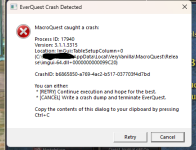
The crash is is the important partView attachment 71899
5 toons load normally. Main driver toon gets this error every time.
I have deleted UI Toonname.ini
and toonname.ini
nothing changed. I cant think of what else might be causing the issue and hoping for a helping hand
GUID
34946600-7867-4eed-a0ee-b14dab120c01
yeah this is mqnearby---------------------------
EverQuest Crash Detected
---------------------------
MacroQuest caught a crash:
Process ID: 20832
Version: 3.1.1.3315
Location: ImGui::TableSetupColumn+0 (C:\Users\***\AppData\Local\VeryVanilla\MacroQuest\Release\imgui-64.dll+0000000000099C20)
CrashID: 687272b4-b4cc-4e4e-ac04-e7e005b1082d
You can either:
* [RETRY] Continue execution and hope for the best.
* [CANCEL] Write a crash dump and terminate EverQuest.
Copy the contents of this dialog to your clipboard by pressing Ctrl+C
---------------------------
Retry Cancel
---------------------------
^yeah this is mqnearby
i'll take a look at it tomorrow if cwtn doesn't get a chance to - in the meantime you can change your macroquest.ini to mqnearby=0
i suspect there's another spot that when minimized, it crashes upon trying to load it