
-
 Hail, we're RedGuides. We want you to play six (yes, 6!) EverQuest characters at once. We have scripts and a friendly community to help, please join our playstyle and say hello! 👋
You are using an out of date browser. It may not display this or other websites correctly.
You should upgrade or use an alternative browser.
You should upgrade or use an alternative browser.

Release MQ2Melee (3 Viewers)
- Thread starter Redbot
- Start date

How do I turn off Dragon Fang ? It keeps firing it off. NM did some research found the command for leopardclaw.
I see you've edited your own question having found the answer.
In the configuration file, it details the various abilities a class have access to, but names them from the initial ability of that line.
You should also have configuration switches keyed by the following:
cloud, falls, fistsofwu, mend, monkey, synergy and vigshuriken; in addition to the leopardclaw you've found.
In your case, you've asked about Dragon Fang, which is coded as an upgrade for Leopard Claw.
The same line will follow; Clawstriker flurry, Wheel of fists, Six - Seven - Eight step patterns, Torrent - Firestorm - Barrage - Buffeting of fists.
If the configuration is turned on for a certain line of abilities, the plugin works top down. That is, it looks to see the highest rank and level of an ability / spell to be available and uses those in preference of lower.
Hope that helps, you and others who may have similar queries.
i edited my MQ2Melee.dll by accident now it wont work any way i can get a link to redownload the default or updated file and stick it in there to replace the one i messed up

I doubt you edited your mq2melee.dll, it would require edits to the code, then the code to be compiled against macroquesti edited my MQ2Melee.dll by accident now it wont work any way i can get a link to redownload the default or updated file and stick it in there to replace the one i messed up
But yes, you can redownload it by hitting reinstall on the launcher
if you want to save your mq2melee settings you change it with the relevant slash command and then save it
like
/melee taunt=0 then /melee saveIs there an option to turn off auto attacking after getting up from a feign? I've turned off the feign death and resume options but it will still get up and auto attack if you get up before 2 seconds has passed for some reason.
Also is there an updated melee options list somewhere? I've been sort of compiling my own list but the one from here and even MMO bugs are missing quite a few.
Also is there an updated melee options list somewhere? I've been sort of compiling my own list but the one from here and even MMO bugs are missing quite a few.

knave23
Cookie Champion 2022
Probably a dumb question, but I rolled up a brand new cleric and was piddling around in the tutorial but something kept turning off autoattack. I had to keep hitting the button seemingly every round to get my dude to swing. Any ideas what could be doing that? I wasn't running any macros, just base VV, and melee settings looked fine.
Last edited:

i don't know that mq2melee would be turning it off, but unload that just to be safeProbably a dumb question, but I rolled up a brand new cleric and was piddling around in the tutorial but something kept turning off autoattack. I had to keep hitting the button to get my dude to swing. Any ideas what could be doing that? I wasn't running any macros, just base VV, and melee settings looked fine.
/plugin mq2melee unload
knave23
Cookie Champion 2022
ahh much smarter than my plain /unload haha. that did the trick though I agree, I'm not sure why mq2melee would be doing that. Should I bug report this somewhere?i don't know that mq2melee would be turning it off, but unload that just to be safe
/plugin mq2melee unload
Zeusdracco
Seasoned veteran member
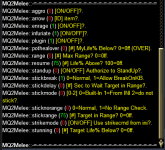
did you check in the script if you have melee on?. just a thought. not meant to be sarcastic. Ive done that
taldorblackfire
Member
Does anyone know how to permanently disable MQ2Melee even after an update is made to MacroQuest?

- Commits
- 2
Have you tried unloading it? /plugin mq2melee unloadDoes anyone know how to permanently disable MQ2Melee even after an update is made to MacroQuest?
taldorblackfire
Member
I have, but it seems it keeps getting loaded back in.Have you tried unloading it? /plugin mq2melee unload
- Commits
- 2
Are you using a macro or script that requires it? Some of these macros and scripts auto load mq2meleeI have, but it seems it keeps getting loaded back in.
taldorblackfire
Member
I am not sure, is there a dependency list I can check?Are you using a macro or script that requires it? Some of these macros and scripts auto load mq2melee
taldorblackfire
Member
I have tried this, but when MacroQuest gets an update, this is reset back to 1.I believe you can edit your MacroQuest.ini file to do this. R-Click launcher -> INI File -> under [Plugins] change MQ2Melee=1 to MQ2Melee=0.
- Commits
- 2
Yah, that was the file I was trying to think of. heheI believe you can edit your MacroQuest.ini file to do this. R-Click launcher -> INI File -> under [Plugins] change MQ2Melee=1 to MQ2Melee=0.
- Commits
- 2
You could always do up a simple Lua script to run each time you log in that disables mq2melee.
Something like this.
Something like this.
Code:
local mq = require('mq')

local function CheckMQ2Melee ()
if mq.TLO.Plugin('mq2melee')() then
    print(msg, "\awUnloading: \agmq2melee")
    mq.cmd('/squelch /plugin mq2melee unload')
end
end
while true do
    CheckMQ2Melee()
end
Last edited:
macroquest updating does not change ini files that already existI have tried this, but when MacroQuest gets an update, this is reset back to 1.
if you do anything that does
/plugin mq2melee loading the plugin, that will change your ini to =1you can /plugin mq2melee noauto and that would load it but not change your ini to =1
taldorblackfire
Member
Ok, interesting I will try that out. I know certain .mac files will get updated any time a MQ update is made. I will be on the look out for what exactly occurs with it set to 0. I will also try your suggestion of the /plugin mq2melee noauto.macroquest updating does not change ini files that already exist
if you do anything that does/plugin mq2meleeloading the plugin, that will change your ini to =1
you can /plugin mq2melee noauto and that would load it but not change your ini to =1
yes, if a macro resource is updated the macro would of course be replaced, but your ini files - which are the files with your settings/configurations do not get adjusted or replacedOk, interesting I will try that out. I know certain .mac files will get updated any time a MQ update is made. I will be on the look out for what exactly occurs with it set to 0. I will also try your suggestion of the /plugin mq2melee noauto.
can you imagine if every setting and option you use is put back to default every time you update? no one would want that.
taldorblackfire
Member
Yeah, this is true!yes, if a macro resource is updated the macro would of course be replaced, but your ini files - which are the files with your settings/configurations do not get adjusted or replaced
can you imagine if every setting and option you use is put back to default every time you update? no one would want that.

One Cool Trick
Seasoned veteran member
Not going to lie, this is why I feel obligated to tip the Devs... I read this speak and I am LOST... you guys that are IT pros and whatnot are AMAZING! at what you do! I'm just thankful for RG and MQ and boxing this game... And I hope that everyone else just recognizes how incredibly intricate it is what you guys do for this site and EQ players! 


- Commits
- 191
I was thinking that, based on their download they are downloading Kissassist. So if they use it, chances are they have UseMQ2Melee=1, which is what is loading it. Changing that to zero will make it stop loading it.Look for this line in your kissassist inis.
Usemq2melee=1 and change it to 0
 Commits
Hi - How do i prevent MQ2Melee from auto firing my harm touch. Thanks!

There's an .ini file for each character in the config folder. File name is <server>_<character>.ini format. In that file there will be a section for [MQ2Melee] that has all the mq2melee settings. Find the one for harm touch and change it from =1 to =0.Hi - How do i prevent MQ2Melee from auto firing my harm touch. Thanks!

If you open the config file for the specific char and you don't see a MQ2Melee section, then on your char in game type, /melee save. Then reopen the config file and it will have the settings that you can change. Also, once you change anything in the settings file and save it, you have to /melee load on your char in game to have it pull in the changes.

RedMan updated MQ2Melee with a new update entry:
20221229
Read the rest of this update entry...
20221229
Read the rest of this update entry...
Thank you!
I would like to disable or change the hotkeys MQ2Melee assigns when it is loaded. The "X" and "Z" keys get used for melee and ranged and it conflicts with how I have my binds set up. I have seen this issue in other threads with the solution being to edit the melee.ini file. The issue is, I don't have a melee.ini file. All I have is the plugin file with is a DLL and is unreadable. Anyone have a solution for this other than to change my custom hotkeys, which is what I am trying to avoid.

read here: https://docs.macroquest.org/plugins/community-plugins/mq2melee/#optional-global-ini-file
all ini files are in the config folder, not in the plugin folder, and this optional ini file is one you must create yourself
all ini files are in the config folder, not in the plugin folder, and this optional ini file is one you must create yourself
BigDorf updated MQ2Melee with a new update entry:
20230219
Read the rest of this update entry...
20230219
Read the rest of this update entry...
Hi Sippi,Where will I find this config file specifically so I can update it? I went with all default settings so it should be in a certain spot.
When you're in game on your toon, first ensure the plugin is loaded
/plugin MQ2Melee, then type /melee save.You'll find the file in the
..\MacroQuest\Release\Config folder. The name will be in the pattern of <server>_<toon_name>.ini.This file will contain configuration information for several plugins.
Users who are viewing this thread
Total: 4 (members: 0, guests: 4)
Share: