
-
 Hail, we're RedGuides. We want you to play six (yes, 6!) EverQuest characters at once. We have scripts and a friendly community to help, please join our playstyle and say hello! 👋
You are using an out of date browser. It may not display this or other websites correctly.
You should upgrade or use an alternative browser.
You should upgrade or use an alternative browser.

Release MQ2GroundSpawns
- Thread starter ChatWithThisName
- Start date


Link?There’s been a lot of chat about this plugin on the official forums. Be careful all!
Link?
Bot collection farmers | EverQuest Forums
Apparently the program-that-must-not-be-named has at some point developed the ability to allow people to farm ground spawn collectibles in a zone...
forums.daybreakgames.com


- Commits
- 191
Some of the people trying to guess how it works is amusing as well.

- Commits
- 2
Or the guy that drops and picks up a globe just to watch the bot run back and forth over and over to the spawn.

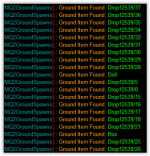
> MQ2GroundSpawns FAQ <So with the new ground drops for Eroillisi Day in Runnyeye, they are called Drop 12539/##. Do I need to manually add all the numbers or is there a wildcard I can use for anything with "Drop" in it?
View attachment 45729
Q. Some items are weird names, like Drop11125/123?
A. you can just /ground add 11125 and it would find any of the weird entries for "Drop11125/123"
> MQ2GroundSpawns FAQ <
Q. Some items are weird names, like Drop11125/123?
A. you can just /ground add 11125 and it would find any of the weird entries for "Drop11125/123"
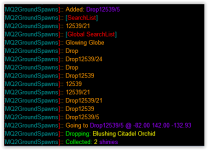
I added /ground add 12539 and my guy just sits there. If I add one specifically ( /ground add Drop12539/28) he will go get it.
Here you can see were I add one and off I go to get it.

Wow, I can't believe they haven't locked or deleted it. Absolutely exhausting trying to keep up with their silly complaining. Spend more time playing as opposed to whining.
They must have deleted it now since I cannot view it.

odd, i'll take a lookI added /ground add 12539 and my guy just sits there. If I add one specifically ( /ground add Drop12539/28) he will go get it.
Here you can see were I add one and off I go to get it.
View attachment 45730
works as expected.
I'm not sure what your issue is, but i would remove all of the stuff that shouldn't be there
you can see here loading the plugin
adding
then turning active on
I'm not sure what your issue is, but i would remove all of the stuff that shouldn't be there
you can see here loading the plugin
adding
/ground add 12539then turning active on
/ground active on
Less:
> /plugin groundspawns toggle
[MQ2GroundSpawns]:: [Global SearchList]
[MQ2GroundSpawns]:: glowing globe
Plugin 'MQ2GroundSpawns' loaded.

> /ground add 12539
[MQ2GroundSpawns]:: Added: 12539
[MQ2GroundSpawns]:: [SearchList]
[MQ2GroundSpawns]:: 12539
[MQ2GroundSpawns]:: [Global SearchList]
[MQ2GroundSpawns]:: glowing globe

> /ground active on
[MQ2GroundSpawns]:: active is now: On
[MQ2GroundSpawns]:: Alternate path found for 21 with Distance: 1348.25.
[MQ2GroundSpawns]:: Alternate path found for 22 with Distance: 1348.25.
[MQ2GroundSpawns]:: Going to Drop12539/277 @ -110.00 85.00 -61.96
> /plugin groundspawns toggleworks as expected.
I'm not sure what your issue is, but i would remove all of the stuff that shouldn't be there
you can see here loading the plugin
adding/ground add 12539
then turning active on
/ground active on
Less:> /plugin groundspawns toggle [MQ2GroundSpawns]:: [Global SearchList] [MQ2GroundSpawns]:: glowing globe Plugin 'MQ2GroundSpawns' loaded. > /ground add 12539 [MQ2GroundSpawns]:: Added: 12539 [MQ2GroundSpawns]:: [SearchList] [MQ2GroundSpawns]:: 12539 [MQ2GroundSpawns]:: [Global SearchList] [MQ2GroundSpawns]:: glowing globe > /ground active on [MQ2GroundSpawns]:: active is now: On [MQ2GroundSpawns]:: Alternate path found for 21 with Distance: 1348.25. [MQ2GroundSpawns]:: Alternate path found for 22 with Distance: 1348.25. [MQ2GroundSpawns]:: Going to Drop12539/277 @ -110.00 85.00 -61.96 > /plugin groundspawns toggle
Interesting. I will have to see what is wrong with my set up. I zoned out and zoned back in and boom it works... I am sorry to bother yah.
Working as expected as shared above. Are you sure you don't have invalid lists.trying to pick up ground spawns in Runnyeye and /ground add 12539 and /ground active on and its not doing anything. Im not even getting any errors or invalid lists like normal.
Please try and follow the instructions above or provide steps to replicate
No, there isn't a way to do that.I love this plugin. Would love it even more if I could limit the radius and zradius. Aside from modifying my mesh, has anyone came up with a way to confine ground collects to a specific radius and zradius?
Since we're not setting a starting location or setting a camp, we're not setting it to have a radius
- Commits
- 191
Another problem with that is much like with things that are unreachable. Once you collect all the items in an area enough there will only be items spawned outside of the area you designate. Which means you'd just be thumb in bum until someone else picks one up. So setting a maximum radius/zradius would only stand to make you collect less items and have significantly larger downtimes pending someone else picking up the groundspawns.I love this plugin. Would love it even more if I could limit the radius and zradius. Aside from modifying my mesh, has anyone came up with a way to confine ground collects to a specific radius and zradius?
Completely agree with your point, and generally speaking I wouldn't run this plugin with restrictions set; however, there are use cases where one would want to restrict the area you are collecting in. I use MQ2FarmTest this way at times, sometimes I want it to encompass the entire zone, while others I'll restrict to a small area. For me, such a feature would be a nice to have, but certainly not necessary as it would just be used in special cases.Another problem with that is much like with things that are unreachable. Once you collect all the items in an area enough there will only be items spawned outside of the area you designate. Which means you'd just be thumb in bum until someone else picks one up. So setting a maximum radius/zradius would only stand to make you collect less items and have significantly larger downtimes pending someone else picking up the groundspawns.

think you posted in wrong spot but to give ya the short answer that zone sucksi have tried to use mq2groundspawns in velketor's labyrinth but as soon as i do i get a message saying adding to invalid paths i reset it and boom instant all re'added is there somthing i am doing wrong?
any help would be great thank you
its because there is no easy path to some of the areas like the underground
you have to get there then reset
it happens in zones that you have to port around in too

kilroy
Member
Any tips on debugging this? The plugin loads, it lists all the ground spawns with /ground spawns, if I manually pick them up it outputs the items. It doesn't go and grab anything though. I just sit there after /ground active on.
My MQ2GroundSpawns.ini:
[Globals]
ItemList=|
[eastwastestwo]
ItemList=|Drop12539|
[General]
active=on
Is there a dependency other than the nav mesh that I need to load?
My MQ2GroundSpawns.ini:
[Globals]
ItemList=|
[eastwastestwo]
ItemList=|Drop12539|
[General]
active=on
Is there a dependency other than the nav mesh that I need to load?
did you check the FAQ?Any tips on debugging this? The plugin loads, it lists all the ground spawns with /ground spawns, if I manually pick them up it outputs the items. It doesn't go and grab anything though. I just sit there after /ground active on.
My MQ2GroundSpawns.ini:
[Globals]
ItemList=|
[eastwastestwo]
ItemList=|Drop12539|
[General]
active=on
Is there a dependency other than the nav mesh that I need to load?
Q. Some items are weird names, like Drop11125/123?
A. you can just /ground add 11125 and it would find any of the weird entries for "Drop11125/123"

NoIs there a way to specify the number of items to loot of a ground spawn? For example in the Tower of Rot, you want to get 3 Scion Missives for each group member. Right now I have hotkeys to start and stop the collection
- Commits
- 191
ChatWithThisName updated MQ2GroundSpawns with a new update entry:
5/23/2023
Read the rest of this update entry...
5/23/2023
- Cleaned up a bad space in output.
- (requested to add to emu build)
Read the rest of this update entry...
Sic updated MQ2GroundSpawns with a new update entry:
Now on Emu
Read the rest of this update entry...
Now on Emu
MQ2GroundSpawns is now on the VV Emu build.
It will require you patching (zomg patching, for emu, what monsters) roughly every 31 days.
RG will likely rebuild Emu at least everytime live patch happens (and obviously any other big updates)
Read the rest of this update entry...
That means it is out of date.Can't load it. /plugin MQ2GroundSpawns load
Plugin 'MQ2GroundSpawns' could not be loaded: LoadLibrary failed with error 0x0000c1: %1 is not a valid Win32 application.
Sounds like you are on emu, so you'll need to patch RG emu build, and if you're not on emu, don't copy over emu dlls to live or vice versa - and the solution is still to patch

Grimlock
Well-known member
question when might the new version be released ? since the one i have has a deprecated on ground searching with message saying the old code will be replaced . it has a command to add in place and can prolly do it myself but if its happening soonish i will just wait . any info would be appreciated
Grimlock
Grimlock
No you can't. And we already use the method available. The message can be ignored.question when might the new version be released ? since the one i have has a deprecated on ground searching with message saying the old code will be replaced . it has a command to add in place and can prolly do it myself but if its happening soonish i will just wait . any info would be appreciated
Grimlock
How do you reset invalid paths - having issues with a few zonesChatWithThisName submitted a new resource:
MQ2GroundSpawns - OoOo Shiny
Read more about this resource...

/ground invalid <report|reset>How do you reset invalid paths - having issues with a few zones
Its on tab 2, commands
 unless you mean your mesh needs work, then you need to go CWTN's mesh editor vid, and see how to adjust them.
I did /ground invalid reset while off, and it reset them all, then went and stood near a shiny, hit on and it immediately made 28 invalid, and picked up 2 and then stopped - total newb here so not sure what else to doit means you have no nav path to them.
i even talked about stratos specifically in the video
and if you are now in a location that you can get to those (where when those were added you couldn't)
you can/ground invalid reset
If they're inaccessible, they're going to get added to invalid list. That is what it is.I did /ground invalid reset while off, and it reset them all, then went and stood near a shiny, hit on and it immediately made 28 invalid, and picked up 2 and then stopped - total newb here so not sure what else to do
Almost always either a mesh issue, or an issue where the shinies are spawning - meaning you can't reach them.
Last edited:

Users who are viewing this thread
Total: 1 (members: 0, guests: 1)
Share: