For some reason I ran just fine with it yesterday and last night on another sk I have the SK will not pull in pullertank mode. I have the meshes loaded for the zone I'm hunting in and tried few different zones including zone i was in earlier with other sk and nothing is working.

-
 Hail, we're RedGuides. We want you to play six (yes, 6!) EverQuest characters at once. We have scripts and a friendly community to help, please join our playstyle and say hello! 👋
 -
 We've added LLM sections to our Terms & Rules and Resource Rules, for everyone's sanity & in-game safety.
Read more
a. Do not replace your voice with an LLM. This goes for your posts and your scripts. Drafting and editing with a tool is fine, but don't take you out of what you share.
b. Do not replace your EQ character's voice with an LLM. We don't want scripts that speak over/ooc,/shoutor other public channels. This has been an unwritten rule that's kept casino scripts off the site for decades, but we're now compelled to make it clear: keep automated communication private.
Why Does RG Review Scripts?
Nearly every LLM-written Lua script we see is making your character do impossible things, and rarely in a way that's beneficial to you. We've seen heavy server hammering,/targetover impossible distances when/nav spawnwould passively accomplish the same thing, a spawn search that fires 20+ times per second, and other pointless actions that are likely annoying GMs.
You are welcome to use LLMs as a tool to structure, draft, and edit your work, but please read critically before hitting/lua run
You are using an out of date browser. It may not display this or other websites correctly.
You should upgrade or use an alternative browser.
You should upgrade or use an alternative browser.

Plugin - MQ2Eskay (4 Viewers) 3.1.52471.49
- Thread starter ChatWithThisName
- Start date


ok sorry about thatplease make sure to post in the correct location.
got it set for 125 and 125 the terrain is pretty much flatcheck your zradius and radius settings,
Please see >>> Getting Started with CWTN plugins! (Movement, UI Window, Clickies, Pulling, ETC) Check Here First! <<<For some reason I ran just fine with it yesterday and last night on another sk I have the SK will not pull in pullertank mode. I have the meshes loaded for the zone I'm hunting in and tried few different zones including zone i was in earlier with other sk and nothing is working.
Please make sure to check out the sticky so you can a: post in the correct location, b: find the information that you need, c: find ways to help us better help you (there's a sticky on asking for help).
I would already be answering your question, but i have to move the thread to the correct location, link the stuff, and then explain it all before i can answer your question
if you follow that sticky above to find out where/how to find information
you'll find the > MQ2Eskay FAQ <
in there it will have how to find out why you're not pulling
Q. Why am I Not Pulling XYZ mob?
A. Not pulling a mob is almost always an issue either with your Navmesh or your pull settings. If you do a
/shd debugpull on once and it will cycle 1 time and spit out in your mq2 window all the mobs and why you are not pulling them. Compare the output with the mobs you think you should be pulling and it will tell you why. This will notify you if you have no nav path, or out of zradius, or regular radius, or on ignore, etc.ok i did that get message saying manaconversion return false how do i fix that? I tried b;locking the mana conversion spell and still trying to cast itPlease see >>> Getting Started with CWTN plugins! (Movement, UI Window, Clickies, Pulling, ETC) Check Here First! <<<
Please make sure to check out the sticky so you can a: post in the correct location, b: find the information that you need, c: find ways to help us better help you (there's a sticky on asking for help).
I would already be answering your question, but i have to move the thread to the correct location, link the stuff, and then explain it all before i can answer your question
if you follow that sticky above to find out where/how to find information
you'll find the > MQ2Eskay FAQ <
in there it will have how to find out why you're not pulling
Q. Why am I Not Pulling XYZ mob?
A. Not pulling a mob is almost always an issue either with your Navmesh or your pull settings. If you do a/shd debugpull on onceand it will cycle 1 time and spit out in your mq2 window all the mobs and why you are not pulling them. Compare the output with the mobs you think you should be pulling and it will tell you why. This will notify you if you have no nav path, or out of zradius, or regular radius, or on ignore, etc.
Last edited:
it means it is waiting for you to get your mana converstion.ok i did that get message saying manaconversion return false how do i fix that? I tried b;locking the mana conversion spell and still trying to cast it
since you blocked it - did you read the FAQ that i shared? because you also need to block the illusion.
yw! happy fridaygot it thank you

Quick question, maybe more of a general CWTN question.
Is there a way to list all of the spells from my current spellbook that the plugin will use so I know exactly which type3s will give me the most benefit?
Thanks,
Is there a way to list all of the spells from my current spellbook that the plugin will use so I know exactly which type3s will give me the most benefit?
/${Me.Class.ShortName} missing shows what I'm missing but havent found a way to list everything that it is using other than parsing through logs.Thanks,
unload and load the pluginQuick question, maybe more of a general CWTN question.
Is there a way to list all of the spells from my current spellbook that the plugin will use so I know exactly which type3s will give me the most benefit?/${Me.Class.ShortName} missingshows what I'm missing but havent found a way to list everything that it is using other than parsing through logs.
Thanks,
it tells you what spells it uses.
Thanks Sic!unload and load the plugin
it tells you what spells it uses.

- Commits
- 191
- Seller
- #2,053
Sic updated MQ2Eskay with a new update entry:
Jul 20 2022
Read the rest of this update entry...
Jul 20 2022
MQ2Eskay -
- Corrected a self-cure issue that came to be 7 months ago =p
Read the rest of this update entry...

it is specifically addressed in the FAQ > HERE < (well other items are, voice of terris is a new one but i'll add it)For those of you on Project Lazarus (Emu Server) using Mq2Eskay, don't scribe "Voice of Terris" as it causes a hard crash. If you do by accident, unload the plugin at the character select screen, delete the spell from your spellbook, and then reload the plugin.
Q. MQ2Eskay is crashing on Emu?
A. You will need to block vampiric embrace (and possibly Scream of Death)
1. unload plugin
2. load in shadowknight
3. add vampiric embrace to blocked buffs
4. load mq2eskay
note: if you are on lazarus you may need to delete VE (and possibly SoD, Voice of Terris) from your spellbook entirely.
still pretty curious why lazarus spcifically wtfsplodes, but thanks for the additional spell
no, there's nothing to really check.Hi Sic can you take a look at buff stacking for Dark Bargain and Voice of Intuition?
check the FAQ eq/mq saying that you're missing buffs and they stack are addressed in there, specifically mana conversion line and enchanter clarity line
Please see >>> Getting Started with CWTN plugins! (Movement, UI Window, Clickies, Pulling, ETC) Check Here First! <<<
no there isn'tIs there any way to stop the SK from using Thought Leech? I like saving it for emergency situations. Is there a command I am overlooking to turn it off like you do the other burn routines (HT, etc.)?
it uses it as part of the burn routine and if you are low on mana (or real low on endurance)
Unfortunately no,Sorry if this has been asked previously, but is Mq2eskay made where it can't be used on TLPs like Yelinak or Mischief etc?
MQ doesn't work on Truebox servers
MQ is not supported and does not work on Truebox servers. DarkPaw Games doesn't want multi-boxers, and we don't want to upset the official devs.
Other tools such as MySEQ and IonBC are available for truebox servers.
Mq isn't supported for truebox and by extension the cwtn plugins are not. Even if you try and bypass or circumvent truebox - which you should not as you potentially lose all of the protections that MQ provides you, the plugins will not work

jsr09
Member
Thanks so much! I was fairly certain I had seen this before but wasn't sure.MQ doesn't work on Truebox servers
MQ is not supported and does not work on Truebox servers. DarkPaw Games doesn't want multi-boxers, and we don't want to upset the official devs.
Other tools such as MySEQ and IonBC are available for truebox servers.
Mq isn't supported for truebox and by extension the cwtn plugins are not

if its a true box, only SEQ is supported from RGs. you can do your thing, and figure out work arounds, however recent BANS say thats uber risky 

Gekko
Seasoned veteran member
Hi, I just did a reload of the program and various mq2s that I have - The SK on tank mode won't attack anything that comes into the camp - I tried /reload UI -- but not attacking.
Did you check the map window to make sure the camp was reset to the SK's current location? /SHD resetcamp
Also did you make sure the plugin was not paused? /SHD pause off
Just trying to go stepwise.
Be well. Happy gaming.
my SK will attack if i manually hit attack - then she is casting, hitting, etc....but then the next mob that walks in, she stops. Those two commands didn't seem to do anything. Is MQ2 move needed or something?Did you check the map window to make sure the camp was reset to the SK's current location? /SHD resetcamp
Also did you make sure the plugin was not paused? /SHD pause off
Just trying to go stepwise.
Be well. Happy gaming.
do I need to "Migrate to Macroquest?" That button on the last page of the launcher -my SK will attack if i manually hit attack - then she is casting, hitting, etc....but then the next mob that walks in, she stops. Those two commands didn't seem to do anything. Is MQ2 move needed or something?
@Fearflow said:Hi, I just did a reload of the program and various mq2s that I have - The SK on tank mode won't attack anything that comes into the camp - I tried /reload UI -- but not attacking.
reloading your ui wouldn't have anything to do with that
my SK will attack if i manually hit attack - then she is casting, hitting, etc....but then the next mob that walks in, she stops. Those two commands didn't seem to do anything. Is MQ2 move needed or something?
do I need to "Migrate to Macroquest?" That button on the last page of the launcher -Please see >>> Getting Started with CWTN plugins! (Movement, UI Window, Clickies, Pulling, ETC) Check Here First! <<<
Sounds like you're not in a mode that would automatically choose your target, like a tanking mode with a camp set
definitely give the information sticky a visit
There is no longer an "MQ2" so there's nothing to migrate to or from unless if you're returning back from something like a year ago and want to move your settings and configs (like meshes) then you would - but you've been using MQ for several months now
a: make sure you have mq2nav setup (meshes etc)
b: make sure you are in a mode you want to be in (a tank mode if you want to automatically pick your target)
c: make sure your camp settings are how you want them to be (the mob would need to be in your camp, and on xtarget)
Hi Sic, How do I load mq2nav --- just like that /load mq2nav or /mq2nav onPlease see >>> Getting Started with CWTN plugins! (Movement, UI Window, Clickies, Pulling, ETC) Check Here First! <<<
Sounds like you're not in a mode that would automatically choose your target, like a tanking mode with a camp set
definitely give the information sticky a visit
There is no longer a "MQ2" so there's nothing to migrate to or from unless if you're returning back from something like a year ago and want to move your settings.
a: make sure you have mq2nav setup (meshes etc)
b: make sure you are in a mode you want to be in
c: make sure your camp settings are how you want them to be
all plugins get loaded with aHi Sic, How do I load mq2nav --- just like that /load mq2nav or /mq2nav on
/plugin name so /plugin mq2nav in this case. You would ensure you have the meshes downloaded in the RG launcher> check out our mq2nav video <
hi, i also noticed the MQ icon isn't showing on my tool bar, but the characters all seem to have the program running... and when I typed in /mq2nav it said it couldn't open the macro fileHi Sic, How do I load mq2nav --- just like that /load mq2nav or /mq2nav on
ok, says mq2nav is already loadedall plugins get loaded with a/plugin nameso/plugin mq2navin this case. You would ensure you have the meshes downloaded in the RG launcher
> check out our mq2nav video <
i didn't say to type "/mq2nav" i said to typehi, i also noticed the MQ icon isn't showing on my tool bar, but the characters all seem to have the program running... and when I typed in /mq2nav it said it couldn't open the macro file
/plugin mq2navif it sayd "couldn't open the macro file" it means you typed
/mac mq2nav which is also incorrectdid you follow the abc? Please take time to check each of those things before responding back and forthhi, i also noticed the MQ icon isn't showing on my tool bar, but the characters all seem to have the program running... and when I typed in /mq2nav it said it couldn't open the macro file
a: make sure you have mq2nav setup (meshes etc)
b: make sure you are in a mode you want to be in (a tank mode if you want to automatically pick your target)
c: make sure your camp settings are how you want them to be (the mob would need to be in your camp, and on xtarget)
Yes - a b c are done - I am wondering if the pathing is wrong to my setting in Daybreak folders since i had to reload everything, I'll look and see if they went to the wrong spot. TY for tryingi didn't say to type "/mq2nav" i said to type/plugin mq2nav
if it sayd "couldn't open the macro file" it means you typed/mac mq2navwhich is also incorrect
did you follow the abc? Please take time to check each of those things before responding back and forth
a: make sure you have mq2nav setup (meshes etc)
b: make sure you are in a mode you want to be in (a tank mode if you want to automatically pick your target)
c: make sure your camp settings are how you want them to be (the mob would need to be in your camp, and on xtarget)
yep, if you installed to new location and aren't patching/launching from there, then you need to correct that - the settings tab of the launcher should get you sorted outYes - a b c are done - I am wondering if the pathing is wrong to my setting in Daybreak folders since i had to reload everything, I'll look and see if they went to the wrong spot. TY for trying
hi, if you want to take this to private messages, that would help unclog the system a bit - here is the messageyep, if you installed to new location and aren't patching/launching from there, then you need to correct that - the settings tab of the launcher should get you sorted out
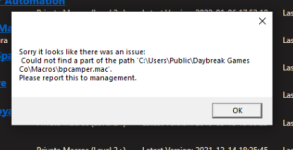
this almost always means that you have antivirus or file syncing software "holding something hostage"hi, if you want to take this to private messages, that would help unclog the system a bit - here is the message
View attachment 41146
you should consider whitelisting your eq and mq folders from your av/defender.
i also don't know anything about bpcamper.mac
> RedGuides Launcher Resource Overview <
Hello
I m trying to load the plug-in but it auto unload it.
I got mq2melee loaded and moveutils too.
What I am missing ?
Thanks
I m trying to load the plug-in but it auto unload it.
I got mq2melee loaded and moveutils too.
What I am missing ?
Thanks
MQ doesn't work on Truebox serversHello
I m trying to load the plug-in but it auto unload it.
I got mq2melee loaded and moveutils too.
What I am missing ?
Thanks
MQ is not supported and does not work on Truebox servers. DarkPaw Games doesn't want multi-boxers, and we don't want to upset the official devs.
Other tools such as MySEQ and IonBC are available for truebox servers.
Are you trying to use the plugins on an unsupported server because they're not going to work on TrueBox or otherwise unsupported servers, the "relaxed" truebox servers are still not currently supported, and sometime *after* they are is when the plugins would work on newly mq-supported servers
If you are force loading MQ and otherwise circumventing MQ, potentially running the risk of not allowing MQ to protect you from EQ.
Users who are viewing this thread
Total: 5 (members: 0, guests: 5)
Share: