• You've discovered RedGuides, an EverQuest multi-boxing and scripting community 🧙‍♀️⚙️. We want you to play several EQ characters at once, come join us and say hello! 👋

  • A TLP without truebox has thawed (Very Vanilla ready)
    Frostreaver
MQ2Eskay

Plugin - MQ2Eskay 3.1.52471.11

I run 100% off my plugins. Berzerkers flying through the air, enchanter mezzing mobs as they enter camp, eskay grabbing spawns with hates attraction, beastlord pumping out nukes, cleric meleeing while also healing, spell effects are a serious concern.

All hell breaking lose is exactly how it should be responsiveness wise. If hell breaks lose a little bit at a time then we need to do better. But if ALL hell breaks lose, I think we're onto something ;)
Just came by to say....holy crap...

Watched a couple vids a few days ago, decided that I'd pick up Eskay and Monk at the same time. Got everything loaded, moved out to where I wanted to be to test it out and set up the SK as tank, monk as Puller Assist, everyone else running IHC and they all sat there and started at each other for a few seconds. I switched over to the monk and had him hit something and then all hell broke loose...

<hours later, me just watching the screen>
Guildie tells guild "what you up to?"
/gu watching EskayTV
Guild tells guild "what?"
/gu dude...

And this is how WarTV was born.....
 
Going to watch the eskay vid again and think ill get that plugin just got the berserker one and it rocks so far so why not get the eskay one lol
 
I've look and looked. I'm not seeing anything that answers my question specifically. What I'm trying to do is set my pull range. On I run my SK on Puller Tank and she wont pull mobs, even if there's a mob directly in front of her line of sight. I've tried setting the pull radius to max and camp radius down so that way she'll run back to the group but nothing seems to be working. I'm not very tech savvy so if anyone has a solution to this problem I'd be much appreciative. Or if this question has been answered already, point me in the right direction. Thanks all.
 

Attachments

  • 222222.png
    222222.png
    1.2 MB · Views: 13
I would say to rebuild your mesh with the mesh generator. I had this problem, and once i redid the mesh, it was working.
You may also look at your zradius on the puller, usually in tower i put it around 30 or so, it's enough.
 
I've look and looked. I'm not seeing anything that answers my question specifically. What I'm trying to do is set my pull range. On I run my SK on Puller Tank, but she only pulls the mobs in the immediate area, even if there's a mob directly in front of her line of sight. I've tried setting the pull radius to max and camp radius down so that way she'll run back to the group but nothing seems to be working. I'm not very tech savvy so if anyone has a solution to this problem I'd be much appreciative. Or if this question has been answered already, point me in the right direction. Thanks all.
you need to adjust your pull settings

you have radius and zradius - those both need to get adjusted

your radius is your pull radius - this is your blue circle on your map. for a dungeon i usually start small like 100-200 until i "dial it in"
your zradius is your vertical distance above and below you - i usually start with 30ish for zradius this will look for mobs 30 above and 30 below you

you have a pull UI tab where you can temporarily set these settings

or you can use the slash commands

for eskay is it /shd radius x where x is the number

> MQ2Eskay Commands <

Pulling & Camp Related:
/shd CampRadius ## - Sets the campradius to the value provided. If no value is provided it outputs the current value.
/shd Radius ## - This is your pull radius
/shd zRadius ## - This is your vertical pull radius
/shd CampOverlapBuffer - is the distance out of Camp to help group members (assigned puller excluded).
/shd DoCampfire - Turns on dropping a campfire
/shd CampfireDistance ## - Create a new campfire if campfire is more than this distance from camp.
/shd Ignore - adds your target to the pullignores.ini file in your release folder - will skip this mob in the pull routine.
/shd Unignore - removes your target or typed name from your pullignores.ini file in your release folder.
/shd ShowIgnore - Outputs a list of NPC's being ignored. May show the previous zone if you haven't gone into puller mode in your current zone.
/shd Groupwatch - 1|2|3|4 - Everyone, CC&Healer, Healer, Self
/shd HpMedStart # - percentage of health you want to start waiting at.
/shd HpMedEnd # - percentage of health you want to stop waiting at.
/shd ManaMedStart # - percentage of mana you want to start waiting at.
/shd ManaMedEnd # - percentage of mana you want to stop waiting at.
/shd EndMedStart # - percentage of endurance you want to start waiting at.
/shd EndMedEnd # - percentage of endurance you want to stop waiting at.
/shd LevelMin # - Where # is the lowest level NPC you want to pull.
/shd LevelMax # - Where # is the maximum level NPC you want to pull.
/shd PullArc # - Sets an arc in the direction of your camp heading to the degress provided. Shows the Arc on the map displaying that area.
/shd GoToCamp - runs back to your camp (like if you were in sictank mode)

you can watch the mq2war video where pulling was first added that can demonstrate the pulling features >>> HERE <<<

if this is still not working you can

VERY QUICKLY

do a /shd debugpulls on and then VERY QUICKLY do a /shd debugpulls off and this will output why any mobs were skipped

if it says that you didn't have a path to the mob it is likely a mesh issue --- you can "visualize" this by doing a[ ICODE]/nav ui[/ICODE] and then "render navigation mesh" - if the mobs are not in the meshed blue area (like they are either sitting in a broken area, or getting to them is broken up) then you need a new mesh.

Attached is my tofs2 nav mesh (I have a few connectors etc for diff floors) - this just goes in your release -> MQ2Nav folder
 

Attachments

Wow. That was easy. I had to manually type in the pull radius/zradius because when I did it in my /shd show > pull tab window it was not updating.

Thank you for the quick response =)
 
I'm having problems with my SK only tanking one mob and ignoring any others. Is there a way to fix this?
 
I'm having problems with my SK only tanking one mob and ignoring any others. Is there a way to fix this?
That's not much information to go by.

But it sounds like you need to adjust your camp radius, or look at your nav mesh to ensure there arent gaps
 
Love the plugin, great job with it. Im having an odd issue I cant seem to fix - the MQ2SHD window wont expand. I can use it and set commands from the MQ window, but cannot expand the plugin window. Ive tried resserting UI, reloading Eq, reloading MQ2, updating the plugin, and it has been this way for a few days now.

Has anyone else had this issue? any thoughts?

As a side note, I use MQ@zerker on the same comp and it works fine.
 
I'd need a little more information on "Won't expand" are you saying the window is there, but it's minimized?

Sometimes it will appear minimized, but really it's just adjusted so that the size is too small. Perhaps I need to set a Min Horizontal Size and Min Vertical size for the window itself so it doesn't look that way.

But the steps I take are attempt to drag the bottom of the window down. If I can't, hit the minimize button, then try again.

Once you've adjusted the window to the size you want, close the window then type /shd show so that it saves the new location and size of the window
 
The mobs are right next to him, he just doesn't switch targets or anything. It's in tank/pull mode. Level 62. Happens in all the zones I've been in so far. I have to manually click a new target if I want him to tank more than one thing.
 
The mobs are right next to him, he just doesn't switch targets or anything. It's in tank/pull mode. Level 62. Happens in all the zones I've been in so far. I have to manually click a new target if I want him to tank more than one thing.
can you please give a screensnip (not screenshot) of your /shd showsettings

windows_key+shift_key+S, then drag over the area to snip, and then control-v here to paste

it sounds like your campradius is too small
 
I was waiting for the other screenshot - because that is missing some of the output, some of the important bits in particular :(

picking a new target happens in our check for tank stuff - which means when you don't have a mob, and you have a mob inside your campradius - go and whack it

so that would happen in mode 4, 5, 7, or 8 regardless of if you were marked as MT or not (tho i do recommend marking yourself MT/MA)
 
The problem i'm having is he will focus on just his target, even if others in the group are getting hit. Is that intentional? Or something fixed at higher levels with an AE of some sort?
 
I'd need a little more information on "Won't expand" are you saying the window is there, but it's minimized?

Sometimes it will appear minimized, but really it's just adjusted so that the size is too small. Perhaps I need to set a Min Horizontal Size and Min Vertical size for the window itself so it doesn't look that way.

But the steps I take are attempt to drag the bottom of the window down. If I can't, hit the minimize button, then try again.

Once you've adjusted the window to the size you want, close the window then type /shd show so that it saves the new location and size of the window

Thank you, this was it!
 
The problem i'm having is he will focus on just his target, even if others in the group are getting hit. Is that intentional? Or something fixed at higher levels with an AE of some sort?
yes it is - you can click to another target if you wish.

you should get CC. it would be near impossible to determine if/when you wanted to just keep randomly target swapping around.

at higher levels sks get A TON more AoE threat stuff to deal with this
 
i was hoping you would get rid of that slider bar in the pulling tab, much easier to set pull radius !
 
My SK stopped turning on attack while in puller tank mode. He will go out and tag, bring back to camp and then just sit there without performing any other actions.
 
My SK stopped turning on attack while in puller tank mode. He will go out and tag, bring back to camp and then just sit there without performing any other actions.
that is usually due to the mob being outside your campradius - I would look on your map and see if the mob you're fighting is outside of your red circle and then adjust your campradius. I also recommend having levitation off
 
that is usually due to the mob being outside your campradius - I would look on your map and see if the mob you're fighting is outside of your red circle and then adjust your campradius. I also recommend having levitation off
It is well within the default camp radius. It was working perfectly fine on my laptop last night. I decided to load it up onto my desktop and this is when the issue started. No levitation, mob is within the camp radius. It pulls just fine but it will not turn on auto attack and seems to hang up once the mob is there.
 
It is well within the default camp radius. It was working perfectly fine on my laptop last night. I decided to load it up onto my desktop and this is when the issue started. No levitation, mob is within the camp radius.
well - it sounds like your settings/setup is different between the two computers. I would definitely compare your settings - especially ensuring you have good nav meshes so the mobs aren't standing in an unmeshed area (maybe even copy over your mq2eskay ini and your nav meshes to your desktop

What mob is it?
What zone are you in?
What is your campradius set to?
 
well - it sounds like your settings/setup is different between the two computers. I would definitely compare your settings - especially ensuring you have good nav meshes so the mobs aren't standing in an unmeshed area (maybe even copy over your mq2eskay ini and your nav meshes to your desktop

What mob is it?
What zone are you in?
What is your campradius set to?
I am in the Grounds right now, it appears to be every mob. It will pull anything within my pull radius and bring it back to the camp spot. My camp radius is set to 60, the default.
 
I am in the Grounds right now, it appears to be every mob. It will pull anything within my pull radius and bring it back to the camp spot. My camp radius is set to 60, the default.
Can you PM me a screensnip of your entire /shd showsettings plz
 
I think I’m setting up my click abilities wrong because when I set it to downtime or even defensive it spammed them but does not look to be using them at all on offensive based on what I can see pls help let me know what to do it’s a fresh heroic toon with the heroic armor. Thanks.
 
Here is a pic of what I’m seeing this one was set to defensive
 

Attachments

  • 6A81C580-FC7B-49F6-BDE8-69C12121C671.jpeg
    6A81C580-FC7B-49F6-BDE8-69C12121C671.jpeg
    28.5 KB · Views: 18
Well heroic pauldrons of the guardian give you a permanent AA and a permanent buff. There's no need to add those to the clicky options.
 
hello all
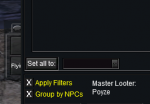
First off i love the mq2 sk thing :) but ever since i loaded it my looting is now done with rolls it sits in the window and wait till it turns red then it rolls on it the master loot gets it because i have it on all ways need but i use to just loot fast and drop to the ground what i did not want. i am a newbe to this please if anyone can help me out haha :) i have unloaded mq2 autoloot also same problem thanks for your time :)
 
hello all
First off i love the mq2 sk thing :) but ever since i loaded it my looting is now done with rolls it sits in the window and wait till it turns red then it rolls on it the master loot gets it because i have it on all ways need but i use to just loot fast and drop to the ground what i did not want. i am a newbe to this please if anyone can help me out haha :) i have unloaded mq2 autoloot also same problem thanks for your time :)
well mq2eskay doesn't do anything with looting at all

using mq2autoloot for your looting is what a good majority of people do

but if you have /autoloot turn off
or you have apply filters checked - you will use your in-game eq loot filters (and do rolls and such)
1596396577515.png

so i would /plugin mq2autoloot load
/autoloot turn on

and
un check that box
 
Is this usable at level 50? I'm very new new to mq2 and boxing all together, I play on Rizlona so i am definitely capped at level by expansion, would love to use this!
 
Is this usable at level 50? I'm very new new to mq2 and boxing all together, I play on Rizlona so i am definitely capped at level by expansion, would love to use this!
yup, they have abilities from lvl 1 onward

edit: the CWTN plugins are free to use on Test server with your VV lvl 2 --- so if you're curious on how/what it will do on your toon, you could always test copy and check it out (keep in mind, test copy is down until, i believe, next update because dbg broke some stuff)
 
So i've started to use this plugin to pull more lately, as i am doing some hunter stuff. What I have noticed with the pull arc/radius is that as I fine tune my radius/arc to include several ph's sometimes it's not possible to camp in a bot safe spot with the radius and arc that doesn't overlap with another part of the zone that is WELL beyond the camp region in regards to path distance.

ie. it will clear out all mobs in the camp radius/arc that are the obvious shortest path to pull, then it will go to pull the few mobs that fall into the radius.

ie my radius/arc are 550/250 respectively, and the mobs well beyond a reasonable distance that fall into the arc are >3000 feet away.

Is there anyway for a camp radius exceed in terms of pathlength or something? seems odd to attempt to pull something >3000 feet pathlength away despite a camp radius of 550.

It also doesn't seem to regard adds that aggro along the way important to return to camp? not sure if that has just been my observation timing or what it's actually doing
 
Plugin - MQ2Eskay

Users who are viewing this thread

Back
Top
Cart