looks like DPS ADV isnt registering the new format for others dps. Example Tank is at 1.2m dps. Ranger 277k dps. Rog 189k dps seen from tank screen. From ranger screen I need Rng at 1.2m dps, Rog at 189k dps and tank at 183k dps.

-
 Hail, we're RedGuides. We want you to play six (yes, 6!) EverQuest characters at once. We have scripts and a friendly community to help, please join our playstyle and say hello! 👋
You are using an out of date browser. It may not display this or other websites correctly.
You should upgrade or use an alternative browser.
You should upgrade or use an alternative browser.

Release MQ2DPSAdv
- Thread starter Teichou
- Start date
I noticed my zerkers dmg isn't registering properly.looks like DPS ADV isnt registering the new format for others dps. Example Tank is at 1.2m dps. Ranger 277k dps. Rog 189k dps seen from tank screen. From ranger screen I need Rng at 1.2m dps, Rog at 189k dps and tank at 183k dps.


brainiac updated MQ2DPSAdv with a new update entry:
01/19/2024
Read the rest of this update entry...
01/19/2024
 Commits
Read the rest of this update entry...
My shamans parser shows less than half the values of the other 5 parser when boxing.
SK, BRD, mage, rogues show always about the same values, whereas the shaman is showing less than half of the dps.
As the shaman is not y main and most of the time the only Char in my evening-group with my Ingame-friends, I would like to get information what I might do no narrow down the issue or even fix it.
My shaman is always meleeing, so as close on the mobs as the tank or the other melee.
The mage, not being as close at the mob showing similar values, as the others, just the shamans parses is always way of.
I noticed this about a week ago and it is always like this. Does anyone have an idea, what I can do to get his parses back in line with the others?
SK, BRD, mage, rogues show always about the same values, whereas the shaman is showing less than half of the dps.
As the shaman is not y main and most of the time the only Char in my evening-group with my Ingame-friends, I would like to get information what I might do no narrow down the issue or even fix it.
My shaman is always meleeing, so as close on the mobs as the tank or the other melee.
The mage, not being as close at the mob showing similar values, as the others, just the shamans parses is always way of.
I noticed this about a week ago and it is always like this. Does anyone have an idea, what I can do to get his parses back in line with the others?

Adjust your chat filers. It parses the displayed chat to show the #, if you at one time for tired of X spam in shaman window and turned some off, (or havent since the chat filter adjustment DBG's did in Jan), its possible dpsadv isnt getting the right data from shm client.My shamans parser shows less than half the values of the other 5 parser when boxing.
SK, BRD, mage, rogues show always about the same values, whereas the shaman is showing less than half of the dps.
As the shaman is not y main and most of the time the only Char in my evening-group with my Ingame-friends, I would like to get information what I might do no narrow down the issue or even fix it.
My shaman is always meleeing, so as close on the mobs as the tank or the other melee.
The mage, not being as close at the mob showing similar values, as the others, just the shamans parses is always way of.
I noticed this about a week ago and it is always like this. Does anyone have an idea, what I can do to get his parses back in line with the others?
I remember to have created a "spam" tab beside the mainchat, which usually is hidden behind the mainchat.
Probably I missed some filter at the Shaman. Ty for the hint. Will check all filters with the settings of those of the sk, next time I am at the computer.
Probably I missed some filter at the Shaman. Ty for the hint. Will check all filters with the settings of those of the sk, next time I am at the computer.

That doesn't sound too far fetched if your shaman is healing.My shamans parser shows less than half the values of the other 5 parser when boxing.
SK, BRD, mage, rogues show always about the same values, whereas the shaman is showing less than half of the dps.
As the shaman is not y main and most of the time the only Char in my evening-group with my Ingame-friends, I would like to get information what I might do no narrow down the issue or even fix it.
My shaman is always meleeing, so as close on the mobs as the tank or the other melee.
The mage, not being as close at the mob showing similar values, as the others, just the shamans parses is always way of.
I noticed this about a week ago and it is always like this. Does anyone have an idea, what I can do to get his parses back in line with the others?

whytdrumer
Well-known member
Wrong forum
How do I turn on the DPSMeter so I can see dps for all my toons. I see it in one of my chat windows but I thought there was a separate window that popped up that showed a bar chart of all my group's DPS compared to the mob's DPS.

there is not a bar chart for your dps vs the mobs dps, there is a dps counter but its sorta not super accurate, your best would to use a regular log parser on your tank
one that is pretty good is
 github.com
it also has the ability to display your dps in bars on top of your eq screen.
one that is pretty good is
EQLogParser/Release at master · kauffman12/EQLogParser
Everquest Log Parser for Live and TLP servers. Contribute to kauffman12/EQLogParser development by creating an account on GitHub.
github.com
it also has the ability to display your dps in bars on top of your eq screen.

How do I turn on the DPSMeter so I can see dps for all my toons. I see it in one of my chat windows but I thought there was a separate window that popped up that showed a bar chart of all my group's DPS compared to the mob's DPS.

Release - MQ2DPSAdv
MQ2DpsAdv - This plugin shows the dps output of you and people around you in a custom dps window. COPY MQUI_DpsAdvWnd.xml to /uifiles/default folder or to your custom UI folder. Then you may have to reload your UI. (MQUI_DpsAdvWnd.xml is included in the compile in the /uifiles/ folder)...
 www.redguides.com
I think you are thinking of this
/plugin mq2dpsadv load
not as good as EQLogParser though
whytdrumer
Well-known member
Awesome I appreciate it. I'll check out EQLogParser and see if it's what I'm thinking of. Thanks.
It means you need to reload your uiIt's been awhile that I command /dpsadv show but didn't see the window pop up, some of my characters work. Is that a way to troubleshooting this?

Ordell
Well-known member
Since the expac went live, dpsadv is only showing the active character's screen. So on the tank client, only the tank shows up. Yes I've reloaded the UI multiple times. I know it's not considered an accurate measure of dps but I like it because it tells me who isn't engaged with the target.
So is it broke or a bum setting on my end?
So is it broke or a bum setting on my end?
Suspect chat filter issue. (As in eq changed something) I'll try and take a peak tomorrowSince the expac went live, dpsadv is only showing the active character's screen. So on the tank client, only the tank shows up. Yes I've reloaded the UI multiple times. I know it's not considered an accurate measure of dps but I like it because it tells me who isn't engaged with the target.
So is it broke or a bum setting on my end?
Since the expac went live, dpsadv is only showing the active character's screen. So on the tank client, only the tank shows up. Yes I've reloaded the UI multiple times. I know it's not considered an accurate measure of dps but I like it because it tells me who isn't engaged with the target.
So is it broke or a bum setting on my end?
tested today as i said i would.Suspect chat filter issue. (As in eq changed something) I'll try and take a peak tomorrow
I don't see any issue - everything appears to be working as expected.
there are no unknown chat cases
I can see other toons just fine
I would recommend checking your chat filters in alt-o options -> chat and ensure you're showing others
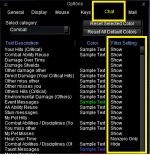


Don't believe it's been accurate for quite some time.Is it safe to assume this is not calculating correctly? My bard can't be out dpsing my rogue. Yes I have no hidden filters. EQParser seems very accurate though.
brainiac updated MQ2DPSAdv with a new update entry:
09/07/2025
Read the rest of this update entry...
09/07/2025
Read the rest of this update entry...
brainiac updated MQ2DPSAdv with a new update entry:
11/04/2025
Read the rest of this update entry...
11/04/2025
Read the rest of this update entry...
I merged your post into the mq2dpsadv discussion.
Please take a quick look at this to familiarize yourself where to post
Please take a quick look at this to familiarize yourself where to post

if I recall it is not a per toon configSo I have two EQ files for the specific purpose of having different settings for my driver, and the other is for my alts. I would like to have DPSAdv turned on for my driver, but not so for the other 5? Is there a .cfg or another way to allow this to happen?

- Commits
- 191
You would use server_character.cfgSo I have two EQ files for the specific purpose of having different settings for my driver, and the other is for my alts. I would like to have DPSAdv turned on for my driver, but not so for the other 5? Is there a .cfg or another way to allow this to happen?
1. You must
/plugin mq2dpsadv unload2. in the server_character.cfg
/plugin mq2dpsadv load noautoWhy step 1. When you load a plugin it stores if it was loaded to the INI. So when you load in other toons it automatically loads that plugin. You want to unload it so that the stored INI value is that it is not loaded.
Why step 2. This is going to load it for that character, but specify the
noauto flag, which means don't store the value in the INI.Here is the link the to macroquest documentation about the cfg files. https://docs.macroquest.org/main/features/cfg-files/

hope some one can help, all of a sudden my dps meter aint loading, was fine before i did a reboot for windows update, and now i am getting message "DPSwind does not exist try reloading your UI /loadskin default" any idea what has gone wrong and how i can sort it? TYI
"
"
if you load the plugin *after* you're already in game you need to do a /reloadui or /loadskin default to reload your ui so the window is there.hope some one can help, all of a sudden my dps meter aint loading, was fine before i did a reboot for windows update, and now i am getting message "DPSwind does not exist try reloading your UI /loadskin default" any idea what has gone wrong and how i can sort it? TYI
"
i'd suggest using EQLogParser over dpsadv, as dpsadv isn't great
Want to know what to use to parse your damage? EQ Log Parser is one of the best options to use. strongly recommended over mq2dpsadv
thanks that worked, i use EQlogparser when i am raiding, but for normal play am happy with dspadvif you load the plugin *after* you're already in game you need to do a /reloadui or /loadskin default to reload your ui so the window is there.
i'd suggest using EQLogParser over dpsadv, as dpsadv isn't great
Want to know what to use to parse your damage? EQ Log Parser is one of the best options to use. strongly recommended over mq2dpsadv
Users who are viewing this thread
Total: 1 (members: 0, guests: 1)
Share: