
-
 Hail, we're RedGuides. We want you to play six (yes, 6!) EverQuest characters at once. We have scripts and a friendly community to help, please join our playstyle and say hello! 👋
 -
 We've added LLM sections to our Terms & Rules and Resource Rules, for everyone's sanity & in-game safety.
Read more
a. Do not replace your voice with an LLM. This goes for your posts and your scripts. Drafting and editing with a tool is fine, but don't take you out of what you share.
b. Do not replace your EQ character's voice with an LLM. We don't want scripts that speak over/ooc,/shoutor other public channels. This has been an unwritten rule that's kept casino scripts off the site for decades, but we're now compelled to make it clear: keep automated communication private.
Why Does RG Review Scripts?
Nearly every LLM-written Lua script we see is making your character do impossible things, and rarely in a way that's beneficial to you. We've seen heavy server hammering,/targetover impossible distances when/nav spawnwould passively accomplish the same thing, a spawn search that fires 20+ times per second, and other pointless actions that are likely annoying GMs.
You are welcome to use LLMs as a tool to structure, draft, and edit your work, but please read critically before hitting/lua run
You are using an out of date browser. It may not display this or other websites correctly.
You should upgrade or use an alternative browser.
You should upgrade or use an alternative browser.

Utility - MQ2CWTNCommons (2 Viewers)
- Thread starter ChatWithThisName
- Start date


No, we won't be doing anything like that, sorryI love the CWTN plugins and Sic's totally awesome videos demonstrating their use.
Feature suggestion: a specific sound alert upon death. A "sad trombone" would be totally hilarious and uber.

- Commits
- 191
Sic updated MQ2CWTNCommons with a new update entry:
Jul 7 2022
Read the rest of this update entry...
Jul 7 2022
CWTN Plugins -
- Fixed an unforgivable UX issue with StandOnFeignAtHealth
- Added a CWTN boolean member "Missing" ${CWTN.Missing} which tells us if we are missing any spells/discs
-- i was being lazy and wanted to /dgae /dgtell all $\{CWTN.Missing} (or whatnot)
Read the rest of this update entry...
- Commits
- 191
Sic updated MQ2CWTNCommons with a new update entry:
Jul 20 2022
Read the rest of this update entry...
Jul 20 2022
CWTN Plugins -
- Adjusted a situation where if we were memorizing a buff that has a long reuse timer on it, we wouldn't wait to check buffs again until it was done
-- this is most noticeable on mq2enchanter with meleeauspice with raidmode on and during downtime
- Added the ability for dispel clickies to be used in offensive or burn
Read the rest of this update entry...
- Commits
- 191
Sic updated MQ2CWTNCommons with a new update entry:
8/02/2022
Read the rest of this update entry...
8/02/2022
CWTN Plugins -
- Cleaned up some of the misc "Updated" messages to include the plugin output message
- resetcamp will now clear our pull target if we had one previously
-- example, you are in an area, and start to pull a mob, you manually move (paused or unpaused)
--- after manually moving you hit resetcamp, before you will still go and pull that previously selected pull target
--- now you will choose a new pull target upon resetting your camp
Read the rest of this update entry...
taldorblackfire
Member
I am not sure if I have done anything wrong, but my MQ2Shaman Settings Window no longer appears, and all the output goes into my MQ2 Window.
When logging in on my shaman i see red text that appears in the center of the screen that says "MQ2Shaman" and then the output floods into my MQ2 Window.
When logging in on my shaman i see red text that appears in the center of the screen that says "MQ2Shaman" and then the output floods into my MQ2 Window.
Please see >>> Getting Started with CWTN plugins! (Movement, UI Window, Clickies, Pulling, ETC) Check Here First! <<<I am not sure if I have done anything wrong, but my MQ2Shaman Settings Window no longer appears, and all the output goes into my MQ2 Window.
When logging in on my shaman i see red text that appears in the center of the screen that says "MQ2Shaman" and then the output floods into my MQ2 Window.
/shm show to show the windowplease make sure to check out the sticky with the FAQ/Commands etc. there are guides and videos on all that stuff
Here is the UI video
taldorblackfire
Member
Please see >>> Getting Started with CWTN plugins! (Movement, UI Window, Clickies, Pulling, ETC) Check Here First! <<<
/shm showto show the window
please make sure to check out the sticky with the FAQ/Commands etc. there are guides and videos on all that stuff
Here is the UI video
I have watched the video, but I am still not really sure what command or thing i have done to not make the UI window appear on login. I can manually each time I login type
/shm show and it will appear. I have tried /shm toggleUI, but that doesn't appear to be working.I tried all the suggestions in the UI Window video and none of them worked. I tried the
/loadskin default and I tried /reload. None of these appeared to make the window appear, unlike in the video. Even performing an /plugin mq2shaman unload and then /plugin mq2shaman load does not make the window appear.Edit: correction, I can type
/shm toggleUI on and that will load the UI while I am logged in, but camping out and coming back in the windows does not appearthen it sounds like you minimized it (top left minimize button all eq windows have) or have it hidden behind another windowI have watched the video, but I am still not really sure what command or thing i have done to not make the UI window appear on login. I can manually each time I login type/shm showand it will appear. I have tried/shm toggleUI, but that doesn't appear to be working.
I tried all the suggestions in the UI Window video and none of them worked. I tried the/loadskin defaultand I tried/reload. None of these appeared to make the window appear, unlike in the video. Even performing an/plugin mq2shaman unloadand then/plugin mq2shaman loaddoes not make the window appearing.
if the mq2shaman chat is coming in your mq window - it means that window isn't being shown, because either a: you closed it or b: because you loaded the plugin after you were already in game and need to reload your ui
if the mq2chat is no longer coming in your mq window - it means that the mq2shaman window is visible *somewhere* and means you have it behind another window minimized, or somehow off screen.
as far as the plugin itself knowing if it should load the window or not - if you log off with the window closed, it changed a value so it will remain closed
this value is in side your config->MQ2Shaman.ini it is > not < the config->cwtn->MQ2Shaman_ToonName.ini file
it looks like this, where the 1 is to show it and if it was a 0 would be to not show it.
INI:
[ToonName]
show=1taldorblackfire
Member
This is what I am seeing, but it happens on login. I am not really in control what loads at that point and aif the mq2shaman chat is coming in your mq window - it means that window isn't being shown, because either a: you closed it or b: because you loaded the plugin after you were already in game and need to reload your ui
/reload does nothing.taldorblackfire
Member
This was indeed the fix! Thanks, I did not know that!then it sounds like you minimized it (top left minimize button all eq windows have) or have it hidden behind another window
if the mq2shaman chat is coming in your mq window - it means that window isn't being shown, because either a: you closed it or b: because you loaded the plugin after you were already in game and need to reload your ui
if the mq2chat is no longer coming in your mq window - it means that the mq2shaman window is visible *somewhere* and means you have it behind another window minimized, or somehow off screen.
as far as the plugin itself knowing if it should load the window or not - if you log off with the window closed, it changed a value so it will remain closed
this value is in side your config->MQ2Shaman.ini it is > not < the config->cwtn->MQ2Shaman_ToonName.ini file
it looks like this, where the 1 is to show it and if it was a 0 would be to not show it.
INI:[ToonName] show=1
as far as the plugin itself knowing if it should load the window or not - if you log off with the window closed, it changed a value so it will remain closedThis is what I am seeing, but it happens on login. I am not really in control what loads at that point and a/reloaddoes nothing.
this value is in side your config->MQ2Shaman.ini it is > not < the config->cwtn->MQ2Shaman_ToonName.ini file
it looks like this, where the 1 is to show it and if it was a 0 would be to not show it.
INI:
[ToonName]
show=1we default to show the plugin windows to show them.
If you are using .cfg files to not load plugins until you're in game, this would require reloading your ui
taldorblackfire
Member
Yeah, that did the trick. I must have closed it by accident when logging off. Appreciate your help!as far as the plugin itself knowing if it should load the window or not - if you log off with the window closed, it changed a value so it will remain closed
this value is in side your config->MQ2Shaman.ini it is > not < the config->cwtn->MQ2Shaman_ToonName.ini file
it looks like this, where the 1 is to show it and if it was a 0 would be to not show it.
INI:[ToonName] show=1
we default to show the plugin windows to show them.
If you are using .cfg files to not load plugins until you're in game, this would require reloading your ui
This goes for all plugins - just posting on eskay,
I love the Byos custom feature and find it super handy. I just wish there was a /shd command to turn it off and on, a toggle option would be even better for broadcasting.
At the moment I have to manually click byos custom on each of the buffers when I want them to rebuff and if you ask why don't you leave it on I don't like leaving byos cusom on when in combat/raiding because sometimes I need a mem a spell on the fly and without pausing the plugin first it will just demem whatever spell.
Just passing along some feedback thanks gents.
I love the Byos custom feature and find it super handy. I just wish there was a /shd command to turn it off and on, a toggle option would be even better for broadcasting.
At the moment I have to manually click byos custom on each of the buffers when I want them to rebuff and if you ask why don't you leave it on I don't like leaving byos cusom on when in combat/raiding because sometimes I need a mem a spell on the fly and without pausing the plugin first it will just demem whatever spell.
Just passing along some feedback thanks gents.
Not 100% sure what you are asking, since it sounds like that already exists.This goes for all plugins - just posting on eskay,
I love the Byos custom feature and find it super handy. I just wish there was a /shd command to turn it off and on, a toggle option would be even better for broadcasting.
At the moment I have to manually click byos custom on each of the buffers when I want them to rebuff and if you ask why don't you leave it on I don't like leaving byos cusom on when in combat/raiding because sometimes I need a mem a spell on the fly and without pausing the plugin first it will just demem whatever spell.
Just passing along some feedback thanks gents.
If you want to be in byos but clear the boys custom (so you don't do buffs and gem swapping) stay in byos and clear the custom set
/shd byos custom clear to clear your custom set
/Shd byos cust set to set the custom set.
This is explained in the byos info in the sticky
Please see >>> Getting Started with CWTN plugins! (Movement, UI Window, Clickies, Pulling, ETC) Check Here First! <<<
CalmDownYall
Member
First, autologin is legit and saves me loads of hassle so I appreciate it very much! The only issue I have, which is more of a minor annoyance, is once all of my characters have loaded (works perfectly) there are always a select few who's (cwtn) class window wont open. For example, I type in /zerk show on to open it, and the MQ window tells me "ZerkerWnd does not exist. Try reloading your UI." which forces me to log back to character select and reload the character, for multiple characters. I haven't realized a pattern in which character windows do not open.
If I am doing something wrong or if there is a workaround for this, I would appreciate any guidance. Thanks in advance, and happy hunting!
If I am doing something wrong or if there is a workaround for this, I would appreciate any guidance. Thanks in advance, and happy hunting!

this means you're not loading the plugin until you enter the game, like using a cfg or something like that in which case you need toFirst, autologin is legit and saves me loads of hassle so I appreciate it very much! The only issue I have, which is more of a minor annoyance, is once all of my characters have loaded (works perfectly) there are always a select few who's (cwtn) class window wont open. For example, I type in /zerk show on to open it, and the MQ window tells me "ZerkerWnd does not exist. Try reloading your UI." which forces me to log back to character select and reload the character, for multiple characters. I haven't realized a pattern in which character windows do not open.
If I am doing something wrong or if there is a workaround for this, I would appreciate any guidance. Thanks in advance, and happy hunting!
/reloadui or /loadskin default as the error message tells you to dodoesn't have anything to do with autologin
the cwtn info sticky has a video explaining the ui window.
Please see >>> Getting Started with CWTN plugins! (Movement, UI Window, Clickies, Pulling, ETC) Check Here First! <<<
if you let mq load the plugins "normally" they will have them loaded when eq loads, and that ui window will be present and will not require reloading your ui
CalmDownYall
Member
That makes perfect sense, I'll get that straightened out then. Thank you for your knowledge and your time!this means you're not loading the plugin until you enter the game, like using a cfg or something like that in which case you need to/reloaduior/loadskindefault as the error message tells you to do
doesn't have anything to do with autologin
the cwtn info sticky has a video explaining the ui window.
Please see >>> Getting Started with CWTN plugins! (Movement, UI Window, Clickies, Pulling, ETC) Check Here First! <<<
if you let mq load the plugins "normally" they will have them loaded when eq loads, and that ui window will be present and will not require reloading your ui
- Commits
- 191
Sic updated MQ2CWTNCommons with a new update entry:
Aug 11 2022
Read the rest of this update entry...
Aug 11 2022
8/11/2022:
CWTN: |
- Corrected an issue where we would start pulling when we needed/wanted to memorize a buff spell
-- this was a result of buff timer changes in july; fix'td's
Read the rest of this update entry...
- Commits
- 191
RedMan updated MQ2CWTNCommons with a new update entry:
8/10/2022
Read the rest of this update entry...
8/10/2022
- Corrected an issue where we would start pulling when we needed/wanted to memorize a buff spell
-- this was a result of buff timer changes in july; fix'td's
Read the rest of this update entry...
- Commits
- 191
RedMan updated MQ2CWTNCommons with a new update entry:
8/27/2022
Read the rest of this update entry...
8/27/2022
- "ui" now performs the same as "toggle ui" example: /shd ui"
Read the rest of this update entry...
- Commits
- 191
RedMan updated MQ2CWTNCommons with a new update entry:
9/12/2022
Read the rest of this update entry...
9/12/2022
- some error warnings will now popup on your screen
-- examples include: needing to reload your ui, missing meshes, etc
Read the rest of this update entry...
- Commits
- 191
RedMan updated MQ2CWTNCommons with a new update entry:
9/12/2022
Read the rest of this update entry...
9/12/2022
- some error warnings will now popup on your screen
-- examples include: needing to reload your ui, missing meshes, etc
Read the rest of this update entry...
- Commits
- 191
RedMan updated MQ2CWTNCommons with a new update entry:
9/20/2022
Read the rest of this update entry...
9/20/2022
- Will no longer count corpses towards fellowship numbers.
- Default for check for stuck gems is now false (we don't adjust your current settings).
Read the rest of this update entry...
- Commits
- 191
RedMan updated MQ2CWTNCommons with a new update entry:
9/26/2022
Read the rest of this update entry...
9/26/2022
- removed arcane secrets from glyph usage
-- power and secrets being on the same timer can result in a situation where we fire secrets early
-- and also prevent from being able to use power again later if we had puchased another power
Read the rest of this update entry...
- Commits
- 191
RedMan updated MQ2CWTNCommons with a new update entry:
10/02/2022
Read the rest of this update entry...
10/02/2022
- the cwtn window title will now reflect the plugin's build date and not the cwtn commons library build date.
-- this means if a plugin, like mq2paladin, was rebuilt, but commons wasn't, then it would now update the correct date.
- We will now automatically set your fps/bgfps to 30 if they are below this setting
-- you can turn this setting off with AdjustLowFPSSetting off
--- example: /pal AdjustLowFPSSetting off
Read the rest of this update entry...

Nothing super important, as I found the correct command usage via a 5 min search of the forums, but trying to find the empowered campfire command by using /shd help returns the command text as "/shd EmpoweredCampfire" which doesn't work obviously since the correct command is:
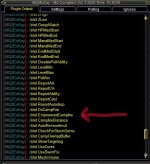
Just a heads up for the next time you're already under the hood . Stellar plugins... Seriously. Be lost without em. Thanks for everything you do.
- Added UseEmpoweredCampfire
-- example: /shd useempoweredcampfire on
Just a heads up for the next time you're already under the hood
. Stellar plugins... Seriously. Be lost without em. Thanks for everything you do.
Last edited by a moderator:
- Commits
- 191
RedMan updated MQ2CWTNCommons with a new update entry:
10/04/2022
Read the rest of this update entry...
10/04/2022
- fixed typo with empowered campfire command output
Read the rest of this update entry...
- Commits
- 191
RedMan updated MQ2CWTNCommons with a new update entry:
10/16/2022
Read the rest of this update entry...
10/16/2022
- Corrected popup messages if you don't have a mesh for the zone you're in and are trying to use modes that require nav meshes.
- Added instruction to run the mesh updater on the RG Launcher.
Read the rest of this update entry...
- Commits
- 191
RedMan updated MQ2CWTNCommons with a new update entry:
10/19/2022
Read the rest of this update entry...
10/19/2022
- Added additional mez animations
-- this should help in places like vergalid mines
Read the rest of this update entry...
- Commits
- 191
RedMan updated MQ2CWTNCommons with a new update entry:
10/26/2022
Read the rest of this update entry...
10/26/2022
- Added additional debug for *during* pulls.
-- /mnk debugduringpull on
- Fix for the eqbug with trailing spaces
-- this fixes GHBuffBot
Read the rest of this update entry...
Shouldn't the first post be updated?
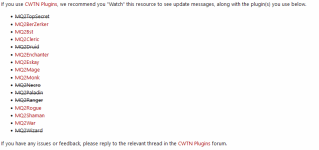
The list is missing MQ2Bard ... and maybe MQ2Necro and MQ2Paladin should be changed to red color.
The list is missing MQ2Bard ... and maybe MQ2Necro and MQ2Paladin should be changed to red color.
the MQ2Bard wasn't meant seriuos 
- Commits
- 191
RedMan updated MQ2CWTNCommons with a new update entry:
11/16/2022
Read the rest of this update entry...
11/16/2022
- added additional CureCheckType
-- for future mq2druid usage
Read the rest of this update entry...
- Commits
- 191
ChatWithThisName updated MQ2CWTNCommons with a new update entry:
11/22/2022
Read the rest of this update entry...
11/22/2022
- preliminary emu work
- "past/present" proofed mana/health/endurance checks
- item clicky deprecation Cleanup
Read the rest of this update entry...
- Commits
- 191
ChatWithThisName updated MQ2CWTNCommons with a new update entry:
11/23/2022
Read the rest of this update entry...
11/23/2022
- You can now click on mez/immune ignore button again!
Read the rest of this update entry...
- Commits
- 191
ChatWithThisName updated MQ2CWTNCommons with a new update entry:
12/02/2022
Read the rest of this update entry...
12/02/2022
- added trying to automatically handle bad dbg naming
-- handle if dbg has a trailing space left in a spell name
-- handle if dbg is missing a space between '.' and 'II/III' in 'Rk. iii' like in "Cantata of Rodcet Rk.iii"
Read the rest of this update entry...
Users who are viewing this thread
Total: 3 (members: 0, guests: 3)
Share: