• You've discovered RedGuides, an EverQuest multi-boxing and scripting community 🧙‍♀️⚙️. We want you to play several EQ characters at once, come join us and say hello! 👋

  • A TLP without truebox has thawed (Very Vanilla ready)
    Frostreaver
Resource icon

Release Make Crew [Bind] 2022-09-07

No permission to download

SpecialEd

Lua Slayer
Joined
Apr 4, 2021
RedCents
5,705¢
SpecialEd submitted a new resource:

Make Crew [Bind] - No frills, no fluff, just put my damn groups together I have things to kill.

A sexy little lua bind to throw your group(s) together in a jiffy. Combined with mq2autoaccept, we're unstoppable.

Credits: Shamelessly inspired (read: copied/stolen) from @exspes007 / entropy / core.

Steps below assume you have

1) copied the LIP.lua into the root lua folder
2) created "binds" directory under your lua folder
3) copied the makecrew.lua into the "binds" directory


Start the script on any characters who regularly form groups - /lua run...

Read more about this resource...
 
Any chance this could add group rolls, such as MT MA pull etc? As is this is a great little script. I use it when autogroup fails due to spell casting.
 
Last edited:
Would this allow me to assign the same characters to multiple group configurations? This is a limitation of MQ2AutoGroup and it only allows a character to be in one group.
 
This is really interesting then, i'll have to think up all sorts of new groups with existing characters and give it a try. Thanks!
 
Would this allow me to assign the same characters to multiple group configurations? This is a limitation of MQ2AutoGroup and it only allows a character to be in one group.
As many as you want. That's a dumb limitation.
Agreed!! I have different group configurations, often sharing some pivotal roles, for farming, raids, progression, etc. I have these all broken out with multiple autologin profiles, but they won't group together with mq2autogroup -- so I've resorted to making "Invite" hotbuttons on my driver.
 
To future new users, <CrewName> = case sensitive.
If you save it by /mc Crew1 save, won't work when load it by /mc crew1
 
Last edited:
So I have found my crew.ini and it does reflect the crew I built - ensuring I have it all case sensitive - they /mc command "/mc eziaincrew" returns the crew eziaincrew does not exist ?

Any hints please? Crew.ini is in the config folder if this is right ?
 
So I have found my crew.ini and it does reflect the crew I built - ensuring I have it all case sensitive - they /mc command "/mc eziaincrew" returns the crew eziaincrew does not exist ?

Any hints please? Crew.ini is in the config folder if this is right ?
Crew.ini is located in your config folder?
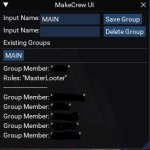
Entry like this.
Code:
[Main]
Member0=Toon1
Member1=Toon2
Member2=Toon3
Member3=Toon4
Member4=Toon5
Member5=Toon6
Roles0=MainTank,MainAssist,MasterLooter
and running /makecrew Main
 
GUI for MakeCrew
If you have the binds folder place it in there and run /Lua run binds/makecrew
if not throw the makecrew.Lua in your Lua folder and run /Lua run makecrew
 

Attachments

Last edited:
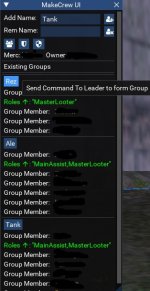
So I was bored and started modifying this UI again. Thought I would share.
Added buttons for
Disband All Groups
Disband Targeted Merc
Disband All Mercs
Players listed in the window are now target clickable. If you double click a name in a group it will target the player or merc.
Also, now when clicking the group name it will send commands to other group leaders to run makecrew and then form the group.
 

Attachments

  • Untitled.jpg
    Untitled.jpg
    64.8 KB · Views: 24
  • MakeCrew.zip
    MakeCrew.zip
    3.2 KB · Views: 15
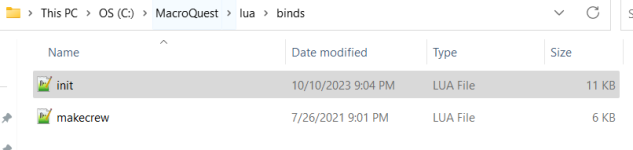
Ignore.. I figured it out. I put the whole makecrew folder that contained the init.Lua in the binds folder.

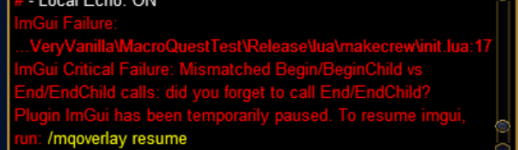
How do I get the UI?
My folder looks like this.
1696997488682.png
 
Last edited:
Release Make Crew [Bind]

Users who are viewing this thread

Back
Top
Cart