• Hail, we're RedGuides. We want you to play six (yes, 6!) EverQuest characters at once. We have scripts and a friendly community to help, please join our playstyle and say hello! 👋
  • We've added LLM sections to our Terms & Rules and Resource Rules, for everyone's sanity & in-game safety.
    Read more
    a. Do not replace your voice with an LLM. This goes for your posts and your scripts. Drafting and editing with a tool is fine, but don't take you out of what you share.
    b. Do not replace your EQ character's voice with an LLM. We don't want scripts that speak over /ooc, /shout or other public channels. This has been an unwritten rule that's kept casino scripts off the site for decades, but we're now compelled to make it clear: keep automated communication private.

    Why Does RG Review Scripts?
    Nearly every LLM-written Lua script we see is making your character do impossible things, and rarely in a way that's beneficial to you. We've seen heavy server hammering, /target over impossible distances when /nav spawn would passively accomplish the same thing, a spawn search that fires 20+ times per second, and other pointless actions that are likely annoying GMs.

    You are welcome to use LLMs as a tool to structure, draft, and edit your work, but please read critically before hitting /lua run
Make Crew [Bind]

Release Make Crew [Bind] 2022-09-07

SpecialEd

Lua Slayer
Creator
Commits
3
SpecialEd submitted a new resource:

Make Crew [Bind] - No frills, no fluff, just put my damn groups together I have things to kill.

A sexy little lua bind to throw your group(s) together in a jiffy. Combined with mq2autoaccept, we're unstoppable.

Credits: Shamelessly inspired (read: copied/stolen) from @exspes007 / entropy / core.

Steps below assume you have

1) copied the LIP.lua into the root lua folder
2) created "binds" directory under your lua folder
3) copied the makecrew.lua into the "binds" directory


Start the script on any characters who regularly form groups - /lua run...

Read more about this resource...
 
Any chance this could add group rolls, such as MT MA pull etc? As is this is a great little script. I use it when autogroup fails due to spell casting.
 
Last edited:
Would this allow me to assign the same characters to multiple group configurations? This is a limitation of MQ2AutoGroup and it only allows a character to be in one group.
 
Would this allow me to assign the same characters to multiple group configurations? This is a limitation of MQ2AutoGroup and it only allows a character to be in one group.
As many as you want. That's a dumb limitation.
Agreed!! I have different group configurations, often sharing some pivotal roles, for farming, raids, progression, etc. I have these all broken out with multiple autologin profiles, but they won't group together with mq2autogroup -- so I've resorted to making "Invite" hotbuttons on my driver.
 
To future new users, <CrewName> = case sensitive.
If you save it by /mc Crew1 save, won't work when load it by /mc crew1
 
Last edited:
So I have found my crew.ini and it does reflect the crew I built - ensuring I have it all case sensitive - they /mc command "/mc eziaincrew" returns the crew eziaincrew does not exist ?

Any hints please? Crew.ini is in the config folder if this is right ?
 
So I have found my crew.ini and it does reflect the crew I built - ensuring I have it all case sensitive - they /mc command "/mc eziaincrew" returns the crew eziaincrew does not exist ?

Any hints please? Crew.ini is in the config folder if this is right ?
Crew.ini is located in your config folder?
Entry like this.
Code:
[Main]
Member0=Toon1
Member1=Toon2
Member2=Toon3
Member3=Toon4
Member4=Toon5
Member5=Toon6
Roles0=MainTank,MainAssist,MasterLooter
and running /makecrew Main
 
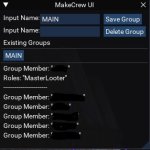
GUI for MakeCrew
If you have the binds folder place it in there and run /lua run binds/makecrew
if not throw the makecrew.Lua in your Lua folder and run /lua run makecrew
 

Attachments

Last edited:
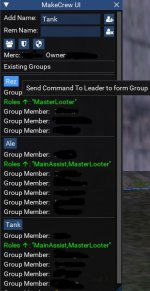
So I was bored and started modifying this UI again. Thought I would share.
Added buttons for
Disband All Groups
Disband Targeted Merc
Disband All Mercs
Players listed in the window are now target clickable. If you double click a name in a group it will target the player or merc.
Also, now when clicking the group name it will send commands to other group leaders to run makecrew and then form the group.
 

Attachments

  • Untitled.jpg
    Untitled.jpg
    64.8 KB · Views: 24
  • MakeCrew.zip
    MakeCrew.zip
    3.2 KB · Views: 15
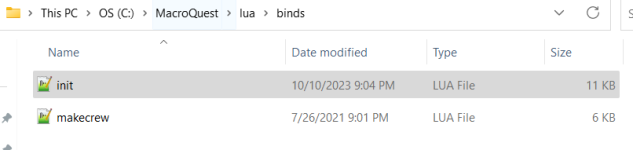
Ignore.. I figured it out. I put the whole makecrew folder that contained the init.Lua in the binds folder.

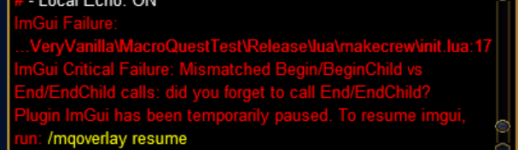
How do I get the UI?
My folder looks like this.
1696997488682.png
 
Last edited:
Release Make Crew [Bind]

Users who are viewing this thread

Back
Top
Cart