
-
 Hail, we're RedGuides. We want you to play six (yes, 6!) EverQuest characters at once. We have scripts and a friendly community to help, please join our playstyle and say hello! 👋
You are using an out of date browser. It may not display this or other websites correctly.
You should upgrade or use an alternative browser.
You should upgrade or use an alternative browser.

KissAssist Release KissAssist (4 Viewers) 12.002.40
- Thread starter ctaylor22
- Start date


ctaylor22 updated KissAssist with a new update entry:
Fix misspelling of ClickBackToCamp to ClickBacktoCamp
Read the rest of this update entry...
Fix misspelling of ClickBackToCamp to ClickBacktoCamp
This update is to just fix a misspelling of the ClickBacktoCamp variable.
Read the rest of this update entry...

Sum1
Warriors are inferior (read: crybaby) tanks
I had a toon started to cast Origin over and over for no reason.
I've been seeing this, as well, in the latest KA version.

Found out the hard way today that if you are using |debuffall specific settings in the DPS section that adding Conditions probably won't work. I was running into parsing issues during runtime.
I'm not stating the macro has a problem, I was in undocumented territory and I'm just offering an FYI in case others run into issues with conditionals breaking the macro execution.
For example these lines caused issues and once I removed the conditions I no longer had parsing issues:
problem conditionals
Now here are the lines that work perfectly without issue and according to the instructions!:
No problem Kemosabe!
I'm not stating the macro has a problem, I was in undocumented territory and I'm just offering an FYI in case others run into issues with conditionals breaking the macro execution.
For example these lines caused issues and once I removed the conditions I no longer had parsing issues:
problem conditionals
INI:
DPS1=Eradicate Magic|100|once|cond12
Cond12=${Target.Type.Equal[NPC]} && ${Target.PctHPs}>50 && ${Target.Beneficial.ID} && ${Target.Beneficial.ID}!=49665

DPS3=Slowing Helix|99|debuffall|slow|cond14
Cond14=!${Target.Slowed}
Now here are the lines that work perfectly without issue and according to the instructions!:
No problem Kemosabe!
INI:
DPS1=Eradicate Magic|100|debuffall|strip

DPS3=Slowing Helix|99|debuffall|slow
For some reason this keeps happening to only one of my toons, its always just my beastlord. Any ideas what might be causeing this?

Using kiss12 in assist mode
Using kiss12 in assist mode

can you post your conditions for your bstFor some reason this keeps happening to only one of my toons, its always just my beastlord. Any ideas what might be causeing this?
View attachment 28236
Using kiss12 in assist mode
only have 1 condition atm
[KConditions]
ConOn=1
CondSize=5
Cond1=!${Target.Slowed}
Cond2=TRUE
Cond3=TRUE
Cond4=TRUE
Cond5=TRUE
for his slow spell, only want him to do it if the shm slow hasnt landed
But, i changed line 1337 in the macro to /if (${Macro.Return.Equal[CAST_COND_FAILED]}) /Return
Seems to have stopped it for now.. but im pretty sure thats not the answer heh..
now that im looking at the conditions.. I maybe should change the other 4 to NULL maybe?
[KConditions]
ConOn=1
CondSize=5
Cond1=!${Target.Slowed}
Cond2=TRUE
Cond3=TRUE
Cond4=TRUE
Cond5=TRUE
for his slow spell, only want him to do it if the shm slow hasnt landed
But, i changed line 1337 in the macro to /if (${Macro.Return.Equal[CAST_COND_FAILED]}) /Return
Seems to have stopped it for now.. but im pretty sure thats not the answer heh..
now that im looking at the conditions.. I maybe should change the other 4 to NULL maybe?
ooohh, didnt think of that.. will give that a try. that
Well, so far so good.. changed the condition to include .ID, and changed the kiss macro line back to what it was originally, it it doesn't seem to be happening anymore..
On a side note, i went through the ini's for the rest of my team, and all their conditions had the .ID.. which would be why they weren't running into the same issue..
Thanks for the help Sic !!
Well, so far so good.. changed the condition to include .ID, and changed the kiss macro line back to what it was originally, it it doesn't seem to be happening anymore..
On a side note, i went through the ini's for the rest of my team, and all their conditions had the .ID.. which would be why they weren't running into the same issue..
Thanks for the help Sic !!
Last edited:

- Commits
- 2
Looks like ClickBacktoCamp went back to ClickBackToCamp with yesterdays patch.
Sorry if this is a trivial question, but getting more familiarized with Kissassist. f I start off with /mac kissassist assist <MAname> 95, and then wanted to switch my role to "chase" on the fly, would the most efficient method be to simply restart the macro with /mac kissassist chase <MAname> 95?
Also, does this automatically change the "returntocamp" settings?
Also, does this automatically change the "returntocamp" settings?
| /chase 0/1/on/off CharacterName | [General] | Toggles ChaseAssist on/off - ON will abandon camp and have your group follow the MA - good for manual pulling, or Hunter mode. CharcterName is optional, and can be used to change who you want to chase. The chase(WhoToChase) no longer has to be the MA. |
After starting the macro just use /chase on and the character will start chasing the MA.
Use /camphere on to turn OFF /chase and set a new camp location and turn ON ReturnToCamp.
When you turn on chase it will turn off returntocamp, and vice versa.
it also writes the change to the ini file so the next time you start kiss it will start in what ever mode to ended in.
After starting the macro just use /chase on and the character will start chasing the MA.
Use /camphere on to turn OFF /chase and set a new camp location and turn ON ReturnToCamp.
Thank you Bud!

So I have to relate another idiot failure on my part that has made using KissAssist less than pleasant at times. When I'm trying to dungeon crawl with my group and my melee characters always seem to have a problem engaging the mob. They spin and twirl like Olympic class figure skaters.
Well... when I was setting up all my control buttons (since I use a custom UI), I created my own Chase Assist button. Which looked like this:
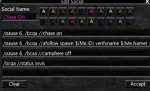
Anybody see the problem? TL R... /afollow doesn't leave your characters the latitude to melee engage on a regular basis. They have their noses up the MA butt so far they can't get on the target!
DUH!
Well... when I was setting up all my control buttons (since I use a custom UI), I created my own Chase Assist button. Which looked like this:
Anybody see the problem? TL
R... /afollow doesn't leave your characters the latitude to melee engage on a regular basis. They have their noses up the MA butt so far they can't get on the target!DUH!

Running into issue with Mage no longer casting summon weapon spell 2x for pet. Not exactly sure when this really changed, I know it did used to work. I am guessing it changed going from v11 to v12, didn't notice til saw pet was only running around with 1 weapon.
PetToysOn=1
PetToysSize=6
PetToys1=Dagger of Symbols|Summoned: Dagger of Symbols
PetToys2=Dagger of Symbols|Summoned: Dagger of Symbols
PetToys3=Summon Phantom Plate
PetToys4=Summon Elemental Blanket
PetToysGave=Gobekn|Dagger of Symbols:Summoned: Dagger of Symbols1|Summon Phantom Plate
last line used to read
PetToysGave=Gobekn|Dagger of Symbols:Summoned: Dagger of Symbols1|Dagger of Symbols:Summoned: Dagger of Symbols2|Summon Phantom Plate
the Summon Elemental Blanket also doesn't get passed to pet.... it just remains held on cursor
PetToysOn=1
PetToysSize=6
PetToys1=Dagger of Symbols|Summoned: Dagger of Symbols
PetToys2=Dagger of Symbols|Summoned: Dagger of Symbols
PetToys3=Summon Phantom Plate
PetToys4=Summon Elemental Blanket
PetToysGave=Gobekn|Dagger of Symbols:Summoned: Dagger of Symbols1|Summon Phantom Plate
last line used to read
PetToysGave=Gobekn|Dagger of Symbols:Summoned: Dagger of Symbols1|Dagger of Symbols:Summoned: Dagger of Symbols2|Summon Phantom Plate
the Summon Elemental Blanket also doesn't get passed to pet.... it just remains held on cursor
Running into issue with Mage no longer casting summon weapon spell 2x for pet.
It hands the pet the second weapon but for some reason it doesn't always click the button to give it to the pet. Then it ends up on the cursor and of course destroys it. Easiest solution is to customize your kissassist.mac file with the code from this thread.
It hands the pet the second weapon but for some reason it doesn't always click the button to give it to the pet. Then it ends up on the cursor and of course destroys it. Easiest solution is to customize your kissassist.mac file with the code from this thread.
looked that thread over and tried changing to the INI to example given for pet... still no joy. mage does NOT cast the 2nd summoned weapon. Mage summons weapon gives to pet then swaps out the spell out for the summoned plate and so on... its only the weapon summoning that is the issue at moment, its not being cast twice. And well mostly, elemental Blanket isn't being given to pet but was something i was adding in as was new item. main concern is the weapons, it used to work and now doesn't. I have tried so many different things that i really have broke it and am stuck in loop of the armor getting cast non stop after the routine...

I no longer code due to tend to make things worse than improve these days, see above for explanation if need one.

@Draknocht PM me the ini file you are using.
Questions for @ctaylor22 ...
I want to get tighter control of my dps for burning at the right time in CoV missions. For example in the Skyshrine group mission The Crusaders I prefer to save my burns for the final dragon. But all my characters begin burning on the very first dragon and there's nothing left by the time I get to the last dragon. 3 out of 4 missions in CoV require burning later in the event rather than right away.
From reading the current directions it would appear I should ensure
And then when I actually want to burn I should issue the command
I'd like an understanding how the [Burn] section will be parsed. For example my Mage has 16 entries in that section and I need to use Conditional logic because some of those burn items are mutually exclusive. Will the macro make one pass when I issue the
The reason I'm looking at this is my current INI files handle the burning in the [DPS] section by using the conditional
Finally, I think Kiss 11 used a
Thanks for any insight you can provide. Burning at the correct time will make these missions a lot easier!
Edit to ask another question... My older INI files have a line
Edit to add I'm using the currently (March 12, 2021) available kissassist 12 not a beta version.
Edit to add that I answered my own question about Tribute. As a suggestion perhaps you want to add a 2nd command to that section for
I found the following lines in my kissassist.ini file...
Enable tribute block in KA Burn Section
Edit to ask yet another question... Some of the Mage burn spells have a discrete casting time and with an extensive [Burn] section the macro could spent many seconds here. Is there an escape mechanism to do things like pet heals or drop aggro?
Here's my existing [Burn] section and it's only going to get longer as I move things out of my [DPS] section to more correctly reflect their intended usage...
Mage Burn Section
I want to get tighter control of my dps for burning at the right time in CoV missions. For example in the Skyshrine group mission The Crusaders I prefer to save my burns for the final dragon. But all my characters begin burning on the very first dragon and there's nothing left by the time I get to the last dragon. 3 out of 4 missions in CoV require burning later in the event rather than right away.
From reading the current directions it would appear I should ensure
BurnAllNamed=2 and then ensure my KissAssist_Info.ini file doesn't contain any of the mob names!And then when I actually want to burn I should issue the command
/bc //burn from my driving character since I still use EQBCS for communications. (Or /bct SomeChar //burn if I want to specify a single character begins their burns?)I'd like an understanding how the [Burn] section will be parsed. For example my Mage has 16 entries in that section and I need to use Conditional logic because some of those burn items are mutually exclusive. Will the macro make one pass when I issue the
/burn command? What happens if I spam the /bc //burn command from my driver? In other words, I'm concerned that the [Burn] section will be entered repeatedly to ensure every command gets executed in the conditional sequence I plan to configure.The reason I'm looking at this is my current INI files handle the burning in the [DPS] section by using the conditional
${Target.Named}. Of course I'm going to need to strip that logic out in order to get manual control of burns. I'd like to make sure I use the [Burn] section in the most DPS-centric method. Of course the actual nukes and actions will remain in the [DPS] section.Finally, I think Kiss 11 used a
BurnText=something. Is that no longer in use and replaced by the /burn command?Thanks for any insight you can provide. Burning at the correct time will make these missions a lot easier!
Edit to ask another question... My older INI files have a line
UseTribute=1 in the [Burn] section. But that's not in the current instructions. Is that option still working?Edit to add I'm using the currently (March 12, 2021) available kissassist 12 not a beta version.
Edit to add that I answered my own question about Tribute. As a suggestion perhaps you want to add a 2nd command to that section for
/tribute trophy on?I found the following lines in my kissassist.ini file...
Enable tribute block in KA Burn Section
INI:
        /if (!${BurnActive}) /call BroadCast r "BURN ACTIVATED => Autobots Transform <="
        /if (${UseTribute} && !${Me.TributeActive}) {
           /squelch /tribute personal on
           /varset TributeTimer 570s
        }
Edit to ask yet another question... Some of the Mage burn spells have a discrete casting time and with an extensive [Burn] section the macro could spent many seconds here. Is there an escape mechanism to do things like pet heals or drop aggro?
Here's my existing [Burn] section and it's only going to get longer as I move things out of my [DPS] section to more correctly reflect their intended usage...
Mage Burn Section
INI:
[Burn]
BurnSize=16
BurnText=BurnNow
BurnAllNamed=2
UseTribute=1
Burn1=Focus of Arcanum|Me
Burn2=Rage of Rolfron|Me
Burn3=Heart of Skyfire|Me
Burn4=Thaumaturge's Focus|Me
Burn5=Companion's Fortification|Me
Burn6=Spire of Elements|Me
Burn7=Improved Twincast|Me
Burn8=Second Wind Ward|Pet
! 0.3 sec cast
Burn9=Ice Woven Flameweaver Robe|Mob
! 0.5 sec cast
Burn10=Host in the Shell|Pet
Burn11=Servant of Ro|Mob
Burn12=Summoned: Exigent Servant XXIII II|Mob
Burn13=Summoned: Exigent Minion XXIII|Mob
! 1.0 sec cast
Burn14=Host of the Elements|Mob
Burn15=Companion's Fury|99|Pet
Burn16=Glyph of Destruction (115+)|Me
Last edited:
Finally, I think Kiss 11 used a BurnText=something. Is that no longer in use and replaced by the /burn command?
The Burn command was changed from an Event to a Bind, so the BurnText was used to trigger the event. BurnText is now just for broadcasting.
Because of MQ2, and the way Binds work, by design you can only have 1 Bind active at a time. You CANNOT execute a bind from a bind, and if you are in a /bind and hit a hotkey to execute another /bind MQ2 will bark at you.
So if you are burning and hit your /burn hot key again, you will get barked at, but your burn will continue.
From reading the current directions it would appear I should ensureBurnAllNamed=2and then ensure my KissAssist_Info.ini file doesn't contain any of the mob names!
Never thought about it in that manner, but I think you may be on to something. What I would do is create me a new mycmd command to update the KissAssist_Info.ini. I would set up the command so I could blank out the MobsToBurn field or write a name in the entry.
If I was using hotkeys this is how I would do it.
Hot Key 1:
Clear Burn
/ini "${InfoFileName}" "${ZoneName}" MobsToBurn NULL
Hot Key 2:
Set Burn
/ini "${InfoFileName}" "${ZoneName}" MobsToBurn "${Target.CleanName}"
So if I set BurnAllNamed=2 the first thing I would do after starting KissAssist is hit my Clear Burn key. Now there is nothing in the list to burn.
Then once I target a mob, I WANT everyone to /burn. I would hit my Set Burn key to update MobsToBurn. Now there is still the issue of pushing the NEW MobsToBurn to the other characters.
There is a couple of ways to push out the new MobsToBurn to the other characters, one would be to create another hot key, but I think a cleaner solution would be too add two lines of code to the Macro.
I would add "/varset MobsToBurn ${Ini[${InfoFileName},${ZoneName},MobsToBurn]}" in two locations in the NamedWatch routine.
There are two places where you will find these 2 lines:
Rich (BB code):
                    | Setting BurnAllNamed=2 will only burn mobs on the list.
                    /declare i int local
I would add the additional line just below the last line above, so the code would look like this:
Rich (BB code):
                    | Setting BurnAllNamed=2 will only burn mobs on the list.
                    /declare i int local
                    /varset MobsToBurn ${Ini[${InfoFileName},${ZoneName},MobsToBurn]}
Now anyone looking at the same ini file will get the updated/changed MobsToBurn from the ini file before checking the burn name list.
I'd like an understanding how the [Burn] section will be parsed. For example my Mage has 16 entries in that section and I need to use Conditional logic because some of those burn items are mutually exclusive. Will the macro make one pass when I issue the /burn command? What happens if I spam the /bc //burn command from my driver? In other words, I'm concerned that the [Burn] section will be entered repeatedly to ensure every command gets executed in the conditional sequence I plan to configure.
Well the Burn routine was originally designed to be a one and done type routine, That got executed when called on, by an actual real person. This routine was created for a real person making the decision on when it should be fired. So it has always been intended for someone at the keyboard to trigger the routine.
There is only one instance that I know of where the Burn routine will get interrupted and not flow from beginning to end.
First, the Routine is designed to execute all entries from beginning to end. There is no wait on Global cooldown, so instant cast abilities are preferred. Any entry that is not ready to be used is skipped. You should keep this in mind when setting up your burn. Also something to keep in mind is there is no checking for any other function when in the burn routine. The means if you set up your Cleric's Burn routine to cast a lot of stuff and/or spend a lot of time in the routine. The MA could be dead by the time the cleric leaves the routine. Like I said there is no other checks in this routine. The best way I know to describe this routine is. It is a one and done routine that you should setup to get in and out of ASAP.
Now let's go back the the first statement I made in this section. The /burn routine is a Bind and you can not execute a /bind from a /bind unless you use the /call and access the Bind as a normal routine. Hope your still with me, lol... Here is where things can fall apart.
The Bind_Burn routine does a /call to the Burn routine, so if you enter the Bind_Burn routine as a /bind then everything will work like intended and there will be NO interruption.
But the NamedWatch routine calls the Burn routine directly /call Burn. That means if you are Burning a mob because the NamedWatch routine triggered the Burn, and you hit your /burn hot key, you just halted the /Burn routine in it's tracks and the Burn will start over. That is not all there is to it, but basically if your going to use the NamedWatch routine to use Burn, then don't use the /burn command on those same characters.
Hope this was helpful.
The Burn command was changed from an Event to a Bind...
Hope this was helpful.
Thank you for responding, it's going to take me a while to digest this!
I did get one very important insight about the "one and done" aspect of the Burn section! That will make a big difference what I put in that section!
Do you have any thoughts on how I could use Conditions to check if I'm in Burn mode? Then I could leave a lot of my actions in the [DPS] section but use the "Burn" status as part of the conditional logic. When I've tried this in the past the macro wouldn't initialize because it detected variables being used in the [KConditions] section which hadn't been initialized yet.
Yep. Sure thing. There are two global variable that gets set when you start and finish Burning. When you use /burn the variable BurnCalled gets set to 1, when the burn starts, and set to 0 when the burn target is dead. There is also a variable BurnActive that gets set to 1 when the burn routine finishes, and gets set to zero after the mob dies.
Hope that helps.
Hope that helps.
Yep. Sure thing. There are two global variable that gets set when you start and finish Burning. When you use /burn the variable BurnCalled gets set to 1, when the burn starts, and set to 0 when the burn target is dead. There is also a variable BurnActive that gets set to 1 when the burn routine finishes, and gets set to zero after the mob dies.
Hope that helps.
Cond10=${BurnActive} returns the expected results! Thanks!
Plus I made an error several posts ago... the command to turn Trophy Tribute on is
/trophy personal on! If you have the newer trophy's it can be huge!So I checked all the spells in my [Burn] section and took out any that were not Instant cast. Then I replaced all my ${Target.Named} conditions with ${BurnActive}. Then I took all the things which I had stripped out of the Burn section and added them to the DPS section with the BurnActive condition. While in the files I also ensured each was set to BurnAllNamed=2. Finally I added a hot button on my driving character (my SK) with a command /bca //burn.
Works awesome! Now I'm back in complete control of when the characters actually burn. If running manually I have to click the button. If camping a namer I just have to edit the Info file and add the mobs name!
On the Sleeper's Tomb mission tonight Vulak just melted because every character had all their burn abilities available when I clicked the button.
Works awesome! Now I'm back in complete control of when the characters actually burn. If running manually I have to click the button. If camping a namer I just have to edit the Info file and add the mobs name!
On the Sleeper's Tomb mission tonight Vulak just melted because every character had all their burn abilities available when I clicked the button.
- Commits
- 2
Line 11369 /if (${Me.Fellowship.Campfire} && ${ClickBackToCamp}==1) /break
clickbacktocamp went back to broken again. should be
Line 11369 /if (${Me.Fellowship.Campfire} && ${ClickBacktoCamp}==1) /break
clickbacktocamp went back to broken again. should be
Line 11369 /if (${Me.Fellowship.Campfire} && ${ClickBacktoCamp}==1) /break

Anybody know of this error? Cant seem to run KA on paladin during grinds. Just attacks now. Stopped working last night/this morning.
[KissError]
LastCMD:=/if (!37) {
ErrorDateTime:=03/20/2021 20:59:51
ErrorMsg:=DoCommand - Couldn't parse '/PAL pause off'
DataError:=NULL
SyntaxError:=Could not find channel ber
RunningTime:=49858279
BuildDate:=20210311
CurrentUI:=Default
[KissError]
LastCMD:=/if (!37) {
ErrorDateTime:=03/20/2021 20:59:51
ErrorMsg:=DoCommand - Couldn't parse '/PAL pause off'
DataError:=NULL
SyntaxError:=Could not find channel ber
RunningTime:=49858279
BuildDate:=20210311
CurrentUI:=Default
@B_I_G__D_A_D_D_Y : I use BurnAllNamed=0 and a Hotbutton "/dggaexecute /burn" (/bc //burn for Eqbcs). Seems to work fine.
Whats the benefit to use BurnAllNamed=2 over BurnAllNamed=0?
Whats the benefit to use BurnAllNamed=2 over BurnAllNamed=0?
@B_I_G__D_A_D_D_Y : I use BurnAllNamed=0 and a Hotbutton "/dggaexecute /burn" (/bc //burn for Eqbcs). Seems to work fine.
Whats the benefit to use BurnAllNamed=2 over BurnAllNamed=0?
BurnAllNamed=2 also allows your characters to burn automatically on mobs you've entered into your kissassist_info.ini file. So like if you're doing Hunter in a zone, you could pre-enter all their names in the file and then KISS will burn them without any further input from you. Probably mainly for when you are AFK camping a named.
OK, not real certain where to post this one, but my Mage after this last CTWN update has decided he going to pull when Monk is waiting for group mana / End thresholds. was funny watching the gnome sprint off and grabbing stuff but I can see this going awry very quickly. Mage is not set to pull in kiss ini, nor in the group selection. Monk has always been set as puller. Since still camping same spot i been in for last 3 days, tonight was the only time it has started happening.
You should restart kiss and ensure you're not starting it with the puller flagOK, not real certain where to post this one, but my Mage after this last CTWN update has decided he going to pull when Monk is waiting for group mana / End thresholds. was funny watching the gnome sprint off and grabbing stuff but I can see this going awry very quickly. Mage is not set to pull in kiss ini, nor in the group selection. Monk has always been set as puller. Since still camping same spot i been in for last 3 days, tonight was the only time it has started happening.
/mac kissassist assist ${Group.MainTank}
You should restart kiss and ensure you're not starting it with the puller flag
/mac kissassist assist ${Group.MainTank}
The command is same it's hotkeyed so it starts all the Kiss toons with kissassist, Bard isn't pulling but mage is. Monk is sitting due to low endurance, Monk is using CTWN and has the puller flags and is set to pullerassist. just to make sure something not changed, where is the on off for puller in the kissassist so can make sure i don't have it on there.
well nothing to do with mq2monk or the cwtn plugins would make your mage pull.The command is same it's hotkeyed so it starts all the Kiss toons with kissassist, Bard isn't pulling but mage is. Monk is sitting due to low endurance, Monk is using CTWN and has the puller flags and is set to pullerassist. just to make sure something not changed, where is the on off for puller in the kissassist so can make sure i don't have it on there.
the only thing that will make your mage pull is if it is flagged either in its ini, or by start command parameters to be in puller mode
well nothing to do with mq2monk or the cwtn plugins would make your mage pull.
the only thing that will make your mage pull is if it is flagged either in its ini, or by start command parameters to be in puller mode
I didn't think it was with the monk, i just need to know what all to check to find where this was going awry at, I found it on the Bards kissassist hotkey... it was set to puller, but am curious why bard wasn't going out pulling as the hotkey should of affected him as well and not just mage.
 Either way all corrected now. Thanks
Share: