- Seller
- #401
I go off what I'm told for that class. I don't have a necro myself. This is the line that tries to find the lev AA. What value should be present for Necros?
/varset levAbility ${Select[TRUE,${Me.AltAbilityReady[Group Perfected Levitation]},${Me.AltAbilityReady[Perfected Dead Men Floating]},${Me.AltAbilityReady[Shauri's Sonorous Clouding]},${Me.AltAbilityReady[Perfected Levitation]},${Me.AltAbilityReady[Perfected Dead Man Floating]},${Me.AltAbilityReady[Bobbing Corpse]},${Me.AltAbilityReady[Elemental Form: Air]},${Me.AltAbilityReady[Noteworthy Disguise: Blue Drake II]},${Me.AltAbilityReady[Divine Steed]},${Me.AltAbilityReady[Steed of Souls]}]} Started using Mq2 yesterday specifically because of explore.mac
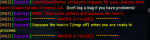
  Trying to get this to run using my 113 Shaman so lev/invis/shrink clickies arent theissue. I tried following the repair procedure you specified for Farmer217 (delete denecore and explore.mac) so deleted denecore folder and explore folder and the separate explore file and had launcher reinstall them using both the reinstall and update buttons. Exact same error message. DeneCore and Explore are in the macros folder all denecore file are there . MQ2nav is loaded and as far as i can tell works since it paths me to other zones, displays meshes, etc. I am probably missing something simple but since I'm brand new, these are literally the only 2 macros i have installed other than muleassist, i am at a loss.