the_ovenman
Well-known member
Will the Macros I currently use work with NEXT Specifically the Bazaar mac?



/ooc, /shout or other public channels. This has been an unwritten rule that's kept casino scripts off the site for decades, but we're now compelled to make it clear: keep automated communication private./target over impossible distances when /nav spawn would passively accomplish the same thing, a spawn search that fires 20+ times per second, and other pointless actions that are likely annoying GMs./lua run

yup most/all should workWill the Macros I currently use work with NEXT Specifically the Bazaar mac?
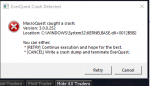
dmps get autosent to the MQ dev team for review (and cwtn/myself).Next is working flawlessly on my desktop down in the basement but my laptop I use upstairs, one session keeps crashing. The other 5 run without issue and no issues when I fall back to MQ2.
I tried many things to replicate or to identify the cause but without any luck. At first I thought it was zoning but it will crash after I login and without touching anything on the keyboard after awhile.
This toon is a monk and has just the standard plugins enabled as well as MQ2Monk
Not sure how to troubleshoot this - any help is appreciated!
View attachment 33365
dmps get autosent to the MQ dev team for review (and cwtn/myself).
I haven't seen anything specific come through that jumps out as an mq2monk specific crash (you likely have 30-50 plugins other than mq2monk loaded and doing stuff).
do you have any overlay software running? like discord overlay, the built-in nvidia stuff - asus's sonic overlay stuff etc? anything like that? as some of those appear to be frequent fliers on the "crash airlines"
also out of curiosity - can you share what you have your frame limiter settings to?
it does not currently, no.Does Next work on EMU servers? If not, is there any intent to enable it for EMU?
waiting to hear from knightly/brain about it, but apprears just to be an issue with the "promt if out of date"Tried updating and using today and keep getting
Update Available
You are running version 3.0.0.0
Current latest version 3.0.0.256
exit out completly and reload patcher, shows im updated. tried the reinstall. Same problem. DL from the Dl link above and moved into folder, nope same issue
Howdy Myyst,I know you got lots of things you're working on and I really appreciate all the work you put into MQNext, but I just have a couple sections for the MQNext Section of the RG Launcher
- Please add a launch EQBCS button to the launcher main screen. It can get a little weird launching EQBCS when you already have Everquest logged in and when you load MQ, it auto loads the MQ window and dorks up the /bccmd connect for any toons that are already logged in. The load EQBCS option in this case needs to be before you load MQ. I'm sure there's situations where you'd want to load your injections into EQ without having BCS up, so i won't suggest you not load MQ window until after BCS is up. Just an easy option to do it the other way around would be nice. When you have to load the launcher without logging out cause its acting weird, it would ne nice to be able to get EQBCS up before the injections are sent to the UI in game.
- The "Latest updates" notes in the launcher isn't always the most current updates. It would be nice to be able to see them before you launch MQNext and get your programs up. The only place i know to see them is at the character select screen and i have 3 minutes to read them unless I load up manually.
- Mesh updater button.
- I have had issues updating my MQNext after I /unload as i get an error i need to unload everything on all my toons, but I have. I saw an update which might have covered this, but I wasn't sure if it was what it meant, but I am just saying in case it wasn't.
Thx Sicwaiting to hear from knightly/brain about it, but apprears just to be an issue with the "promt if out of date"
the actual version it downloads is correct as an /echo ${MacroQuest.Version} returns 3.0.0.356 corrrectly.
can likely just disregard
- Please add a launch EQBCS button to the launcher main screen. It can get a little weird launching EQBCS when you already have Everquest logged in and when you load MQ, it auto loads the MQ window and dorks up the /bccmd connect for any toons that are already logged in. The load EQBCS option in this case needs to be before you load MQ. I'm sure there's situations where you'd want to load your injections into EQ without having BCS up, so i won't suggest you not load MQ window until after BCS is up. Just an easy option to do it the other way around would be nice. When you have to load the launcher without logging out cause its acting weird, it would ne nice to be able to get EQBCS up before the injections are sent to the UI in game.
YOu completely missed the point of the recommendation. The reason is because it loads out of order when your group is ALREADY loaded.when you go to load your group(s) there’s a line that says “start Eqbcs server” or something very similar. click that before loading the groups and it works the same as when doing it on the live version. I’m not home or I would post a screenshot but it’s pretty easy to see.
I’m still not completely following then. You click the start eqbcs line and it opens the window just like when its in the launcher, then you load your group. I’m not sure what you mean by it loads out of order when the group is already loaded. Honestly I’d prefer it in the launcher too as it’s just 1 more step for me to forget but it seems to work fine when I do it that way.YOu completely missed the point of the recommendation. The reason is because it loads out of order when your group is ALREADY loaded.
he's loading EQ first, then MQ.I’m still not completely following then. You click the start eqbcs line and it opens the window just like when its in the launcher, then you load your group. I’m not sure what you mean by it loads out of order when the group is already loaded. Honestly I’d prefer it in the launcher too as it’s just 1 more step for me to forget but it seems to work fine when I do it that way.
then you load your group. I
As it turns out, I'm either illiterate or really bad at math. Found and will be fixed in the next build. Thanks for the heads up.Thx Sic
kk, logged in and played just fine but wanted to let them know what was happening to some atleast

he's loading EQ first, then MQ.
I don't know why you want to do it this way, but you can launch eqbcs manually from your MQ folder if you really need to do it without the launcher.
I wasnt loading EQ first... I had EQ up because I occasionally need to unload MQ for various reasons. I don't always want to relog to get it to work right.
Nope. I had to close it so I can update it... or its acting funny... or something else. Sometimes you gotta load MQ2 and EQBCS when you already are logged into EQ.If thats the case then you would already have a way to launch eqbcs...
Live has ability to launch EQBCS via the launcher, Next does not. Also, loading MQ via the launcher automatically forces into EQ and dorks up all your connections which you then must load /bccmd manually and wastes time.I believe brainiac's point was that you can close it and subsequently reopen it with a shortcut, you don't really need anything in the tray icon and it adds minimal value (in general) for non-core component. Being that the launcher already handles it for you, it doesn't need to be handled in the tray utility. There's multiple methods to accomplish what you want, without adding it to the tray utility. So hopefully that clears it up.
Live has ability to launch EQBCS via the launcher, Next does not. Also, loading MQ via the launcher automatically forces into EQ and dorks up all your connections which you then must load /bccmd manually and wastes time.
/dgae /bccmd connectBECAUSE MY GROUP IS ALREADY LOADED AND IM STARTING UP MQ2 DUE TO SOME SORT OF EVENT. I had to /unload on all my toons to do an update, or check for an update, or cause i just felt like it. Regardless... If you open MQ2, it will load injections on all your toons before you can get EQBCS open and you gotta manually /bccmd connect.
Maybe a few times, but definitely not daily.will Next be compiled for beta coming up in a few weeks?
Also if we are lucky it will crash you when you die! /crossesfingers!Maybe a few times, but definitely not daily.
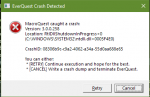
I get that same ntdll.dll error about 50% of the time when launching EQ. I use ISBoxer and autologin to launch the clients as a group and usually have to reload a few times before they all get into game. For me, it happens almost immediately on launching the game. If I can make it to the password prompt, I'm good for that client instance.Hi folks not sure what is happing but when I log out of the game I get this
View attachment 33717
This only happens when I log out. I tried several characters with just EQ. They all logged out just fine. I load up RedGuides Launcher. Launch EQBC 2 then launch MQ (button). Load up my group and everything works. I run the group to do stuff and then camp out. So far so good then as I log out each character I get this (see above). I am using MQNext. I have not tried it just on Live as of yet. Will check it tomarrow.
Any Ideas would be great. Thanks all.
Zeb
This should be in the next build.Is it possible to get MQ2Ice plugin on Next?
Please and thank you
MQ2GearScore was renamed to MQ2ItemScore. I got the latest code from dewey and posted it up. He said it's untested on Next so you'll have to let us know how it goes. MQ2ItemScore will be in the next build.
The yaml they were talking about is in resources\EasyFind\ZoneConnection.yaml. You should have it already.
did you run the eqbcS (server) - there is no option on the VV launcher at the moment.HI, i just loaded MqNEXT. It sayes to connect to BCCMD connect. which is do and it states could not connect! any idea's?
thanks