
-
 Hail, we're RedGuides. We want you to play six (yes, 6!) EverQuest characters at once. We have scripts and a friendly community to help, please join our playstyle and say hello! 👋
You are using an out of date browser. It may not display this or other websites correctly.
You should upgrade or use an alternative browser.
You should upgrade or use an alternative browser.

Vanilla - Very Vanilla MQ (Live Servers) (4 Viewers) 3.1.52471.42
- Thread starter Knightly
- Start date

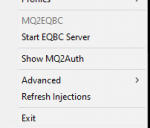
you can right-click on your MacroQuest iconok one quest where is that start eqbc server icon located>? im going to reboot now. thanks

and "Start EQBC Server"
from:
I'm not sure what your question means "i also do not have the mq window not the mq2?" - There is the new macroquest console, which you can enable to be default visible in your macroquest.ini withah once again your right on top of things. Are there other MQ2 files i need to download to get this fully functioning?
I also do not have the mq window not the mq2?
thanks
ShowMacroQuestConsole=1the "regular" mq2 window comes from mq2chatwnd - so you can load it with
/plugin mq2chatwnd or just /plugin chatwndIf you didn't use the migrator you would have the "out of the box default" settings for your configs and plugins.
This is what i recommend starting with:
download next via the RG launcher
hit the migrator tool (will move any configs/macros etc from old install) (has a vid too)
setup framelimiter (i have a quick vid on it)
Migrator: <https://www.redguides.com/community/resources/macroquest-migrator.2156/>
Framelimiter: <https://www.redguides.com/community/threads/mqnext-framelimiter-demo.78448/>
then:
/plugin groupinfo
/plugin targetinfo
/plugin xtarinfo
mental notes:
mq2map click is Control+Shift+Click
new easyfind self travel is Control+Click (reminder in find window title bar)
new easyfind group travel is Control+Shift+Click
one you get all that good stuff situated, I would jump right into BoxHud, Lootly, and ButtonMasterYes i did the Migrator. will try the rest now. thanks
some absolutely game changing stuff
I'm attempting to switch to Macroquest. I downloaded the migrator tool, ran it through powershell and now I'm getting this
EDIT: I figured it out. I never actually downloaded Macroquest{Next}. When I selected next via the Launcher I thought it was DLing Macroquest.
EDIT: I figured it out. I never actually downloaded Macroquest{Next}. When I selected next via the Launcher I thought it was DLing Macroquest.
Last edited:
This is what i recommend starting with:
download next via the RG launcher
hit the migrator tool (will move any configs/macros etc from old install) (has a vid too)
setup framelimiter (i have a quick vid on it)
Migrator: <https://www.redguides.com/community/resources/macroquest-migrator.2156/>
Framelimiter: <https://www.redguides.com/community/threads/mqnext-framelimiter-demo.78448/>
then:
/plugin groupinfo
/plugin targetinfo
/plugin xtarinfo
mental notes:
mq2map click is Control+Shift+Click
new easyfind self travel is Control+Click (reminder in find window title bar)
new easyfind group travel is Control+Shift+Click
NOTED...!
NOTED!one you get all that good stuff situated, I would jump right into BoxHud, Lootly, and ButtonMaster
some absolutely game changing stuff
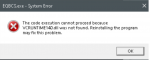
I'm getting this when I start click the Start EQBCS option in the MacroQuest system tray
Last edited by a moderator:
Hey Folks,
I downloaded MacroQuest, then used the MacroQuest Migrator that Knightly made to copy all my files into my "NEXT" folder that I placed on the desktop. Some things are not working right for me and I know it's me. It's not you!! I'll post new ones as I get them fixed.
Thanks for your patience
-- None of my Mesh are available so Easyfind won't work. The MQ2Nav folder inside the the Resource folder has 530 files.
I downloaded MacroQuest, then used the MacroQuest Migrator that Knightly made to copy all my files into my "NEXT" folder that I placed on the desktop. Some things are not working right for me and I know it's me. It's not you!! I'll post new ones as I get them fixed.
Thanks for your patience
-- None of my Mesh are available so Easyfind won't work. The MQ2Nav folder inside the the Resource folder has 530 files.
Last edited:

Does anyone have any ideas for me to try? I love this plugin to quickly evaluate gear and augs for 30 toons.[2021/10/07 12:19:28] Plugin 'mq2itemscore' unloaded.
[2021/10/07 12:19:31] MQ2ItemScore by Dewey2461 Version 3.16 - Aug 6th 2019 Type /iScore help for command list.
[2021/10/07 12:19:31] MQ2ItemScore Error:[DoCommand - Couldn't parse '|/outputfile inventory'] on Evaluate[${Me.Class.ShortName}] = [WAR]
[2021/10/07 12:19:31] MQ2ItemScore::LoadDB Failed to open file [C:\Games\MQNext\Config\MQ2ItemScoreTemplates.txt]
[2021/10/07 12:19:31] MQ2ItemScore::LoadDB Failed to open file [C:\Games\MQNext\Config\MQ2ItemScoreCache.txt]
[2021/10/07 12:19:31] MQ2ItemScore::LoadDB: 0 items, Found templates for [ ]
[2021/10/07 12:19:31] Plugin 'mq2itemscore' loaded.

Hi guys,
I think this is a Lua question , but I hope this is the right place to post it.
I used the Migrator and loaded my character up, they are running a few of Chat's plugins just fine and I wanted to try a few other things that are not working for me. /Lua ps , /Lua run buttonmaster, /Lua run alertmaster are all giving me an error saying this is not a valid command. I tried typing it in the MQ window as well. Any idea what I might be missing? /plugin groupinfo does work. I did copy the Lua files into the directories said.
I think this is a Lua question , but I hope this is the right place to post it.
I used the Migrator and loaded my character up, they are running a few of Chat's plugins just fine and I wanted to try a few other things that are not working for me. /Lua ps , /Lua run buttonmaster, /Lua run alertmaster are all giving me an error saying this is not a valid command. I tried typing it in the MQ window as well. Any idea what I might be missing? /plugin groupinfo does work. I did copy the Lua files into the directories said.

you need mq2lua loaded to use luasHi guys,
I think this is a Lua question , but I hope this is the right place to post it.
I used the Migrator and loaded my character up, they are running a few of Chat's plugins just fine and I wanted to try a few other things that are not working for me. /lua ps , /lua run buttonmaster, /lua run alertmaster are all giving me an error saying this is not a valid command. I tried typing it in the MQ window as well. Any idea what I might be missing? /plugin groupinfo does work. I did copy the lua files into the directories said.
/plugin mq2lua
Thank You, I must have missed it somewhere, was driving me nuts. :Pyou need mq2lua loaded to use luas
/plugin mq2lua
right click on the mq icon by the clock, and start eqbc server.MQNext will not load the eqcb server I have to go to the directory for mq and manually start the eqcb server...

I've tried that...
Ever since I added a cleric I've spent more time making mqnext and eq work than playing EQ. I've lost experience every day for the last week.
I made the usual mistake of copying my eq folders to an new directory and running the test server on all three of my accounts from those new "installs". Everything seemed fine. I login in to the test server on my three accounts and played for about an hour and got bored with test.
I went back to play on my regular live server and mq wouldn't load nor would eq. I couldn't load eq on the test server either. I was floored. I'd done everything right and yet another attempt to run on test and now I find myself, in the usual situation, when I try to play on test, my eq installs and mq2 installs were Borked.
I did what anyone would do after numerous ineffective edits of ini files and reinstallations of eq and mq2. I restarted my PC. I get the message on boot, hard disk not fount. I'm thinking there's no way an install of test on my pc should destroy my boot sector but somehow it did. I reformat do a reinstall of window 10 pro and then EQ and then MQ2. I reload everything from the C+ libraries and dx libraries etc.
I can finally load eq. But now mq2 is borked. All the "included with plugins" have to be loaded manually, even if they are in the ini. I'm getting vcruntime140.dll errors. I reinstall c+ from 2010 and that error goes away but now EQCB will not load any other way than manually starting it from the folder.
I get eqcb working but i'm still mannually having to load any plugin i want to use. Come to me is not working and all of my toons actions are delayed and or they don't respond.
I'm clearly stupid. Who spends $800 in a month on a game and software that none of the people you're paying the money give a shit if you can play and enjoy or not. DB sure doesn't give a shit, they just assume you'll spend more trying to play like you used to and my mq2 folks seem to have the same motivations, just get this upgraded macro or that one or buy another toon from the tunnel surely that will make eq enjoyable again...
Is there any way other than buying a sk off ectunnel and buying the upgraded versions of mq2 to enjoy EQ? If i do all that all i'm doing at that point is watching a movie of my toons playing eq...

Last edited by a moderator:

This is going to sound confusing, so I'm sorry in advance -- the first error, the one with the docommand is just because of how the evaluate gets the last error -- which is telling you that you have an error totally unrelated to MQ2ItemScore. It’s just giving you the last command that errored out.Does anyone have any ideas for me to try? I love this plugin to quickly evaluate gear and augs for 30 toons.
The second part is the actual error and I’ll have to look at it to see. Very little of the code was changed from what dewey gave me, so I’ll have to step through and see what the error is.
RG isn’t the place for RMT. Neither MQ or MQ2 modified your boot sector and it sounds like you’re talking about computer problems. I’d recommend starting a separate thread to help with that.Is there any way other than buying a sk off ectunnel and buying the upgraded versions of mq2 to enjoy EQ? If i do all that all i'm doing at that point is watching a movie of my toons playing eq...
View attachment 33908
Can anyone help with this? Seen this? This is what I get when starting eqbcs via the MQ icon from the system tray.
Can anyone help with this? Seen this? This is what I get when starting eqbcs via the MQ icon from the system tray.

View attachment 33908
Can anyone help with this? Seen this? This is what I get when starting eqbcs via the MQ icon from the system tray.
The missing dll comes from windows update, but I've configured EQBCS to not require it, that change will be in the next build.
Thanks Brain. ))The missing dll comes from windows update, but I've configured EQBCS to not require it, that change will be in the next build.
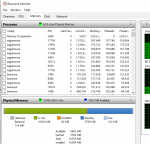
Wanted to add a thanks for all the work on Next, I'm slowly beginning to uncover its potential. Besides seemingly loading faster, on an older laptop that ran 6 characters decent with Wire (not more than decent), I can now easily run 9, possibly 10 smoothly. I am still testing, but I brought up the resource monitor and I was like Wow, this is great ! What do you guys use for memory checking?
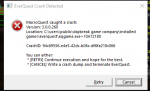
I made teh jump to next, so far it is running very smoothly and nice. When I do autologon on my crew, i get this crash very often. Like, 15 or so will log in, then 8 or so will crash, then the rest logon, When they crash, it moves my toons from middle monitor to another monitor, and even loaded up the daybreak launcher out of the blue. Also, i noticed i have models turned on now when i didn't before, i didn't' make any changes. Where do I even start to troubleshoot this error?
Are all your characters launching from the same EQ folder or different ones? To have some models on/off would require different eqclient.ini or WinEq type virtual ini files.I made teh jump to next, so far it is running very smoothly and nice. When I do autologon on my crew, i get this crash very often. Like, 15 or so will log in, then 8 or so will crash, then the rest logon, When they crash, it moves my toons from middle monitor to another monitor, and even loaded up the daybreak launcher out of the blue. Also, i noticed i have models turned on now when i didn't before, i didn't' make any changes. Where do I even start to troubleshoot this error?
View attachment 33982
models just come from your eqclient.iniall launching from same folder, nothing fancy, just a regular setup. Everyone has models on now, not some, so i was mistaken there. Not that i'm complaining about models being on, just noticed it was different.


Autumn
Well-known member
that is not mq2easyfind group buttons, those are from the mq2groupinfo plugin.
/plugin mq2groupinfo load
ah gotchyea
my brain sometimes confuses some of the mq2 plugins
thanks
Betting you aren’t using the default UI.Still Struggling with group members distance being displayed in Group Window, all three needed plugins loaded. Might be INI thing?
if you have a custom UI you need to edit the ini file to allow for it.
Betting you aren’t using the default UI.
if you have a custom UI you need to edit the ini file to allow for it.
Fixed!
INI:
[UI_classic_spell_icons]
DynamicUI=1
In the Groupinfo INI file just had to set DynamicUI to 1 instead of 0.
Last edited:
models just come from your eqclient.ini
ya, but it was weird the game reverted back to some settings i hadn't had, like it defaulted back to defaults. This is pretty frustrating, i do auto logon, half login fine, then i get this crash on everyone that was loaded, then everyone else loads up on a different monitor which has a different resolution. Then, i have to drag them to the main monitor and move all my chat boxes around again, on like 15 toons.
And, when it crashes, the toons when i log them back in revert back to new models again, and graphics settings that i normally have turned off are now back on.
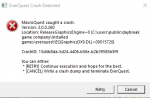

That's a graphics crash, while MQ may be contributing to it there's nothing in the call stack from MQ, it's all EQ. We don't modify the eqclient.ini (which is what stores your model settings). So anything getting modified there is likely a result of whatever happens when that crash happens and not anything MQ is specifically doing. This is likely related to your monitors having different resolutions and EQ getting dropped there, but it's not something I can reproduce with different resolutions myself.
Users who are viewing this thread
Total: 5 (members: 0, guests: 5)
Share: