• You've discovered RedGuides, an EverQuest multi-boxing and scripting community 🧙‍♀️⚙️. We want you to play several EQ characters at once, come join us and say hello! 👋

  • A TLP without truebox has thawed (Very Vanilla ready)
    Frostreaver
Very Vanilla MQ (Live Servers)

Vanilla - Very Vanilla MQ (Live Servers) (5 Viewers) 3.1.52471.11

No permission to download
Well shitsky, I just got use to things the way they were. haha
the developers have gone through pretty great lengths to ensure backwards compatibility and an impressive amount of fixes, optimizations, and enhancements. You should find your experience is enhanced, rather than more painful - but be generous with your feedback, if you find something that is cumbersome or such a departure that it gives you a bad experience, let the devs know.

> here < is the gitlab issues tracker if you're curious or you run across something that needs some TLC
 
Well shitsky, I just got use to things the way they were. haha

What Sic said is 100% true. There's a public issues tracker here and brainiac/Knightly/dannuic are great about taking ideas for enhancements or resolving bugs.
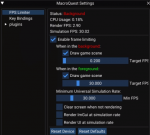
The framelimiter that's built in (EverQuest button-Macroquest Settings) has reinvigorated my interest in EQ and allows me to box another group or two:
1624918412106.png
 
Were there plugins missing? Or you mean your config?

It was my fault. I did a clean install of Next but only copied my KA ini files over so I was missing a huge amount of config files and probably more importantly, macroquest.ini was sparse so I wasn't loading half of my normal plugins.

I know I could have made it right with some judicious mods and copying of config files but I was lazy so just went back to existing Live.
 
I noticed there was mention of a migrate script, is there a setup guide for dummies that don't like to get headaches somewhere?
 
It should just be “Run the script and follow the prompts” — but if you run into issues let me know and I’ll fix them.

The only “gotcha” I’m aware of is that I don’t build eqbcs, but you can use your preferred server from the mq2 build and it will work.
 
Attached is what I was thinking of for a migration helper for users. This is based on Sic's initial work. It's pretty hacky, but for a one time thing I think it will suffice. If anyone wants to test it out, please do.


When I click on your attached file in Windows 10, it just open a text file in Notepad. How do I actually run the script. Thanks
 
It should just be “Run the script and follow the prompts” — but if you run into issues let me know and I’ll fix them.

The only “gotcha” I’m aware of is that I don’t build eqbcs, but you can use your preferred server from the mq2 build and it will work.
I'm wanna those guys that don't like to fix something that isn't broken. I have everything working perfect right now. I fear that when I start trying to run this and something goes wrong I will spend the next day or two trying to fix it. haha.
If I select next in the dropdown and run it, is there a going back to what I have now without any issue or will it replace files? Are the files in my mq2 folder compatible, plugins, macros?
I know there will come a time when I will have to do it, but need a little more confidence. Thanks for your time and patience.
 
They install to two different places (assuming you choose a different place to install it, which you should).

They are independent of each other. The plugins in your MQ2 folder are not compatible with MQNext, but the macros should be. If we’re missing a plugin that you use, let us know and we’ll add it. We’ve not converted every plugin, but we have converted every plugin that anyone has requested and we were in beta for a very long time with a lot of different people so I feel like we have the majority of plugins that people use converted.

The migrator script is mostly “copy” but it will ask you whether you want to move or copy your nav meshes since they’re so large. Since you want to be able to go back and forth between versions, you’ll want to choose “copy.” The script should explain this as well. The rest is small enough that it will copy and before it runs it will tell you the commands it is going to run. It will handle everything for you and put it in the right place so you shouldn’t have to do anything manually.

The only caveat to this is if you are switching back and forth and editing macros, you’ll need to copy those macros over to Next again after you edit. You can run the migrator script again and it will do this, but it will overwrite your config every time, which may not be what you want. Or, for a more advanced user, you can just edit your macroquest.ini and point your macro directory to your old macro folder and it will all work. However the latter can get confusing once you’re ready to stop switching back and forth, so I’d go the copy route (which is why I wrote that script).

There’s no harm in trying, unless you install over your existing copy (which requires you changing the defaults from the updater). So just don’t do that, the rest my suggestion is: Try it and see, if you run into issues let us know.
 
Yep, brainiac is working on a replacement. EasyFind is eqmule’s plugin, not an open source plugin and I don’t believe he plans to convert it so we have to write a replacement.
 
I see a post earlier about not being able to navigate, I placed all of my navmesh files in the folder and tried to nav and just the glowing string appears. As I was missing the zones for guild hall. Part of MQ2AdvPath?
 
Did you use the migrator script? If not, make sure your meshes are in the right folder. In old MQ2 they were in the MQ2Nav folder in the root. In new MQ they are in the MQ2Nav folder under the resources folder. The script will do this for you.

However, it sounds like you’re talking about “Find” and not “Nav” when you talk about the glowing string. That is part of EasyFind.

For Nav you can /nav spawn banker or whatever the spawn name is. You can also ctrl+shift click on the map.
 
Where is the migrator script? Found it. I placed them in the mq2nav folder under resources. I used the updater/patcher and then copied the navmesh files over.
 
Ran the migrator, worked without a hitch. Imported all settings and plugins that were available. Still a mystical path when trying to navigate.
 
It really sounds like you’re trying to use EasyFind. How are you trying to navigate?
Yah, sorry. That is the problem. That was a huge game changer for me. haha. I will live without it for now and continue to explore the MQNext. Nice job with the migrator by the way. Went from 17 to 30 active plugins haha.
 
/nav spawn and /nav loc or use the map controls to replace most of that (/travelto is the big one that doesn’t have an easy replacement right now).
 
/nav spawn and /nav loc or use the map controls to replace most of that (/travel to is the big one that doesn’t have an easy replacement right now).
I understand that. Now for the testing.
 
Not having the /travelto command is showing me how lazy I have become in EQ. haha
I guess the next step is to check all my macros for any commands that use easyfind.
 
Last edited:
I recently tried MQ Next and the only thing I found was the group window buttons where missing, however I did fine a thread with a link to the gitlab location that had and example mq2groupinfo.ini and that corrected the issue. I also noted that MQ2yes seems to be missing. Otherwise everything else so far seems to work well.
 
I recently tried MQ Next and the only thing I found was the group window buttons where missing, however I did fine a thread with a link to the gitlab location that had and example mq2groupinfo.ini and that corrected the issue. I also noted that MQ2yes seems to be missing. Otherwise everything else so far seems to work well.

MQ2Yes was replaced with the /yes alias, no plugin is needed
 
Ok thanks I will give it try.

UPDATE:

So I gave it a try and it was not work. After fishing around I realized that it was due to using the migration script move my regular live mq2 ini into next. So I did some reinstall still default ini to get what I needed add /yes /no back to the ini. It works great so far.
 
Last edited:
I recently tried MQ Next and the only thing I found was the group window buttons where missing, however I did fine a thread with a link to the gitlab location that had and example mq2groupinfo.ini and that corrected the issue. I also noted that MQ2yes seems to be missing. Otherwise everything else so far seems to work well.


If you don't mine what was the link that corrected the groupinfo.ini because I seem to have the same thing happening? Also what is a good UI file to use?

Thanks all.
 
I ran migrator and it seems to have done the job of moving everything without a hitch. Now to actually use it and see how it goes
 
The migration script did well. One thing to note that is copies the MacroQuest.ini from live to MQNext and over write the default ini. This causes you to lose anything new in that ini that is not in your current live ini. Not end of the world but worth mentioning.
 
Not a big issue, but the migration tool didn't seem to move my config files.
If you’re talking about your macro config files, it’s probably because you’re looking for them in your macros directory and it moves them to your config directory. They’ll work from either place, but prefer config.
The migration script did well. One thing to note that is copies the MacroQuest.ini from live to MQNext and over write the default ini. This causes you to lose anything new in that ini that is not in your current live ini. Not end of the world but worth mentioning.
I think it tells you this before it does it. But good to point it out. If you ever need the original ini file it’s macroquest_default.ini
 
I think it tells you in that message the better TLO to use.
Yes, and I tried to use that and got the same message. ${Ground.Search[Brew Barrel]}

/if (${Ground[${TradeSkillArray[${CurrentRecipeNumber},2]}].Distance}>18) /call MoveToContainer
/if (${Ground.Search[${TradeSkillArray[${CurrentRecipeNumber},2]}].Distance}>18) /call MoveToContainer
 
Hey,
I have tried to get MQnext installed and running two ways with no success. I have tried with the launcher and by downloading and creating a new MQnext folder. Is there a post somewhere that gives a step by step setup guide for us dummies?

Thanks
 
Hey,
I have tried to get MQnext installed and running two ways with no success. I have tried with the launcher and by downloading and creating a new MQnext folder. Is there a post somewhere that gives a step by step setup guide for us dummies?

Thanks
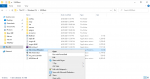
Get the migrator. I threw it in my mq2 folder and right click select run powershell. follow directions. might still have to set your eq folder and stuff in the mq settings.
Migrator
 
@Knightly I was referring to the zoned.cfg and the character.cfg files that reside in the config folder in MQ2. I had to move those files manually, but again, was not a big deal.
 
Get the migrator. I threw it in my mq2 folder and right click select run powershell. follow directions. might still have to set your eq folder and stuff in the mq settings.

Hi, thanks for responding. I tried that and my computer does not give me that option when I right click. Would I have to have another program loaded or is powershell something my computer would already have? If it is something my computer would have, is there any reason that the powershell option would not come up with a right click?

Thanks
 
Hi, thanks for responding. I tried that and my computer does not give me that option when I right click. Would I have to have another program loaded or is powershell something my computer would already have? If it is something my computer would have, is there any reason that the powershell option would not come up with a right click?
Not sure why it wouldn't be there.


Can Try This
 

Attachments

  • Untitled.png
    Untitled.png
    40.7 KB · Views: 17
Vanilla - Very Vanilla MQ (Live Servers)

Users who are viewing this thread

Back
Top
Cart