• You've discovered RedGuides, an EverQuest multi-boxing and scripting community 🧙‍♀️⚙️. We want you to play several EQ characters at once, come join us and say hello! 👋

  • A TLP without truebox has thawed (Very Vanilla ready)
    Frostreaver

Problem - This Noob has loaded unloaded and loaded MQ2advpath again and again. Toons don't budge when follow me button is depressed.

AlseyWalsey

New member
Joined
Feb 5, 2021
RedCents
20¢
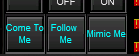
I can't be the only one. It just wont work and it's a basic thing from the official tutorial. Dated.......... 2005 btw. I press the Follow me button, the BC window says the group is following me, but they don't move. If I "afollow on" myself, I'll run to my target and then I can "afollow off". If I switch to that targeted party member and move him, it stops. Can anyone offer a simple fix? I don't mind making my own buttons and all that, but I'm just learning how to do it. I'd like to think the follow me button "can work". My computer doesn't seem to be choking on any of this.. I don't think it's that. MQ2NAV tools, the mimic button and come to me work. Is there a way to stop them quickly when they get to me?
 
On the Redguides launcher there is a button, Launch Mesh Updater. Have you updated it? You will get a pop up that shows you files that are needed.
 
On the Redguides launcher there is a button, Launch Mesh Updater. Have you updated it? You will get a pop up that shows you files that are needed.

I've updated it. I don't think it's that. From what people on these forums say, the MQ2Nav plugin uses the mesh and not really the MQ2advpath. Thanks for trying though.
 
if u can target toon, npc even a mob and type /nav target and a path appears then u have a good mesh and nav is working
if u can do /bc toon name //sit and that toonname sits, then u have eqbc working

if either of those 2 things are not working , get them to work and try again

then your button once u are grped up will work
 
The other thing to consider after you prove both options in Dealings post is that in order for the follow me button to work, your toons need to be fairly close to the person pressing the follow me button.

Come to me uses Nav to target and goto the toon.
Followme just states /afollow the toon, so it you are not close enough, then you need to hit the come to me button and then once within range, try the Follow me.

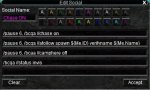
In the mq2targetinfo.ini folder , here are the commands:

ShowComeToMeButton=1
ShowFollowMeButton=1
ShowMimicMeButton=1
ShowHotButtons=1
ShowDistance=1
ShowExtDistance=1

ComeToMeText=Come To Me
ComeToMeCommand=/bcg //nav id ${Me.ID}
ComeToMeToolTip=/bcg //nav id ${Me.ID}
FollowMeText=Follow Me
FollowMeCommand=/bcg //afollow spawn ${Me.ID}
FollowMeeToolTip=/bcg //afollow spawn ${Me.ID}
MimicMeSayCommand=/bcg //say
MimicMeHailCommand=/bcg //keypress HAIL
 
if u can target toon, npc even a mob and type /nav target and a path appears then u have a good mesh and nav is working
if u can do /bc toon name //sit and that toonname sits, then u have eqbc working

if either of those 2 things are not working , get them to work and try again

then your button once u are grped up will work
All of that works, but not the Follow me button
 
I would run a /bccmd connect to make sure your toon is connected to eqbc server. I have made this mistake in the past. I keep my mq2 windows minimized most of the time so i didn't see the warning scroll through.
 
The other thing to consider after you prove both options in Dealings post is that in order for the follow me button to work, your toons need to be fairly close to the person pressing the follow me button.

Come to me uses Nav to target and goto the toon.
Followme just states /afollow the toon, so it you are not close enough, then you need to hit the come to me button and then once within range, try the Follow me.

In the mq2targetinfo.ini folder , here are the commands:

ShowComeToMeButton=1
ShowFollowMeButton=1
ShowMimicMeButton=1
ShowHotButtons=1
ShowDistance=1
ShowExtDistance=1

ComeToMeText=Come To Me
ComeToMeCommand=/bcg //nav id ${Me.ID}
ComeToMeToolTip=/bcg //nav id ${Me.ID}
FollowMeText=Follow Me
FollowMeCommand=/bcg //afollow spawn ${Me.ID}
FollowMeeToolTip=/bcg //afollow spawn ${Me.ID}
MimicMeSayCommand=/bcg //say
MimicMeHailCommand=/bcg //keypress HAIL
Even when they're right on top of me it doesn't work
 
The other thing to consider after you prove both options in Dealings post is that in order for the follow me button to work, your toons need to be fairly close to the person pressing the follow me button.

Come to me uses Nav to target and goto the toon.
Followme just states /afollow the toon, so it you are not close enough, then you need to hit the come to me button and then once within range, try the Follow me.

In the mq2targetinfo.ini folder , here are the commands:

ShowComeToMeButton=1
ShowFollowMeButton=1
ShowMimicMeButton=1
ShowHotButtons=1
ShowDistance=1
ShowExtDistance=1

ComeToMeText=Come To Me
ComeToMeCommand=/bcg //nav id ${Me.ID}
ComeToMeToolTip=/bcg //nav id ${Me.ID}
FollowMeText=Follow Me
FollowMeCommand=/bcg //afollow spawn ${Me.ID}
FollowMeeToolTip=/bcg //afollow spawn ${Me.ID}
MimicMeSayCommand=/bcg //say
MimicMeHailCommand=/bcg //keypress HAIL
I reinstalled from the launcher and now one character is following badly, but the others still don't budge
 
Are you using KA or some other built in /chase on feature?

.. so try
1. /bcaa //mac off
2. Run away a little and hit the come to me button
3 . Once party is at your feet, hit the follow me button.

What happens ?
 
Last edited:
Are you using KA or some other built in /chase on feature?

.. so try
1. /bcaa //mac off
2. Run away a little and hit the come to me button
3 . Once party is at your feet, hit the follow me button.

What happens ?
If I hit come to me, they keep coming and following me. Follow doesn't really make it act differently. Thehe smooth on/off toggle the "follow me" button demonstrated in the video doesn't seem to work anymore, but overall I guess the "Come to me" using the mq2nav plugin is stronger because its working off the mesh. I'll put up with it for now I guess. It's still really cool. I made a button that stops them and keeps them from humping my leg when they catch up to me.
 
Don't know if it pertains but if you're using one of the ~~~assist macros you also need to //camphere off in order to allow the character to leave it's campsite area.chase_on.JPG
 
If I hit come to me, they keep coming and following me. Follow doesn't really make it act differently. Thehe smooth on/off toggle the "follow me" button demonstrated in the video doesn't seem to work anymore, but overall I guess the "Come to me" using the mq2nav plugin is stronger because its working off the mesh. I'll put up with it for now I guess. It's still really cool. I made a button that stops them and keeps them from humping my leg when they catch up to me.

For anybody tto help we need ot know what else you are running KA, something with chase/stick on or to the last posters point even camp here setup. Afollow is not as smooth as the come to me here but there is still a ton of use for it if you don’t like ot use chase like me (restless assault missions it’s all i use). but if it’s not smooth it sounds like chase or something to that effect is fighting the pull.
 
the follow me toggle does not work for me (hasnt in a long time), it starts follow but wont stop it, this is a button i made to make them stop following me
/bcg //keypress esc
/bcg //afo

now that they are not humping my leg and I just want them to move up I can use the come to me button

if you had them set a camp, anchor etc somewhere then you should have a hotkey to remove that camp/anchor
/bcg //makecamp off
if they are returning to a location you no longer want to be at
 
For anybody tto help we need ot know what else you are running KA, something with chase/stick on or to the last posters point even camp here setup. Afollow is not as smooth as the come to me here but there is still a ton of use for it if you don’t like ot use chase like me (restless assault missions it’s all i use). but if it’s not smooth it sounds like chase or something to that effect is fighting the pull.
I just downloaded Vanilla and "Follow Me" has not worked at all. I've just been using it for two days. I have to reload MQ2nav when I first log in my characters, but after that it's fine. I'll look to see what's running, but it should just be the default things that come with it.
 
I just downloaded Vanilla and "Follow Me" has not worked at all. I've just been using it for two days. I have to reload MQ2nav when I first log in my characters, but after that it's fine. I'll look to see what's running, but it should just be the default things that come with it.
afollow is mq2advpath and has nothing to do with mq2nav - the come to me uses mq2nav, but the follow me does not
 
Don't know if it pertains but if you're using one of the ~~~assist macros you also need to //camphere off in order to allow the character to leave it's campsite area.View attachment 28073
I'm going to check on this tomorrow. Don't know what's on or off by default

afollow is mq2advpath and has nothing to do with mq2nav - the come to me uses mq2nav, but the follow me does not
 
if you are using dannet there's issues with the buttons performing as you would want them to (in the group window). but if you're using eqbc (and dannet isn't loaded) and everyone is in your group, and everyone is connected to your eqbcs - the followme should tell your entire group to /afollow spawn ${Me.ID} from the person issuing the command.

1612744587344.png
 
Yes, but at the moment it's the only other thing that's off, so I mention it.
yes, but mq2nav doesn't have anything to do with autofollow - that's important because you're going to go chasing down a rabbit hole that is unrelated.
 
if you are using dannet there's issues with the buttons performing as you would want them to (in the group window). but if you're using eqbc (and dannet isn't loaded) and everyone is in your group, and everyone is connected to your eqbcs - the followme should tell your entire group to /afollow spawn ${Me.ID} from the person issuing the command.

View attachment 28075
I just unloaded it and nope, no change. It comes with Vanilla now. Should I leave it on or off????
 
I just unloaded it and nope, no change. It comes with Vanilla now. Should I leave it on or off????
leave what off?
afollow? yes if you don't want your characters afollowing you, you want it clicked off.
dannet? that is up to you - if you want to use dannet leave it on - but you may not have perfect results with the mq2targetinfo buttons as i mentioned above
 
the follow me toggle does not work for me (hasnt in a long time), it starts follow but wont stop it, this is a button i made to make them stop following me
/bcg //keypress esc
/bcg //afo

now that they are not humping my leg and I just want them to move up I can use the come to me button

if you had them set a camp, anchor etc somewhere then you should have a hotkey to remove that camp/anchor
/bcg //makecamp off
if they are returning to a location you no longer want to be at
Don't know if it pertains but if you're using one of the ~~~assist macros you also need to //camphere off in order to allow the character to leave it's campsite area.View attachment 28073
It couldn't parse chase on or camp here off.

When I use the Follow Me button I get messages like "Group now follow you around" then "[{msg}Gundarson} //afollow spawn 8007" for each character and finally Group stopped following you when I unclick the button. It would be perfect if they actually followed me around instead of it just claiming they do.
 
yes, but mq2nav doesn't have anything to do with autofollow - that's important because you're going to go chasing down a rabbit hole that is unrelated.
I've told others here they're unrelated. I'm not chasing it.
leave what off?
afollow? yes if you don't want your characters afollowing you, you want it clicked off.
dannet? that is up to you - if you want to use dannet leave it on - but you may not have perfect results with the mq2targetinfo buttons as i mentioned above

I would run a /bccmd connect to make sure your toon is connected to eqbc server. I have made this mistake in the past. I keep my mq2 windows minimized most of the time so i didn't see the warning scroll through.
"already connected", but thanks
 
The other thing to consider after you prove both options in Dealings post is that in order for the follow me button to work, your toons need to be fairly close to the person pressing the follow me button.

Come to me uses Nav to target and goto the toon.
Followme just states /afollow the toon, so it you are not close enough, then you need to hit the come to me button and then once within range, try the Follow me.

In the mq2targetinfo.ini folder , here are the commands:

ShowComeToMeButton=1
ShowFollowMeButton=1
ShowMimicMeButton=1
ShowHotButtons=1
ShowDistance=1
ShowExtDistance=1

ComeToMeText=Come To Me
ComeToMeCommand=/bcg //nav id ${Me.ID}
ComeToMeToolTip=/bcg //nav id ${Me.ID}
FollowMeText=Follow Me
FollowMeCommand=/bcg //afollow spawn ${Me.ID}
FollowMeeToolTip=/bcg //afollow spawn ${Me.ID}
MimicMeSayCommand=/bcg //say
MimicMeHailCommand=/bcg //keypress HAIL
I checked it. It's the values you have there.
 
What Sic is trying to say is that 'Come to Me' uses MQ2Nav (which is working by your reporting) while 'Follow Me' uses MQ2AdvPath (which is not working by the same reporting).

Based on these observations, it would seem you should check to make sure that MQ2AdvPath is loaded on your toons (/plugin MQ2AdvPath load).

I am curious why you have to reload MQ2Nav on your characters each time you log on - you should not have to do this each time. But since you are, you may also need to load MQ2AdvPath to make 'Come to Me' work.
 
All I do to get the follow me button working is I press my start-up button on each toon with 2 lines:
/plugin mq2eqbc
/bccmd connect

I have to press it twice I get an unloaded message for mq2eqbc already being loaded but I do it like this anyway because it works. It wasn't always like this but still works so I am not "fixing" it.

I have the launch EQBCS with MQ2 button checked on the Redguides Launcher and select standalone when the server starts. Now, there are times when I get a "Connected!" message instead of the joined the server message and the list of toons on the server. When this happens follow me will NOT work correctly. For that I click my start button which unloads mq2eqbc. Then I kill the eqbcs.exe window. After that I press the launch MQ2 button on the Redguides Launcher which restarts the chat server and select standalone again. Then I press my start-up buttons on each too twice again to reconnect. That normally fixes any problems I have.
 
So, I uninstalled everything and started over as best I could and now things got a little better. I get the behavior when I use the "follow me" button that most of you were describing. They want to stay in camp and not follow right away. Oddly they start to move when I get pretty far out, but they don't come all the way to me. This is much more promising than stone dead. There was something buggy about my original install I think. I wish I could have figured out what exactly if not for me, but for all of you who were interested.

Now I have to figure out what plugins, Macros or other settings can be tweaked, turned off or controlled and how. It's more than playable, but it's not doing what's shown in red guides video I don't know if it's supposed too anymore, but it seems like it would be better to start with toons running after the new user and letting the new user add the other behaviors.
 
Follow me tries to stick
come to me moves up
follow me isn't toggling for quite some time now , easy fix to stop the STICK follow read posts above
if the way you game is that you are constantly roaming use the follow button (make a unfollow button)
if I send my main toon a bit ahead and i tell everyone to move up, they wont stop till they catch me, regardless where i started command

anyways I been looking at this thread too long gl
 
So, I uninstalled everything and started over as best I could and now things got a little better. I get the behavior when I use the "follow me" button that most of you were describing. They want to stay in camp and not follow right away. Oddly they start to move when I get pretty far out, but they don't come all the way to me. This is much more promising than stone dead. There was something buggy about my original install I think. I wish I could have figured out what exactly if not for me, but for all of you who were interested.

Now I have to figure out what plugins, Macros or other settings can be tweaked, turned off or controlled and how. It's more than playable, but it's not doing what's shown in red guides video I don't know if it's supposed too anymore, but it seems like it would be better to start with toons running after the new user and letting the new user add the other behaviors.

Glad to hear things are a bit better. But what you are describing is still not 'right'. Believe it or not, you are not special, and there is no reason to believe that something that works out of the box for everyone else would behave fundamentally different for you.

While you didn't say so specifically, it sounds like:
i) You have EQBCS working.
ii) When you click "Follow Me" the appropriate command is being sent to your other toon. This can be confirmed by checking their MQ2 windows.
iii) They still are not behaving the way you think they 'should'.

Normally, if follow is basically working but showing odd behavior, it is related to your background FPS limiter. Check in the EQ settings (Alt-O, display) and make sure your background FPS is set to 30 minimum (60 is better if your PC can handle it). Most especially, make sure it is not 'Min CPU' or whatever the default is - that will cause very buggy follow behavior.
 
Well my afollow just stopped working today. I unloaded the plugin and reloaded it and it worked again. Might try that.
 
Glad to hear things are a bit better. But what you are describing is still not 'right'. Believe it or not, you are not special, and there is no reason to believe that something that works out of the box for everyone else would behave fundamentally different for you.

While you didn't say so specifically, it sounds like:
i) You have EQBCS working.
ii) When you click "Follow Me" the appropriate command is being sent to your other toon. This can be confirmed by checking their MQ2 windows.
iii) They still are not behaving the way you think they 'should'.

Normally, if follow is basically working but showing odd behavior, it is related to your background FPS limiter. Check in the EQ settings (Alt-O, display) and make sure your background FPS is set to 30 minimum (60 is better if your PC can handle it). Most especially, make sure it is not 'Min CPU' or whatever the default is - that will cause very buggy follow behavior.

You were on the right track. The final piece was to adjust the video settings, but not in Everquest as you suggested. Those setting were already all maxed or near maxedI run 3d modeling, photography and Printing software on this computer and view it on two different model monitors. My old workstation video card, though powerful, can't make the Follow Me work well in 4K Windowed, nor does like to choose my secondary monitor. I lower the resolution on my 4k monitor in windows and it works now. Windowed 4k made Everquest text too small anyway.

Thankyou very much for pointing me in the right direction.
 
I skimmed through this but i dont know if it was brought up, is mq2moveutils loaded? if so try unloading that and try your buttons then load it back in and see if that was the cause
 
I skimmed through this but i dont know if it was brought up, is mq2moveutils loaded? if so try unloading that and try your buttons then load it back in and see if that was the cause
I did that and read about the plugin too. This whole experience caused me to read about these different plugins which has been good. To really leverage MQ2, I have to learn how to write in Spawn ${whatever}. MQ2mule might be a direction I take because there's a GUI that guides you through that phase... I'm having a lot of fun setting up primitive buttons and things without all that. The little bit that Very Vanilla starts with seems to be more in line with what Id hoped for than I initially thought.

The hardest part of this for me now is that all of the users posting things have been doing this for years. I'm at the "what the hell do I type and where to make it do this" phase.
 
Are you using KA or some other built in /chase on feature?

.. so try
1. /bcaa //mac off
2. Run away a little and hit the come to me button
3 . Once party is at your feet, hit the follow me button.

What happens ?
1./bcaa // mqp not mac off mqp pauses macros other turns them off
 
Been having this issue a lot lately. Switched to different internet and my toons suddenly became unresponsive and difficult when they started following me. Ive been going down rabbit holes for a week now. Happy Stomples Day.
 
Problem - This Noob has loaded unloaded and loaded MQ2advpath again and again. Toons don't budge when follow me button is depressed.

Users who are viewing this thread

Back
Top
Cart