• You've discovered RedGuides, an EverQuest multi-boxing and scripting community 🧙‍♀️⚙️. We want you to play several EQ characters at once, come join us and say hello! 👋

  • A TLP without truebox has thawed (Very Vanilla ready)
    Frostreaver

Problem - Still crashing pretty often

sendaid

Member
Joined
Sep 12, 2004
RedCents
164¢
Hi folks. Still having one or 2 toons crashing on every session. Can't have a full group of 6 in the game for an hour at a time or less. Here are a few of the logs for those that have the brainpower to conquer them. :)
 

Attachments

Is this was you are looking for?

[Plugins]
mq2ic=1
mq2autologin=1
mq2bzsrch=1
mq2chatwnd=1
mq2custombinds=1
mq2eqbugfix=1
mq2hud=1
mq2itemdisplay=1
mq2labels=1
mq2map=1
mq2targetinfo=1
 
or probably this one...

mq2autoaccept=1
mq2autologin=1
mq2cast=1
mq2chatwnd=1
mq2easyfind=1
mq2eqbc=1
mq2eqbugfix=1
mq2exchange=1
mq2ic=1
mq2itemdisplay=1
mq2map=1
mq2melee=1
mq2moveutils=1
mq2nav=1
mq2portalsetter=1
mq2rez=1
mq2targetinfo=1
mq2autogroup=1
mq2dannet=0
mq2advpath=1
mq2eskay=1
mq2kissbuffs=1
mq2rogue=1
mq2berzerker=1
MQ2Posse=1
mq2war=1
mq2relocate=1
mq2status=1
mq2cleric=0
 
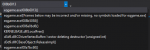
Call Stack form the first one:
1585938513079.png

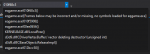
Call Stack from the second one:
1585938582982.png

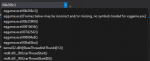
Call Stack from the third one:
1585938640596.png


Nothing I can do/see with these, unfortunately - will likely need to send them to [email protected] since they are eqgame.exe crashes


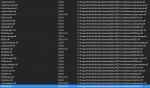
Here are the loaded plugins:
Nothing really unusual in here, outside of maybe mq2exchange?
1585938732634.png
 
Getting random crashes on all toons except for toon im currently on no crash dump no error just closes all but 1 client.
 
C drive has plenty of space. I am sure this is a nvidea issue. Gonna load everything up on a simpler machine later today and I am betting that will prolly solve my issues. Yesterday I went through the painstaking process of turning off all my plugins. Set up a 3 toon test kit and turned each plugin back on one at a time. I logged off and closed MQ2 and the server between each change. Once I got past the "basics" I would run each toon around argath to stress the system. I was also gating them back to the guild hall and fellowshipping back to Argath. When I was running one toon around it had this graphics crash. I installed MSI Afterburner and turned down all the settings on the video card. Did the whole process again just using the basic plugins. Had the same issue. We've also been having issues because Xfinity has Covid-19 and is on life support so the net drops in and out (completely unrelated, but frustrating for the entire house)

So bottom line I am positive this is a "my system" issue and not really a MQ2 issue. I also want to thank all the super smart folks on here who work so hard to help all of us out. Would be curious to see the general specs of folks' systems that are successfully running a 6 group or more crew without issues.

My system specs are:
Intel i-7 6 cores 3.1 ghz
32 Gigs RAM
Nvidea GTX 1080 with 8 gigs
C: Drive 500 gig samsung ssd 960 EVO
D: Drive 1 T same as above.

I know this is waaaay overkill for a EQ machine but I video edit as my main use of my PC so I have to have this hardware.
 
C drive has plenty of space. I am sure this is a nvidea issue. Gonna load everything up on a simpler machine later today and I am betting that will prolly solve my issues. Yesterday I went through the painstaking process of turning off all my plugins. Set up a 3 toon test kit and turned each plugin back on one at a time. I logged off and closed MQ2 and the server between each change. Once I got past the "basics" I would run each toon around argath to stress the system. I was also gating them back to the guild hall and fellowshipping back to Argath. When I was running one toon around it had this graphics crash. I installed MSI Afterburner and turned down all the settings on the video card. Did the whole process again just using the basic plugins. Had the same issue. We've also been having issues because Xfinity has Covid-19 and is on life support so the net drops in and out (completely unrelated, but frustrating for the entire house)

So bottom line I am positive this is a "my system" issue and not really a MQ2 issue. I also want to thank all the super smart folks on here who work so hard to help all of us out. Would be curious to see the general specs of folks' systems that are successfully running a 6 group or more crew without issues.

My system specs are:
Intel i-7 6 cores 3.1 ghz
32 Gigs RAM
Nvidea GTX 1080 with 8 gigs
C: Drive 500 gig samsung ssd 960 EVO
D: Drive 1 T same as above.

I know this is waaaay overkill for a EQ machine but I video edit as my main use of my PC so I have to have this hardware.

I'm getting crashes in both Nvidia and AMD machines.
 
My Bard was crashing every time I logged him on. It was only the Bard for some reason. I deleted the MQ2Main.dll file and then reloaded MQ2 and that SEEMS to have fixed the problem. We shall see over time though.
 
Sic had me unload these plugins and I havnt crashed since posting about it.

mq2labels mq2debuffs mq2damageparser mq2cpuload mq2bzsrch mq2bardswap mq2xassist mq2exchange mq2custombinds
 
Sic had me unload these plugins and I havnt crashed since posting about it.

mq2labels mq2debuffs mq2damageparser mq2cpuload mq2bzsrch mq2bardswap mq2xassist mq2exchange mq2custombinds
awesome mini - hollar if you still have issues

(and just for clarity, I'm not suggesting there was anything wrong with those plugins, just recommended unloading plugins if you're not actively using them, tho i have seen some people mention crashes with mq2labels)
 
I've been noticing some stability issues starting on the 28th/29th that weren't there prior (smoothing running 22nd to 28th or so). Been tossing dumps over to eqmule.
 
Problem - Still crashing pretty often

Users who are viewing this thread

Back
Top
Cart