• You've discovered RedGuides, an EverQuest multi-boxing and scripting community 🧙‍♀️⚙️. We want you to play several EQ characters at once, come join us and say hello! 👋

  • A TLP without truebox has thawed (Very Vanilla ready)
    Frostreaver
RedGuides Launcher

RedGuides Launcher (8 Viewers) 1.1.0

No permission to download
So 'what' is stopping you? You get an error? Cant press the button? It freezez?
Bless your heart for being willing to pull teeth to help this dude out.

@Lightbringer
You have a lot of knowledgeable dudes (up to and including some of the people who wrote this stuff) around to help you, but you really need to help them, by providing as much detail as possible (in a clear and concise manner, if able).

Nobody here is looking at your screen and it seems this isn't an issue that people are familiar with (it isn't a regular occurrence).
 
Sorry, i've away for a bit. I don't think it's a redguide issue. I try to load eq manually and my computer some times restart by itself with the following errors. fltmgr.sys and system_service_exceptio errors. I plan to get Norton to see if i have a malware in the computer.
 
Sorry, i've away for a bit. I don't think it's a redguide issue. I try to load eq manually and my computer some times restart by itself with the following errors. fltmgr.sys and system_service_exceptio errors. I plan to get Norton to see if i have a malware in the computer.
A little off-topic but I actually recommend that you check the integrity of your drive. Good luck with the issues.
 
hey guys having a problem with launcher,will not load do i need to redownload it? has been working fine for a long time now wont load at all

 
hey guys having a problem with launcher,will not load do i need to redownload it? has been working fine for a long time now wont load at all
I suggest trying redfetch


just point it to your mq and eq folders
 
thank you Sic will try it,i thought maybe it was down or something launcher tries to load and then stops
 
I suggest trying redfetch


just point it to your mq and eq folders
thank you again Sic ,worked perfectly using redfetch
 
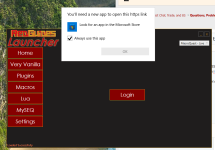
I recently had to reinstall everything on my computer (SSD failed). Upon reinstalling red guides launcher, i get the following message when trying to launch it (I am using the desktop icon RedGuides Launcher that was setup when i installed very vanilla).

the desktop icon points to the following file: testrunner.exe

Below is the popup when i click "login" - wont take me to the login 'page' in the redguides launcher.

I uninstalled launcher, reinstalled it
I am running it as administrator
running on windows 11 (fresh install)

Any thoughts how to fix this?

1742968720933.png
 
When I have to log in, it always takes me to the web page. Maybe you are trying to always launch from the wrong app...

I could be wrong, and totally not know what I am talking about. But maybe try choosing your browser.
 
That's what it looks like. It's trying to open a https link to login and you don't have a default browser set or don't have any file association set for https. Also, you shouldn't be running it as admin.
 
This thread discussed some of the reasons why it shouldn't be done

 
My AV software decided to blast the RG Launcher. I resolved that issue (including an exception for the future), re-installed the Launcher, but now I am getting the error message of "Failed to authenticate with the forums" in the launcher. My login is working properly (I am here posting this, after all), have tried to repair, reinstall the Launcher again, used 3 different browsers as default, forced my router to get a different IP address, all with the same result.

Any ideas from this point? Everything was working fine until this started happening.
 
My AV software decided to blast the RG Launcher. I resolved that issue (including an exception for the future), re-installed the Launcher, but now I am getting the error message of "Failed to authenticate with the forums" in the launcher. My login is working properly (I am here posting this, after all), have tried to repair, reinstall the Launcher again, used 3 different browsers as default, forced my router to get a different IP address, all with the same result.

Any ideas from this point? Everything was working fine until this started happening.
you could check in your %appdata% folder that you didn't get something whacky with your rg launcher settings

If i were in your shoes i'd use this as a good opportunity to swap over to > redfetch < all you need to do is point the settings tab to your current installation locations and you'll be gtg
 
you could check in your %appdata% folder that you didn't get something whacky with your rg launcher settings

If i were in your shoes i'd use this as a good opportunity to swap over to > redfetch < all you need to do is point the settings tab to your current installation locations and you'll be gtg
Went in and completely removed RGLauncher once again, including the settings folders in %appdata%, then reinstalled the Launcher, followed by redfetch. Everything seems to be working once again, now (likely due to redfetch!). Thank you! :D
 
Went in and completely removed RGLauncher once again, including the settings folders in %appdata%, then reinstalled the Launcher, followed by redfetch. Everything seems to be working once again, now (likely due to redfetch!). Thank you! :D
To be clear, you only need redfetch. You do not also need the rglauncher.
 
started the download as the video explain. installed very vanilla (up to date now.)

i checked the setting: i populated macroquest directory (default location). my SEQ directory (default location)
under mySEQ, i installed the main application, ini file and maps
in very vanilla i launched the mesh updater

when i launch MQ (Launch EQBCS with MQ is checked) i get EQBCS (EQ BOX Chat server) 1.9, waiting for connection on port 2112... and it hangs there...

ANY IDEA what i'm missing?

also how do i create and autoload my group? (in macroquest?)

the video for the launcher really needs to be updated...

shadowcat
 
started the download as the video explain. installed very vanilla (up to date now.)

i checked the setting: i populated macroquest directory (default location). my SEQ directory (default location)
under mySEQ, i installed the main application, ini file and maps
in very vanilla i launched the mesh updater

when i launch MQ (Launch EQBCS with MQ is checked) i get EQBCS (EQ BOX Chat server) 1.9, waiting for connection on port 2112... and it hangs there...

ANY IDEA what i'm missing?

also how do i create and autoload my group? (in macroquest?)

the video for the launcher really needs to be updated...

shadowcat
Howdy, sorry you're having issues

I already responded to your pm, please check that.

Also, please familiarize yourself with the forums. It is a lot out the gate, but every resource has a discussion thread, and overview, and usually FAQ and such. Checking with the search will often get you in the right direction.
 
my problem is i don't even get to the login menu. i get stuck at the launch MQ (like i said it hangs out querrying a port. and nothing is installed in my tray (i see macroquest but it's talking about logging cleanup, macroquest info, and processes, i don't think that's the loading stuff
 
my problem is i don't even get to the login menu. i get stuck at the launch MQ (like i said it hangs out querrying a port. and nothing is installed in my tray (i see macroquest but it's talking about logging cleanup, macroquest info, and processes, i don't think that's the loading stuff
I answered you in pm with link to both a grimier walkthrough video and a post I made with step by step pictures.

The "querying a port" has nothing to do with what you're trying to do - same as what I said in the pm reply. Since you don't have a need for eqbcS, uncheck the load eqbcS button and then just exit that window.

Seeing an additional window with processes and stuff means you clicked to show debug information.
 
my problem is i don't even get to the login menu. i get stuck at the launch MQ (like i said it hangs out querrying a port. and nothing is installed in my tray (i see macroquest but it's talking about logging cleanup, macroquest info, and processes, i don't think that's the loading stuff
Make sure you are not running anything as admin.

Waiting for connections is part of EQBCS which is the server for MQ2EQBC (the client).

Macroquest when updated and launched will appear in the system tray (by the clock on your task bar).

You must then launch Everquest. Setting up MQ2Autologin is a different thread.
 
Is there a way to sort Macros and Lua alphabetically in the launcher? It would sure make updating or finding easier.
 
When I try and start RG's the launcher gives me the normal window of "do you want this app to make changes to windows?" I click yes and then it does nothing. I have deleted the whole folder of very vanilla and uninstalled launch pad and redownloaded and installed it and nothing still.

Any help would be appreciated.
 
sounds maybe like


are you asking about the RG launcher, or macroquest launcher (not posting in those respective discussion threads means we don't know)?

if you're having issues with the redguide's launcher i recommend just moving over to redfetch

 
I had a power outage while running Redguides Launcher, and now it will not run correctly. I did a full uninstall, rename directory, restart, and re-install, but I am still gettign Windows faults when running the launcher. I was able to login, then when it is downloading the Lua's, it just closes. Here is the event viewer errors I am seeing. I am about to go out of town, so won't be able to reply or keep up with the thread on a daily basis, but I will try to check in to see if you have any thoughts.

I am using the RedFetch program also, I just dont like that you cannot control what resources are being updated from a list like you can in the Redguides Launcher. If I had a bit more control, or at least was notified as to what resources were updated, I would like it more.. I tend to modify some of the base luas for my own purposes (like overseer to fix crashes) and those tend to get overwritten and I wasn't aware they were changed.

When I did the reinstall, it did tell me that it was migrating settings, so I wonder if it is pullling in some old configuraton data that is messing it up? I tried installing it into a different folder also to see if it was caching the settings.

UPDATE: I think I got it fixed. I had to delete the AppData\Local\RedGuides folder, then it seemed to start working again without crashing, I am redoing my settings, then I will know for sure.

Application: fgfczmyj.exe
Framework Version: v4.0.30319
Description: The process was terminated due to an unhandled exception.
Exception Info: System.ArgumentNullException
at System.Linq.Enumerable.Any[[System.__Canon, mscorlib, Version=4.0.0.0, Culture=neutral, PublicKeyToken=b77a5c561934e089]](System.Collections.Generic.IEnumerable`1<System.__Canon>, System.Func`2<System.__Canon,Boolean>)
at VVUpdaterCore.MiscFunctions.GetLastStoredUpdatedDate(Int64, VVUpdaterCore.Enums.ServerType)
at VeryVanillaModule.ViewModels.VeryVanillaContentViewModel+<ServerSelectionChange>d__96.MoveNext()
at System.Runtime.ExceptionServices.ExceptionDispatchInfo.Throw()
at System.Windows.Threading.ExceptionWrapper.InternalRealCall(System.Delegate, System.Object, Int32)
at System.Windows.Threading.ExceptionWrapper.TryCatchWhen(System.Object, System.Delegate, System.Object, Int32, System.Delegate)
at System.Windows.Threading.DispatcherOperation.InvokeImpl()
at MS.Internal.CulturePreservingExecutionContext.CallbackWrapper(System.Object)
at System.Threading.ExecutionContext.RunInternal(System.Threading.ExecutionContext, System.Threading.ContextCallback, System.Object, Boolean)
at System.Threading.ExecutionContext.Run(System.Threading.ExecutionContext, System.Threading.ContextCallback, System.Object, Boolean)
at System.Threading.ExecutionContext.Run(System.Threading.ExecutionContext, System.Threading.ContextCallback, System.Object)
at MS.Internal.CulturePreservingExecutionContext.Run(MS.Internal.CulturePreservingExecutionContext, System.Threading.ContextCallback, System.Object)
at System.Windows.Threading.DispatcherOperation.Invoke()
at System.Windows.Threading.Dispatcher.ProcessQueue()
at System.Windows.Threading.Dispatcher.WndProcHook(IntPtr, Int32, IntPtr, IntPtr, Boolean ByRef)
at MS.Win32.HwndWrapper.WndProc(IntPtr, Int32, IntPtr, IntPtr, Boolean ByRef)
at MS.Win32.HwndSubclass.DispatcherCallbackOperation(System.Object)
at System.Windows.Threading.ExceptionWrapper.InternalRealCall(System.Delegate, System.Object, Int32)
at System.Windows.Threading.ExceptionWrapper.TryCatchWhen(System.Object, System.Delegate, System.Object, Int32, System.Delegate)
at System.Windows.Threading.Dispatcher.LegacyInvokeImpl(System.Windows.Threading.DispatcherPriority, System.TimeSpan, System.Delegate, System.Object, Int32)
at MS.Win32.HwndSubclass.SubclassWndProc(IntPtr, Int32, IntPtr, IntPtr)
at MS.Win32.UnsafeNativeMethods.DispatchMessage(System.Windows.Interop.MSG ByRef)
at System.Windows.Threading.Dispatcher.PushFrameImpl(System.Windows.Threading.DispatcherFrame)
at System.Windows.Application.RunDispatcher(System.Object)
at System.Windows.Application.RunInternal(System.Windows.Window)
at RGResourceManager.App.Main()

Then immedialely after that one:
Faulting application name: fgfczmyj.exe, version: 1.0.2.0, time stamp: 0x9b7d8e8b
Faulting module name: KERNELBASE.dll, version: 10.0.26100.3775, time stamp: 0x6e2fc3bb
Exception code: 0xe0434352
Fault offset: 0x00000000000c933a
Faulting process id: 0x33D8
Faulting application start time: 0x1DBB5C01377B302
Faulting application path: C:\Games\RedGuides\fgfczmyj.exe
Faulting module path: C:\WINDOWS\System32\KERNELBASE.dll
Report Id: 0f0dbbea-3351-489a-a5fc-2119eec1478c
Faulting package full name:
Faulting package-relative application ID:
 
Hopefully this helps someone who is trying to add Lua scripts to Launcher.

I was wondering why some of the Lua's were picked up by Launcher and some were not.

Turns out the answer is easy - you have to follow the resources NOT general thread - doh *facepalm*.

So for example for Sic's Magellan you should Watch - https://www.redguides.com/community/resources/magellan-travel-utility.2422/ - and Launcher will pick up on this

Watching discussion thread - https://www.redguides.com/community/threads/magellan-travel-utility.81432/ does not activate trigger which is completely fine :) just something to know.
 
RedGuides Launcher

Users who are viewing this thread

Back
Top
Cart