
-
 Hail, we're RedGuides. We want you to play six (yes, 6!) EverQuest characters at once. We have scripts and a friendly community to help, please join our playstyle and say hello! 👋
 -
 We've added LLM sections to our Terms & Rules and Resource Rules, for everyone's sanity & in-game safety.
Read more
a. Do not replace your voice with an LLM. This goes for your posts and your scripts. Drafting and editing with a tool is fine, but don't take you out of what you share.
b. Do not replace your EQ character's voice with an LLM. We don't want scripts that speak over/ooc,/shoutor other public channels. This has been an unwritten rule that's kept casino scripts off the site for decades, but we're now compelled to make it clear: keep automated communication private.
Why Does RG Review Scripts?
Nearly every LLM-written Lua script we see is making your character do impossible things, and rarely in a way that's beneficial to you. We've seen heavy server hammering,/targetover impossible distances when/nav spawnwould passively accomplish the same thing, a spawn search that fires 20+ times per second, and other pointless actions that are likely annoying GMs.
You are welcome to use LLMs as a tool to structure, draft, and edit your work, but please read critically before hitting/lua run
You are using an out of date browser. It may not display this or other websites correctly.
You should upgrade or use an alternative browser.
You should upgrade or use an alternative browser.

RedGuides Launcher (1 Viewer) 1.1.0
- Thread starter r1pt1de
- Start date


start by doing the following:Been trying to update MQ2 but everytime I try I get an error message and to /unload in my eq clients. Even when doing this I still get the same error message. I've closed all/any running clients and even restarted the computer and it still gives me the same error message. Any help would be greatly appreciated.
- check you don't have any eq/mq/rg files being held by antivirus
- restart your computer
- run the launcher
mapquest?So it looks like mapquest was the issue. Clicked that off and was able to install the update

TinyBubbles
Seasoned veteran member
I have MacroQuest installed for the Test server. I want to install a 2nd macroquest for live. I downloaded the launcher and when I click the executable, I get the following pop-up. Not sure what to do at this point. 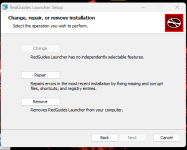
It doesnt give me the option to just install it again. Suggestions?
Or should I copy my MQ test folder, into a new folder for live. and when I use that one, change the server from macroquest - test to macroquest - live?
It doesnt give me the option to just install it again. Suggestions?
Or should I copy my MQ test folder, into a new folder for live. and when I use that one, change the server from macroquest - test to macroquest - live?

- Commits
- 191
Sounds like you already have the launcher installed.
You don't install separately that way.
Would need to know if you already have the launcher installed.
You don't install separately that way.
Would need to know if you already have the launcher installed.
TinyBubbles
Seasoned veteran member
I do have the launcher installed. I asked about needing a 2nd install and Sic said yes. https://www.redguides.com/community/threads/very-vanilla-mq-live-servers.77019/page-46#post-595055
So now I'm just trying to figure out how to install a 2nd Macroquest for live so I dont mess up my macroquest-test.
my current install for test is at C:\ProgramData\RedGuides\DesktopUtility\testrunner.exe
Is it as simple as copying my macroquest-test install into anew folder, like \redguideslive\ and creating a short cut to that new folder's C:\ProgramData\RedGuidesLive\DesktopUtility\testrunner.exe and choosing macroquest - live? or some other kind of magic?
So now I'm just trying to figure out how to install a 2nd Macroquest for live so I dont mess up my macroquest-test.
my current install for test is at C:\ProgramData\RedGuides\DesktopUtility\testrunner.exe
Is it as simple as copying my macroquest-test install into anew folder, like \redguideslive\ and creating a short cut to that new folder's C:\ProgramData\RedGuidesLive\DesktopUtility\testrunner.exe and choosing macroquest - live? or some other kind of magic?
You don't need 2 RedGuides launchers...I do have the launcher installed. I asked about needing a 2nd install and Sic said yes. https://www.redguides.com/community/threads/very-vanilla-mq-live-servers.77019/page-46#post-595055
So now I'm just trying to figure out how to install a 2nd Macroquest for live so I dont mess up my macroquest-test.
my current install for test is at C:\ProgramData\RedGuides\DesktopUtility\testrunner.exe
Is it as simple as copying my macroquest-test install into anew folder, like \redguideslive\ and creating a short cut to that new folder's C:\ProgramData\RedGuidesLive\DesktopUtility\testrunner.exe and choosing macroquest - live? or some other kind of magic?
Just use the drop-down from live to test, it'll even default to its own install directory
TinyBubbles
Seasoned veteran member
Ahh. I mis understood you from the previous post. Thank you muchly for the clarification.You don't need 2 RedGuides launchers...
Just use the drop-down from live to test, it'll even default to its own install directory
i am having the same issue also. just bought a quarterly sub, watched the DL tutorial, downloaded the app and am trying to log in. after clicking login from the app, it brings up the authorize access window in my web browser, i hit authorize access then the page displays "please return to the app". when i go back to the app, it says "auth: failed to authenticate with the forums." in the lower left hand corner of the app and i cant log in. tried restarting computer, tried changing browser to 3 different browsers, went into firewall setting and manually accepted permissions for the redguides app, nothing has worked. was hoping someone had any other options for me to try
steve666, were you logged into the redguide site? try doing that first and select keep me signed in, then run the launcher. should load up and auto authenticate since it will be logged in as soon as it pull up the return to the app. , but don't close out the return to the app page it brings up.
missedaspot
New member
restarted, ran repair through installer, uninstalled, reinstalled rinsed repeated a few times. no difference. still crashes immediately upon opening.restart your pc
been doing this since yesterday to no avail.
missedaspot
New member
tried this too. doesnt work.Launcher problems?Sorry to hear that.
you can try these steps and install the new launcher
1 - delete your AppData - paste this in windows explorer search window (any folder) %LocalAppData%\RedGuides and %LocalAppData%\RGResourceManager and then delete the contents in that folders
1b - Did you skip step 1? if you did, go back and do step 1
2 - then go to add/remove programs, and remove the redguide's launcher
3 - reinstall the launcher
4 - open launcher
5 - point the re-install to your existing mq directory
6 - boom - back in business
7 - get a snack/drink - you earned it!

are you on windows 7?tried this too. doesnt work.
it is an unsupported OS for both the launcher and MQ as a whole
I have searched long and hard hope this is right place for my new probnlem. since last to updates i can no longer log my toons at all. my screen locks up when it is loading on the picture Laurion's song page. patch before last it happened so restarted comp and tried again and it loaded. after last patch I have restarted and shut down computer seaveral times. I have also tried loading just 1 toon and each time screen freezes at the same point. go into mq launcher and it shows the toon or toons are loaded but will not shutdown or finish loading. I have put in ticket with daybreak just in case it is there problem but since it was during last 2 updates here think it maybe here? I have been using this program since becoming a member with no problems.

Can you load in clean (no MQ or ISB?)?I have searched long and hard hope this is right place for my new probnlem. since last to updates i can no longer log my toons at all. my screen locks up when it is loading on the picture Laurion's song page. patch before last it happened so restarted comp and tried again and it loaded. after last patch I have restarted and shut down computer seaveral times. I have also tried loading just 1 toon and each time screen freezes at the same point. go into mq launcher and it shows the toon or toons are loaded but will not shutdown or finish loading. I have put in ticket with daybreak just in case it is there problem but since it was during last 2 updates here think it maybe here? I have been using this program since becoming a member with no problems.
If you cant load in clean, then its 99% most likely, not a MQ issue. I would continue your troubleshooing with DBGs.I have checked and can niot anymore.
What are your PC specs? with DX11 crap going live, you might have been passed by
I ill change that reloaded computer to clear locked up screen then went in and logged out of manual load of everquest then manually entered login. then manually selected server and it logged in. then llogged out and relogged in with mq and seems to have finally cleared issue.
Good deal, thanks for letting us know.I ill change that reloaded computer to clear locked up screen then went in and logged out of manual load of everquest then manually entered login. then manually selected server and it logged in. then llogged out and relogged in with mq and seems to have finally cleared issue.
Since the recent update of the launcher I get multiple errormessages when starting the launcher:
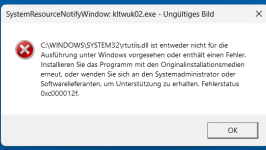
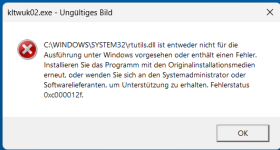
Anytime I start the launcher I get like 6-10 Error-Messageboxes befor the launcher finally starts.
All of them declaring Errorstatus: 0xc00012f.
Passing all of the Messages by clicking "OK" the Redguides-Launcher finally popps up and works as expected.
Windows-Specifications:
Edition Windows 11 Pro
Version 23H2
Installiert am 05.10.2022
Betriebssystembuild 22631.3085
Leistung Windows Feature Experience Pack 1000.22684.1000.0
Hardware-Spezifications:
Prozessor Intel(R) Core(TM) i9-10900K CPU @ 3.70GHz 3.70 GHz
Installierter RAM 128 GB (128 GB verwendbar)
Systemtyp 64-Bit-Betriebssystem, x64-basierter Prozessor
All windows updates installed as far as I am aware
Also clicking "update" within the launcher to update to the latest version shows me an Error-Message.
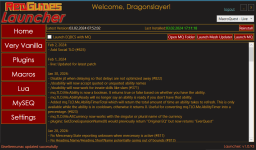
But seemingly the update works.
Does anyone have an idea how I might fix this problem?
Anytime I start the launcher I get like 6-10 Error-Messageboxes befor the launcher finally starts.
All of them declaring Errorstatus: 0xc00012f.
Passing all of the Messages by clicking "OK" the Redguides-Launcher finally popps up and works as expected.
Windows-Specifications:
Edition Windows 11 Pro
Version 23H2
Installiert am 05.10.2022
Betriebssystembuild 22631.3085
Leistung Windows Feature Experience Pack 1000.22684.1000.0
Hardware-Spezifications:
Prozessor Intel(R) Core(TM) i9-10900K CPU @ 3.70GHz 3.70 GHz
Installierter RAM 128 GB (128 GB verwendbar)
Systemtyp 64-Bit-Betriebssystem, x64-basierter Prozessor
All windows updates installed as far as I am aware
Also clicking "update" within the launcher to update to the latest version shows me an Error-Message.
But seemingly the update works.
Does anyone have an idea how I might fix this problem?
thank you for the hint.You may try what I did. I manually loged 1 toon all the way in in regular everquest typing password and account name. once I logged all the way into game then logged of error messages dissappeared and launched just fine.
After fresh pc-reboot or with RG-Launcher active?
Thanks, will try that, next time I log in.
Unfortunately that didn't work for me.
Searching the web found a potential fix executing sfc /scannow within a cmd-window with administrator privileges.
In the resulting log I found: "Info CSI 00000007 Hashes for file member [l:11]'rtutils.dll' do not match."
The process reported a sucessful repair.
After the process "sfc /scannow" had done its magic, the error was gone.
Searching the web found a potential fix executing sfc /scannow within a cmd-window with administrator privileges.
In the resulting log I found: "Info CSI 00000007 Hashes for file member [l:11]'rtutils.dll' do not match."
The process reported a sucessful repair.
After the process "sfc /scannow" had done its magic, the error was gone.
Doingbigthings
Active member
On my second PC I am not able to use MQ it disappears from the taskbar when I attempt to launch MQ from the icon it disappears. I have tried logging in manually without MQ2AutoLogin and MQ doesnt work this way either. Any suggestions?

Atomic Bomb
Member
1 of my 3 computers just wont launch the redguides launcher anymore and im kinda out of ideas on what to do,
symptoms
clicking redguides launcher spins wheels and it tries to open but then just nothing happens
i was working great for months , my other 2 computers launched and updated fine
EQ launches fine on its own
everything else works fine
i have uninstalled reinstalled redguides several times now, re downloaded the launcher, reset, uninstalled reset, re install to all the same effect that it will just no longer open the launcher and just does nothing
any help would be appreciated on what to try.
symptoms
clicking redguides launcher spins wheels and it tries to open but then just nothing happens
i was working great for months , my other 2 computers launched and updated fine
EQ launches fine on its own
everything else works fine
i have uninstalled reinstalled redguides several times now, re downloaded the launcher, reset, uninstalled reset, re install to all the same effect that it will just no longer open the launcher and just does nothing
any help would be appreciated on what to try.
This sounds like your AV or firewall is holding that PC's files hostage. can you make sure that your EQ and MQ folders are "whitelisted", reboot and then let us know?1 of my 3 computers just wont launch the redguides launcher anymore and im kinda out of ideas on what to do,
symptoms
clicking redguides launcher spins wheels and it tries to open but then just nothing happens
i was working great for months , my other 2 computers launched and updated fine
EQ launches fine on its own
everything else works fine
i have uninstalled reinstalled redguides several times now, re downloaded the launcher, reset, uninstalled reset, re install to all the same effect that it will just no longer open the launcher and just does nothing
any help would be appreciated on what to try.
I'm having the same issue. Tried uninstalling and reinstalling. EQ updated. Been running fine on this machine for a year now at least.On my second PC I am not able to use MQ it disappears from the taskbar when I attempt to launch MQ from the icon it disappears. I have tried logging in manually without MQ2AutoLogin and MQ doesnt work this way either. Any suggestions?

Hi all, also having issues after this patch, cant get mq to load after starting redguide launcher, checked windows antivirus and dont see it blocked. trying to uninstall reinstall now
Atomic Bomb
Member
this is what i am thinking too, but i don't have anything but basic windows defender on that machineThis sounds like your AV or firewall is holding that PC's files hostage. can you make sure that your EQ and MQ folders are "whitelisted", reboot and then let us know?
its windows 11 and i kinda hate it now
I've been searching and reading everything i can find
i cant seem to figure out how to whitelist redguides in windows 11, use to know what i was doing but im getting lost.
Doingbigthings
Active member
I havnt changed any firewall settings but I did add to allow list and still no dice 
Same. I've always just had defender for AV and never gave me issues before. Not sure why it would now. Plus I'm pretty sure it would give a notification it was flagged, no?I havnt changed any firewall settings but I did add to allow list and still no dice
So there is a issue with autologin/MQ crashing as soon as you launch.. but your saying you cant even launch it? if its 1, discord has devs in there working on it, if its 2, you are using the legacy launcher, not the new beta one right?this is what i am thinking too, but i don't have anything but basic windows defender on that machine
its windows 11 and i kinda hate it now
I've been searching and reading everything i can find
i cant seem to figure out how to whitelist redguides in windows 11, use to know what i was doing but im getting lost.
Users who are viewing this thread
Total: 2 (members: 0, guests: 2)
Share: