I believe I had a pretty fundamental understanding of KA, and decided to explore MA. I couldn't get mq2 muleassist to load and noticed i didn't have it as a plugin. I started looking at my config folder for KA and tried to show hidden files in my AppData folder here C:\Users\David's Main PC\AppData\Local\VeryVanilla\MacroQuest\Release\Config and everything went to crap. I tried to downlowd the Lua for MA and it gave me an error message and told me to restart my computer. I restarted and half my icons were missing off my desktop so I had to do a recovery, which was only 2 days ago. I uninstalled and re-install RG Launcher to no avail. I can't install very vanilla or the Lua without the error message saying it cannot access path 'C:\Users\David's Main PC\AppData\Local\VeryVanilla\MacroQuest\Release\Lua\examples\autoassist.Lua' is denied. I have restarted a few times. What's next? I didn't previously have problems with RGLauncher

-
 Hail, we're RedGuides. We want you to play six (yes, 6!) EverQuest characters at once. We have scripts and a friendly community to help, please join our playstyle and say hello! 👋
You are using an out of date browser. It may not display this or other websites correctly.
You should upgrade or use an alternative browser.
You should upgrade or use an alternative browser.

RedGuides Launcher (3 Viewers) 1.1.0
- Thread starter r1pt1de
- Start date

Usually means antivirus is holding something hostageI believe I had a pretty fundamental understanding of KA, and decided to explore MA. I couldn't get mq2 muleassist to load and noticed i didn't have it as a plugin. I started looking at my config folder for KA and tried to show hidden files in my AppData folder here C:\Users\David's Main PC\AppData\Local\VeryVanilla\MacroQuest\Release\Config and everything went to crap. I tried to downlowd the LUA for MA and it gave me an error message and told me to restart my computer. I restarted and half my icons were missing off my desktop so I had to do a recovery, which was only 2 days ago. I uninstalled and re-install RG Launcher to no avail. I can't install very vanilla or the lua without the error message saying it cannot access path 'C:\Users\David's Main PC\AppData\Local\VeryVanilla\MacroQuest\Release\lua\examples\autoassist.lua' is denied. I have restarted a few times. What's next? I didn't previously have problems with RGLauncher
Today I noticed, that the Launcher, after loading the basic updates, managed to automatically update also the CWTN Plugins.
For me its the first time I noticed that behavior.
Is it going to stay?
Its a nice QOL-Update for me.
For me its the first time I noticed that behavior.
Is it going to stay?
Its a nice QOL-Update for me.
the launcher should always do that, it is unrelated to cwtn pluginsToday I noticed, that the Launcher, after loading the basic updates, managed to automatically update also the CWTN Plugins.
For me its the first time I noticed that behavior.
Is it going to stay?
Its a nice QOL-Update for me.
the only time it cant is when things like AV or something else on your computer prevents it, or internet connection or such - but it should be the exception to have to check the plugin tab, not the norm
Ohh, ok, ty.
So when next time update of plugin fails, I know I might check my system to find out whats going wrong.
Sorry for the formerly post in the wrong place.
So when next time update of plugin fails, I know I might check my system to find out whats going wrong.
Sorry for the formerly post in the wrong place.

I had that issue, I was able to resolve it by dragging the window to the top of screen and windows resized it to fit my screen. Hope that helps
What launcher? The RedGuides desktop launcher?I know its prolly a setting somewhere but one of my pc's the launcher window is too small to show all the contents! thats a mess...what do yall think

yeah I have the same issue the redguides launcher window is not resizable and too small so you always have to use scroll bars to look at the last version date etcWhat launcher? The RedGuides desktop launcher?
I tried that but it didn't do anything, probably because I have a dual-screen set upI had that issue, I was able to resolve it by dragging the window to the top of screen and windows resized it to fit my screen. Hope that helps
you are not the OP, I was asking the OP so i could move/merge this thread to where it should be.yeah I have the same issue the redguides launcher window is not resizable and too small so you always have to use scroll bars to look at the last version date etc
some people call the mq2pluginmanager window the "launcher thingie"
some people call the redguides launcher window the "launcher thingie"
I was asking to clarify before i moved it to another place
np, merging this thread into that resource discussionsorry..yes the redguides launcher
Check antiviruslauncher closing the second i click update mq2. it just closes clompletly. no messages or anything. just closes. i have tried several times and same thing everytime
Reboot
I am unable to update the launcher. I have tried turning off the windows defender firewall, Rebooting my computer, reset my router, even hot spotted my phone to see if it would work. I am getting this message. Has anyone else had this issue before? I also tried the RGResourceManager.Installer repair function.
Attachments
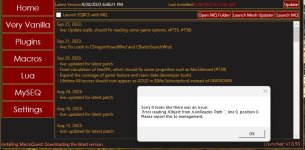
would double check your antivirus isn't holding things hostage.I am unable to update the launcher. I have tried turning off the windows defender firewall, Rebooting my computer, reset my router, even hot spotted my phone to see if it would work. I am getting this message. Has anyone else had this issue before? I also tried the RGResourceManager.Installer repair function.
it is often recommended to consider whitelisting your RG, EQ, and MQ folders from file scanning and file syncing
I will have to read and find out how to do that. Thank you for the advise. The only thing I have running is the windows defender. Let me see what I can do. Thank you Kindly.
Sometimes a reboot can shake things loose, but that won't prevent it from potentially happening againI will have to read and find out how to do that. Thank you for the advise. The only thing I have running is the windows defender. Let me see what I can do. Thank you Kindly.
Well to answer what happened, it was not my computer, or RedGuides. It is an issue with one of the fiber lines lying in the ocean got cut. At least that is what I was told when I called and asked. Besides that, where I live the internet is provided through the use of a phone chip in a router. No cable or anything so when you can imagine when no one is at work and everyone is home the bandwidth goes way down for everyone. Again thank you for your suggestions.

My RedGuides Launcher shows MQ2Druid in the Plugins section. I never purchased nor "watched" that plugin. (I vaguely remember clicking on something while reading the discussion forum for it though!)
It doesn't show up in my subscriptions. It is not currently downloaded nor installed on any of my systems.
It's not a big deal, I just can't figure out how to stop watching it in the Launcher.
My Lua and Macro sections are correct. I have searched my macroquest.ini and I reviewed the human readable config files in the Launcher folder and found nothing. Assuming the subscriptions are maintained server-side via the "Watch" button and/or purchases?
Maybe @Sic or @ChatWithThisName are trying to tell me I need to learn how to run a druid??? /grin
It doesn't show up in my subscriptions. It is not currently downloaded nor installed on any of my systems.
It's not a big deal, I just can't figure out how to stop watching it in the Launcher.
My Lua and Macro sections are correct. I have searched my macroquest.ini and I reviewed the human readable config files in the Launcher folder and found nothing. Assuming the subscriptions are maintained server-side via the "Watch" button and/or purchases?
Maybe @Sic or @ChatWithThisName are trying to tell me I need to learn how to run a druid??? /grin

It's in pre-release and free to all until it becomes premium =)My RedGuides Launcher shows MQ2Druid in the Plugins section. I never purchased nor "watched" that plugin. (I vaguely remember clicking on something while reading the discussion forum for it though!)
It doesn't show up in my subscriptions. It is not currently downloaded nor installed on any of my systems.
It's not a big deal, I just can't figure out how to stop watching it in the Launcher.
My Lua and Macro sections are correct. I have searched my macroquest.ini and I reviewed the human readable config files in the Launcher folder and found nothing. Assuming the subscriptions are maintained server-side via the "Watch" button and/or purchases?
Maybe @Sic or @ChatWithThisName are trying to tell me I need to learn how to run a druid??? /grin
EDIT - And yes, it's time to make a Drood. Plugin rocks! The portal window is a game changer!
Last edited:

- Commits
- 191
It's true!It's in pre-release and free to all until it becomes premium =)
merlinhartwood
New member
why isn't my eq seeing redguides launcher its not loading mq at all

Are you on Truebox TLP?
Is your MQ/RG pointed to the right EQ install?
Did it work before, but not now?
Did you reboot?
Did you whitelist MQ related files?
Is your MQ/RG pointed to the right EQ install?
Did it work before, but not now?
Did you reboot?
Did you whitelist MQ related files?
Sent you a month of level 2. Might have to refresh browser (maybe even re-login) for it to show, and should be able to get the launcher then.i guess you have to be level 2 to see that?
Please read, watch, get lost in the below information. We are a very helpful community, but it helps you ask the right questions, and us to give better answers if you are at least passingly familiar with the below info.
Getting Started / Returning user
Welcome to RedGuides, fellow EQ multi-boxing enthusiast!
The best place to begin is our "New User Guide" video series, click this TV to watch:

This step-by-step series will teach absolute beginners how to control 6 characters at once while highlighting Nav, AutoLogin, and DanNet, which are fundamental plugins that will enhance every aspect of your game.
Returning users check out - MacroQuest Release Party: https://www.redguides.com/community/threads/macroquest-release-party.80628/ for information about changes from the legacy MQ2 to the new and awesome MQ

This might help you with keeping your level 2 - just a fast overview -thank you sir ill continue to watch the videos now
You can get and maintain a Level 2 via Red Cents. Level 2 will allow you to do more.
How that works is once you are level 2 and you find posts you like then you can click the the red cent icon in lower right - this give the person who made the post some red cents and gives you some too. They do not take away from your total.
Like right now you were gifted a level 2 so you can start giving other helpful posts some Red cents and earn some in return.
Once you earn 50 red cents then you go to the red cents shop and "buy" your level 2 each month using the red cents you earned.
If you post a topic that is cool, or of interest or contributes and others like it then they give YOU red cents and you build up more that way.
Even basic topics like how to work a certain camp or good places to farm or tips you have discovered can be fruitful and earn them.
Please stop necro posting all sorts of old threads.ok i got it to install but did not make it to the login screen so what do i do now i try to reinstall but that takes me to a repair option still no red login button and no MQ on my task bar
guess ill try uninstall re install and see if i get farther down the rabbit hole
If you haven't already, check out the new user videos.
Getting Started / Returning user
Welcome to RedGuides, fellow EQ multi-boxing enthusiast!
The best place to begin is our "New User Guide" video series, click this TV to watch:
This step-by-step series will teach absolute beginners how to control 6 characters at once while highlighting Nav, AutoLogin, and DanNet, which are fundamental plugins that will enhance every aspect of your game.
Returning users check out - MacroQuest Release Party: https://www.redguides.com/community/threads/macroquest-release-party.80628/ for information about changes from the legacy MQ2 to the new and awesome MQ
Necro posting. You keep posting to several other threads.i was watching the video thats how i saw my button was missing and no RG on task bar, not sure what stop by ping all sorts of old thread means
What "button" is missing.
Have you ensured that MQ, RG, and EQ folders are exempted from antivirus? Have you double checked nothing is quarantined?
Are you using a supported modern OS windows 10/11? Windows XP, me, 7, 8 - unsupported
Yes, eqbc is going to do that, it is going to wait for you to connect to it. It is the eqbc server. That isn't macroquest, that is a server that an MQ plugin connects took 2 steps farther i got the login in button , pushed it, worked nice installed stuff... clicked on launch EQBCS then clicked on Launach MQ ....loaded a window and now sayls it waiting on port 2112 and stops there
antivirus is off. Windowns 10ok 2 steps farther i got the login in button , pushed it, worked nice installed stuff... clicked on launch EQBCS then clicked on Launach MQ ....loaded a window and now sayls it waiting on port 2112 and stops there
Users who are viewing this thread
Total: 4 (members: 0, guests: 4)
Share: