• You've discovered RedGuides, an EverQuest multi-boxing and scripting community 🧙‍♀️⚙️. We want you to play several EQ characters at once, come join us and say hello! 👋

  • A TLP without truebox has thawed (Very Vanilla ready)
    Frostreaver
RedGuides Launcher

RedGuides Launcher (2 Viewers) 1.1.0

No permission to download
Killed app, rebooted 2x times. No EQclient running via taskmaster either. Almost like a permissions issue. Tried all of that before I asked the question. Which is why i am puzzled. Thanks

i know its probably moot.. but you keep saying EQclient.. but for this , its the MQ program that gets updated by the redguides launcher.. you dont have your MQ somehow set to start with windows or something do you?
 
Hi All
Just checking if anyone else is having this issue trying to update today? I did a search and couldn't find anything on issue when RG launcher tries to update but says EQ has some files locked? I don't have EQ up and I also rebooted with same issue. No EQ task running at all anywhere. What files is it talking about please or how to fix it. Hate to have to reinstall RG sorry. EQ comes up just fine. Thanks for your understanding
Thanks, Tshadow
this could be for all sorts of reasons.

I would check you don't have antivirus or file syncing holding files up while the launcher is trying to update.

best bet is to restart your computer, then run the updater, and go from there.
 
Thanks for all the suggestions. Multiple reboots and running updater. It did clear up until the latest windows update for some reason. Not sure why that fixed it but it did. Weird for sure and the only difference was the windows patches LOL.. chalking it up to one of those weird Windows things.
 
Hi guys,
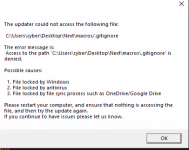
On my second PC, older Win 10. I am trying to load up my baz guys. Normally no issue, ever. Today I got this error on Launcher update. I only have Defender on the comp, and turned it off, no other antivirus. No OneDrive/GoogleDrive or anything like that. Have tried Windows Update and rebooted multiple times. No new installed software. Launcher is latest version, Plugins, Macro and Lua update. Only MQ does not. Also have 'Desktop/Next' Folder on exclusions for Defender, but Defender is even turned off. Any ideas?
1681556555311.png
 
Hi guys,
On my second PC, older Win 10. I am trying to load up my baz guys. Normally no issue, ever. Today I got this error on Launcher update. I only have Defender on the comp, and turned it off, no other antivirus. No OneDrive/GoogleDrive or anything like that. Have tried Windows Update and rebooted multiple times. No new installed software. Launcher is latest version, Plugins, Macro and Lua update. Only MQ does not. Also have 'Desktop/Next' Folder on exclusions for Defender, but Defender is even turned off. Any ideas?
View attachment 47826

I get that message when I (deliberately) write protect any files within the mq folder that it's trying to overwrite with an updated one..

in my case, for the test compile, its the Zoneconnections.yaml .. that I've added a ton of my own manual entries in, and have write protected the file so updater doesnt overwrite it.. everything else still updates fine, just throws that error..

So, its likely either an open file (for whatever reason) or something thats been flagged read-only.. or windows defender and its goofy limited access folders..

check the properties of that file its throwing the error on, see if maybe its read only (for whatever reason)...
 
I get that message when I (deliberately) write protect any files within the mq folder that it's trying to overwrite with an updated one..

in my case, for the test compile, its the Zoneconnections.yaml .. that I've added a ton of my own manual entries in, and have write protected the file so updater doesnt overwrite it.. everything else still updates fine, just throws that error..

So, its likely either an open file (for whatever reason) or something thats been flagged read-only.. or windows defender and its goofy limited access folders..

check the properties of that file its throwing the error on, see if maybe its read only (for whatever reason)...
Thanks Lor, So I checked it, and it was not on Read Only. So I do not know what the problem is. However, its resolved. Three files with .git (gitignore, gitmodules and gitkeep {in macros/rgmercs} ) was causing it to not update. But being the numbskull I am, I looked at my main comp files to look and was like.. I'll Homer Simpson it and try copy/pasting those..did it one at a time and it told me each was wrong as I went, but upon the last one, it completed and I got the GREEN letters.. HUZZAH !
 
I could really use some help with the launcher because it just won't update but maybe 1 in 50 attempts or more. I've downloaded a new one and installed it in the download folder just to keep it away from old copies. Plugins, macros and luas generally load (a few attempts) but the launcher update sometimes just won't update even after days of trying.
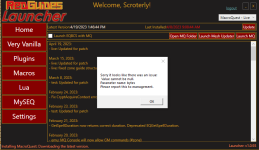
1682105573762.png


And here's the log file (of the new download/install).

2023-04-21 11:44:56,714 [1] INFO - AuthModule: AuthContentViewmodel VerifyLogin, attempting to call login
2023-04-21 11:44:56,730 [1] INFO - AuthModule: AuthContentViewmodel Login, attempting to call doauth
2023-04-21 11:44:56,730 [1] INFO - XFApiHelper DoAuth: Attempting to get stored token
2023-04-21 11:44:56,730 [1] INFO - Authorization.cs GetStoredTokenData: Attempting to get stored token from C:\Users\Jeff\AppData\Local\RedGuides\ResourceManager
2023-04-21 11:44:56,730 [1] INFO - Authorization.cs GetStoredTokenData: C:\Users\Jeff\AppData\Local\RedGuides\ResourceManager\tokens.txt existed, attempting to read
2023-04-21 11:44:56,783 [1] INFO - XFApiHelper DoAuth: We believe we found a token, continuing automatic auth process
2023-04-21 11:44:56,783 [1] INFO - XFApiHelper DoAuth: Attempting to call auth
2023-04-21 11:44:56,783 [1] INFO - Authorization.cs Auth: beginning auth
2023-04-21 11:44:56,799 [1] INFO - Authorization.cs Auth: we have a refresh token, calling codeexchange
2023-04-21 11:44:56,799 [1] INFO - Authorization.cs performCodeExchange: Have a refresh token that we believe is valid, asking for new access token
2023-04-21 11:44:57,171 [1] INFO - Authorization.cs performCodeExchange: Waiting for the token response
2023-04-21 11:45:03,901 [1] INFO - AuthModule: AuthContentViewmodel VerifyLogin, attempting to call login
2023-04-21 11:45:03,901 [1] INFO - AuthModule: AuthContentViewmodel Login, attempting to call doauth
2023-04-21 11:45:03,916 [1] INFO - XFApiHelper DoAuth: Attempting to get stored token
2023-04-21 11:45:03,916 [1] INFO - Authorization.cs GetStoredTokenData: Attempting to get stored token from C:\Users\Jeff\AppData\Local\RedGuides\ResourceManager
2023-04-21 11:45:03,916 [1] INFO - Authorization.cs GetStoredTokenData: C:\Users\Jeff\AppData\Local\RedGuides\ResourceManager\tokens.txt existed, attempting to read
2023-04-21 11:45:03,916 [1] INFO - XFApiHelper DoAuth: We believe we found a token, continuing automatic auth process
2023-04-21 11:45:03,916 [1] INFO - XFApiHelper DoAuth: Attempting to call auth
2023-04-21 11:45:03,916 [1] INFO - Authorization.cs Auth: beginning auth
2023-04-21 11:45:03,916 [1] INFO - Authorization.cs Auth: we have a refresh token, calling codeexchange
2023-04-21 11:45:03,932 [1] INFO - Authorization.cs performCodeExchange: Have a refresh token that we believe is valid, asking for new access token
2023-04-21 11:45:04,101 [1] INFO - Authorization.cs performCodeExchange: Waiting for the token response
2023-04-21 11:45:22,559 [1] INFO - AuthModule: AuthContentViewmodel VerifyLogin, attempting to call login
2023-04-21 11:45:22,566 [1] INFO - AuthModule: AuthContentViewmodel Login, attempting to call doauth
2023-04-21 11:45:22,566 [1] INFO - XFApiHelper DoAuth: Attempting to get stored token
2023-04-21 11:45:22,566 [1] INFO - Authorization.cs GetStoredTokenData: Attempting to get stored token from C:\Users\Jeff\AppData\Local\RedGuides\ResourceManager
2023-04-21 11:45:22,566 [1] INFO - Authorization.cs GetStoredTokenData: C:\Users\Jeff\AppData\Local\RedGuides\ResourceManager\tokens.txt existed, attempting to read
2023-04-21 11:45:22,581 [1] INFO - XFApiHelper DoAuth: We believe we found a token, continuing automatic auth process
2023-04-21 11:45:22,581 [1] INFO - XFApiHelper DoAuth: Attempting to call auth
2023-04-21 11:45:22,581 [1] INFO - Authorization.cs Auth: beginning auth
2023-04-21 11:45:22,581 [1] INFO - Authorization.cs Auth: we have a refresh token, calling codeexchange
2023-04-21 11:45:22,597 [1] INFO - Authorization.cs performCodeExchange: Have a refresh token that we believe is valid, asking for new access token
2023-04-21 11:45:22,973 [1] INFO - Authorization.cs performCodeExchange: Waiting for the token response
2023-04-21 11:45:22,975 [1] INFO - Authorization.cs performCodeExchange: Failed to retrieve access token: ProtocolError
2023-04-21 11:45:22,975 [1] INFO - Authorization.cs Auth: Token status is still not valid, removing refresh token
2023-04-21 11:45:22,976 [1] INFO - Authorization.cs Auth: Got all the way to the end. Token status is Expired with reason: HTTP: BadRequest : {
"status": "error",
"errors": [
"The refresh token is invalid."
]
}
2023-04-21 11:45:25,373 [1] INFO - AuthModule: AuthContentViewmodel VerifyLogin, attempting to call login
2023-04-21 11:45:25,373 [1] INFO - AuthModule: AuthContentViewmodel Login, attempting to call doauth
2023-04-21 11:45:25,373 [1] INFO - XFApiHelper DoAuth: Attempting to get stored token
2023-04-21 11:45:25,373 [1] INFO - Authorization.cs GetStoredTokenData: Attempting to get stored token from C:\Users\Jeff\AppData\Local\RedGuides\ResourceManager
2023-04-21 11:45:25,373 [1] INFO - Authorization.cs GetStoredTokenData: C:\Users\Jeff\AppData\Local\RedGuides\ResourceManager\tokens.txt existed, attempting to read
2023-04-21 11:45:25,373 [1] INFO - XFApiHelper DoAuth: We believe we found a token, continuing automatic auth process
2023-04-21 11:45:25,373 [1] INFO - XFApiHelper DoAuth: Attempting to call auth
2023-04-21 11:45:25,373 [1] INFO - Authorization.cs Auth: beginning auth
2023-04-21 11:45:25,373 [1] INFO - Authorization.cs Auth: we have a refresh token, calling codeexchange
2023-04-21 11:45:25,373 [1] INFO - Authorization.cs performCodeExchange: Have a refresh token that we believe is valid, asking for new access token
2023-04-21 11:45:25,436 [1] INFO - Authorization.cs performCodeExchange: Waiting for the token response
2023-04-21 11:45:25,552 [1] INFO - Authorization.cs performCodeExchange: Failed to retrieve access token: ProtocolError
2023-04-21 11:45:25,552 [1] INFO - Authorization.cs Auth: Token status is not valid, and we are not in startup, calling authorize automatically
2023-04-21 11:45:25,567 [1] INFO - Authorization.cs Authorization: beginning web based oauth
2023-04-21 11:45:25,567 [1] INFO - Authorization.cs Authorization: starting listener
2023-04-21 11:45:25,574 [1] INFO - Authorization.cs Authorization: authRequest https://www.redguides.com/community...3H_SsGMMVGsmMdcjvs&code_challenge_method=S256
2023-04-21 11:45:25,574 [1] INFO - Authorization.cs Authorization: sending auth request message to api
2023-04-21 11:45:25,652 [1] INFO - Authorization.cs Authorization: If we didnt catch an exception the browser should be open
2023-04-21 11:45:25,652 [1] INFO - Authorization.cs Authorization: listener awaiting http context
2023-04-21 11:45:26,410 [1] INFO - Authorization.cs Authorization: got the context, decoding
2023-04-21 11:45:26,412 [1] INFO - Authorization.cs Authorization: Got the code, sending to codeExchange
2023-04-21 11:45:26,413 [1] INFO - Authorization.cs performCodeExchange: Not a refresh token, send the code to the verifier
2023-04-21 11:45:26,413 [6] INFO - Authorization.cs Authorization: stopping the listener
2023-04-21 11:45:26,431 [1] INFO - Authorization.cs performCodeExchange: Waiting for the token response
2023-04-21 11:45:26,519 [1] INFO - Authorization.cs performCodeExchange: Got the token response, decoding
2023-04-21 11:45:26,771 [1] INFO - Authorization.cs performCodeExchange: Encrypting and storing the tokens
2023-04-21 11:45:26,792 [1] INFO - Authorization.cs Auth: Token status is valid, saving data
2023-04-21 11:45:26,796 [1] INFO - Authorization.cs Auth: Got all the way to the end. Token status is Valid with reason:
2023-04-21 11:45:26,799 [1] INFO - AuthHelper: Getting API Key
2023-04-21 11:49:52,206 [1] INFO - AuthModule: AuthContentViewmodel VerifyLogin, attempting to call login
2023-04-21 11:49:52,206 [1] INFO - AuthModule: AuthContentViewmodel Login, attempting to call doauth
2023-04-21 11:49:52,222 [1] INFO - XFApiHelper DoAuth: Attempting to get stored token
2023-04-21 11:49:52,222 [1] INFO - Authorization.cs GetStoredTokenData: Attempting to get stored token from C:\Users\Jeff\AppData\Local\RedGuides\ResourceManager
2023-04-21 11:49:52,222 [1] INFO - Authorization.cs GetStoredTokenData: C:\Users\Jeff\AppData\Local\RedGuides\ResourceManager\tokens.txt existed, attempting to read
2023-04-21 11:49:52,222 [1] INFO - XFApiHelper DoAuth: We believe we found a token, continuing automatic auth process
2023-04-21 11:49:52,222 [1] INFO - XFApiHelper DoAuth: Attempting to call auth
2023-04-21 11:49:52,222 [1] INFO - Authorization.cs Auth: beginning auth
2023-04-21 11:49:52,222 [1] INFO - Authorization.cs Auth: we have a refresh token, calling codeexchange
2023-04-21 11:49:52,237 [1] INFO - Authorization.cs performCodeExchange: Have a refresh token that we believe is valid, asking for new access token
2023-04-21 11:49:52,587 [1] INFO - Authorization.cs performCodeExchange: Waiting for the token response
2023-04-21 11:49:52,590 [1] INFO - Authorization.cs performCodeExchange: Got the token response, decoding
2023-04-21 11:49:52,818 [1] INFO - Authorization.cs performCodeExchange: Encrypting and storing the tokens
2023-04-21 11:49:52,828 [1] INFO - Authorization.cs Auth: Token status is valid, saving data
2023-04-21 11:49:52,828 [1] INFO - Authorization.cs Auth: Got all the way to the end. Token status is Valid with reason:
2023-04-21 11:49:52,828 [1] INFO - AuthHelper: Getting API Key
2023-04-21 11:50:09,629 [1] INFO - AuthModule: AuthContentViewmodel VerifyLogin, attempting to call login
2023-04-21 11:50:09,645 [1] INFO - AuthModule: AuthContentViewmodel Login, attempting to call doauth
2023-04-21 11:50:09,645 [1] INFO - XFApiHelper DoAuth: Attempting to get stored token
2023-04-21 11:50:09,645 [1] INFO - Authorization.cs GetStoredTokenData: Attempting to get stored token from C:\Users\Jeff\AppData\Local\RedGuides\ResourceManager
2023-04-21 11:50:09,645 [1] INFO - Authorization.cs GetStoredTokenData: C:\Users\Jeff\AppData\Local\RedGuides\ResourceManager\tokens.txt existed, attempting to read
2023-04-21 11:50:09,661 [1] INFO - XFApiHelper DoAuth: We believe we found a token, continuing automatic auth process
2023-04-21 11:50:09,661 [1] INFO - XFApiHelper DoAuth: Attempting to call auth
2023-04-21 11:50:09,661 [1] INFO - Authorization.cs Auth: beginning auth
2023-04-21 11:50:09,661 [1] INFO - Authorization.cs Auth: we have a refresh token, calling codeexchange
2023-04-21 11:50:09,667 [1] INFO - Authorization.cs performCodeExchange: Have a refresh token that we believe is valid, asking for new access token
2023-04-21 11:50:10,009 [1] INFO - Authorization.cs performCodeExchange: Waiting for the token response
2023-04-21 11:50:10,011 [1] INFO - Authorization.cs performCodeExchange: Got the token response, decoding
2023-04-21 11:50:10,231 [1] INFO - Authorization.cs performCodeExchange: Encrypting and storing the tokens
2023-04-21 11:50:10,246 [1] INFO - Authorization.cs Auth: Token status is valid, saving data
2023-04-21 11:50:10,246 [1] INFO - Authorization.cs Auth: Got all the way to the end. Token status is Valid with reason:
2023-04-21 11:50:10,246 [1] INFO - AuthHelper: Getting API Key
2023-04-21 12:05:14,361 [1] INFO - AuthModule: AuthContentViewmodel VerifyLogin, attempting to call login
2023-04-21 12:05:14,383 [1] INFO - AuthModule: AuthContentViewmodel Login, attempting to call doauth
2023-04-21 12:05:14,383 [1] INFO - XFApiHelper DoAuth: Attempting to get stored token
2023-04-21 12:05:14,383 [1] INFO - Authorization.cs GetStoredTokenData: Attempting to get stored token from C:\Users\Jeff\AppData\Local\RedGuides\ResourceManager
2023-04-21 12:05:14,383 [1] INFO - Authorization.cs GetStoredTokenData: C:\Users\Jeff\AppData\Local\RedGuides\ResourceManager\tokens.txt existed, attempting to read
2023-04-21 12:05:14,383 [1] INFO - XFApiHelper DoAuth: We believe we found a token, continuing automatic auth process
2023-04-21 12:05:14,383 [1] INFO - XFApiHelper DoAuth: Attempting to call auth
2023-04-21 12:05:14,383 [1] INFO - Authorization.cs Auth: beginning auth
2023-04-21 12:05:14,383 [1] INFO - Authorization.cs Auth: we have a refresh token, calling codeexchange
2023-04-21 12:05:14,398 [1] INFO - Authorization.cs performCodeExchange: Have a refresh token that we believe is valid, asking for new access token
2023-04-21 12:05:14,812 [1] INFO - Authorization.cs performCodeExchange: Waiting for the token response
2023-04-21 12:05:14,814 [1] INFO - Authorization.cs performCodeExchange: Got the token response, decoding
2023-04-21 12:05:15,038 [1] INFO - Authorization.cs performCodeExchange: Encrypting and storing the tokens
2023-04-21 12:05:15,048 [1] INFO - Authorization.cs Auth: Token status is valid, saving data
2023-04-21 12:05:15,056 [1] INFO - Authorization.cs Auth: Got all the way to the end. Token status is Valid with reason:
2023-04-21 12:05:15,058 [1] INFO - AuthHelper: Getting API Key


That last line is actually the last line; Getting API Key. And then I get the null value error on the screenshot. None of the directories are RO, everywhere these exist (old and new) are exceptions in Windows Defender.
I've logged out and logged back in multiple times. Reboots. etc.

If anyone has suggestions I'd be grateful.

Thanks.
 
If anyone has suggestions I'd be grateful.

So, I don't have any special insight into web-based authentication issues. And I'm going to assume your PC is otherwise working more or less normally.

In general, the first thing you want to ensure is your PCs time is correct. It should be automatically updating itself.

Then the 2nd boilerplate recommendation is to ensure that all Windows updates are done without errors and you've rebooted when applying them.

Finally, I'd play around with your web browser. Install a new one and change it to be the default. Make sure you log into Redguides via the web and then try the launcher again.
 
So, I don't have any special insight into web-based authentication issues. And I'm going to assume your PC is otherwise working more or less normally.

In general, the first thing you want to ensure is your PCs time is correct. It should be automatically updating itself.

Then the 2nd boilerplate recommendation is to ensure that all Windows updates are done without errors and you've rebooted when applying them.

Finally, I'd play around with your web browser. Install a new one and change it to be the default. Make sure you log into Redguides via the web and then try the launcher again.
PC has correct time. All windows updates have been applied in the past ( no new ones today ) and it was rebooted today.

One interesting thing though, I made TOR my default browser, logged out from the RG Launcher, restarted it and logged in but it went to FireFox again. Maybe TOR isn't supported so I'm getting something else shortly. But I tried that with CWTN once before and it didn't have any impact.
 
PC has correct time. All windows updates have been applied in the past ( no new ones today ) and it was rebooted today.

One interesting thing though, I made TOR my default browser, logged out from the RG Launcher, restarted it and logged in but it went to FireFox again. Maybe TOR isn't supported so I'm getting something else shortly. But I tried that with CWTN once before and it didn't have any impact.

Perhaps your ISP is manipulating your Internet traffic? Try using a VPN just to see if the symptoms change?
 
Perhaps your ISP is manipulating your Internet traffic? Try using a VPN just to see if the symptoms change?
Dude, I think you may have NAILED it with that.

I was attempting to download Chrome and on minute 45 of the 2 minute installation I killed it and fired up Windscribe. Boom. Everything loaded first try and launcher updated. Now it's *possible* this was just the magical 172'd try that worked but I suspect you were dead on.
 
Dude, I think you may have NAILED it with that.

I was attempting to download Chrome and on minute 45 of the 2 minute installation I killed it and fired up Windscribe. Boom. Everything loaded first try and launcher updated. Now it's *possible* this was just the magical 172'd try that worked but I suspect you were dead on.

Good deal! I also use Windscribe. Got the Lifetime subscription quite a few years ago!
 
Good deal! I also use Windscribe. Got the Lifetime subscription quite a few years ago!
I booted up this morning, fired up launcher without vpn, it barfed 25% through the plugins. Kill it, pop Windscribe, start launcher and everything loaded perfectly. You are absolutely correct that it's an ISP manipulation and I would never have considered that. So thank you!
 
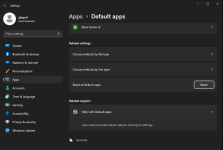
ive this issue come up after i clone a vm with the launcher. Reseting default browser doesnt work, but a full reset of default apps works like a charm.


1682703978966.png
 
I know this is a super fringe use case, but I was wondering if someone had any ideas if there were /switches for running the updater in Powershell.

I'd like to have a script that would launcher.exe /update if there is an update and update out-of-date plugins/macros/luas.
 
First of all, I'm new to the forums, so greetings to everyone and happy to be here :-).

I've played EQ for quite a long time, and even used MQ2 in the past (some vanila non-RG), but this is the first time trying the RG compilation. I've followed the video instructions and downloaded the patcher. I've run it and I'm trying to login, but I'm getting the dreaded "Auth: Failed to authenticate with the forums." message.

1684426953555.png

This is the logs message the application creates (with some parts obfuscated just in case):
[CODE title="logs"]2023-05-18 18:17:18,971 [1] INFO - AuthModule: AuthContentViewmodel VerifyLogin, attempting to call login
2023-05-18 18:17:18,991 [1] INFO - AuthModule: AuthContentViewmodel Login, attempting to call doauth
2023-05-18 18:17:19,011 [1] INFO - XFApiHelper DoAuth: Attempting to get stored token
2023-05-18 18:17:19,031 [1] INFO - Authorization.cs GetStoredTokenData: Attempting to get stored token from C:\Users\LyB\AppData\Local\RedGuides\ResourceManager
2023-05-18 18:17:19,051 [1] INFO - XFApiHelper DoAuth: User Clicked the login button, continuing auth process
2023-05-18 18:17:19,071 [1] INFO - XFApiHelper DoAuth: Attempting to call auth
2023-05-18 18:17:19,101 [1] INFO - Authorization.cs Auth: beginning auth
2023-05-18 18:17:19,121 [1] INFO - Authorization.cs Auth: Token status is not valid, and we are not in startup, calling authorize automatically
2023-05-18 18:17:19,141 [1] INFO - Authorization.cs Authorization: beginning web based oauth
2023-05-18 18:17:19,171 [1] INFO - Authorization.cs Authorization: starting listener
2023-05-18 18:17:19,191 [1] INFO - Authorization.cs Authorization: authRequest https://www.redguides.com/community/redapi/index.php/oauth/authorize?response_type=code&scope=read%20post%20usercp%20conversate&redirect_uri=http%3A%2F%2F127.0.0.1%3A62897%2F&client_id=xxx&state=yyy&code_challenge=zzz&code_challenge_method=S256
2023-05-18 18:17:19,211 [1] INFO - Authorization.cs Authorization: sending auth request message to api
2023-05-18 18:17:19,251 [1] INFO - Authorization.cs Authorization: If we didnt catch an exception the browser should be open
2023-05-18 18:17:19,281 [1] INFO - Authorization.cs Authorization: listener awaiting http context
2023-05-18 18:17:24,286 [1] INFO - Authorization.cs Authorization: got the context, decoding
2023-05-18 18:17:24,314 [1] INFO - Authorization.cs Authorization: Got the code, sending to codeExchange
2023-05-18 18:17:24,314 [10] INFO - Authorization.cs Authorization: stopping the listener
2023-05-18 18:17:24,362 [1] INFO - Authorization.cs performCodeExchange: Not a refresh token, send the code to the verifier
2023-05-18 18:17:24,505 [1] INFO - Authorization.cs Auth: Token status is still not valid, removing refresh token
2023-05-18 18:17:24,540 [1] INFO - Authorization.cs Auth: Got all the way to the end. Token status is Invalid with reason: Failed to authenticate
[/CODE]

I've searched the forums and tried changing the default browser, clearing cache, reinstalling, restarting, and even looking for some keys in the register. Obviously, no luck or I wouldn't be here (maybe somewhere else in the forums).

What next steps would you recommend me to try? Is there any further information I can provide that can help?

Thanks!
 
First of all, I'm new to the forums, so greetings to everyone and happy to be here :-).

I've played EQ for quite a long time, and even used MQ2 in the past (some vanila non-RG), but this is the first time trying the RG compilation. I've followed the video instructions and downloaded the patcher. I've run it and I'm trying to login, but I'm getting the dreaded "Auth: Failed to authenticate with the forums." message.

View attachment 48644

This is the logs message the application creates (with some parts obfuscated just in case):
[CODE title="logs"]2023-05-18 18:17:18,971 [1] INFO - AuthModule: AuthContentViewmodel VerifyLogin, attempting to call login
2023-05-18 18:17:18,991 [1] INFO - AuthModule: AuthContentViewmodel Login, attempting to call doauth
2023-05-18 18:17:19,011 [1] INFO - XFApiHelper DoAuth: Attempting to get stored token
2023-05-18 18:17:19,031 [1] INFO - Authorization.cs GetStoredTokenData: Attempting to get stored token from C:\Users\LyB\AppData\Local\RedGuides\ResourceManager
2023-05-18 18:17:19,051 [1] INFO - XFApiHelper DoAuth: User Clicked the login button, continuing auth process
2023-05-18 18:17:19,071 [1] INFO - XFApiHelper DoAuth: Attempting to call auth
2023-05-18 18:17:19,101 [1] INFO - Authorization.cs Auth: beginning auth
2023-05-18 18:17:19,121 [1] INFO - Authorization.cs Auth: Token status is not valid, and we are not in startup, calling authorize automatically
2023-05-18 18:17:19,141 [1] INFO - Authorization.cs Authorization: beginning web based oauth
2023-05-18 18:17:19,171 [1] INFO - Authorization.cs Authorization: starting listener
2023-05-18 18:17:19,191 [1] INFO - Authorization.cs Authorization: authRequest https://www.redguides.com/community/redapi/index.php/oauth/authorize?response_type=code&scope=read%20post%20usercp%20conversate&redirect_uri=http%3A%2F%2F127.0.0.1%3A62897%2F&client_id=xxx&state=yyy&code_challenge=zzz&code_challenge_method=S256
2023-05-18 18:17:19,211 [1] INFO - Authorization.cs Authorization: sending auth request message to api
2023-05-18 18:17:19,251 [1] INFO - Authorization.cs Authorization: If we didnt catch an exception the browser should be open
2023-05-18 18:17:19,281 [1] INFO - Authorization.cs Authorization: listener awaiting http context
2023-05-18 18:17:24,286 [1] INFO - Authorization.cs Authorization: got the context, decoding
2023-05-18 18:17:24,314 [1] INFO - Authorization.cs Authorization: Got the code, sending to codeExchange
2023-05-18 18:17:24,314 [10] INFO - Authorization.cs Authorization: stopping the listener
2023-05-18 18:17:24,362 [1] INFO - Authorization.cs performCodeExchange: Not a refresh token, send the code to the verifier
2023-05-18 18:17:24,505 [1] INFO - Authorization.cs Auth: Token status is still not valid, removing refresh token
2023-05-18 18:17:24,540 [1] INFO - Authorization.cs Auth: Got all the way to the end. Token status is Invalid with reason: Failed to authenticate
[/CODE]

I've searched the forums and tried changing the default browser, clearing cache, reinstalling, restarting, and even looking for some keys in the register. Obviously, no luck or I wouldn't be here (maybe somewhere else in the forums).

What next steps would you recommend me to try? Is there any further information I can provide that can help?

Thanks!
would suggest trying a different "default browser" and/or doing a cookies/cache delete, then reboot, and then try again.

you also want to ensure that your RG launcher isn't getting AV scanned and having any files getting held-up or held hostage
 
would suggest trying a different "default browser" and/or doing a cookies/cache delete, then reboot, and then try again.

you also want to ensure that your RG launcher isn't getting AV scanned and having any files getting held-up or held hostage
Hi Sic, and thanks for your quick reply.

I've tried with different browsers, clearing cache and restarting, but I don't think I've tried that exact sequence all together. I'll give it a try and let you know if it works.

As for an AV, I only have Microsoft Defender or whatever it's called, and it didn't show any alert.

Looking at the logs, it seems as if the token returned by the browser was invalid. Has anyone else logged in recently?

Thanks!
 
Last edited:
Hi all!

I've tried in a different computer (different OS and different network) and it worked. However, it's still failing in this machine, apparently, at token validation.

I've tried clearing cache, rebooting and starting the browser with extensions and plugins disabled. When I click the login button, the browser asks me to login and authorize the API access. However, when it tells me to get back the app, the app hangs up a bit and then shows the auth error provided above.

Is there any way to manually copy the token from the working computer into this one? Also, is there any way to get more debug info?

Thanks!
 
The launcher will not authenticate with the forums. I'm on win7 chrome browser running the launcher as user and also tried admin still shows Auth: Failed to authenticate with the forums
 
The launcher will not authenticate with the forums. I'm on win7 chrome browser running the launcher as user and also tried admin still shows Auth: Failed to authenticate with the forums
Win7? mq doesn't support win7, and I don't believe the launcher does either.

In the paraphrased words of @Knightly "don't be a botnet"

You will need a modern, supported windows, like 10 or 11
 
I've been at this for about 2 hours now deleting and reloading the launcher everything comes up as it should. When I click login I go to a page that says please return to app.
I cannot log into the launcher somebody please help me because there is no place I can go and actually ask someone for help. Lets assume I don't know what I'm doing
 
I've been at this for about 2 hours now deleting and reloading the launcher everything comes up as it should. When I click login I go to a page that says please return to app.
I cannot log into the launcher somebody please help me because there is no place I can go and actually ask someone for help. Lets assume I don't know what I'm doing
There is a place we are on discord and you can click on the discord button and talk with folks.

It sounds like potentially you have antivirus holding files and programs from running.

If you haven't already restarted your computer, that's where I would start.

And if you didn't watch the getting started videos, that's where you would start as well

Getting Started / Returning user

Welcome to RedGuides, fellow EQ multi-boxing enthusiast!

The best place to begin is our "New User Guide" video series, click this TV to watch:


This step-by-step series will teach absolute beginners how to control 6 characters at once while highlighting Nav, AutoLogin, and DanNet, which are fundamental plugins that will enhance every aspect of your game.

Returning users check out - MacroQuest Release Party: https://www.redguides.com/community/threads/macroquest-release-party.80628/ for information about changes from the legacy MQ2 to the new and awesome MQ
 
If disabling your antivir doesn't work, try changing your default browser. Type "default apps" into your windows search, and switch the browser to Chrome or Edge or Firefox.
 
I ran into this problem suddenly today, too, have been worked well for half a year though.
(auth: failed to auth with the forums)
try clean appdata contents/clean browser cache/uninstall&reinstall/change default browser(chrome&edge)/reboot, but still no luck.
log seems exactly the same as @Varthak posted.

OS: windows 10 pro

any other way to login?


Update: I changed my network connection to another and it worked now.
 
Last edited:
When I try to run the launcher since last update the launcher just stops and closes after the splash screen. Any thoughts?
 
anytime ive had launcher cause a failure was after and udpate and a hardboot solved my issue.

your patched to live/test/emu?

not trying to launch anything else in sync with it ? isboxer etc?
 
I can't even get to the screen that asks which to choose live/test/emu.
Nope not running anything else with it.
Tried the hardboot and tried deleting and reinstalling launcher.
 
i bought a new pc installed launcher , when i hit login it says failed to authenticate with forum ???
 
it just launches and says log in , i hit log in and it opens and closes a page then says that failed on launcher
 
did you open a web browser, go to redguides.com and login?

Also there is some troubleshooting in the launcher thread, this didnt need to be the place. it happens and that thread has various tips.
 
did you open a web browser, go to redguides.com and login?

Also there is some troubleshooting in the launcher thread, this didnt need to be the place. it happens and that thread has various tips.
yes i did log on on the web site
 
RedGuides Launcher

Users who are viewing this thread

Back
Top
Cart