Anteroz1994
Member
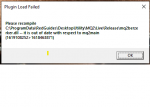
i have uninstalled, deleted everything to do with redguides/mq restarted done fresh installs and no matter what i do trying to install i get these errors. any tips?
Last edited by a moderator:



/ooc, /shout or other public channels. This has been an unwritten rule that's kept casino scripts off the site for decades, but we're now compelled to make it clear: keep automated communication private./target over impossible distances when /nav spawn would passively accomplish the same thing, a spawn search that fires 20+ times per second, and other pointless actions that are likely annoying GMs./lua run

That's usually from a slow download. Do you have any connection issues?i have uninstalled, deleted everything to do with redguides/mq restarted done fresh installs and no matter what i do trying to install i get these errors. any tips?
View attachment 29426
ah yes i have to play on mobile hotspot connection atm due to movingThat's usually from a slow download. Do you have any connection issues?
Worst case, you can download manually:
 thank you atleast now i know what it is lol, been trying to figure this out for literally 5 hours
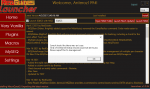
RG site was down for a couple.when i click on the redguides launcher shortcut the box with "home", Very Vanilla", and the login button in the middle pops up but wont do anythign after that.
the bottum left corner has "Loaded Successfully"
the only plugins that show in your launcher are the "premium" paid-for plugins, like mq2eqwire. all other plugins are included in your VV already and are already in your release folder, you just need to load them in gamei have followed the process of following the plugins i wish to use, but they never show up in the launcher plugins tab. so can someone please walk me through this?
/plugin pluginname load
thanksthe only plugins that show in your launcher are the "premium" paid-for plugins, like mq2eqwire. all other plugins are included in your VV already and are already in your release folder, you just need to load them in game
/plugin pluginname load
macros on the other hand aren't all automatically downloaded (as there are a lot), and you can "watch" those resources to get them added to your launcher to auto download
on patch days mq2 has to get patched, and then VV rebuilt - the target is usually 8pm est.I have a trouble with this not working; everquest have been active atleast 10h now, and louncher hasent been uptadet yet. is there a way to make it update manyally, so I can play with all my crew?
on patch days mq2 has to get patched, and then VV rebuilt - the target is usually 8pm est.
it was not a normal patch because they released the .exe at 3am est
VV will likely be up as usually by that 8pm est time
on patch days mq2 has to get patched, and then VV rebuilt - the target is usually 8pm est.
it was not a normal patch because they released the .exe at 3am est
VV will likely be up as usually by that 8pm est time
its up now! PAAAAATCHThanks for the information. This was my first patch with VV. I may have to play normally. It almost feels archaic now! These programs have really refreshed the game and changed my life with it. Glad to be coming back after 19 years.
Sorry to hear that!The launcher isn't working for me. Nothing happens. I've tried deleting the ResourceManager file, and that didn't work either.

Thanks for your time Sic, much appreciated. Will give it a shotSorry to hear that!
Sometimes the Launcher gets a little confused and will close automatically - when this happens you need to reinstall the launcher after deleting your APPDATA and here are some steps to help you do that.
```
1 - delete your AppData - paste this in windows explorer search window (any folder) %LocalAppData%\RedGuides and then delete the contents in that folder
1b - Did you skip step 1? if you did, go back and do step 1
2 - then go to add/remove programs, and remove the redguide's launcher
3 - reinstall the launcher
4 - open launcher
5 - point the re-install to your existing mq2 directory
6 - boom - back in business
7 - get a snack/drink - you earned it!
```
Here is the link to re-download the launcher <https://www.redguides.com/community/resources/redguides-launcher.1255/download>
Hmmm, still didn't work. No hurry, the last patch was just long enough to break the addiction, haha. I'll follow along and see if anyone else is having issues.Thanks for your time Sic, much appreciated. Will give it a shot
are you positive you followed the steps about deleting the appdata?Hmmm, still didn't work.
I did delete the app data (it was located in a different folder.../users/appdata/local), then I uninstalled the program and re-installed. When I click the launcher I get the security warning..."Do you want this app to make changes to your device"...the usual disclaimer. When I click "yes", my desktop shows again, there's the turny circle on my cursor for 0.5 to 1 second, and nothing.are you positive you followed the steps about deleting the appdata?
if so - what is actually happening when you launch?
Try updating your launcher and pluginsI tried today to autologin my group of 6 and they all launch ok but after launch I am getting this error message on them all:
View attachment 29734can anyone please help??? Thank you in advance
Grab a hammer and manually adjust your pcI have reloaded the plugin several times, it still fails
I have reloaded the plugin several times, it still fails


Yup that was it, damn that year went quick LOLView attachment 29735
Looks like you're due for renewal.
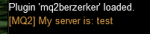
howdy huksyHello, I patched the launcher and logged in. However once i did and went to boot up my box crew I noticed mqzerker wasn't working and said it couldnt be loaded. the command /plugin mq2zerk is not working for it. Please help.
I would maybe try hitting the reinstall button on the launcherIm running test
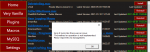
Getting an error message when attempting to install one particular macro (DeleteInBag). Now, I've already downloaded the macro and used it in game. But the launcher just seems to have an issue doing an "official" install. I'm sure this is specific to this macro. I did installs for a couple other macros just this morning. Any ideas on how to track down the cause of this issue?
View attachment 30512

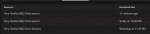
this is just giving you the option to reinstall, if, for some reason, you wanted to reinstall. It only shows update if there is an update you haven't downloadedJust installed VV, (watching the walk through on youtube) instead of it saying UPDATE in the right hand corner of launcher after installation it says Re-Install, just wondering if this is normal or something i should worry about,...