Thanks so much guys. I uninstalled red guides and installed and it didnt do the trick so i ended up retarting then installing and it worked fine. You guys rocksometimes folks need to reinstall their launcher for various reasons
Delete your appdata - paste this in windows explorer search window (any folder)%LocalAppData%\RedGuidesand then delete the contents in that folder
then go to add/remove programs, and remove the redguide's launcher
reinstall the launcher
open launcher
point the re-install to your existing mq2 directory
boom - back in business

-
 Hail, we're RedGuides. We want you to play six (yes, 6!) EverQuest characters at once. We have scripts and a friendly community to help, please join our playstyle and say hello! 👋
You are using an out of date browser. It may not display this or other websites correctly.
You should upgrade or use an alternative browser.
You should upgrade or use an alternative browser.

RedGuides Launcher (4 Viewers) 1.1.0
- Thread starter r1pt1de
- Start date
huronworker
Member
Ok, so i did a brief read of this and deleted the resource file and uninstalled the launcher and reinstalled. still not loading. any resolution?

did you follow the following instructions (which the user above you just did this morning). the deleting the appdata when you reinstall is key hereOk, so i did a brief read of this and deleted the resource file and uninstalled the launcher and reinstalled. still not loading. any resolution?
sometimes folks need to reinstall their launcher for various reasons
Delete your appdata - paste this in windows explorer search window (any folder) %LocalAppData%\RedGuides and then delete the contents in that folder
then go to add/remove programs, and remove the redguide's launcher
reinstall the launcher
open launcher
point the re-install to your existing mq2 directory
boom - back in business
huronworker
Member
Ok, so pointing it to the existing mq2 directory worked. Thank you!
lunchbox7107
BANNED
how do i correct the date time issue
you need to patch both eq and mq2, like your popup sayshow do i correct the date time issue
lunchbox7107
BANNED
i have done that then i get a a message that eq has a file locked even after i did a power down on computer
then that is likely a antivirus or other type thing holding your files. you should exempt your mq2i have done that then i get a a message that eq has a file locked even after i did a power down on computer
ToeJamSamy
Seasoned veteran member
IDK why this is, it could be why in the past I had to run my emu server on a 7 machine, but RGI wants .NET 4.7.2. I tried the web installer for 4.7.2 and 4.8, as well as the developer offline install for 4.7.2. As with everything I unblocked the file after download, I ran as administrator. They all say not supported on this system. I'm running a 10 Pro 64bit OS, how does that not support it? Should be automatically included (again, an issue I remember running into with other .NET versions for emu server) Has anyone else run into this issue? Should I just give up and use one of my win 7 machines instead?
After this issue I tried just running the VV on its own, but it wanted me to install the RGI first too. I'd figured RGI was just an easier all-in-one place to maintain updates etc. Other suggestions?
After this issue I tried just running the VV on its own, but it wanted me to install the RGI first too. I'd figured RGI was just an easier all-in-one place to maintain updates etc. Other suggestions?

If that is the adobe flash it is getting discontinued next monthLauncher opens then closes with a Flash error any idea's?
r1pt1de updated RedGuides Launcher with a new update entry:
MySEQ Support
Read the rest of this update entry...
MySEQ Support
Added support for MySEQ
Read the rest of this update entry...

Robban
Ultimate seasoned veteran member
Oh this is Lovely!r1pt1de updated RedGuides Launcher with a new update entry:
MySEQ Support
Read the rest of this update entry...
Launcher opens then closes with a Flash error any idea's?
If that is the adobe flash it is getting discontinued next month
Sorry just saw this. Unfortunately I am not sure on this one as there is no Flash in the launcher. Its all .Net

I think most everyone is running Win 10 64bit, so I'm not sure the issue here. Do you have antivirus running?IDK why this is, it could be why in the past I had to run my emu server on a 7 machine, but RGI wants .NET 4.7.2. I tried the web installer for 4.7.2 and 4.8, as well as the developer offline install for 4.7.2. As with everything I unblocked the file after download, I ran as administrator. They all say not supported on this system. I'm running a 10 Pro 64bit OS, how does that not support it? Should be automatically included (again, an issue I remember running into with other .NET versions for emu server) Has anyone else run into this issue? Should I just give up and use one of my win 7 machines instead?
After this issue I tried just running the VV on its own, but it wanted me to install the RGI first too. I'd figured RGI was just an easier all-in-one place to maintain updates etc. Other suggestions?
ToeJamSamy
Seasoned veteran member
nope. i don't use them, i use common senseI think most everyone is running Win 10 64bit, so I'm not sure the issue here. Do you have antivirus running?
 (and i don't do porn lol) I was thinking maybe it was trying to make me dl the 64bit version and i need to find the x86 maybe? i haven't tried again since i found VV installable without this, but the more plugins etc i use the more I'm going to need it.
nope. i don't use them, i use common sense
I just installed Windows 10 x64 on a virtual machine (stable 1809) and didn't require any additional software to run the launcher. No .NET downloads or anything. Have you made modifications to your win10 installation? Do you have another PC you can try it on?
ToeJamSamy
Seasoned veteran member
I'm sure I've made modifications but it should still have the .net(cause you can't uninstall it). I can try installing on other machines but they're not win10 or running the software. If can verify for nonwin10 that it is x86 not x64, then I will retry finding the right one for my win10. It is pro not home so that could make a difference.I just installed Windows 10 x64 on a virtual machine (stable 1809) and didn't require any additional software to run the launcher. No .NET downloads or anything. Have you made modifications to your win10 installation? Do you have another PC you can try it on?
r1pt1de updated RedGuides Launcher with a new update entry:
Fixed Latest Version date on MySEQ Maps
Read the rest of this update entry...
Fixed Latest Version date on MySEQ Maps
Fixed copy paste error for the MySEQ Maps latest version date.
Read the rest of this update entry...
did you end up getting running? shoot me a msg sometime this afternoon if not and i'll see if i can helptrying to load the launcher and i keep getting rgresourcemanager has stopped working any suggestions?

I updated yesterday and now the launcher starts, runs for a few seconds and then crashes with no message.
If the launcher had worked before but is now crashing on startup, open file explorer and go to %LocalAppData%\RedGuides and delete the folder ResourceManagerI updated yesterday and now the launcher starts, runs for a few seconds and then crashes with no message.
That fixed it, thanksIf the launcher had worked before but is now crashing on startup, open file explorer and go to %LocalAppData%\RedGuides and delete the folder ResourceManager
thenorthdave
New member
Installed redguides launcher, when opened it will not stay open for more than 3 seconds and closes itself.
howdy @thenorthdave welcome to RG - sorry for your troubles.Installed redguides launcher, when opened it will not stay open for more than 3 seconds and closes itself.
it might have had a hiccup installing.
I would try and different default windows browser
you can press your windows button on your keyboard
then type in "browser" and you will see this button

then click web broser, and choose a different one. I personally use Brave, or Chrome

if that doesn't work I would reinstalling by following these instructions:
Delete your appdata - paste this in windows explorer search window (any folder) %LocalAppData%\RedGuides and then delete the contents in that folder
then go to add/remove programs, and remove the redguide's launcher
reinstall the launcher
open launcher
point the re-install to your existing mq2 directory
boom - back in business
thenorthdave
New member
Thanks that fixed it
howdy @thenorthdave welcome to RG - sorry for your troubles.
it might have had a hiccup installing.
I would try and different default windows browser
you can press your windows button on your keyboard
then type in "browser" and you will see this button
View attachment 26739
then click web broser, and choose a different one. I personally use Brave, or Chrome
View attachment 26740
if that doesn't work I would reinstalling by following these instructions:
Delete your appdata - paste this in windows explorer search window (any folder) %LocalAppData%\RedGuides and then delete the contents in that folder
then go to add/remove programs, and remove the redguide's launcher
reinstall the launcher
open launcher
point the re-install to your existing mq2 directory
boom - back in business
This has been happening to me as well. Have tried the above several times. Doesn't seem to "stick" with the fix.
Any idea what causes it?
nah, I know its something r1pt1de is working on its tough to intentionally replicate so then you can find out why and fix lolThis has been happening to me as well. Have tried the above several times. Doesn't seem to "stick" with the fix.
Any idea what causes it?
its poopy tho =/ sorry you're having issues
i'm not sure it would help - but since you appear to be able to replicate it and do a step-by-step thing - would you mind shooting @r1pt1de a pm with a quick little writeup on the steps that you do that causes it, and then what you have to do to fix it - it might give him a little more insightAll good. It just takes a couple times of clearing app data, uninstall/reinstall, click "install" on VV, watch the launcher crash, and then rinse and repeat two or three times. Eventually it works, lol.
Thanks for the quick response!
i'm not sure it would help - but since you appear to be able to replicate it and do a step-by-step thing - would you mind shooting @r1pt1de a pm with a quick little writeup on the steps that you do that causes it, and then what you have to do to fix it - it might give him a little more insight
Done. Again, thanks Sic!
howdy @Youness,hi my redguides launcher app is not working, once I open it, it launches the application and at the bottom it says loaded successfully and then it closes the program. Anyone please help me out. Thanks.
sorry to hear you are having issues with the launcher. I know r1p has been working on getting the kinks worked out so hopefully this gets fixed up here soon.
The best bet is to check out the following things:
1. - start with a restart of your computer, sometimes the launcher gets hung up if you leave it open.
2. - if that doesn't work, you might need to reinstall the launcher after deleting your AppData by following these instructions
Code:
1 - delete your AppData - paste this in windows explorer search window (any folder) %LocalAppData%\RedGuides and then delete the contents in that folder
1b - Did you skip step 1? if you did, go back and do step 1 :)
2 - then go to add/remove programs, and remove the redguide's launcher
3 - reinstall the launcher
4 - open launcher
5 - point the re-install to your existing mq2 directory
6 - boom - back in business
7 - get a snack/drink - you earned it!
> RedGuide's App Link < <--- here's the link to re-download the app so you don't have to go searching for it
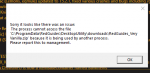
The launcher giving that message means that something is locking your files.View attachment 27060
on a fresh boot of computer and reinstall / update of kissassist.
only program running is discord. EQBC will not load at all.
I am running 2 computers the other loads KA just fine
To be clear i think you're a little mixed up about mq2 and kissassist. Kissassist is the macro that runs in mq2. The redguides very vanilla is a compile of macroquest2. The very vanilla launcher updates you to the latest very vanilla build or mq2, and latest versions of macros like kissassist and plugins like dannet or mq2nav.
Locked file could be anything from still being in game with mq2 loaded, to your antivirus holding those files.
Best bet is another restart, and then run updater again. If you get the same message start looking at your antivirus to see if that is holding files hostage. Likely a good idea to exempt your mq2 folder.
Yep i had to except mq2 folder couple months ago. 2 different antivirus programs where locking files in them for "suspicious" activity. exempted them like sic said and bam. no more issuesThe launcher giving that message means that something is locking your files.
To be clear i think you're a little mixed up about mq2 and kissassist. Kissassist is the macro that runs in mq2. The redguides very vanilla is a compile of macroquest2. The very vanilla launcher updates you to the latest very vanilla build or mq2, and latest versions of macros like kissassist and plugins like dannet or mq2nav.
Locked file could be anything from still being in game with mq2 loaded, to your antivirus holding those files.
Best bet is another restart, and then run updater again. If you get the same message start looking at your antivirus to see if that is holding files hostage. Likely a good idea to exempt your mq2 folder.
Users who are viewing this thread
Total: 5 (members: 0, guests: 5)
Share: