
-
 Hail, we're RedGuides. We want you to play six (yes, 6!) EverQuest characters at once. We have scripts and a friendly community to help, please join our playstyle and say hello! 👋
 -
 We've added LLM sections to our Terms & Rules and Resource Rules, for everyone's sanity & in-game safety.
Read more
a. Do not replace your voice with an LLM. This goes for your posts and your scripts. Drafting and editing with a tool is fine, but don't take you out of what you share.
b. Do not replace your EQ character's voice with an LLM. We don't want scripts that speak over/ooc,/shoutor other public channels. This has been an unwritten rule that's kept casino scripts off the site for decades, but we're now compelled to make it clear: keep automated communication private.
Why Does RG Review Scripts?
Nearly every LLM-written Lua script we see is making your character do impossible things, and rarely in a way that's beneficial to you. We've seen heavy server hammering,/targetover impossible distances when/nav spawnwould passively accomplish the same thing, a spawn search that fires 20+ times per second, and other pointless actions that are likely annoying GMs.
You are welcome to use LLMs as a tool to structure, draft, and edit your work, but please read critically before hitting/lua run
You are using an out of date browser. It may not display this or other websites correctly.
You should upgrade or use an alternative browser.
You should upgrade or use an alternative browser.

RedGuides Launcher (2 Viewers) 1.1.0
- Thread starter r1pt1de
- Start date
sameI am having the exact same issue
Seems to be an issue with the launcher not being able to connect / login the account. Here is the launcher screen:
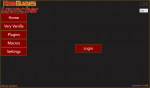
Clicking Login just brings up a page from 127.0.01 that first says "please return to the app" but after a few seconds brings up the Redguides home page, where I can login just fine.
Saw a couple other posts a few minutes ago reviving an old thread, but figured I would start a new thread, mostly because I'm bored because I can't play...
Anyone else having this issue?
Clicking Login just brings up a page from 127.0.01 that first says "please return to the app" but after a few seconds brings up the Redguides home page, where I can login just fine.
Saw a couple other posts a few minutes ago reviving an old thread, but figured I would start a new thread, mostly because I'm bored because I can't play...
Anyone else having this issue?
 itself is working fine. its just the launcher.
Stay_Classy
Member
Seems to be an issue with the launcher not being able to connect / login the account. Here is the launcher screen:
View attachment 23260
Clicking Login just brings up a page from 127.0.01 that first says "please return to the app" but after a few seconds brings up the Redguides home page, where I can login just fine.
Saw a couple other posts a few minutes ago reviving an old thread, but figured I would start a new thread, mostly because I'm bored because I can't play...
Anyone else having this issue?
Same issue here.
AkronzFurey
Member
i just got this issue and after getting a sub gifted upset by this being down and not being able to play
Crazyred8282
New member
Yes im having same issue i log in and says go back to app but still wont do anything

dastugots
Member
i just got this issue and after getting a sub gifted upset by this being down and not being able to play
My gosh, its the end of the world! Things break from time to time, it always happens. Its happening to me as well, it will get fixed.
al;ways one poster with a witty response to folks.... nothing wrong with people reporting a issue....no one was crying and moaning.My gosh, its the end of the world! Things break from time to time, it always happens. Its happening to me as well, it will get fixed.
classifyde
Member
i'm just glad it is not just a me issue lol.
classifyde
Member
this is the same for me. I guess it runs a separate exe.
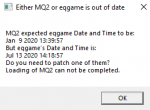
Launching just the macroquest2.exe gives the program is out of date message:

Launching just the macroquest2.exe gives the program is out of date message:

classifyde
Member
thanks Sic
RedGuides Launcher is down for Maintenance ETA ~10pm EST. Sorry for the inconvenience.I have been using launcher and MQ2 for a week now, all of a sudden to day i cant start vanilla and macros or anything, only button that works is login button and that takes me to a page inside redguides that just says return to app
This is just the launcher/updater, however.
you can still run your macroquest2.exe in your mq2 folder

fartjarfunkel
Active member
i put the MacroQuest2.exe on my desktop in case of something like this. the damn thing wont work i click it and nothing happens and for some reason out side of the launcher rmq2 folder button folder mq2 dose not exsist on my computer. i can not find one trace of mq2 on my computer can not find a mq2 folder anywhere
RedGuides Launcher is down for Maintenance ETA ~10pm EST. Sorry for the inconvenience.I press Login on launcher and it logs me into the site but not the launcher

you need to patch your everquest. it is out of date. - which is what that says thereI am having the same issue here. I just loaded red guides launcher today.
View attachment 23299
any help greatly appreciated!
this usually happens on a patch day when mq2 is waiting to be patched - but you can see in your image that eqgame is behind mq2 - which means you need to run the eq patcher to update your everquest files
Hello - For some reason the launcher no longer opens for me. Not sure why. Here is what I have done so far:
1. restarted
2. changed my default browser
3. Searched for Appdata in file explorer to delete but came up empty on search: used search that Sic suggested - %LOCALAPPDATA%\RedGuides
4. reinstalled the launcher
None of that seems to have fixed the issue for me - any other suggestions?
1. restarted
2. changed my default browser
3. Searched for Appdata in file explorer to delete but came up empty on search: used search that Sic suggested - %LOCALAPPDATA%\RedGuides
4. reinstalled the launcher
None of that seems to have fixed the issue for me - any other suggestions?
I am stuck, I can't seem to get my launcher or my MQ updated today. I turned my logs on full and got the following:
020-08-19 21:54:41,241 [1] INFO - VeryVanillaModule: Installing Very Vanilla for Live servers.
2020-08-19 21:54:41,246 [1] INFO - VeryVanillaModule: Check settings for install location for Live servers.
2020-08-19 21:54:41,250 [1] INFO - VeryVanillaModule: Finding processes that are executing from the target folder.
2020-08-19 21:54:41,269 [1] INFO - VeryVanillaModule: Asking the api for the latest version of VeryVanilla for Live servers.
2020-08-19 21:54:41,466 [1] INFO - VeryVanillaModule: Api returned the latest version of VeryVanilla for Live servers, and it has a downloadable file. Installing now.
2020-08-19 21:54:41,473 [1] INFO - VeryVanillaModule: File not present at the location returned by the ApiHelper
2020-08-19 21:54:41,477 [1] INFO - VeryVanillaModule: Installation of VeryVanilla for Live completed.
2020-08-19 21:54:41,774 [1] INFO - VeryVanillaModule: Server type selection changed. Verifying versions
2020-08-19 21:54:41,782 [1] INFO - VeryVanillaModule: Getting latest version information from the forums
2020-08-19 21:54:41,916 [1] INFO - VeryVanillaModule: Getting the last installed date
2020-08-19 21:54:44,065 [1] INFO - SettingsModule: A new version of the launcher has been downloaded, installing now
2020-08-19 21:54:49,926 [6] INFO - SettingsModule: Checking for a new version of the Launcher from the forums
2020-08-19 21:54:50,054 [14] INFO - SettingsModule: Getting the current installed version of the launcher from the registry
2020-08-19 21:54:54,483 [1] INFO - SettingsModule: Checking for a new version of the Launcher from the forums
2020-08-19 21:54:54,805 [1] INFO - SettingsModule: Getting the current installed version of the launcher from the registry
2020-08-19 21:54:55,116 [1] INFO - SettingsModule: Downloading the new version of the Launcher from the forums
2020-08-19 21:54:55,121 [1] INFO - SettingsModule: There was an error downloading the latest version.
020-08-19 21:54:41,241 [1] INFO - VeryVanillaModule: Installing Very Vanilla for Live servers.
2020-08-19 21:54:41,246 [1] INFO - VeryVanillaModule: Check settings for install location for Live servers.
2020-08-19 21:54:41,250 [1] INFO - VeryVanillaModule: Finding processes that are executing from the target folder.
2020-08-19 21:54:41,269 [1] INFO - VeryVanillaModule: Asking the api for the latest version of VeryVanilla for Live servers.
2020-08-19 21:54:41,466 [1] INFO - VeryVanillaModule: Api returned the latest version of VeryVanilla for Live servers, and it has a downloadable file. Installing now.
2020-08-19 21:54:41,473 [1] INFO - VeryVanillaModule: File not present at the location returned by the ApiHelper
2020-08-19 21:54:41,477 [1] INFO - VeryVanillaModule: Installation of VeryVanilla for Live completed.
2020-08-19 21:54:41,774 [1] INFO - VeryVanillaModule: Server type selection changed. Verifying versions
2020-08-19 21:54:41,782 [1] INFO - VeryVanillaModule: Getting latest version information from the forums
2020-08-19 21:54:41,916 [1] INFO - VeryVanillaModule: Getting the last installed date
2020-08-19 21:54:44,065 [1] INFO - SettingsModule: A new version of the launcher has been downloaded, installing now
2020-08-19 21:54:49,926 [6] INFO - SettingsModule: Checking for a new version of the Launcher from the forums
2020-08-19 21:54:50,054 [14] INFO - SettingsModule: Getting the current installed version of the launcher from the registry
2020-08-19 21:54:54,483 [1] INFO - SettingsModule: Checking for a new version of the Launcher from the forums
2020-08-19 21:54:54,805 [1] INFO - SettingsModule: Getting the current installed version of the launcher from the registry
2020-08-19 21:54:55,116 [1] INFO - SettingsModule: Downloading the new version of the Launcher from the forums
2020-08-19 21:54:55,121 [1] INFO - SettingsModule: There was an error downloading the latest version.

Rather than a search, put that in your folder location box.Hello - For some reason the launcher no longer opens for me. Not sure why. Here is what I have done so far:
1. restarted
2. changed my default browser
3. Searched for Appdata in file explorer to delete but came up empty on search: used search that Sic suggested - %LOCALAPPDATA%\RedGuides
4. reinstalled the launcher
None of that seems to have fixed the issue for me - any other suggestions?
I am stuck, I can't seem to get my launcher or my MQ updated today. I turned my logs on full and got the following:
020-08-19 21:54:41,241 [1] INFO - VeryVanillaModule: Installing Very Vanilla for Live servers.
2020-08-19 21:54:41,246 [1] INFO - VeryVanillaModule: Check settings for install location for Live servers.
2020-08-19 21:54:41,250 [1] INFO - VeryVanillaModule: Finding processes that are executing from the target folder.
2020-08-19 21:54:41,269 [1] INFO - VeryVanillaModule: Asking the api for the latest version of VeryVanilla for Live servers.
2020-08-19 21:54:41,466 [1] INFO - VeryVanillaModule: Api returned the latest version of VeryVanilla for Live servers, and it has a downloadable file. Installing now.
2020-08-19 21:54:41,473 [1] INFO - VeryVanillaModule: File not present at the location returned by the ApiHelper
2020-08-19 21:54:41,477 [1] INFO - VeryVanillaModule: Installation of VeryVanilla for Live completed.
2020-08-19 21:54:41,774 [1] INFO - VeryVanillaModule: Server type selection changed. Verifying versions
2020-08-19 21:54:41,782 [1] INFO - VeryVanillaModule: Getting latest version information from the forums
2020-08-19 21:54:41,916 [1] INFO - VeryVanillaModule: Getting the last installed date
2020-08-19 21:54:44,065 [1] INFO - SettingsModule: A new version of the launcher has been downloaded, installing now
2020-08-19 21:54:49,926 [6] INFO - SettingsModule: Checking for a new version of the Launcher from the forums
2020-08-19 21:54:50,054 [14] INFO - SettingsModule: Getting the current installed version of the launcher from the registry
2020-08-19 21:54:54,483 [1] INFO - SettingsModule: Checking for a new version of the Launcher from the forums
2020-08-19 21:54:54,805 [1] INFO - SettingsModule: Getting the current installed version of the launcher from the registry
2020-08-19 21:54:55,116 [1] INFO - SettingsModule: Downloading the new version of the Launcher from the forums
2020-08-19 21:54:55,121 [1] INFO - SettingsModule: There was an error downloading the latest version.
Looks like you may need to re-install the launcher. Also be sure to give it time after clicking install or reinstall or update.
I have been using launcher for a while now with no issues. Patch day comes out, I wait a few hours after that patch is done and load up the launcher for the updates. everything works great. However, about 2 weeks ago every time I would open launcher it would open, show that i'm logged in, then immediately close without allowing me to select anything.
A few steps I've already done:
1) I'm ran the repair option, went through some file updates, still no luck
2) I removed launcher then reloaded it, no luck there
3) I rebooted the PC and removed and reloaded launcher again, still not working
Is there anything i'm missing? I assume there's probably an easy fix and I just didn't see it in the various threads about launcher issues.
A few steps I've already done:
1) I'm ran the repair option, went through some file updates, still no luck
2) I removed launcher then reloaded it, no luck there
3) I rebooted the PC and removed and reloaded launcher again, still not working
Is there anything i'm missing? I assume there's probably an easy fix and I just didn't see it in the various threads about launcher issues.
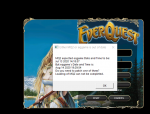
you need to double check that your launcher is pointing to the mq2 directory that you are launching from - it appears whatever mq2 you are launching isn't the one you patched - check the serttings tabI had to reinstall everything on my comp. I keep getting this error. I've reinstalled updater and logged into eq after installing and updating red's and eq. I can't figure out what I'm doing wrong. Any help would rock.

You're using the wrong MQ2 folder. If you go to the RedGuides Launcher, press "Open MQ2 Folder" and you'll see the correct folder.I had to reinstall everything on my comp. I keep getting this error. I've reinstalled updater and logged into eq after installing and updating red's and eq. I can't figure out what I'm doing wrong. Any help would rock.
See Sic's video here,
You're using the wrong MQ2 folder. If you go to the RedGuides Launcher, press "Open MQ2 Folder" and you'll see the correct folder.
See Sic's video here,
You guys ROCK!!!!!! I appreciate the wicked fast response!!! I bow to you Masters of the Ways!
Any thought on the issue I posted earlier? the launcher window wont stay open long enough for me to select anything.
have been using launcher for a while now with no issues. Patch day comes out, I wait a few hours after that patch is done and load up the launcher for the updates. everything works great. However, about 2 weeks ago every time I would open launcher it would open, show that i'm logged in, then immediately close without allowing me to select anything.
A few steps I've already done:
1) I'm ran the repair option, went through some file updates, still no luck
2) I removed launcher then reloaded it, no luck there
3) I rebooted the PC and removed and reloaded launcher again, still not working
Is there anything i'm missing? I assume there's probably an easy fix and I just didn't see it in the various threads about launcher issues.
have been using launcher for a while now with no issues. Patch day comes out, I wait a few hours after that patch is done and load up the launcher for the updates. everything works great. However, about 2 weeks ago every time I would open launcher it would open, show that i'm logged in, then immediately close without allowing me to select anything.
A few steps I've already done:
1) I'm ran the repair option, went through some file updates, still no luck
2) I removed launcher then reloaded it, no luck there
3) I rebooted the PC and removed and reloaded launcher again, still not working
Is there anything i'm missing? I assume there's probably an easy fix and I just didn't see it in the various threads about launcher issues.
If the launcher had worked before but is now crashing on startup, open file explorer and go to %LocalAppData%\RedGuides and delete the folder ResourceManagerAny thought on the issue I posted earlier? the launcher window wont stay open long enough for me to select anything.
have been using launcher for a while now with no issues. Patch day comes out, I wait a few hours after that patch is done and load up the launcher for the updates. everything works great. However, about 2 weeks ago every time I would open launcher it would open, show that i'm logged in, then immediately close without allowing me to select anything.
A few steps I've already done:
1) I'm ran the repair option, went through some file updates, still no luck
2) I removed launcher then reloaded it, no luck there
3) I rebooted the PC and removed and reloaded launcher again, still not working
Is there anything i'm missing? I assume there's probably an easy fix and I just didn't see it in the various threads about launcher issues.
Users who are viewing this thread
Total: 3 (members: 0, guests: 3)
Share: