
happens to me too. I need to start all of mine individually.But you need to be really careful with this (see my post in this forum thread on Sep 16th). It works fine if you launch overseer separately, however, if you launch multiples at the same time (either via like /dgga /lua run overseer, or doing it from ingame.cfg) then it will quite often ignore your overseer.lua, create a default one for that character and use it instead.

Install the app
How to install the app on iOS
Follow along with the video below to see how to install our site as a web app on your home screen.
Note: This feature may not be available in some browsers.
-
 You've discovered RedGuides, an EverQuest multi-boxing and scripting community 🧙♀️⚙️. We want you to play several EQ characters at once, come join us and say hello! 👋
You are using an out of date browser. It may not display this or other websites correctly.
You should upgrade or use an alternative browser.
You should upgrade or use an alternative browser.
Resource icon
Release Overseer 04/27/2026
No permission to download
- Thread starter GoldenFrog
- Start date

That seems odd. I run 11 toons and log them all in at the same time without an issue. I do have the /Lua run oversser in that field, but I also use a /timed so it does not try to start multiple things at one time and I load it last. Maybe try something like below to see if it helps?
/multiline ; /timed 50 /Lua run guildclicky; /timed 100 /Lua run lem; /timed 150 /Lua run alphabuff; /timed 200 /Lua run invisdisplay; /timed 250 /Lua run boxhud; /timed 300 /Lua run overseer
/multiline ; /timed 50 /Lua run guildclicky; /timed 100 /Lua run lem; /timed 150 /Lua run alphabuff; /timed 200 /Lua run invisdisplay; /timed 250 /Lua run boxhud; /timed 300 /Lua run overseer

If you need help let me know.Yeah. I've seen that. Need to buckle down again on that one.
Haven't been able to play much so that's been annoying. Will see if we can address.


SomeRandomDude
Well-known member
As I said in my September 16th comment, it seems to me that it is an issue with exclusive permissions when opening the overseer.Lua. I say this because the Settings object is nil (as determined by print statements that I added) after it has been loaded (on the characters that fail). I tried looking at the Lua logic that loads the file and it wasn't totally clear to me how to modify it to make it open in read-only mode so as to not inhibit others from simultaneously reading the file.That seems odd. I run 11 toons and log them all in at the same time without an issue. I do have the /lua run oversser in that field, but I also use a /timed so it does not try to start multiple things at one time and I load it last. Maybe try something like below to see if it helps?
/multiline ; /timed 50 /lua run guildclicky; /timed 100 /lua run lem; /timed 150 /lua run alphabuff; /timed 200 /lua run invisdisplay; /timed 250 /lua run boxhud; /timed 300 /lua run overseer
One simple workaround would be to add a retry:
Code:
if (the settings file exists on the filesystem) then  --Note: This protects against infinite loop in case the file doesn't exist
   repeat
        attempt to load the settings file
        if (settings == nil) then
            delay some random amount
        endif
    until settings ~= nil
endif
The above logic fails if the overseer.Lua file is corrupted (i.e. is seen by the filesystem as existing, but unable to be loaded by the load logic). Maybe one could account for this edge case just by adding a print statement inside the "if (settings == nil)" check like "Retrying loading the settings file. If this persists forever then perhaps your overseer.Lua file is corrupted."
Gotcha! My bad as I missed the reference to the 9/16 post. I use individual files, so the issue you are describing would not apply to my setup or comment.As I said in my September 16th comment, it seems to me that it is an issue with exclusive permissions when opening the overseer.lua. I say this because the Settings object is nil (as determined by print statements that I added) after it has been loaded (on the characters that fail). I tried looking at the lua logic that loads the file and it wasn't totally clear to me how to modify it to make it open in read-only mode so as to not inhibit others from simultaneously reading the file.
One simple workaround would be to add a retry:
Code:if (the settings file exists on the filesystem) then --Note: This protects against infinite loop in case the file doesn't exist repeat attempt to load the settings file if (settings == nil) then delay some random amount endif until settings ~= nil endif
The above logic fails if the overseer.lua file is corrupted (i.e. is seen by the filesystem as existing, but unable to be loaded by the load logic). Maybe one could account for this edge case just by adding a print statement inside the "if (settings == nil)" check like "Retrying loading the settings file. If this persists forever then perhaps your overseer.lua file is corrupted."
I do wonder though if using the /timed for this Lua with a different value for each toon in the server_toonname.cfg file instead of the ingame.cfg file would be a quick workaround until/if another solution is discovered.
SomeRandomDude
Well-known member
Yeah, that's the weird thing. When I launch EQ for a handful of toons simultaneously (using an AutoLogin profile) they seem to all be naturally staggered by a few seconds, however, I still encounter the overseer issue sporadically. Note: my overseer launch is in my ingame.cfg. I imagine that doing a "/dgga /lau run overseer" would be a much more reliable way to reproduce the problem I'm seeing because this would be much closer to simultaneous.
Anyway, I switched back to per-character configurations after my 9/16 post, so I'm referencing my prior findings--while I was still trying to use the single shared configuration.
I will try to find some time to try out my solution that I pseudo-coded above. If it works reliably then I'll send you the change for your review and possible inclusion.
I sincerely hope that my comments haven't come across as ungrateful or criticizing. Completely on the contrary, I'm a huge fan of this script and *very* appreciative of your efforts on it. Thank you.
Anyway, I switched back to per-character configurations after my 9/16 post, so I'm referencing my prior findings--while I was still trying to use the single shared configuration.
I will try to find some time to try out my solution that I pseudo-coded above. If it works reliably then I'll send you the change for your review and possible inclusion.
I sincerely hope that my comments haven't come across as ungrateful or criticizing. Completely on the contrary, I'm a huge fan of this script and *very* appreciative of your efforts on it. Thank you.

will this let me use a mac and a Lua at the same time... will it collect my rewards ?
- Commits
- 6
Thank you, SomeRandomDude. To help me understand this - it seems there's an issue with "too many characters" hitting the shared Lua at the same time.As I said in my September 16th comment, it seems to me that it is an issue with exclusive permissions when opening the overseer.lua. I say this because the Settings object is nil (as determined by print statements that I added) after it has been loaded (on the characters that fail). I tried looking at the lua logic that loads the file and it wasn't totally clear to me how to modify it to make it open in read-only mode so as to not inhibit others from simultaneously reading the file.
One simple workaround would be to add a retry:
Code:if (the settings file exists on the filesystem) then --Note: This protects against infinite loop in case the file doesn't exist repeat attempt to load the settings file if (settings == nil) then delay some random amount endif until settings ~= nil endif
The above logic fails if the overseer.lua file is corrupted (i.e. is seen by the filesystem as existing, but unable to be loaded by the load logic). Maybe one could account for this edge case just by adding a print statement inside the "if (settings == nil)" check like "Retrying loading the settings file. If this persists forever then perhaps your overseer.lua file is corrupted."
EDIT: Doing more testing, I can reproduce this regularly now. Will address.
Last edited:
- Commits
- 6
GoldenFrog updated Overseer with a new update entry:
3.40: Add Retry Logic to Loading Global Settings
Read the rest of this update entry...
3.40: Add Retry Logic to Loading Global Settings
- Add retry logic to loading global settings.
- Handles situation when too many characters loading at once
Read the rest of this update entry...
SomeRandomDude
Well-known member
I am encountering a hang with the new Overseer.Lua on the test server. EQ and RG work correctly up to the point where I do /Lua run overseer, and then it all hangs and requires me to kill EQ from the OS task manager. It is working fine on the live server. Thanks.
I am getting similar behavior on live. Appears to work fine if left alone when starting at login. However, when you try and open the gui for config it freezes the window and you have kill it from task manager.I am encountering a hang with the new Overseer.lua on the test server. EQ and RG work correctly up to the point where I do /lua run overseer, and then it all hangs and requires me to kill EQ from the OS task manager. It is working fine on the live server. Thanks.
- Commits
- 6
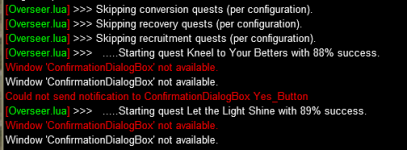
Thanks. Hadn't logged on since release. Will correct it today.I figured today's update would mess with this amazing program. After the confirmation box was removed, the following errors occur but the program still works fine. It completes all tasks =)
View attachment 51675
- Commits
- 6
GoldenFrog updated Overseer with a new update entry:
3.41: Remove Handling of Obsolete Confirmation Dialog
Read the rest of this update entry...
3.41: Remove Handling of Obsolete Confirmation Dialog
* Change to match latest patch's removal of the Confirmation Dialog prompting when a new quest was run
Read the rest of this update entry...
Also, i tried porting my stuff over from overseer.mac and it didnt port my settings in correctly.
Overseer.mac
overseer.lua
What did I do wrong? I cleared out the config/overseer folder, then ran the Lua. rewards aren't matching. I see the general overseer group is being imported over the group1 + 2 etc. which is fairly easy to fix. Ive been putting off converting to the Lua due to expecting issues with importing something that was working mostly fine, and I was not wrong :P Now i gotta fix this shiz
Overseer.mac
Code:
[QuestPriority]
Durations=6h|12h
Levels=5|4|3|2|1
Priorities=Levels|Durations|Rarities|Types
Rarities=Elite|Rare|Uncommon|Common|Easy
Types=Any

[QuestPriority_Group2]
Durations=24h|12h|6hr
Levels=5|4|3|2|1
Priorities=Levels|Durations|Rarities|Types
Rarities=Elite|Rare|Uncommon|Common|Easy
Types=Crafting|Harvesting|Research

[General]
minimumSuccessPercent=60
storeQuestExperienceHistory=0
useQuestPriorityGroups=Group1|Group2
maxLevelForClaimingExpReward=120
claimAgentPacks=0
requireMercToClaimExpRewards=**Obsolete**
maxLevelPctForClaimingExpReward=95
agentCountForConversion=2
claimRewards=1
useQuestPriorities=**Obsolete**
questSelectionType=Priority
useFastAgentSelection=1
ignoreConversionQuests=0
logLevel=2
minimumQuestExperience=0
monitorQuestRotation=0
version=2
countAgentsBetweenCycles=1
ignoreRecruitmentQuests=0
claimTetradrachmPacks=0
repeatTimeMinutes=-1

[QuestPriority_Unsubscribed]
Durations=24h|12h|6h
Levels=5|4|3|2|1
Priorities=Levels|Durations|Rarities|Types
Rarities=Elite|Rare|Uncommon|Common|Easy
Types=Exploration|Diplomacy|Trade|crafting|Military|Stealth|plunder

[Rewards]
1=Collection Item Dispenser
2=Torment of Veeshan
3=Overseer Tetradrachm
index=3

[QuestPriority_Group1]
Durations=24h|12h|6hr
Levels=5|4|3|2|1
Priorities=Levels|Rarities|Types|Durations
Rarities=Elite|Rare|Uncommon|Common|Easy
Types=Trade|Diplomacy|Exploration
overseer.lua
Code:
-- Persistent Data
local multiRefObjects = {

} -- multiRefObjects
local obj1 = {
    ["QuestPriority"] = {
        ["Durations"] = "6h|12h";
        ["Levels"] = "5|4|3|2|1";
        ["Priorities"] = "Levels|Durations|Rarities|Types";
        ["Rarities"] = "Elite|Rare|Uncommon|Common|Easy";
        ["Types"] = "Exploration|Diplomacy|Trade|Plunder|Military|Stealth|Research|Crafting|Harvesting";
    };
    ["General"] = {
        ["minimumSuccessPercent"] = 0;
        ["ignoreRecruitmentQuests"] = false;
        ["version"] = 7;
        ["maxLevelForClaimingExpReward"] = 120;
        ["claimAgentPacks"] = false;
        ["agentCountForConversionUncommon"] = 2;
        ["maxLevelPctForClaimingExpReward"] = 95;
        ["claimEliteAgentEchos"] = false;
        ["agentCountForConversionCommon"] = 2;
        ["claimRewards"] = false;
        ["agentCountForConversionRare"] = 2;
        ["showUi"] = true;
        ["ignoreConversionQuests"] = false;
        ["claimCollectionFragments"] = false;
        ["agentCountForConversionElite"] = 99;
        ["logLevel"] = 1;
        ["ignoreRecoveryQuests"] = true;
        ["claimTetradrachmPacks"] = false;
        ["claimEliteEchos"] = false;
    };
    ["Rewards"] = {
        [1] = "Character Experience";
        [2] = "Overseer Tetradrachm";
        ["eliteAgentEchoReward"] = "";
        ["index"] = 2;
    };
    ["Display"] = {
        ["showDetailed"] = true;
    };
    ["Debug"] = {
        ["allowTestMode"] = false;
        ["doNotFindAgents"] = false;
        ["doNotRunQuests"] = false;
    };
}
return obj1
What did I do wrong? I cleared out the config/overseer folder, then ran the Lua. rewards aren't matching. I see the general overseer group is being imported over the group1 + 2 etc. which is fairly easy to fix. Ive been putting off converting to the Lua due to expecting issues with importing something that was working mostly fine, and I was not wrong :P Now i gotta fix this shiz
- Commits
- 6
These are typically linear - you have to finish first to get second, etc... And you will not be presented with a quest you've already finished.Any specific handling instructions for the holiday overseer? like getting the 3-6-9h quests first if possible?
Lua Overseer should already be configured to do this for you. It'll run the first, if available, else second, etc...
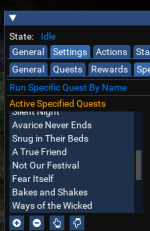

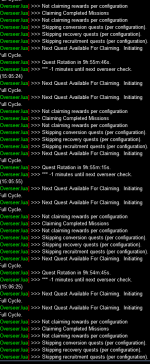
Check that you do not have 10 rewards waiting to be collected in the /rewards.View attachment 52185
not sure whats going on i logged in started overseer and it opens restarts opens restarts in a loop forever till it crashed , made sure everything was updated relaunched EQ ran overseer agin to the same result was able to grab this screen shoot befor it crashed
- Commits
- 6
That's interesting. I know this used to work. Haven't tested having restrictions that mean no quests are viable.ok after not using script to run overseer and doing it manule im guessing its because there is not a single quest avalable for my settings , i have it set to do only the collection items and there are none in this rotation
I'll test that again later today
For what it's worth, a similar loop happens if you choose "trade skill" only quests but fail to click 6hr quests as an option and only leave 12h and 24h. I figured it was not worth mentioning since I was the bonehead that told it to do trade skill only but failed to select 6h LOL.
EDIT - Maybe we could add a message like the cwtn plugins have when you try to execute a command on a toon using the wrong class shortname - Stop that, you don't have 6 hours checked slacker!
EDIT - Maybe we could add a message like the cwtn plugins have when you try to execute a command on a toon using the wrong class shortname - Stop that, you don't have 6 hours checked slacker!
Last edited:
- Commits
- 6
For what it's worth, a similar loop happens if you choose "trade skill" only quests but fail to click 6hr quests as an option and only leave 12h and 24h. I figured it was not worth mentioning since I was the bonehead that told it to do trade skill only but failed to select 6h LOL.
EDIT - Maybe we could add a message like the cwtn plugins have when you try to execute a command on a toon using the wrong class shortname - Stop that, you don't have 6 hours checked slacker!
First thing - I'm not reproducing this. Created a set of configurations that resulted in no quests being run. Things just completed and sat waiting for next Cycle.
Will continue but not sure what you're guys' situation is.
Second - just FYI if you weren't aware, but there's an option to "Test" the current configuration.
Selecting it will do a Not-Real run-through and show you which quests would run and in which order. A good way to see what's what without actually committing the runs.
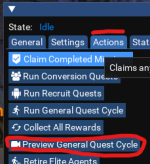
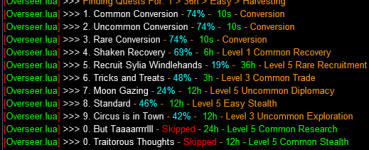
Gotcha, thanks for checking anyway! This was a couple of weeks ago when it did it. I just tried it again now and you're 100% correct, no error. The only difference I can see is that I have 5 quests running so it has nothing to choose from. I set it back to TS only and selected 12h only as well just to see what it does when it cycles next. I also just realized I do have "automatically restart" checked under general, so that may be related as well. I'll test both just because I'm curious.irst thing - I'm not reproducing this. Created a set of configurations that resulted in no quests being run. Things just completed and sat waiting for next Cycle.
Will continue but not sure what you're guys' situation is.
Super cool. I had no clue that was there, thank you!!Second - just FYI if you weren't aware, but there's an option to "Test" the current configuration.
Selecting it will do a Not-Real run-through and show you which quests would run and in which order. A good way to see what's what without actually committing the runs.

Just to reiterate, this is one of the best Lua's out there hands down!! Such as huge QoL upgrade when you have multiple toons, you can't live without it, so thank you again!
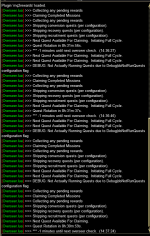
Request: 2 more mq.doevents()
motivation: when running overseer.Lua the account feels often like complete in freeze.
I started to read the Lua in order to find out, where an addditional doevent() may be helpful.
The first point I identified was right before the delay() within the main loop.
As this delay will "freeze" the code a doevent() right before should not change a lot (if any) of the runtime of overseer itself but gives the ability tho check for any events created by the user-UI before going into the delay.
The result was, I could walk the char around or reply to questions of guildies, while overseer was doing its magic.
function main
Laterone I ran overseer on an account with lot of agents (above 2000), so there was a longer conversion time to be expected.
The original overseer.Lua keeps the account almost irresponsible during the conversion timespan.
walkagents
here I added a doevents()
actually the conversion is still running with this modification. Overseer is running fine and I can control the chare, almost like overseer would run in the background, despite overseer is running for more than 2 hours consecutively now. So no negtative effect to find, but a greate improvement in the possibillity to control the char.
Reading the Lua, I saw that at different time-consuming places there are already doevents() placed. So you are allready used to place it within this nice tool.
If you might consider to add these 2 doevents(), the allover responsiveness of the char may improve notable.
motivation: when running overseer.Lua the account feels often like complete in freeze.
I started to read the Lua in order to find out, where an addditional doevent() may be helpful.
The first point I identified was right before the delay() within the main loop.
As this delay will "freeze" the code a doevent() right before should not change a lot (if any) of the runtime of overseer itself but gives the ability tho check for any events created by the user-UI before going into the delay.
The result was, I could walk the char around or reply to questions of guildies, while overseer was doing its magic.
function main
Code:
function actions.Main()
    if (Settings.General.runFullCycleOnStartup and actions.TutorialIsRequired == false) then nextAction = 'FullCycle'
    else nextAction = 'Initialize'
    end

    while true do
        ValidateCharacter()

        if (nextAction ~= nil) then
            if (nextAction == 'FullCycle') then SetCurrentProcess('Running complete cycle') RunCompleteCycle()
            elseif (nextAction == 'Initialize') then SetCurrentProcess('Initialze') ReadInitialData()
            elseif (nextAction == 'CountAgents') then SetCurrentProcess('Collecting Statistics') CollectAgentStatistics()
            elseif (nextAction == 'ClaimCompletedMissions') then SetCurrentProcess('Claiming completed missions') ClaimCompletedMissions()
            elseif (nextAction == 'RunTutorial') then SetCurrentProcess('Running tutorial') RunTutorial()
            elseif (nextAction == 'RunConversions') then SetCurrentProcess('Running conversion quests') RunConversions()
            elseif (nextAction == 'RunRecoveryQuests') then SetCurrentProcess('Running recovery quests') RunRecoveryQuests()
            elseif (nextAction == 'RunRecruitQuests') then SetCurrentProcess('Running recruit quests') RunRecruitQuests()
            elseif (nextAction == 'RunGeneralQuests') then SetCurrentProcess('Running general quests') RunGeneralQuests()
            elseif (nextAction == 'SelectBestAgents') then SetCurrentProcess('Selecting best agents') SelectBestAgents()
            elseif (nextAction == 'PreviewGeneralQuestList') then SetCurrentProcess('Generating quest preview list') PreviewGeneralQuestList()
            elseif (nextAction == 'CollectAllRewards') then SetCurrentProcess('Collecting Rewards') CollectAllRewards()
            elseif (nextAction == 'RetireEliteAgent') then SetCurrentProcess('Retiring Elite Agent') RetireEliteAgent(nextActionParameter)
            elseif (nextAction == 'DumpQuestDetails') then SetCurrentProcess('Outputting Quest Details') DumpQuestDetails()
            end

            if (hasInitializedQuestTimes == false) then
                SetCurrentProcess('Initialize')
                ReadInitialData()
            end

            if (HasInitialized == false) then
                InitializeTimers()
                HasInitialized = true
            end

            EndCurrentProcess()
            nextAction = nil
        end

        UpdateTimers()
[B]        mq.doevents()
        mq.delay(1000)[/B]
    end
end
Laterone I ran overseer on an account with lot of agents (above 2000), so there was a longer conversion time to be expected.
The original overseer.Lua keeps the account almost irresponsible during the conversion timespan.
walkagents
Lua:
local function walk_agents(typeIndex, action, startAction, doneAction)
    if (startAction ~= nil) then
        startAction(typeIndex)
    end

    mq.cmdf('/notify OverseerWnd OW_OM_RarityFilter listselect %s', typeIndex+1)
    mq.delay(250)

    local agentNode = mq.TLO.Window('OverseerWnd/OW_OM_MinionList').FirstChild

    local lastAgentName = nil

[B]    ::nextAgent::
    if Aborting then return end
    mq.doevents()[/B]
here I added a doevents()
actually the conversion is still running with this modification. Overseer is running fine and I can control the chare, almost like overseer would run in the background, despite overseer is running for more than 2 hours consecutively now. So no negtative effect to find, but a greate improvement in the possibillity to control the char.
Reading the Lua, I saw that at different time-consuming places there are already doevents() placed. So you are allready used to place it within this nice tool.
If you might consider to add these 2 doevents(), the allover responsiveness of the char may improve notable.

ChamIzland
Well-known member
Thank you for your time and effort you put into creating this.
First thing - I'm not reproducing this. Created a set of configurations that resulted in no quests being run. Things just completed and sat waiting for next Cycle.
Will continue but not sure what you're guys' situation is.
Second - just FYI if you weren't aware, but there's an option to "Test" the current configuration.
Selecting it will do a Not-Real run-through and show you which quests would run and in which order. A good way to see what's what without actually committing the runs.
View attachment 52281
View attachment 52283
Thanks for pointing out the "Preview General Quest Cycle" button. The seasonal quest (Season of Dread) is getting ranked 20th, because of probability (62% in this case). Shouldn't Seasonal / Specific Quests be selected first regardless of how we have set them to be run?
- Commits
- 6
You are correct - the "Run Specific" happens before the "General" quests and % success isn't a priority there. I'm not duplicating what you are seeing yet but will look further:Thanks for pointing out the "Preview General Quest Cycle" button. The seasonal quest (Season of Dread) is getting ranked 20th, because of probability (62% in this case). Shouldn't Seasonal / Specific Quests be selected first regardless of how we have set them to be run?
(Unless the spelling is off. I don't have the actual Season of Dread on any characters at the moment. But you could verify they're spelled the same)
Could you add a directory check to the io_utils.Lua create_dir() function? Currently it always runs the os.execute, which causes a terminal window to open on my machine * however many boxes I load up. This fixes it:
Lua:
local lfs = require("lfs")

function actions.create_dir(directoryPath)
    -- Check if the directory exists
    local attr = lfs.attributes(directoryPath)
    if not (attr and attr.mode == "directory") then
        -- Directory does not exist, attempt to create it
        os.execute('mkdir "'..directoryPath:gsub('/','\\')..'" >nul 2>&1')
    end
end- Commits
- 6
I don't think I've ever noticed a terminal window - but testing this change now and will push when done.Could you add a directory check to the io_utils.lua create_dir() function? Currently it always runs the os.execute, which causes a terminal window to open on my machine * however many boxes I load up. This fixes it:
...
That kinda check is always good practice anyway, thank you.
Having an issue with Lua not doing conversion, and may be due to my misunderstanding. Attached are two screen shots. Once shows the settings, and the other an example of how many agents can be converted. I think I have it set to convert if there are at least two agents of the same type. There are no errors, it just doesn't do any conversion.
Attachments
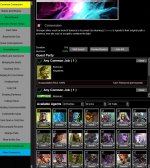
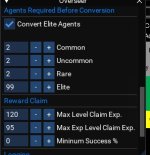
that is how many you save, if you have more than 2 duplicates of them it will convert.Having an issue with LUA not doing conversion, and may be due to my misunderstanding. Attached are two screen shots. Once shows the settings, and the other an example of how many agents can be converted. I think I have it set to convert if there are at least two agents of the same type. There are no errors, it just doesn't do any conversion.

That works. Thanks.Yeah when you hoover over the convert number it says number of X to maintain. I was under the impression it was the min number of dups but its needs to be set to 1 if you want it run when you have 2 or more. I tried changed it and it seems to work now.
First time ever I had Eq ctd on all 7 active accounts, after I logged in some minutes ago and launching overseer standing in the guildlobby.
As far as I can tell, I did nothing different comparing to the last days.
Am I the only one with this new behavior?
Are there any log-Files or other file-contents I can post, to help to narrow down the issue.
After restart I tried again to launch overseer.Lua, trying to keep an eye as if I can notice what happens when eq disappears.
After starting on 2 different chars one after the other, it happens while attempting to start a mission.
The names of the mission where different on both toons, so its not a specific mission causing the closure of eq.
As far as I can tell, I did nothing different comparing to the last days.
Am I the only one with this new behavior?
Are there any log-Files or other file-contents I can post, to help to narrow down the issue.
After restart I tried again to launch overseer.Lua, trying to keep an eye as if I can notice what happens when eq disappears.
After starting on 2 different chars one after the other, it happens while attempting to start a mission.
The names of the mission where different on both toons, so its not a specific mission causing the closure of eq.
pepsipepsi
Well-known member
Same thing happened to me this morning. Have it set to autostart in my ingame.cfg file, and after a few moments each of my instances of eq just popped away. No error message, just lost... like tears in the rain.
Removed it from auto starting, and no problems. Haven't tried rerunning it again yet.
Removed it from auto starting, and no problems. Haven't tried rerunning it again yet.
Later I ran overseer.mac, just to see if overseer itself may have an issue.
overseer.mac didn‘t show any unusual effects.
overseer.mac didn‘t show any unusual effects.

Users who are viewing this thread
Total: 1 (members: 0, guests: 1)
Share: