Ok it successfully loaded on the laptop. Just like the other rogue. Load the plugin and reload the UI. So it must be something on my computer. I will uninstall (saving all the macs for the toon. Do not want to spend a million hours redoing them) and see what happens.

Install the app
How to install the app on iOS
Follow along with the video below to see how to install our site as a web app on your home screen.
Note: This feature may not be available in some browsers.
-
 You've discovered RedGuides, an EverQuest multi-boxing and scripting community 🧙♀️⚙️. We want you to play several EQ characters at once, come join us and say hello! 👋
You are using an out of date browser. It may not display this or other websites correctly.
You should upgrade or use an alternative browser.
You should upgrade or use an alternative browser.

Plugin - MQ2Rogue (1 Viewer) 3.1.52471.40
- Thread starter ChatWithThisName
- Start date

that is definitely not the case. I suspect it has to do with an equi settings/file somewhereNope that did not work either....Must be MQ2Rogue doesn't like running two rogues on same computer...gonna try and see what happens on my laptop...
cool - if it is still acting up, I still think it might be related to your eq ui files in your everquest directory and not necessarily related to mq2ok uninstalled MQ2 and reloaded all the char info...fresh copies of mq2rogue...lets hope this works...
ok...After reinstalling MQ2 it now works....Not sure why or what was wrong, but it now loads normally from plugin manager. Trying it ojn other rogue and testing the same computer thing. I know it works with two rogues on same computer...been using it for weeks and didn't have an issue until yesterday...maybe going LD twice had something to do with it...Anyway, thank you Sic and company for all that you do...will let you know about the other rogue in a moment.
OK it now works on both toons. So the actual issue was in MQ2 somewhere. Or maybe the plugin manager plugin needed updating.....going to put it on watch for updates...maybe that was the issue...not sure. Thank you for all that you guys do...Makes this game so much more fun.
thanks for the followup! let us know if there are other weirdness issues - it is super helpful when we know what we're seeing and what you're seeing/experiencing are the same/different so we can see what we can do to fix it.OK it now works on both toons. So the actual issue was in MQ2 somewhere. Or maybe the plugin manager plugin needed updating.....going to put it on watch for updates...maybe that was the issue...not sure. Thank you for all that you guys do...Makes this game so much more fun.
Sic updated MQ2Rogue with a new update entry:
Rog Video
Read the rest of this update entry...
Rog Video
- Finally added a rog video to the overview page(youtube still rendering it, so give it a couple of minutes for the HD to become available)
Read the rest of this update entry...
OK I have narrowed down the following...will send the dump files to Eqmule. I noticed that rog 1 (the one that works) did not have MQ2Nav loaded. Rog 2 (the one that does not work) loads his while loading the toon into EQ. Then when I load MQ2rogue, after unloading MQ2Nav, one of two things happens, 1st: MQ2rogue loads but does not show the settings window... OR... 2nd EQ crashes for Rog 2. (Hence the dump files). I also noticed on Rog 1 that the message "MQ2Nav has been unloaded" next line says "MQ2Rogue has been loaded", then the settings window pops up and everything is right with the world. So I am guessing the settings window has something to do with MQ2rogue and MQ2Nav....doesnt make sense to me.
But that is what I am seeing...Happened again after I redown loaded and installed MQ2 (and updated the meshes (again)).
I did see that MQ2 rogue did load on Rog 2 afterwards, but zoned and happened all over again....I know..I suck at this computer stuff....
V/r
Stregg
But that is what I am seeing...Happened again after I redown loaded and installed MQ2 (and updated the meshes (again)).
I did see that MQ2 rogue did load on Rog 2 afterwards, but zoned and happened all over again....I know..I suck at this computer stuff....
V/r
Stregg
what is your .dmp filed called? it it an mq2rogue.dmp or something like eqgame/kernelbase? I know eq has an issue sometimes with /reload causing a crash (could be mq2, but i've seen people outside of mq2 complain about it so I'm assuming its just an eq issue).OK I have narrowed down the following...will send the dump files to Eqmule. I noticed that rog 1 (the one that works) did not have MQ2Nav loaded. Rog 2 (the one that does not work) loads his while loading the toon into EQ. Then when I load MQ2rogue, after unloading MQ2Nav, one of two things happens, 1st: MQ2rogue loads but does not show the settings window... OR... 2nd EQ crashes for Rog 2. (Hence the dump files). I also noticed on Rog 1 that the message "MQ2Nav has been unloaded" next line says "MQ2Rogue has been loaded", then the settings window pops up and everything is right with the world. So I am guessing the settings window has something to do with MQ2rogue and MQ2Nav....doesnt make sense to me.
But that is what I am seeing...Happened again after I redown loaded and installed MQ2 (and updated the meshes (again)).
I did see that MQ2 rogue did load on Rog 2 afterwards, but zoned and happened all over again....I know..I suck at this computer stuff....
V/r
Stregg
if it is an mq2rogue dmp file PM it to me or Chat
edited to add: as far as one character loading mq2nav but not the other - that is definitely unusual.
how are you normally loading mq2nav? just have it loaded and it fires up when you log in? or are you manually doing something like
/plugin mq2nav load noauto?someone else recently had an issue where mq2nav would only load on 1 or 2 of their toons but not on multiples - the only time i've seen this happen and saw a resolution, was when someone had a fresh install of windows 10, but didn't go and install the correct > DIRECT X < --- for some reason windows 10 installs a "bare bones" version of direct x 9, and not a "good version" (per brainiac who knows way more than I do)
Last edited:
Well there were no files generated by EQ, my computer or anything else. I searched for all the .dmp files on it, and nothing, except those three files I sent you. So am thinking that it is a ghost problem. Will reload MQ2 again. Seemed to fix it last time. So here goes. Will let you know
thanks, I popped open those .dmp files and they were eqgame.dmps so i couldn't do anything with them unfortunately (lack of skill, knowledge, etc), they would need to go to eqmuleWell there were no files generated by EQ, my computer or anything else. I searched for all the .dmp files on it, and nothing, except those three files I sent you. So am thinking that it is a ghost problem. Will reload MQ2 again. Seemed to fix it last time. So here goes. Will let you know
if you've already done the direct x thing i posted, if i were in your shoes, I would go into my everquest install and i would find anything that has ui information for that character and
not sure if it was this thread or another one today, but some other folks are having this ghost/phantom issue with mq2rez and seeing the rez accept window when it should and have taken to editing one of the UI_toonname.ini files specificlly under the AlertWnd section (alertwnd doesn't apply to this, but the idea is the same).
since you are having issues with having mq2nav stay loaded or loading on multiple toons, i strongly suspect it is a driver issue of some sort.
If i were in your shoes i would start with windows update drivers -> direct x that was posted -> the eq directory ui stuff and go from there.
out of curiosity - where do you have your mq2 installed at? are you using the appdata default folder, or something like desktop/MQ2
I have it in the download folder of the computer. It is frustrating, but I am like a bulldog, will not give up until the computer catches fire....Still I can try and restore a backup file I did a few months ago. And see if that fixes it. The windows drivers update everytimte I start/restart my computer. I have the latest drivers.
Oh btw, I was wondering if you can CWTN place his denethor core mac with his explore mac...when I redownload MQ2 and hit update on the launscher the denethor mac does not appear. Checked to see that it is watched in the browser....Maybe someone or something is just having a fun f*** with stregg day....

I just started a rogue on Rizlona today. At level 10, I got the Disarm combat skill. I checked the box to 'UseDisarm' in MQ2Rogue settings. Does not appear to be working at this time. I have zoned several times and unload and reload the plugin and restarted MQ to no avail.
what lvl do you get disarm? some reason i had lvl 27 for rogues, but if you're 10 I'm guessing that isn't the case (let me know and i'll get it updated)I just started a rogue on Rizlona today. At level 10, I got the Disarm combat skill. I checked the box to 'UseDisarm' in MQ2Rogue settings. Does not appear to be working at this time. I have zoned several times and unload and reload the plugin and restarted MQ to no avail.
what lvl do you get disarm? some reason i had lvl 27 for rogues, but if you're 10 I'm guessing that isn't the case (let me know and i'll get it updated)
[Mon Aug 03 19:21:33 2020] You have gained a level! Welcome to level 10!
[Mon Aug 03 19:21:33 2020] You have gained the ability to use Backstab.
[Mon Aug 03 19:21:33 2020] You have become better at Backstab! (1)
[Mon Aug 03 19:21:33 2020] You have gained the ability to use Disarm.
[Mon Aug 03 19:21:33 2020] You have become better at Disarm! (1)
[Mon Aug 03 19:21:33 2020] You have gained the ability to use Parry.
[Mon Aug 03 19:21:33 2020] You have become better at Parry! (1)
[Mon Aug 03 19:21:33 2020] You have gained the ability to use Safe Fall.
[Mon Aug 03 19:21:33 2020] You have become better at Safe Fall! (1)
[Mon Aug 03 19:21:33 2020] You have gained the ability to use Sense Traps.
[Mon Aug 03 19:21:33 2020] You have become better at Sense Traps! (1)
perfect thanks - sorry for the troubles - disarm was my addition to stuff, for some reason the levels i had for the abilities were super wrong for a couple classes. I'll put in our update, so probably next live build will be fixed[Mon Aug 03 19:21:33 2020] You have gained a level! Welcome to level 10!
[Mon Aug 03 19:21:33 2020] You have gained the ability to use Backstab.
[Mon Aug 03 19:21:33 2020] You have become better at Backstab! (1)
[Mon Aug 03 19:21:33 2020] You have gained the ability to use Disarm.
[Mon Aug 03 19:21:33 2020] You have become better at Disarm! (1)
[Mon Aug 03 19:21:33 2020] You have gained the ability to use Parry.
[Mon Aug 03 19:21:33 2020] You have become better at Parry! (1)
[Mon Aug 03 19:21:33 2020] You have gained the ability to use Safe Fall.
[Mon Aug 03 19:21:33 2020] You have become better at Safe Fall! (1)
[Mon Aug 03 19:21:33 2020] You have gained the ability to use Sense Traps.
[Mon Aug 03 19:21:33 2020] You have become better at Sense Traps! (1)

Eqgame crashes, u will have to send those to eqmule, im guessing it crashed when you tried to reload your ui? Ive heard people without mq2 having crashes on reloading their ui, so its possible its not even an mq2 issue.hrm sic for some reason tonight loading rogue or sk crashes eq for meView attachment 23474 well not he plugin itself but trying to get the class window to show crashes it

Ok I saw sic's video on getting clicky's added to MQ2Rogue. Awesome that it is...I followed step by step what he was doing. However, I tell the rogue to only keep 5 of a poison type (usually from his leggins) he applies all five at one time. Is there a command or code to tell the rogue to only apply one poison at a time before applying the next one?
it should only apply it the once - what poison are you using?Ok I saw sic's video on getting clicky's added to MQ2Rogue. Awesome that it is...I followed step by step what he was doing. However, I tell the rogue to only keep 5 of a poison type (usually from his leggins) he applies all five at one time. Is there a command or code to tell the rogue to only apply one poison at a time before applying the next one?
can you give the name of the poison (or image of which poison)
logging in my dude to check again, it works as expected
My poopy legs give "Consinged Bite of the Shissar XVIII" which gives "Bite of the Shissar Poison X"
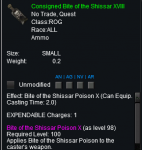

If i click off the Bite of the Shissar Poison buff, I will then use "Consigned Bite of the Shissar XVIII" to get the Bite of the Shissar Poison X as its added to downtime

So hollar at me with the item/buff information so we can track it down
My poopy legs give "Consinged Bite of the Shissar XVIII" which gives "Bite of the Shissar Poison X"
If i click off the Bite of the Shissar Poison buff, I will then use "Consigned Bite of the Shissar XVIII" to get the Bite of the Shissar Poison X as its added to downtime
So hollar at me with the item/buff information so we can track it down
why are you legs on downtime? they should be summon then number
sounds like when you said step by step that was a LIE!
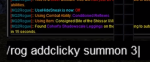
sounds like when you said step by step that was a LIE!
[Clickies]
Clicky0=Consigned Bite of the Shissar XVIII|downtime
Clicky1=Cohort's Shadowscale Leggings|summon|3

Redbot updated MQ2Rogue with a new update entry:
8/7/2020
Read the rest of this update entry...
8/7/2020
- Disarm Fix.
Read the rest of this update entry...
Sic updated MQ2Rogue with a new update entry:
Pulling hot-fix
Read the rest of this update entry...
Pulling hot-fix
Pulling Hotfix
Read the rest of this update entry...
Sic updated MQ2Rogue with a new update entry:
re-build since VV was rebuilt
Read the rest of this update entry...
re-build since VV was rebuilt
applies same hotfix as this am
Read the rest of this update entry...


- Joined
- Dec 29, 2017
- RedCents
- 24,701¢
- Seller
- #399
Not a known issue. I'd need more information though.
First, and most obvious question. Is the option turned on.
Do you currently have a camp? (Rogue doesn't know where to bring the corpse if you don't have a camp set)
Is the body in a location that the rogue can get to (corpses that are not on the mesh cannot be grabbed because the rogue doesn't know how to get there)
Is the rogue on the mesh (Rogue can't find a path to a corpse because the rogue is not on the mesh)
And last, is the corpse greater than 100 away (Which I feel like you answered with your question, but asking anyway to be sure)
Please use this checklist to ensure all of these are valid.
First, and most obvious question. Is the option turned on.
Do you currently have a camp? (Rogue doesn't know where to bring the corpse if you don't have a camp set)
Is the body in a location that the rogue can get to (corpses that are not on the mesh cannot be grabbed because the rogue doesn't know how to get there)
Is the rogue on the mesh (Rogue can't find a path to a corpse because the rogue is not on the mesh)
And last, is the corpse greater than 100 away (Which I feel like you answered with your question, but asking anyway to be sure)
Please use this checklist to ensure all of these are valid.
- Joined
- Dec 29, 2017
- RedCents
- 24,701¢
- Seller
- #400
Should be in next update.Is it possible to get the Duelist/Executioner disc line as a toggle? Since this is a burn on older content?
Users who are viewing this thread
Total: 2 (members: 0, guests: 2)
Share: