
you would need/want to edit your mesh so you don't try and go past the doorI am using this right now and I'm in a place that requires a key for me to get a this glowing globe, but I don't have the key. Is there a way for me to manually make it stop trying to pick it up? To clarify, other collectibles/glowing globes that it tries to reach but can't, it removes it from the list. But it won't remove this one.

-
 Hail, we're RedGuides. We want you to play six (yes, 6!) EverQuest characters at once. We have scripts and a friendly community to help, please join our playstyle and say hello! 👋
You are using an out of date browser. It may not display this or other websites correctly.
You should upgrade or use an alternative browser.
You should upgrade or use an alternative browser.

Release MQ2GroundSpawns
- Thread starter ChatWithThisName
- Start date
Redbot updated MQ2GroundSpawns with a new update entry:
2021 updates
Read the rest of this update entry...
2021 updates
- - you can now "/ground spawns" to list all the ground spawns in the zone.
- -- this makes it easier to identify what the ground spawns are called for purposes of adding it to your local/global list.
- -- example: in Steamfont the ground spawns that you want to collect are called "Rock"
- - accept number only entries
- -- Users had an issue where misty thicket acorns no longer showed up as *Green Leaf, added an option for number only entries where...
Read the rest of this update entry...

Still doing it with the latest build and meshes.
not sure - it is working here as expected
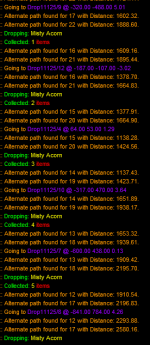
can you give any more details?
are you sure you're not getting bad spawn locations (this zone likes to put them in trees like i mention in the video)
well, if your mesh was not able to get it it - yup, it would add it to invalid, that is what it is supposed to do.Mine seems to quit after failing to navigate to a spawn and "marking it as invalid". Be that Mesh issue or otherwise.
also, make sure you are updated.
Yeah I think I'm okay on updates. I was actually using it for Brell's Bounty and when I /spawn list it shows a lot of Brell's Bounty entries so not sure if it's a spelling thing or something else. Either way, worked pretty well but they're on such a long respawn timer that I am much better off just manually doing the rounds and setting a 60 minute timer for myself.well, if your mesh was not able to get it it - yup, it would add it to invalid, that is what it is supposed to do.
also, make sure you are updated.


I think I saw a react that would invis when it dropped for the bard clouding fade song.Does anyone have a macro / KA ini to use this with a bard?
I will make a heroic rogue if I have no choice but would rather run it with my bard.
Or just do a /twist for the invis traveling song.
Is there a upgrade to the original travelling song that does doublie invis?I think I saw a react that would invis when it dropped for the bard clouding fade song.
Or just do a /twist for the invis traveling song.

right now im in WW (CoV) and they have the "its a mixed bag" collectable ground spawns up
they are listed as "drop12539/86" the last two numbers change the range of numbers is more then the 8 in the collection
will /addglobal drop12539/* work ? or is there a way to have partial name and still pick them up?
they are listed as "drop12539/86" the last two numbers change the range of numbers is more then the 8 in the collection
will /addglobal drop12539/* work ? or is there a way to have partial name and still pick them up?
> MQ2GroundSpawns FAQ <right now im in WW (CoV) and they have the "its a mixed bag" collectable ground spawns up
they are listed as "drop12539/86" the last two numbers change the range of numbers is more then the 8 in the collection
will /addglobal drop12539/* work ? or is there a way to have partial name and still pick them up?
Q. Some items are weird names, like Drop11125/123?
A. you can just /ground add 11125 and it would find any of the weird entries for "Drop11125/123"
so you can just
/ground add 12539
Last edited:
yea thanks i just found in it the command section-- i blame it on monday mornings> MQ2GroundSpawns FAQ <
Q. Some items are weird names, like Drop11125/123?
A. you can just /ground add 11125 and it would find any of the weird entries for "Drop11125/123"
so you can just/ground add 12539
Apparently no upgrade to travel song (a version with double invis doesnt exist) so I ended up using the regular one along with group IVU from my SK for happy zone farming.Is there a upgrade to the original travelling song that does doublie invis?
yesAnyway to make wildcards in ground spawns? The collectibles in cresent reach are all Drop12539/###. The numbers are all different

Utility - MQ2GroundSpawns - Extra info
 www.redguides.com
Q. Some items are weird names, like Drop11125/123?
A. you can just
/ground add 11125 and it would find any of the weird entries for "Drop11125/123"
Oldman66
2025 EQ Software Awards Grand Champ
/alt activate 3704 and /alt activate 231 provided your bard is of level....Tie those into a single key if you likeDoes anyone have a macro / KA ini to use this with a bard?
I will make a heroic rogue if I have no choice but would rather run it with my bard.
blahblahblah84
Well-known member
Is there any way to ignore a specific ground spawn location?
I know that the plugin will ignore spawns that are off mesh, but would like to ignore a specific spawn in some cases. For example, when I'm sending my rogue around (hiding and sneaking) to pick up collectables, the namers and some mobs can still see him. I would like to avoid area with those mobs that can see him, but there's no way to ignore that particular spawn that I can figure out. I know I could edit the mesh to cut off a path to the area, but that seems heavy handed.
I know that the plugin will ignore spawns that are off mesh, but would like to ignore a specific spawn in some cases. For example, when I'm sending my rogue around (hiding and sneaking) to pick up collectables, the namers and some mobs can still see him. I would like to avoid area with those mobs that can see him, but there's no way to ignore that particular spawn that I can figure out. I know I could edit the mesh to cut off a path to the area, but that seems heavy handed.
edit your mesh to have that as an unusable areaIs there any way to ignore a specific ground spawn location?
I know that the plugin will ignore spawns that are off mesh, but would like to ignore a specific spawn in some cases. For example, when I'm sending my rogue around (hiding and sneaking) to pick up collectables, the namers and some mobs can still see him. I would like to avoid area with those mobs that can see him, but there's no way to ignore that particular spawn that I can figure out. I know I could edit the mesh to cut off a path to the area, but that seems heavy handed.
blahblahblah84
Well-known member
Heavy handed approach it is then!edit your mesh to have that as an unusable area
Does anyone have a good Plane of Shadows mesh? The default one doesn't get my guys around to well, especially inside the castle/building?
Twinkeltoes
Active member
love this feature. Had an issue in The Temple of Veeshan (CoV) where it doesn't want to work though, even if I'm standing next to the spawn she just stands there. It worked in the rest of the CoV zones (I'm going zone to zone doing ground spawn collections. All my meshes are updated. The first time in zone I accidentally fell into the lava and would get the off mesh beeps. Gated and ran her back. I tried testing a few spots to see if it would kick in (It tends to do that in zones like Kael) I'm not sure if it's a zone thing or what.
Ok, cleaned up all the Edits
it seems when I start this in The Temple of Veeshan (CoV) it adds a bunch of items at the start to invalid paths. I've reloaded meshes, not sure how to work around this.
Ok, cleaned up all the Edits
it seems when I start this in The Temple of Veeshan (CoV) it adds a bunch of items at the start to invalid paths. I've reloaded meshes, not sure how to work around this.
Last edited:

- Commits
- 191
Despite your meshes being updated it's possible you don't have a mesh for the zone. Type /nav reloadlove this feature. Had an issue in The Temple of Veeshan (CoV) where it doesn't want to work though, even if I'm standing next to the spawn she just stands there. It worked in the rest of the CoV zones (I'm going zone to zone doing ground spawn collections. All my meshes are updated. The first time in zone I accidentally fell into the lava and would get the off mesh beeps. Gated and ran her back. I tried testing a few spots to see if it would kick in (It tends to do that in zones like Kael) I'm not sure if it's a zone thing or what.
Ok, cleaned up all the Edits
it seems when I start this in The Temple of Veeshan (CoV) it adds a bunch of items at the start to invalid paths. I've reloaded meshes, not sure how to work around this.
Check that it says it's loading a mesh.
You can also use /nav ui
then get it to show the mesh on screen to verify the mesh looks as it should.

KiteMan
Member
Hello everyone, by the way, this plugin is extremely cool. I'm trying to limit the search radius for pickups. Also, if I'm not exactly sure of the item name or ID is there a setting that will just try to pickup the item where I am at, say locate ground spawn in certain camp radius or something? Or do you always need the ID/name?
So I know where the item spawns and I'm on top of it. Just want to pick it up when it spawns.
So I know where the item spawns and I'm on top of it. Just want to pick it up when it spawns.
howdy kiteman,Hello everyone, by the way, this plugin is extremely cool. I'm trying to limit the search radius for pickups. Also, if I'm not exactly sure of the item name or ID is there a setting that will just try to pickup the item where I am at, say locate ground spawn in certain camp radius or something? Or do you always need the ID/name?
So I know where the item spawns and I'm on top of it. Just want to pick it up when it spawns.
it is going to go anywhere it knows how to get to.
you can edit your mesh so you can't navigate outside of a small area, and then it would only groundspawn those that are right there.
re: not sure the name - did you check the commands tab?
[COLOR=rgb(251, 160, 38)]/ground spawns[/COLOR] - This will spit out all of the ground spawns in the zone by name (MacroQuest "Next" only)
KiteMan
Member
Hey sic, thanks for the reply! I'll work with that mesh then, and that should solve my issue there.howdy kiteman,
it is going to go anywhere it knows how to get to.
you can edit your mesh so you can't navigate outside of a small area, and then it would only groundspawn those that are right there.
re: not sure the name - did you check the commands tab?
[COLOR=rgb(251, 160, 38)]/ground spawns[/COLOR]- This will spit out all of the ground spawns in the zone by name (MacroQuest "Next" only)
Yeah, I did, I'll fool around with it some more. All items seem to just be named "Generic (sm)" or "Generic (lg)" in this zone.
Yup, then that is what the item is calledHey sic, thanks for the reply! I'll work with that mesh then, and that should solve my issue there.
Yeah, I did, I'll fool around with it some more. All items seem to just be named "Generic (sm)" or "Generic (lg)" in this zone.
I'm having an issue in Elddar forest with treat branches with this plugin. I've verified i have a nev loaded and i'm on the nav, i've verified they show up in the /ground spawns list as valid spawns, i've tried adding the branches and oak branches to local and global by item name and number and my rouge just sits there with ground active but won't ever pick anything up. The names don't appear to have a * in front of them, and i tried that anyway, when i manually pick them up it increments the count, but i think it might do that no matter what i picked up. I have had this working to pick up other items in other zones but no luck in Elddar.
Thanks in advance!
Thanks in advance!
Use the command to tell you what the spawns are listed as. Then add the spawns by that nameI'm having an issue in Elddar forest with treat branches with this plugin. I've verified i have a nev loaded and i'm on the nav, i've verified they show up in the /ground spawns list as valid spawns, i've tried adding the branches and oak branches to local and global by item name and number and my rouge just sits there with ground active but won't ever pick anything up. The names don't appear to have a * in front of them, and i tried that anyway, when i manually pick them up it increments the count, but i think it might do that no matter what i picked up. I have had this working to pick up other items in other zones but no luck in Elddar.
Thanks in advance!
A snip of what is listed and what you are adding would be useful.
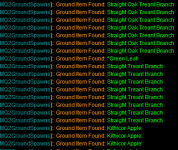
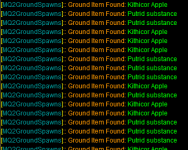
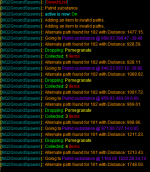
Hey Sic,
Thanks, not sure what was happening, i reporting what was in the zone via /ground spawns and then typing that as a /ground add Straight Oak Treant Branch and it wasn't working but this morning it is, must have been mis typing last night when it was late, re entered it this morning and its now working. most likely a dumb user error!
Thanks, not sure what was happening, i reporting what was in the zone via /ground spawns and then typing that as a /ground add Straight Oak Treant Branch and it wasn't working but this morning it is, must have been mis typing last night when it was late, re entered it this morning and its now working. most likely a dumb user error!
(chat did most of the plugin implementation of this, but was a collab like the rest of the stuff we do)Sic thank you for this i loved it today only used it for a short time but i loved it.
What would be the best class to use to farm this for my alts i am slowly leveling up
rogues are always the best
Users who are viewing this thread
Total: 1 (members: 0, guests: 1)
Share: