
-
 Hail, we're RedGuides. We want you to play six (yes, 6!) EverQuest characters at once. We have scripts and a friendly community to help, please join our playstyle and say hello! 👋
You are using an out of date browser. It may not display this or other websites correctly.
You should upgrade or use an alternative browser.
You should upgrade or use an alternative browser.

Release MQ2GroundSpawns
- Thread starter ChatWithThisName
- Start date
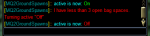

Hrm, i'll take a lookI've just upgraded to 'Next', and MQ2GroundSpawns is giving me the message shown in the attached screenshot:
"I have less than 3 open bag spaces. Turning off "Active".
I actually have 75 open inventory spaces, so this is definitely not working for me.
blahblahblah84
Well-known member
Happy to helplol i see what i did =p
thanks for the report
EverQuest has changed how they designate Misty Acorns in Misty Thicket. They now show up as Drop####### with specific identification numbers.
My MQ2GroundSpawns no longer works for these.
Is there a generic flag I can add rather than having to list specific groundspawn types so I can pickup all groundspawns in the zone, not just acorns?
I loved this program and hope there is a workaround for this problem.
Thank you.
EverQuest has changed how they designate Misty Acorns in Misty Thicket. They now show up as Drop####### with specific identification numbers.
My MQ2GroundSpawns no longer works for these.
Is there a generic flag I can add rather than having to list specific groundspawn types so I can pickup all groundspawns in the zone, not just acorns?
I loved this program and hope there is a workaround for this problem.
Thank you.
yup we updated this a while back - it isn't in update notes because MQ2 update notes only get posted when MQ2 is rebuilt
you can just
/ground add 11125 and it would find any of the weird entries for "Drop11125/123"git entry said:Users had an issue where misty thicket acorns no longer showed up as *Green Leaf, added an option for number only entries where Drop11125/123 would allow /ground add 11125, removing the Drop and information following the '/' so that you didn't need to try and add a million entries.
CWTN authored 9/20/2021 @ 9:34 AM
re: generic flag - no. you will want to add which specific items you want. you can
/ground list to see all the ground items in the zone and decide which ones you want to addThanks that fixed the problem. I love the program.
yup we updated this a while back - it isn't in update notes because MQ2 update notes only get posted when MQ2 is rebuilt
you can just/ground add 1125and it would find any of the weird entries for "Drop11125/123"
yeah imagine our surprise when they re-did the items like that... like uh... why? lolThanks that fixed the problem. I love the program.
I'm trying to use MQ2GroundSpawns for picking up Underfoot mushrooms and Strange Dark Fungus in Kaladam. These names aren't working. What names for these will GroundSpawns recognize. Also...Is there a list of valid groundspawn names for QM2GroundSpawns?ChatWithThisName submitted a new resource:
MQ2GroundSpawns - OoOo Shiny
Read more about this resource...
Thanks.
you should consider using MQ "Next" - the next version has `/ground spawns` which will list all available ground spawns.I'm trying to use MQ2GroundSpawns for picking up Underfoot mushrooms and Strange Dark Fungus in Kaladam. These names aren't working. What names for these will GroundSpawns recognize. Also...Is there a list of valid groundspawn names for QM2GroundSpawns?
Thanks.
Here are the item names for kaladim and mistythicket
Code:
[Mistythicket]
ItemList=|11125|
[Kaladim]
ItemList=|*Red Mushroom|*Blue Mushroom|OK. I'm not sure if you responded yet, but I think I figured it out. I must add the name of the object as it appears on the map, not the true object name.
Correct?
Thanks.
Lara
Yeah. There are a number of ground items like that. The map name is what you should be looking for.
yup i did respond, it is above your post where you said you're not sure if i didOK. I'm not sure if you responded yet, but I think I figured it out. I must add the name of the object as it appears on the map, not the true object name.
Correct?
Thanks.
Lara
Thanks for responding so quickly to my queries. I posted it only 8 minutes ago.yup i did respond, it is above your post where you said you're not sure if i did
BTW I'm looking into MQ Next.
Lara

Krujoeclipse81
Member
why am i addicted to listing to the music you was playing in the background of the video =/
did you jam to the acorn song like @victoriansensewhy am i addicted to listing to the music you was playing in the background of the video =/

victoriansense
Well-known member
did you jam to the acorn song like @victoriansense
The acorn song is awesome! I love when you sing to me, Sic!
Krujoeclipse81
Member
yep now i need this song someone find a link! loldid you jam to the acorn song like @victoriansense
it is in the mq2groundspawn vid.yep now i need this song someone find a link! lol
Krujoeclipse81
Member
seen this asked a few times but can i ask 1 more time for bard Shaun's clouding. oh and always avoid nameds as they can usually see invs. right now its hard to stop the plugin before getting wacked by a named because nav makes me look down or always swival the cam around
no sorry. the plugin picks up ground spawns, you'll want to use a macro or react or something else to invis you and handle that.seen this asked a few times but can i ask 1 more time for bard Shaun's clouding. oh and always avoid nameds as they can usually see invs. right now its hard to stop the plugin before getting wacked by a named because nav makes me look down or always swival the cam around
and no I'm sorry, it is also not going to have the ability to avoid see invis mobs. that is such a larger ask than just picking up ground spawns.

You **COULD** do some sort of autohotkey of Selos+Clouding every 5 minutes or whatever you like, to help drop those back on. Otherwise I suggest having a caster perm invis you (or something like enchanter + cleric permanent double invis), and just dealing with no runspeed.seen this asked a few times but can i ask 1 more time for bard Shaun's clouding. oh and always avoid nameds as they can usually see invs. right now its hard to stop the plugin before getting wacked by a named because nav makes me look down or always swival the cam around

SkatKat
Member
I believe this is the plugin /ground active on
This bypasses a lot of Glowing Globes. Wondered if it could be modified to check as its running you to a glowing globe to see if one is closer? It runs me to a room, there are 2 in that area, yet it starts to run me the other direction, ignoring the other one. Fixable?
This bypasses a lot of Glowing Globes. Wondered if it could be modified to check as its running you to a glowing globe to see if one is closer? It runs me to a room, there are 2 in that area, yet it starts to run me the other direction, ignoring the other one. Fixable?
this is not. mq2groundspawns is the groundspawns collection plugin. (i moved the convo to that thread)I believe this is the plugin /ground active on
This bypasses a lot of Glowing Globes. Wondered if it could be modified to check as its running you to a glowing globe to see if one is closer? It runs me to a room, there are 2 in that area, yet it starts to run me the other direction, ignoring the other one. Fixable?
mq2ground spawns does check if a closer one spawns while you're on the way, and it does go to the closest one.
you might want to edit/check your mesh as it uses mq2nav to move around
"this bypasses a lot of Glowing Globes"
- also a candidate for checking your mesh
is there a particular zone you're talking about?
did you watch the video where i explain the stuff?
Hopefully this is the right place to post this. I am new-ish to MQ2 and not tech savvy, so I apologize in advance.
From a post I made about finding collectibles, Sic posted about this utility macro - MQ2GroundSpawns
Thought I'd give it a whirl today.
1) as directed, typed /plugin mq2groundspawns load
2) then added list of the collectibles I'm looking for using /ground add [name of item] x 30 or so items
3) then did /ground active on
4) get a repeating error that says "I'm off mesh, you should fix that."
5) yes, I have mq2nav on
I'm not sure if the utility is broken or if I am. Please help.
From a post I made about finding collectibles, Sic posted about this utility macro - MQ2GroundSpawns
Thought I'd give it a whirl today.
1) as directed, typed /plugin mq2groundspawns load
2) then added list of the collectibles I'm looking for using /ground add [name of item] x 30 or so items
3) then did /ground active on
4) get a repeating error that says "I'm off mesh, you should fix that."
5) yes, I have mq2nav on
I'm not sure if the utility is broken or if I am. Please help.
mq2groundspawns, the plugin, has a discussion thread, please post mq2groundspawns discussions thereHopefully this is the right place to post this. I am new-ish to MQ2 and not tech savvy, so I apologize in advance.
From a post I made about finding collectibles, Sic posted about this utility macro - MQ2GroundSpawns
Thought I'd give it a whirl today.
1) as directed, typed /plugin mq2groundspawns load
2) then added list of the collectibles I'm looking for using /ground add [name of item] x 30 or so items
3) then did /ground active on
4) get a repeating error that says "I'm off mesh, you should fix that."
5) yes, I have mq2nav on
I'm not sure if the utility is broken or if I am. Please help.

2. what "30 or so items" did you add? I do not know of a zone that has 30 or so distinct ground items. if you're looking for "shinies" they are always called "Glowing Globes"
2b. if you were using mq "Next" you could do a
/ground list and it would tell you all the ground items that you can add, but you are on legacy MQ2, so i would encourage you to update.Here is the overview video for mq2groundspawns.
if you are getting a message that you "are off mesh" that means you are not on a meshed area, and either you don't have a mesh for the zone you're in, or you are in an area that isn't meshed. you can visualize this in the
/nav uioptions with a "Render navigation mesh" option selectedMake sure you have valid meshes for the zones you're in. and make sure that the area that you're in is meshed appropriately.
Also, I would Strongly encourage you to move over to MacroQuest "Next" as is it MANY MANY MANY updates ahead
> Here is a guide <
mq2groundspawns, the plugin, has a discussion thread, please post mq2groundspawns discussions there
2. what "30 or so items" did you add? I do not know of a zone that has 30 or so distinct ground items. if you're looking for "shinies" they are always called "Glowing Globes"
2b. if you were using mq "Next" you could do a/ground listand it would tell you all the ground items that you can add, but you are on legacy MQ2, so i would encourage you to update.
Here is the overview video for mq2groundspawns.
if you are getting a message that you "are off mesh" that means you are not on a meshed area, and either you don't have a mesh for the zone you're in, or you are in an area that isn't meshed. you can visualize this in the/nav ui[/ICODE ]options with a "Render navigation mesh" option selected Make sure you have valid meshes for the zones you're in. and make sure that the area that you're in is meshed appropriately. Also, I would [B][I][COLOR=rgb(251, 160, 38)]STRONGLY [/COLOR][/I][/B]encourage you to move over to MacroQuest "Next" as is it MANY MANY MANY updates ahead [COLOR=rgb(251, 160, 38)]> [URL='https://www.redguides.com/community/threads/mq-next-migration-functions-and-features-oh-my.79369/']Here is a guide[/URL] <[/COLOR]
Pretend, for a moment, that I am from a far away land and don't speak English

How do I know if I'm "on mesh" and/or how would I get "on mesh" if I wasn't?
well like i mentioned, you could turn on the "render navigation mesh" in the nav uiPretend, for a moment, that I am from a far away land and don't speak English
How do I know if I'm "on mesh" and/or how would I get "on mesh" if I wasn't?
I also explain this in the video i linked, did you watch that?
Sorry! I missed the video link!well like i mentioned, you could turn on the "render navigation mesh" in the nav ui
I also explain this in the video i linked, did you watch that?

I'm watching it now
Okay. Says No nav mesh available. Hmm... of course that's my luck lolwell like i mentioned, you could turn on the "render navigation mesh" in the nav ui
I also explain this in the video i linked, did you watch that?
yeah, so if you have no mesh, then you can't do mesh stuff like mq2nav, which is what mq2groundspawns uses to move around.Okay. Says No nav mesh available. Hmm... of course that's my luck lol
> Click here <
Also emphatically, upgrade to macroquest "Next"
Thank you very much for creating such a helpful program.
I was wondering if someone could help me with an issue my rogue has while gathering in Shadow Valley. I have been running with the "MQ2Nav Tools" window open to periodically pause the action, because the rogue gets stuck. For example, the most recent location is a big rock at -431, 1126, and I just pause, move him over, and unpause. Could someone show me how to use one the applications to navigate around rocks like this?
I was wondering if someone could help me with an issue my rogue has while gathering in Shadow Valley. I have been running with the "MQ2Nav Tools" window open to periodically pause the action, because the rogue gets stuck. For example, the most recent location is a big rock at -431, 1126, and I just pause, move him over, and unpause. Could someone show me how to use one the applications to navigate around rocks like this?

- Commits
- 2
You would most likely want to edit the navmesh file to avoid the areas you get stuck on. In your mq folder there is a meshgenerator.exe file. Open that and then open the zone you are wanting to edit.Thank you very much for creating such a helpful program.
I was wondering if someone could help me with an issue my rogue has while gathering in Shadow Valley. I have been running with the "MQ2Nav Tools" window open to periodically pause the action, because the rogue gets stuck. For example, the most recent location is a big rock at -431, 1126, and I just pause, move him over, and unpause. Could someone show me how to use one the applications to navigate around rocks like this?
I see I already started editing this file. This isn't done I am sure, but it gets me around until I find another fix.
Attachments

- Commits
- 191
Thank you very much for creating such a helpful program.
I was wondering if someone could help me with an issue my rogue has while gathering in Shadow Valley. I have been running with the "MQ2Nav Tools" window open to periodically pause the action, because the rogue gets stuck. For example, the most recent location is a big rock at -431, 1126, and I just pause, move him over, and unpause. Could someone show me how to use one the applications to navigate around rocks like this?
Here is an old video I did. The one caveat is that "Not walkable" works as intended and that the mesh generator now has "Off Mesh Links" for spanning locations such as through illusionary walls, or for use to drop down from higher locations. But for the purpose of your question, it would explain how avoidance volumes are used at the very least. Keep in mind I was using legacy MQ2 back when I created this video. The location for the meshgenerator is still located in the MQNext folder where Macroquest.exe is located. The meshes are now located in the
MQNext\Resource\MQ2Nav folder. So instead of selecting the Macroquest Release folder you will want the Resources folder. Yeah. I also got annoyed with the crystal rocks and started adding non-walkable areas when I encountered a stuck point on one of them.You would most likely want to edit the navmesh file to avoid the areas you get stuck on. In your mq folder there is a meshgenerator.exe file. Open that and then open the zone you are wanting to edit.
I see I already started editing this file. This isn't done I am sure, but it gets me around until I find another fix.
Hi All,
New to all this but loving everything so far. My issue is this... In Misty with the acorns.... They are showing "Drop11125/1, Drop11125/2. and up. My question is this, Is there a generic way to place into spawns to which it will grab anything marked with the initial "Drop11125"? I have tried /, All, Misty Acorn, green leaf, to no avail. It does work when I put the full name into it for each one. but really don't want to put each one into it as its time consuming for each as they change. BTW I've entered up to 135 atm but they are continually changing. I have tried to zone out and back in thinking that would reset but no go.
New to all this but loving everything so far. My issue is this... In Misty with the acorns.... They are showing "Drop11125/1, Drop11125/2. and up. My question is this, Is there a generic way to place into spawns to which it will grab anything marked with the initial "Drop11125"? I have tried /, All, Misty Acorn, green leaf, to no avail. It does work when I put the full name into it for each one. but really don't want to put each one into it as its time consuming for each as they change. BTW I've entered up to 135 atm but they are continually changing. I have tried to zone out and back in thinking that would reset but no go.
it is also in the FAQpls ignore my lase post. I found the answer, guess I was being lazy reviewed first 3 pages, but answer was on 4th. Thanks =)
I am using this right now and I'm in a place that requires a key for me to get a this glowing globe, but I don't have the key. Is there a way for me to manually make it stop trying to pick it up? To clarify, other collectibles/glowing globes that it tries to reach but can't, it removes it from the list. But it won't remove this one.
Users who are viewing this thread
Total: 1 (members: 0, guests: 1)
Share: