• You've discovered RedGuides, an EverQuest multi-boxing and scripting community 🧙‍♀️⚙️. We want you to play several EQ characters at once, come join us and say hello! 👋

  • A TLP without truebox has thawed (Very Vanilla ready)
    Frostreaver
MQ2GroundSpawns

Release MQ2GroundSpawns

I love it! I'd like to add a check for nearby players with an avoidance radius and a toggle option for on/off. Could the code be added to git?
No.

But you can make a companion mac to go with it to turn it off like i mention in the vid and the sample post
 
Semi-related to moving to ground spawns. One can open the map and see them. Is there a way so when you click the map, which places an X and establishes a path, that /nav can be invoked?
 
Semi-related to moving to ground spawns. One can open the map and see them. Is there a way so when you click the map, which places an X and establishes a path, that /nav can be invoked?
Mq2map has alt clicking built in. but mq2 groundspawns is going to nav to stuff it can get to while groundspawns is active.
 
If I click the map while pressing alt key it will navigate to that spot / item?

The ground function still does not return the appropriate ground spawn. It will send you clear across a zone even though a second one is right next to you.
 
I'm in Bixie Warfront- I could not edit the file itself to add the collection items so i went through and added every item in all 3 ground spawn collections. I've typed everything I can think of- my character is just standing there doing nothing. What can I do to get this to work?
 
I'm in Bixie Warfront- I could not edit the file itself to add the collection items so i went through and added every item in all 3 ground spawn collections. I've typed everything I can think of- my character is just standing there doing nothing. What can I do to get this to work?
well there are a couple of reasons why you wouldn't get a shiny. I mentioned a couple of them in the video

1 - they are named something weird.
like how in kaladim the ground things are called "*Red Mushroom" and "*Blue Mushroom" with the star
or like how the green leaves in misty thicket are "*Green Leaf" with the star

2. they are off-mesh and you need to edit your mesh so you have a valid navigation path to the items

Q. There are orbs in the zone, but i don't see anything?
A. Are you sure they are accessible? You can see this demonstrated > HERE <
 
-They don't appear to have any issues,they look just like they do in the ACH window- this is the file itself (below- for some reason edits I make to the file directly don't stick):
-It says it loaded the mesh successfully when I zoned in

[Globals]
ItemList=|
[bixiewarfront]
ItemList=Red Spotted Runner|Cobalt Burrower|Violet Ground Beetle|Mummified Mole Paw|Discarded Carapace|Torn Patch of Mole Fur|Web Wrapped Remains|Broken Butterfly Wing|Forgotten Bixie Eye|Citrine Chrysanthemum|Saffron Sunflower|Amber Amaryllis|Lavender Lily|Royal Rose|Byzantium Brodiaea|Cerulean Columbine|Scarlet Snapdragon|
 
-They don't appear to have any issues,they look just like they do in the ACH window- this is the file itself (below- for some reason edits I make to the file directly don't stick):
-It says it loaded the mesh successfully when I zoned in

[Globals]
ItemList=|
[bixiewarfront]
ItemList=Red Spotted Runner|Cobalt Burrower|Violet Ground Beetle|Mummified Mole Paw|Discarded Carapace|Torn Patch of Mole Fur|Web Wrapped Remains|Broken Butterfly Wing|Forgotten Bixie Eye|Citrine Chrysanthemum|Saffron Sunflower|Amber Amaryllis|Lavender Lily|Royal Rose|Byzantium Brodiaea|Cerulean Columbine|Scarlet Snapdragon|
those are not how collectible items work. the items on the ground are "glowing globe" until you collect them.

do either /ground add Glowing Globe if you want it to just be locally for the one zone you are on
or
do /ground addglobal Glowing Globe if you want to add it to your global list.

I recommend adding the glowing globe to your global list if you're collectible shiny hunting.

 
*** editing this. I tested another zone and it worked fine- it must be Bixie Warfront. But my Nav works just fine there- I can navigate to any mob etc. So really don't get it. Bixie Warfront has 3 collections of ground spawns so it should have targets to nav to.
 
Last edited:
Thanks for all the help- I think it's just not going to work for me- I don't know why. My character just stands there- I reset the file and added those two lines and typed /ground active 1 etc... my character navigates the zone just fine with everything else so it doesn't seem to be the mesh. Thanks again =)
did you add glowing globe to your /ground list? because like what i said above - the list that you added... those are not items you can find on the ground. those are the collectibe items that you get FROM the glowing globes on the ground.

when you see a collectible "Shiny" on the ground, it is a glowing globe - a ball of light - a little orb, when you pick it up, magical powers turn it into the actual shiny item "cool keychain of wisdom" or "long night of regrets". you can't search for "cool keychain of wisdom" on the ground unless someone had actually placed that item on the ground (and not something that eq generated)
 
I edited my above comment - so I tried to test it in another zone using the globes just like you said (I typed both) and see if somehow it was Bixie Warfront zone causing the problem, which it appears to be. I tested it in Stratos and my rogue took off running immediatly. But the Nav works fine in Bixie Warfront for everything else so I'm stumped why there's a problem in that particular zone.
 
I edited my above comment - so I tried to test it in another zone using the globes just like you said (I typed both) and see if somehow it was Bixie Warfront zone causing the problem, which it appears to be. I tested it in Stratos and my rogue took off running immediatly. But the Nav works fine in Bixie Warfront for everything else so I'm stumped why there's a problem in that particular zone.
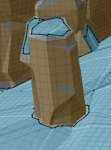
you would need to determine where they are - they might be in a wall, or on a ledge, or op on a mountaintop that we can't navigate to.
example: if a shiny was spawned on top of this, we would have no navigation path to get to it
1627662236712.png
 
I'm in Bixie Warfront- I could not edit the file itself to add the collection items so i went through and added every item in all 3 ground spawn collections. I've typed everything I can think of- my character is just standing there doing nothing. What can I do to get this to work?
For BW, the collections only spawn in heroic adventure instances and they only appear after you complete the first couple steps of the mission. There is nothing to collect in the base zone, you must do HAs. Also, there are only 4 collection items per instance, so you're going to be instance flipping over and over and over. It sucks, I'd just do ogreseer missions to get collection tokens instead.
 
For BW, the collections only spawn in heroic adventure instances and they only appear after you complete the first couple steps of the mission. There is nothing to collect in the base zone, you must do HAs. Also, there are only 4 collection items per instance, so you're going to be instance flipping over and over and over. It sucks, I'd just do ogreseer missions to get collection tokens instead.
I am echoing this, for Deadhills and Bixie Warfront they are in missions and not the static zone.

My guess is you aren't even opening your map to look for where they are. You would see there are none present, so no collectible grabbing macro/plugin will ever get you any of them.
 
Dumb question but is there a version of this for Next? I cant seem to find it in the launchers list of plugins.
 
Dumb question but is there a version of this for Next? I cant seem to find it in the launchers list of plugins.
yes (it should be, we ported it quite some time ago) /plugin mq2groundspawns

the launcher only shows plugins that are licensed
 
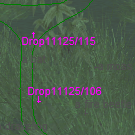
Just tried this out tonight in Misty Thicket for the acorns and noticed two things. 1 the acorns aren't *Green Leaf anymore they're drop11125/1 and the number after the / keeps going up, not related to the plugin other than something new people need to enter into their list (you'll have to keep adding it over and over again increasing the number after the / each time). And 2 (this is related to the plugin) when you get to around 150 things in the list of what to pick up the plugin crashes. Still a very nice resource so thank you for creating it Sic and ChatWithThisName.
 
Looks like it's sort of already like that in the function that gets the friendly name.

sprintf_s(szName, BufferSize, "Drop%05d/%d", Item, pItem->DropID);
I believe here the difference is it doesn't start with "Drop"
 
Okay, so I can just wrangle it so that it accept that ID.

/ground add 11125 would add any "Drop11125/###" to be picked up so you don't have to keep adding things to the list.
1632143398311.png

I've included a copy of it since this ships with live. First file is Standard VV (Legacy?) second file is Next (Un-Legacy?)
 
Last edited:
Added for next in post above this one, it's built against 250, should ensure you're up to date.
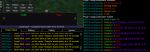
Left is Legacy, right is Next. Sorry it cuts off the name :-(
 
Last edited:
Wow that was a quick fix, just grabbed one of the updated versions and will try it again soon. Wasn't even expecting a fix but I certainly won't complain lol, thanks again.
 
Any chance if you have a rogue running this it will hide and sneak them if they are currently not in that mode, before running off to the next spawn? Or is there another way to do this?
 
Any chance if you have a rogue running this it will hide and sneak them if they are currently not in that mode, before running off to the next spawn? Or is there another way to do this?
Since it is a plugin you can have a macro or other thing do that for you. It pairs great with mq2 rogue, for example
 
I was running kissassist with it, every time I got aggro, it would just run me off to the next ground spawn. I figured the plugin would pause if you had aggrro, before it tried to get more glowies. I will have to pay closer attention and turn it off until the mobs are dead and I have no aggro.
 
I was running kissassist with it, every time I got aggro, it would just run me off to the next ground spawn. I figured the plugin would pause if you had aggrro, before it tried to get more glowies. I will have to pay closer attention and turn it off until the mobs are dead and I have no aggro.
nah, the plugin doesn't, it is just getting groundspawns.

if you wanted to make a macro to handle combat and turn off "ground active" if you decide to fight you can do that - but otherwise, it is going to go and get the shinies.
like have for kiss, you could just make a dps entry like:

(untested)
INI:
dps1=command:/ground active off|99|once|cond1
cond1=${GroundSpawns.Active}

and then some method/means of turning it back on.

if you are SoSing (which i strongly recommend) there shouldn't be many places that you need to combat mobs.
 
nah, the plugin doesn't, it is just getting groundspawns.

if you wanted to make a macro to handle combat and turn off "ground active" if you decide to fight you can do that - but otherwise, it is going to go and get the shinies.
like have for kiss, you could just make a dps entry like:

(untested)
INI:
dps1=command:/ground active off|99|once|cond1
cond1=${GroundSpawns.Active}

and then some method/means of turning it back on.

if you are SoSing (which i strongly recommend) there shouldn't be many places that you need to combat mobs.


Thanks sir, you are dah man!
 
There's also a sample macro on the overview page for the resource that would give you a general idea of how to write a macro to use the plugin whereby you can just turn it off if you get aggro.
The plugin isn't designed to play nice with anything else. It's only purpose is to collect ground spawns and it will do so until you tell it not to do that anymore.
 
if you are SoSing (which i strongly recommend) there shouldn't be many places that you need to combat mobs.

I must of picked the worst 2 zones. Shard's Landing and Breeding grounds.
 
if you are SoSing (which i strongly recommend) there shouldn't be many places that you need to combat mobs.

I must of picked the worst 2 zones. Shard's Landing and Breeding grounds.
you have full ranks of sos? and you're not breaking it for some reason?

I know cotf neriak there is a see-SoS prince guy that will ruin your life - but full rank sos, not a ton of stuff that should see through
 
you have full ranks of sos? and you're not breaking it for some reason?

I know cotf neriak there is a see-SoS prince guy that will ruin your life - but full rank sos, not a ton of stuff that should see through

My rogue is max everything and raid geared. Running it again now and paying close attention. Seros in Breeding Grounds must see sos and not sure on the mob in Shard's.
 
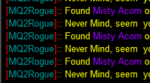
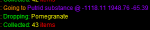
One last thing, be nice if it announced what you picked up in the mq2 window. 😏 Just a thought.
already does.

tells you what it is going to get, and then tells you how many you collected

1632626953288.png

if you mean the item afterwards it collected, it doesn't do that.

but if you had something else announcing when you had stuff on your cursor, like mq2rogue you'd see it there.

1632627021484.png

seems like unnecessary information, but i could see where you want to see that, we'll take a look

Some time later:

since we autoinventory *anything* that might be on your cursor, I'll just add when you drop when you autoinventory.
(this update will just be in MQ "next")
1632631683753.png
 
Release MQ2GroundSpawns

Users who are viewing this thread

Back
Top
Cart