• You've discovered RedGuides, an EverQuest multi-boxing and scripting community 🧙‍♀️⚙️. We want you to play several EQ characters at once, come join us and say hello! 👋

  • A TLP without truebox has thawed (Very Vanilla ready)
    Frostreaver
MQ2Grind

Release MQ2Grind (3 Viewers) 3.1.52471.11

I've been trying for the past couple of days to get into the GOBLINS AND FOOLS mission, but I keep getting this error:

View attachment 34707

I've already imported the navmesh above from hytiek (not that I think that should matter). I'm trying to run this on Live - is that my issue?

You have done nothing wrong. Goblins and Fools was enabled only on MQNext build:

1635912091102.png
 
could someone explain how to get this to run on Next?
I have it on Live fine. I tried using the Next Migrator but that didn't work.
I'm sorry if this is simple.
thank you in advance for your help
 
could someone explain how to get this to run on Next?
I have it on Live fine. I tried using the Next Migrator but that didn't work.
I'm sorry if this is simple.
thank you in advance for your help
if you just purchased it, it takes 0-4 hours for the server to sync licenses from MQ2 "legacy" to MQ "Next", so 6 times a day.

I explain it a bit in the over view vid if this explains it better
 
Thank Sic! You really are the best...i was beating my head against wall trying to figure it out. You rock!
 
Thank Sic! You really are the best...i was beating my head against wall trying to figure it out. You rock!
yeah sorry for the troubles, soon :tm: we won't have the 2 systems nor the sync and waiting thing
 
does this require reguides build for the subscription or can it be used with selfbuild/mq2builder?
 
does this require reguides build for the subscription or can it be used with selfbuild/mq2builder?

It is an exclusive RedGuides plugin, you would need to have appropriate access. I see that you have Level 2 - you can use it in your own release folder, just copy it over post-build.
 
2 questions, Is the frontier mountains one going to be put back on? 2nd, I tried to do the GMM one, but when I zone out of the mission after it it is complete a few of my toons get killed by roamers and since it puts all the CWTN plugins in pause they do nothing. any suggestions?
 
2 questions, Is the frontier mountains one going to be put back on? 2nd, I tried to do the GMM one, but when I zone out of the mission after it it is complete a few of my toons get killed by roamers and since it puts all the CWTN plugins in pause they do nothing. any suggestions?

I didn't remove EoK Goblins and Fools. Sounds like you were playing with Next and now back on Live. The EoK mission is only available on the Next build.

RE: GMM you could modify the pause, you could work on your faction, you could get out of GMM and move to EoK =)
I regret putting GMM in ... it's such a burden. I'm sorry!
 
I didn't remove EoK Goblins and Fools. Sounds like you were playing with Next and now back on Live. The EoK mission is only available on the Next build.

RE: GMM you could modify the pause, you could work on your faction, you could get out of GMM and move to EoK =)
I regret putting GMM in ... it's such a burden. I'm sorry!

not your fault they were stupid and put agro mobs right next to a quest giver. I dont use Next, I just aw it was available from the screen on the frist page. ran my dudes ever there and it said it wasnt available. I might need to figure out the mqnext. scared i will have to redo everything I have done trying a new platform. I appreciate all your work, now if I could get to where I can use it, it would be awesome :).
 
What's the chance of either having a /grind command or a TLO that displays how long the current grind has been running?
 
So I installed and migrated mqnext. Went to frontier mountains, mess around with stuff and finally get grind to start. Zone i to the instance. It says moving to point 1 and nothing happens. Everyone is just sitting there. Any thoughts? Seems like a bunch if plugins that were running in mq2 are not running in next. Everything is updated. I am used to the plugin manager so I have no clue whats working or not.
 
So I installed and migrated mqnext. Went to frontier mountains, mess around with stuff and finally get grind to start. Zone i to the instance. It says moving to point 1 and nothing happens. Everyone is just sitting there. Any thoughts? Seems like a bunch if plugins that were running in mq2 are not running in next. Everything is updated. I am used to the plugin manager so I have no clue whats working or not.
I found that the "one point" move wasn't exactly enough. I made sure that all of my group was set to "Follow Me" and inched my way forward until I got close enough to fall down to the next level. At that point, my other toons were following and I was able to engage in the first fight. After that, it all went smoothly.

Good luck!
 
Yeah I figured that out. I have to drop down before it will start. Was hoping it was less micro managed, and it just ran. Maybe a bug that can be fixed?
 
What's the chance of either having a /grind command or a TLO that displays how long the current grind has been running?

If I were to guess, I'd say quite high chance. There is a command for Kills Per Hour (/grind kph). The time is already being watched, is this what you were looking for or something else?
 
Yeah I figured that out. I have to drop down before it will start. Was hoping it was less micro managed, and it just ran. Maybe a bug that can be fixed?

@classifyde and @Colonel - USMC Retired the plugin was not designed for you to apply a band-aid. The plugin is fully functional as long as you apply what it asks for. =)

Both of your problems will be solved if you update DROGAB mesh as it says in the release notes.

1636236106691.png

You can grab it from here for ease: https://www.redguides.com/community/attachments/drogab-navmesh.34638/
 
@classifyde and @Colonel - USMC Retired the plugin was not designed for you to apply a band-aid. The plugin is fully functional as long as you apply what it asks for. =)

Both of your problems will be solved if you update DROGAB mesh as it says in the release notes.

View attachment 34785

You can grab it from here for ease: https://www.redguides.com/community/attachments/drogab-navmesh.34638/
Hey hytiek!

I wasn't complaining. 😁 I already put the new zone mesh in my files, but still had to "nudge" my SK into the area to get it to go, but definitely not a complaint. Since I've only run this a couple of times in the Droga ***JUST TO GET USED TO IT***, I didn't get much AAXP on a group of 115's, but I was more into watching how the mechanics were working and where I would be required to butt in, if necessary.

I think it's great overall, tho!
 
Hey hytiek!

I wasn't complaining. 😁 I already put the new zone mesh in my files, but still had to "nudge" my SK into the area to get it to go, but definitely not a complaint. Since I've only run this a couple of times in the Droga ***JUST TO GET USED TO IT***, I didn't get much AAXP on a group of 115's, but I was more into watching how the mechanics were working and where I would be required to butt in, if necessary.
I think it's great overall, tho!

Thank you for the compliment; I don't understand the nudge though and I want to understand what is causing the manual intervention.
 
Thank you for the compliment; I don't understand the nudge though and I want to understand what is causing the manual intervention.
I'm an idiot.

I updated the "Live" mesh, not the "MQNext" one. (see my previous post above about not always reading through everything...). 😋
 
Last edited:
If I were to guess, I'd say quite high chance. There is a command for Kills Per Hour (/grind kph). The time is already being watched, is this what you were looking for or something else?
I had 2 reasons:

1.) Sometimes I'm curious how long it's been running
2.) So I can calculate xp/hr over the duration.

I have xp/hr being calculated and displayed on boxhud using a TLO from mq2xptracker but it resets after every instance. Since I spend less than one hour per I'm never getting a true idea of how much per hour I'm gaining over time. I've been using kph as a general gauge of how much better a particular toon is getting as they level and increase in aa but I'd like to have something to pair that against.

It's not a huge want, but if it were easy and if you have time I'd sure appreciate it. =)

-G
 
I had 2 reasons:

1.) Sometimes I'm curious how long it's been running
2.) So I can calculate xp/hr over the duration.

I have xp/hr being calculated and displayed on boxhud using a TLO from mq2xptracker but it resets after every instance. Since I spend less than one hour per I'm never getting a true idea of how much per hour I'm gaining over time. I've been using kph as a general gauge of how much better a particular toon is getting as they level and increase in aa but I'd like to have something to pair that against.

It's not a huge want, but if it were easy and if you have time I'd sure appreciate it. =)

-G

I'll work on it tonight and let you know when ready.
 
I have found that rogues are getting stuck (in great divide, Restless Assault) because of skill:hide outside of the instance, the rogue is hiding when he says ready. I think always adding a makemevisible before having a rogue say "ready" would fix the issue(s) even if it is happening for other instances. Thank you
 
I have found that rogues are getting stuck (in great divide, Restless Assault) because of skill:hide outside of the instance, the rogue is hiding when he says ready. I think always adding a makemevisible before having a rogue say "ready" would fix the issue(s) even if it is happening for other instances. Thank you
yeah you can just add the makemevis in your pause, i believe hytiek was going to update the default to include that

Pause=/multiline ; /rog usehidesneak off; /rog pause on; /timed 20 /makemevisible
 
Thanks Hitiek. It was a bug, a bug in my head. Let.me update the next mesh, as I had only done the live. What he meant by nudge was you physically have to move your tank forward to get it to start running to the first spot. I will report back after I update the mesh. Thanks for the help.
 
I have updated my mesh ( I think ) There was not a mesh folder in my next folder so I copied and put on there then replaced the droga mesh. everything loads in, and it says navigating to the 1st spot and my tank does not move. I have to manually make him run until he falls down the hole then he will start the nav and it takes over from there and finishes. Then I have to run him down the hole for it to start every time. Any suggestions as to what I may be doing wrong or have not done to make it work correctly. I am sure it is my error, but no freaking clue what I didnt load or move to the next folder to make it work.
 
I have updated my mesh ( I think ) There was not a mesh folder in my next folder so I copied and put on there then replaced the droga mesh. everything loads in, and it says navigating to the 1st spot and my tank does not move. I have to manually make him run until he falls down the hole then he will start the nav and it takes over from there and finishes. Then I have to run him down the hole for it to start every time. Any suggestions as to what I may be doing wrong or have not done to make it work correctly. I am sure it is my error, but no freaking clue what I didnt load or move to the next folder to make it work.

Have you put this file (https://www.redguides.com/community/attachments/drogab-navmesh.34638/) in your Next\resources\MQ2Nav folder and reloaded your meshes? Let's be sure you've put the file in the right location. This is definitely a user issue; not a plugin issue. Please reach out to me on Discord (hytiek#2341) for faster assistance!
 
I have updated my mesh ( I think ) There was not a mesh folder in my next folder so I copied and put on there then replaced the droga mesh. everything loads in, and it says navigating to the 1st spot and my tank does not move. I have to manually make him run until he falls down the hole then he will start the nav and it takes over from there and finishes. Then I have to run him down the hole for it to start every time. Any suggestions as to what I may be doing wrong or have not done to make it work correctly. I am sure it is my error, but no freaking clue what I didnt load or move to the next folder to make it work.

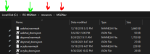
Just to help, your meshes should be in a folder structure like this:

1636382972501.png

The green arrows are optionally named which means you might have your folder on G: or D: and you may have called your install for MQNext something else like "coolRGStuff"; but the red arrows are pointing at mandatory locations for MQ2Nav to work, these cannot be named anything else - which means that the drogab mesh you downloaded must be located in the resrouces > MQ2Nav folder. Anywhere else means you didn't install the mesh correctly.
 
hytiek updated MQ2Grind with a new update entry:

Crash fix and updated some default settings

11/8/2021
---
Enhancements (MQNext build only)
- Updated MQ2Rogue default settings, recommended to reset to default
- Reduced internal pulse to allow the plugin to react quicker (pulseSkip)

Resolved defects (MQNext build only)
- Hopefully fixed a crash - if you are crashing please reach out

Caveats (known issues)
- /multiline issue with /rgstart in MQ2Grind.ini (work around is to replace /rgstart with /macro rgmercs\RGMERC.mac)
- Plugin is not available for EMU
- EQ, MQ2, and...

Read the rest of this update entry...
 
Now sure how but keep walking back to this. in the GMM mission. i think the ranger using Kissassist gets stuck and the rest of the team moves on so him merc stays back with him and the team dies.

1636578829633.png
 
Last edited by a moderator:
I've had this ask a few times and I've thought about it a lot... I really don't want to build it into the plugin because I think it's better suited to be handled with MQ2React to interact with the plugin, instead of yet another layer of configuration buried into a plugin. In saying this, in order to enable this use case, I need to extend some data of the plugin to a TLO (for instance: ${Grind.Active} - this way, a MQ2React could be configured to check end/mana and if a grind is active, and then instruct the plugin to pause as soon as its safe (my thought is /grind safepause). What this would do is ensure that there's no mobs on xtarget and nothing around us to surprise kill us while we paused. Then a second MQ2React which picks up that our end/mana is better and we're ready to continue.

In typing this out, I'm really on the fence because I can see the configuration being built into MQ2Grind and it watching the group stats and such.... and I can see MQ2React working but then getting complicated by support classes asking the tank to safepause. Another option is by introducing a delay at each location that is user defined. Something like "PauseAtLoc=20" would pause for 20 seconds before continuing. This would give your crew the ability to self-manage their end/mana accordingly by sitting or canni or mod rod as their controlling plugin/macro has defined.

I'll sleep on it and give it more thought.

With this information, I'd love to see your opinions on the matter. Help influence me. =)
I have been looking how to do this, Thought I would look in /events, but then found this reply..

Was there a react that worked to pause or unpause automatically?
 
Where do i put the mq2grind.dll file and how do i load it with my sk? /mq2grind load? Also says have to use dannet, what is dannet/? Tried opening the dll file to review, as its mentions will have to customize ... thanks in advance.
 
Where do i put the mq2grind.dll file and how do i load it with my sk? /mq2grind load? Also says have to use dannet, what is dannet/? Tried opening the dll file to review, as its mentions will have to customize ... thanks in advance.
the VV launcher will download it and place it automatically.

 
Release MQ2Grind

Users who are viewing this thread

Back
Top
Cart