
-
 Hail, we're RedGuides. We want you to play six (yes, 6!) EverQuest characters at once. We have scripts and a friendly community to help, please join our playstyle and say hello! 👋
 -
 We've added LLM sections to our Terms & Rules and Resource Rules, for everyone's sanity & in-game safety.
Read more
a. Do not replace your voice with an LLM. This goes for your posts and your scripts. Drafting and editing with a tool is fine, but don't take you out of what you share.
b. Do not replace your EQ character's voice with an LLM. We don't want scripts that speak over/ooc,/shoutor other public channels. This has been an unwritten rule that's kept casino scripts off the site for decades, but we're now compelled to make it clear: keep automated communication private.
Why Does RG Review Scripts?
Nearly every LLM-written Lua script we see is making your character do impossible things, and rarely in a way that's beneficial to you. We've seen heavy server hammering,/targetover impossible distances when/nav spawnwould passively accomplish the same thing, a spawn search that fires 20+ times per second, and other pointless actions that are likely annoying GMs.
You are welcome to use LLMs as a tool to structure, draft, and edit your work, but please read critically before hitting/lua run
You are using an out of date browser. It may not display this or other websites correctly.
You should upgrade or use an alternative browser.
You should upgrade or use an alternative browser.

Plugin - MQ2Eskay 3.1.52471.48
- Thread starter ChatWithThisName
- Start date

I am having trouble setting my pull arc. I have my arc set to 140 and I face the direction I want the arc to be centered in and hit my puller tank hotkey and it targets the nearest mob and sets the arc with respect to that mob and ignores the direction I am facing when initiating the puller tank key. Why is this and what can I do to avoid this?

you set your arc when either you a: set your camp or b: reset your camp.I am having trouble setting my pull arc. I have my arc set to 140 and I face the direction I want the arc to be centered in and hit my puller tank hotkey and it targets the nearest mob and sets the arc with respect to that mob and ignores the direction I am facing when initiating the puller tank key. Why is this and what can I do to avoid this?
if you want to adjust your stuff
set your min pull lvl to like 250
/shd levelmin 250and then turn around and adjust your radius / arc etc and adjust with /shd resetcamp - once you have it where you want
/shd levelmin 1I'm having a new problem with the plugin window after logging in today. Logged out yesterday with the window showing but minimized. Logged in today and the window is still minimized but will not restore - it just stays minimized with just the title visible.
Things I have tried:
- /shd show -> /shd show to reopen
- /plugin MQ2eskay unload -> /plugin MQ2eskay load
- /reloadui
I have not completely rebooted yet.
Any tips? Where are the window parameters stored - can't find them in the MQ2eskay ini or the general MQ2 ini.
Edit - never mind. Slowly moved the mouse and noticed the resize arrow on the border (title bar just had the move pointer). Window could be expanded. I know I didn't resize it myself, so maybe logging with it minimized is resetting the window size?
Things I have tried:
- /shd show -> /shd show to reopen
- /plugin MQ2eskay unload -> /plugin MQ2eskay load
- /reloadui
I have not completely rebooted yet.
Any tips? Where are the window parameters stored - can't find them in the MQ2eskay ini or the general MQ2 ini.
Edit - never mind. Slowly moved the mouse and noticed the resize arrow on the border (title bar just had the move pointer). Window could be expanded. I know I didn't resize it myself, so maybe logging with it minimized is resetting the window size?
this means you likely logged out with the window minimized - you should grab the bottom right of the window and drag it largerI'm having a new problem with the plugin window after logging in today. Logged out yesterday with the window showing but minimized. Logged in today and the window is still minimized but will not restore - it just stays minimized with just the title visible.
Things I have tried:
- /shd show -> /shd show to reopen
- /plugin MQ2eskay unload -> /plugin MQ2eskay load
- /reloadui
I have not completely rebooted yet.
Any tips? Where are the window parameters stored - can't find them in the MQ2eskay ini or the general MQ2 ini.
its discussed in the cwtn ui thread.
another user had the same issue > here <
and > here <
flintleroy
Member
is there a way to make /shd DoCampfire make an Empowered fellowship campfire?
no, not at this timeis there a way to make /shd DoCampfire make an Empowered fellowship campfire?

SomeTester
Well-known member
So I just got my Anguish BP finally. I know to /addclicky but my question is when? When do you all recommend using it?
burnSo I just got my Anguish BP finally. I know to /addclicky but my question is when? When do you all recommend using it?
Sic,
When I am watching your MQ2Eskay video, I see the cool red circle that is set when you enter into Tank/Puller tank/Sic tank modes that shows on your map. I do not get a similar circle on my map, so I'm wondering how to activate that option/what plugin I need for that feature. Also, does it only show your camp or can it show your puller tank radius? I would really like to be able to set a puller radius 45 for instance, and only pull the area in front of me AND see that on my map to adjust it. That would be useful for pulling in tight quarter dungeons to not pull the adjacent room.
Thanks!
When I am watching your MQ2Eskay video, I see the cool red circle that is set when you enter into Tank/Puller tank/Sic tank modes that shows on your map. I do not get a similar circle on my map, so I'm wondering how to activate that option/what plugin I need for that feature. Also, does it only show your camp or can it show your puller tank radius? I would really like to be able to set a puller radius 45 for instance, and only pull the area in front of me AND see that on my map to adjust it. That would be useful for pulling in tight quarter dungeons to not pull the adjacent room.
Thanks!

Rufus
Active member
A lot of the puller tips are in the MQ2War video/tutorial.
If you enter into a pull mode it should automatically show on your map. Might want to check your map settings (height filter/layers/base/labels/etc). You will want your map to show "everything" basically.
Then you can see graphical representations when you change your campradius (/shd campradius 50, for example), pullradius (/shd pullradius 100), and pullarc (/shd pullarc 90/180/360 or whatever you want).
Note: You asked about setting a pull radius to 45...that is VERY small for a pull radius. I think the default camp radius is 60, and the default pull radius is 100. For a tight dungeon, I would recommend a camp radius of 25 or so, and adjust as necessary. Again, check out the MQ2War video as it has detailed instructions for how to set it all up.
If you enter into a pull mode it should automatically show on your map. Might want to check your map settings (height filter/layers/base/labels/etc). You will want your map to show "everything" basically.
Then you can see graphical representations when you change your campradius (/shd campradius 50, for example), pullradius (/shd pullradius 100), and pullarc (/shd pullarc 90/180/360 or whatever you want).
Note: You asked about setting a pull radius to 45...that is VERY small for a pull radius. I think the default camp radius is 60, and the default pull radius is 100. For a tight dungeon, I would recommend a camp radius of 25 or so, and adjust as necessary. Again, check out the MQ2War video as it has detailed instructions for how to set it all up.
sounds like you don't have the layers showing on your map - double check that (the red cirlce is your campradius and gets created in any of the modes with a camp (assist, tank, any puller mode etc)Sic,
When I am watching your MQ2Eskay video, I see the cool red circle that is set when you enter into Tank/Puller tank/Sic tank modes that shows on your map. I do not get a similar circle on my map, so I'm wondering how to activate that option/what plugin I need for that feature. Also, does it only show your camp or can it show your puller tank radius? I would really like to be able to set a puller radius 45 for instance, and only pull the area in front of me AND see that on my map to adjust it. That would be useful for pulling in tight quarter dungeons to not pull the adjacent room.
Thanks!
it also shows pull radius - again sounds like you have your layers hidden on your map.
pull radius if 45 is stupid small.
I also do go over the camp circle stuff in the mq2eskay video as well as the mq2war video.
pull radius if 45 is stupid small.
Sorry, I meant to refer to pull arc at 45 (radius 200 or whatever). I couldn't see the correct term during the patch. It appears I needed layers 2 and 3 on my map enabled. Thanks for all the help.
yes, it is in the FAQMy sk is spamming Helot Covenant level 108 when I use remove illusions. It appears it is checking for the icebone skeleton illusion spell. Sorry if this was reported I didn't find using search.
if you don't want the illusion from the buff, you should add it to your blocked spells. otherwise since you're missing it - you're going to recast it.
Q. I spam memorize my mana conversion / skeleton illusion spell?
A. You probably have auto remove illusion turned on, but don't actually have the illusion from this spell added to your blocked buffs. This will make you want to recast the spell. If you don't want to re-cast the spell to get the illusion, you will want to add it to your blocked buffs.

Crash
Well-known member
yes, it is in the FAQ
if you don't want the illusion from the buff, you should add it to your blocked spells. otherwise since you're missing it - you're going to recast it.
Q. I spam memorize my mana conversion / skeleton illusion spell?
A. You probably have auto remove illusion turned on, but don't actually have the illusion from this spell added to your blocked buffs. This will make you want to recast the spell. If you don't want to re-cast the spell to get the illusion, you will want to add it to your blocked buffs.
Thanks I feel silly.
its a common question - which is why its in the faqThanks I feel silly.
don't feel silly (but you know know about the faq)
Crash
Well-known member
Yes, I have been reading those. I think when I scrolled I was scanning the first part of topic for illusion. Will slow down next time.its a common question - which is why its in the faq
don't feel silly (but you know know about the faq)
I have now had multiple situations where mobs well inside my camp radius on a flat floor are not being pulled. I know that the command: /shd debugpull on once is available, but it has yet to help me figure out why the mobs are not being pulled. It outputs every mob in the zone and when you are in a zone with a hundred trash mobs with the same name, it is impossible to figure out mine. Would it be possible to add a /shd debugpull target once command? Thanks!
you target the mob you expect to pull and find out the mob's id - and then you compare it with the output from the debug.I have now had multiple situations where mobs well inside my camp radius on a flat floor are not being pulled. I know that the command: /shd debugpull on once is available, but it has yet to help me figure out why the mobs are not being pulled. It outputs every mob in the zone and when you are in a zone with a hundred trash mobs with the same name, it is impossible to figure out mine. Would it be possible to add a /shd debugpull target once command? Thanks!
/echo ${Target.ID}the reason it spits out everything - is if you end up seeing a bunch of mobs on ignore - then ya know; if you see a whole section of mobs that have no navpath - then ya know; etc.
Its also not the entire zone. but it is important folks "know" that those spawns are "Seen".
Last edited:
When I do /shd debugpull on once it outputs a list of names like so:you target the mob you expect to pull and find out the mob's id - and then you compare it with the output from the debug.01
/echo ${Target.ID}
[DEBUGPULL] Spawn: a_big_bad_ass01
And when I use /echo ${Target.ID} it gives me a 5 digit number....
Also, the list is so long that I can not scroll to the top because the top of the list is unavailable in the UI...I can't scroll all the way to the top.
sorry i mean ${Target.Name} it will spit out their number on the end of their name. like "BigOrc002"When I do /shd debugpull on once it outputs a list of names like so:
[DEBUGPULL] Spawn: a_big_bad_ass01
And when I use /echo ${Target.ID} it gives me a 5 digit number....
Also, the list is so long that I can not scroll to the top because the top of the list is unavailable in the UI...I can't scroll all the way to the top.
what kind of pull radius are you using if you can't scroll back that far - because that would be a LOT of mobs.
are you *sure* you're doing
on once?what kind of pull radius are you using if you can't scroll back that far - because that would be a LOT of mobs.
My pull radius is 450. I am in a tower zone (convorteum). So perhaps if the Z axis is ignored, it is giving me all the mobs in the entire cylinder from ground floor to top floor?
Yes, I copy and pasted your command from the FAQsare you *sure* you're doingon once?

I am having the same problem. I set up a 1000 camp radius and change my HZ Axis as needed. I open up my map and watch mobs walking around in my camp radius and my puller is just sitting on his caboose! In my case this is a Warrior using MQ2War of courseI have now had multiple situations where mobs well inside my camp radius on a flat floor are not being pulled. I know that the command: /shd debugpull on once is available, but it has yet to help me figure out why the mobs are not being pulled. It outputs every mob in the zone and when you are in a zone with a hundred trash mobs with the same name, it is impossible to figure out mine. Would it be possible to add a /shd debugpull target once command? Thanks!
as mentioned debugpull on once will tell you what/whyI am having the same problem. I set up a 1000 camp radius and change my HZ Axis as needed. I open up my map and watch mobs walking around in my camp radius and my puller is just sitting on his caboose! In my case this is a Warrior using MQ2War of course
/war debugpull on once
J's situation with debugpull is likely the zone spits out too many mobs because they are all near him but vertical.
if you go look at the mesh for convortium - the mesh is a bit rough and just about 90% positive that would be your issue.
but for you, medicman, you know what you need to do. so go and do it.
reasons for not pulling:
waiting for groupwatch
waiting for snare/sickness etc
mob on ignore
mob is wrongspawntype (untargetable or not npc)
mob outside near people outside your group
mob outside of your pull settings (level, radius, zradius, arc)
mob has a title under their name
you don't have a valid path to them <--- this is the most common, that your mesh has a break in it somewhere.
you *have* to do the debugpull on once to determine what/where it is because that literally tells you why.
Last edited:
Undefeated
Well-known member
Question. If using the SK plugin where would I add all my spells and abilities? Since we can not use the kiss file with this plugin?
Thank you
Thank you

It loads them and uses them. If you look at the output tab it will actually tell you when you login/start the plugin what seplls its using for what effect. It also tells you if your missing one it wants.Question. If using the SK plugin where would I add all my spells and abilities? Since we can not use the kiss file with this plugin?
Thank you
Undefeated
Well-known member
So u can add spells as well?
SomeTester
Well-known member
There is a BYOS button for when you want to use your own spells. Otherwise the CWTN plugins automatically use the best available spell and rank in the line.So u can add spells as well?
No.So u can add spells as well?
The whole point is to not have to do that.
no, raid mode does not adjust if you should or should not do taunting thingsHey Sic/Chat
Did a quick search of this thread but don't see it answered anywhere - does "Raid Mode" turn off the AE taunt abilities? Or if not is there a way to do so?
but this chart is in the overview page
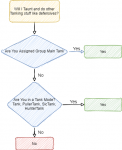
Dont be in a tank mode..Yeah, knew all of that. Just didn't know if there was a way to avoid AE taunting raid mobs that are gonna splat you the second you do. Thanks!

Quichan
Member
Hi,
A. Is there any reason I should not use the "follow me" button? I've never had that fail and when I'm bard-flying it seems to follow better. (Is this because chase modes use Nav and meshes and "follow me" is more of a vector-follow?)
B. I'm trying to understand how group roles and modes play together.
1. The docs here say Mode 2 is "Chaseassist" but I only see "chase" Is this the same thing? Perhaps out of date docs?
2. Is there a mode that will both chase and tank? Meaning, if the group is all in chase mode and a mob walks up and hits one of us, my MT does not do anything until I (the MA) target it. If I set the MT as MA this works but then no one follows me any more (at least I think that is true). (I guess I expected anyone in the group getting hit to be a signal to attack the mob, like a pet would if the owner was hit.)
What is the relationship between the EQ group roles and the Tank modes? My SK will just sit there while people take hits until I target the mob. I was expecting that to be the Assist mode behavior. If I set the SK to both MA and MT, then it works but then the Shaman will chase the Tank when he attacks (not a problem when set to camp obviously). I'm not quite "getting it" when it comes to the modes versus roles. Do you set group roles with hotkeys when changing modes in some cases. I hope if nothing else my questions explain my confusion (and ignorance with group roles as I am a returning player from before those days... I get all but the MA vs MT + modes).
I suspect some of my issue is not resetting camp enough. I noticed when I switched from Tank to Puller Tank my MT just ran back to an old camp. I'll watch the moving toons vid and checkout those hotkeys again too.
A. Is there any reason I should not use the "follow me" button? I've never had that fail and when I'm bard-flying it seems to follow better. (Is this because chase modes use Nav and meshes and "follow me" is more of a vector-follow?)
B. I'm trying to understand how group roles and modes play together.
1. The docs here say Mode 2 is "Chaseassist" but I only see "chase" Is this the same thing? Perhaps out of date docs?
2. Is there a mode that will both chase and tank? Meaning, if the group is all in chase mode and a mob walks up and hits one of us, my MT does not do anything until I (the MA) target it. If I set the MT as MA this works but then no one follows me any more (at least I think that is true). (I guess I expected anyone in the group getting hit to be a signal to attack the mob, like a pet would if the owner was hit.)
What is the relationship between the EQ group roles and the Tank modes? My SK will just sit there while people take hits until I target the mob. I was expecting that to be the Assist mode behavior. If I set the SK to both MA and MT, then it works but then the Shaman will chase the Tank when he attacks (not a problem when set to camp obviously). I'm not quite "getting it" when it comes to the modes versus roles. Do you set group roles with hotkeys when changing modes in some cases. I hope if nothing else my questions explain my confusion
(and ignorance with group roles as I am a returning player from before those days... I get all but the MA vs MT + modes).I suspect some of my issue is not resetting camp enough. I noticed when I switched from Tank to Puller Tank my MT just ran back to an old camp. I'll watch the moving toons vid and checkout those hotkeys again too.
Last edited:

- Commits
- 191
- Seller
- #1,358
A. Follow me is a preference, if you use this button you should be in manual mode on all other characters using the CWTN Plugins to avoid the plugin and the Follow Me conflicting. I personally run with my characters in chase mode while invis if I want to relocate. Sic tends to prefer to put everyone on manual mode (or pause the plugins) and then use Follow Me button. Depends on you, the user, to decide which method you prefer.
B. There are only two group roles that make a difference in the behavior of the plugins.
For MainAssist - the person assigned the main assist is the character that you will help if the plugin is in an assist mode, and who you will chase in chase mode.
For MainTank - This determine what loadout you'll use in combat, making you use defensive instead of offensive abilities on tanks (Like the SK)
You can see a chart for when the plugin will do taunting/defensive stuff 4 posts above this one. https://www.redguides.com/community/threads/mq2eskay.69385/post-461455
1. Yes, these are the same thing. You can actually type
2. Yes and no. You can put yourself in chase mode, set yourself as MainTank in the group roles, and set your assistat to 100. This way your tank will engage immediately, it will use defensive (taunting and damage reduction) abilities. When you're assigned the main tank you will actively try to gain aggro regardless of role. So while there isn't a plugin mode specifically designed to do it, you can get it to happen.
Plugin mode - TANK will set a camp at their current location and use defensive/taunt abilities in an effort to gain aggro and deflect damage while also trying to do damage themselves if something enters within "Camp Radius" distance of your camp location. PullerTank will go get things and bring them back to camp and wait for them to arrive, and then be in "TANK" mode essentially until everything is dead.
Ideally you want to set your driver toon as MA and your Tank toon as Maintank, I personally drive with my tank toon (the SK) so I assign both roles to them.
B. There are only two group roles that make a difference in the behavior of the plugins.
For MainAssist - the person assigned the main assist is the character that you will help if the plugin is in an assist mode, and who you will chase in chase mode.
For MainTank - This determine what loadout you'll use in combat, making you use defensive instead of offensive abilities on tanks (Like the SK)
You can see a chart for when the plugin will do taunting/defensive stuff 4 posts above this one. https://www.redguides.com/community/threads/mq2eskay.69385/post-461455
1. Yes, these are the same thing. You can actually type
/shd mode chaseassist (and that's what we originally had) or /shd mode chase. Due to the length of the words we opted to put "chase" in the dropdown box.2. Yes and no. You can put yourself in chase mode, set yourself as MainTank in the group roles, and set your assistat to 100. This way your tank will engage immediately, it will use defensive (taunting and damage reduction) abilities. When you're assigned the main tank you will actively try to gain aggro regardless of role. So while there isn't a plugin mode specifically designed to do it, you can get it to happen.
Plugin mode - TANK will set a camp at their current location and use defensive/taunt abilities in an effort to gain aggro and deflect damage while also trying to do damage themselves if something enters within "Camp Radius" distance of your camp location. PullerTank will go get things and bring them back to camp and wait for them to arrive, and then be in "TANK" mode essentially until everything is dead.
Ideally you want to set your driver toon as MA and your Tank toon as Maintank, I personally drive with my tank toon (the SK) so I assign both roles to them.
I suspect some of my issue is not resetting camp enough. I noticed when I switched from Tank to Puller Tank my MT just ran back to an old camp. I'll watch the moving toons vid and checkout those hotkeys again too.
Your camp only updates when changing from a non-camp mode to a camp mode.
if you swap from tank to puller tank, the camp doesn't set where you are at - because you already have it set elsewhere. if you want it to be set where you currently are you need to either go into manual mode first (to clear your camp) or utilize the resetcamp. its explained in the vids.
the only reason i pause toons / manual mode to move is because of bards being a pain in the ass.A. Follow me is a preference, if you use this button you should be in manual mode on all other characters using the CWTN Plugins to avoid the plugin and the Follow Me conflicting. I personally run with my characters in chase mode while invis if I want to relocate. Sic tends to prefer to put everyone on manual mode (or pause the plugins) and then use Follow Me button. Depends on you, the user, to decide which method you prefer.
a good portion of the time i just invis them up and leave chase mode on
Users who are viewing this thread
Total: 1 (members: 0, guests: 1)
Share: