• You've discovered RedGuides, an EverQuest multi-boxing and scripting community 🧙‍♀️⚙️. We want you to play several EQ characters at once, come join us and say hello! 👋

  • A TLP without truebox has thawed (Very Vanilla ready)
    Frostreaver
MQ2Eskay

Plugin - MQ2Eskay (1 Viewer) 3.1.52471.11

So i've started to use this plugin to pull more lately, as i am doing some hunter stuff. What I have noticed with the pull arc/radius is that as I fine tune my radius/arc to include several ph's sometimes it's not possible to camp in a bot safe spot with the radius and arc that doesn't overlap with another part of the zone that is WELL beyond the camp region in regards to path distance.

ie. it will clear out all mobs in the camp radius/arc that are the obvious shortest path to pull, then it will go to pull the few mobs that fall into the radius.

ie my radius/arc are 550/250 respectively, and the mobs well beyond a reasonable distance that fall into the arc are >3000 feet away.

Is there anyway for a camp radius exceed in terms of pathlength or something? seems odd to attempt to pull something >3000 feet pathlength away despite a camp radius of 550.

It also doesn't seem to regard adds that aggro along the way important to return to camp? not sure if that has just been my observation timing or what it's actually doing
If the area inside your radius, the blue circle, is reachable, you're going to run to it if u have a path to it. There is no exceed radius.

Regarding the returning if u get aggro, it will do that, the problem is in modern eq u can walk past a bunch of mobs before they aggro due to run speed and server update rate so if u end up pulling mobs by going past mobs u dont want to pull (like the above radius example), you will often not aggro them until you have your pull mob in tow and they social add on the way back. The plugins will turn u around if you get aggro or even your in camp members get aggro, but they have to popup on xtarget.
 
There is no way to implement a path max/exceed option? Seems strange and most real player groups wouldn't even consider pulling that far away in most situations, I could understand some flexibility in round around obstacles to get to within the blue area, but over 3000 feet :P

Also, I'm not sure on the feasibility but trying to fine tune the arc/radius is difficult as the area only updates while in pullertank/puller mob and also not paused - not sure If I have missed something to be able to do this without the puller/tank running to pull mobs and requiring pausing and interruption to reset the camp values to try and get the specific area you want?
 
work around when you're settings aren't already setup is to /shd levelmin 200

then put it in pullertank, adjust radius/arc/zradius etc, then /shd levelmin 1
 
There's no exceed radius, you can add things you want to temporarily ignore to alert 1.

In KA one of my pet peaves about the way it would handle things that required you leave your pull radius was that it would just rubberband back and forth from that mob to the camp. This will allow you to leave the radius, but if there is some specific mob that is troublesome you can simply add that mob to alert list 1. https://redguides.com/docs/projects/macroquest/reference/commands/alert/

The following is used to update the search string. Since we're using "noalert 1" it means bypass anything that is on alert list 1.
C++:
void UpdateSearchString() {
    if (Camp.Set)
        sprintf_s(searchString, MAX_STRING, "npc noalert 1 radius %i zradius %i targetable loc %2.2f %2.2f %2.2f range %i %i", iRadius, iZRadius, Camp.X, Camp.Y, Camp.Z, iLevelMin, iLevelMax);
}
 
Ahh thanks ! Can't believe I didn't think of a level limit work around :(

Also the noalert 1 using mob ID would help a ton, save ignoring spawn names and pulling through them in some areas to ignore others :P

Another quick one - I was attempting to play with the Pull Zradius and even 0 vs 500 it didn't seem to pull different mobs in the camp I was in which had several levels of ramps to go down and collect mobs, would help with the pathexceed/blue area coverage issue I am having.

I was only changing the Pull Zradius in the UI window, if that would be an issue?
 
Well if you target the mob and add it to alert using ${Target.Name} then it'll add it with the "00" "01" etc at the end of their name. As opposed to using ${Target.CleanName} which would do it by name and not include that useful bit.

In regards to the LevelMin make sure to do it with the command. The window option doesn't update the search string correctly. (it will next patch)

But if someone kills it and it respawns then it's possible it has a different number on the end.

Zradius works as it's supposed to. You can try doing /shd debugpull on once

to see if it's triggering zradius correctly. As I expect it should. It's using the same thing as ${Spawn[]} TLO. Nobody else I know is having issues with the ZRadius.


Can always try using a /shd resetcamp to see if that unmucks whatever the issue is.
 
I will have a play with the zradius stuff later today when I go back to that camp to try again

Thanks for the help :)
 
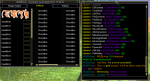
Hi all...first time poster....kind of at a loss here. Hadn't played in a few days and when I logged in and started up MQ2eskay I get a blank 'Plugin Output' box (seems the output is now in the 'MQ' box as shown) and my Settings tab shows InputBoxes and CheckBoxes.

I created a new SK on the same account/computer and everything looks normal but now it seems there is another tab for Ignores but all checkboxes are normal and output is in the normal Plugin Output tab.

I reinstalled everything that I could think of for RedGuides/MQ2/Plugins/Macros etc.

I can still put in commands like '/shd Mode 5' etc and my character does it's thing on my higher level SK. Seems like the MQ2eskay UI is messed up for my already created character only.

Any ideas or suggestions?

1596650826332.png
 
Hi all...first time poster....kind of at a loss here. Hadn't played in a few days and when I logged in and started up MQ2eskay I get a blank 'Plugin Output' box (seems the output is now in the 'MQ' box as shown) and my Settings tab shows InputBoxes and CheckBoxes.

I created a new SK on the same account/computer and everything looks normal but now it seems there is another tab for Ignores but all checkboxes are normal and output is in the normal Plugin Output tab.

I reinstalled everything that I could think of for RedGuides/MQ2/Plugins/Macros etc.

I can still put in commands like '/shd Mode 5' etc and my character does it's thing on my higher level SK. Seems like the MQ2eskay UI is messed up for my already created character only.

Any ideas or suggestions?

View attachment 23501

its early in the vid.
 
Thanks @Robban @drakis that is exactly why - check out that video will explain it
 
Robban, appreciate your quick reply! I watched the vid and copied the UI files from the RedGuides <default>/Live/Release/uifiles directory to the Everquest UIFiles directory and everything is back up and running. Thank you!
 
Robban, appreciate your quick reply! I watched the vid and copied the UI files from the RedGuides <default>/Live/Release/uifiles directory to the Everquest UIFiles directory and everything is back up and running. Thank you!
as the video says, if you move those ui files out of that folder to anywhere else, you are going to have this issue again in the future.

Just leave them alone - I think i even say "our recomendation and request is to please just not copy the file anywhere and allow mq2 to load it"
 
Ok to follow up, I deleted the MQ .xml files from the Everquest/uifiles directory and reloaded everything. All up and running....not sure why I did that in the first place but the help here is fantastic...now back to killing pixels. Thanks!
 
Ok to follow up, I deleted the MQ .xml files from the Everquest/uifiles directory and reloaded everything. All up and running....not sure why I did that in the first place but the help here is fantastic...now back to killing pixels. Thanks!
woot!
#gettem
 
Is there a way to turn off the SK from casting skeleton illusion everytime I zone? My SK has the Helot Covenant buff already but it wants the skeleton illusion. Its annoying everytime I zone it mems the spell and casts it. Sorry if I missed the fix somewhere in the here.
Thanks in advance
 
Yah
Is there a way to turn off the SK from casting skeleton illusion everytime I zone? My SK has the Helot Covenant buff already but it wants the skeleton illusion. Its annoying everytime I zone it mems the spell and casts it. Sorry if I missed the fix somewhere in the here.
Thanks in advance
Yah, block the illusion, then it only looks for the helot buff, and not the secondary illusion
 
Small issues: It doesnt madder how man times i click it off or what my INI file says UsePet is always on when i log back in.
 
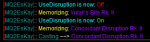
hi i am having some trouble with MQ2eskay where even with Usedisruption on the sk wont load the spell or use it. is there another setting i'm missing?
 
Small issues: It doesnt madder how man times i click it off or what my INI file says UsePet is always on when i log back in.
The ui window doesnt save the settings, as noted in the guides and videos, they are "hot swaps" If u want to perma change a setting use the slash command and it will save it in your settings
 
hi i am having some trouble with MQ2eskay where even with Usedisruption on the sk wont load the spell or use it. is there another setting i'm missing?
are you byos? because then, of course, he wouldn't load it
do you have your 13th gem slot? because you need your 13th gem slot, as that is where we put that buff
1596814030746.png
 
The ui window doesnt save the settings, as noted in the guides and videos, they are "hot swaps" If u want to perma change a setting use the slash command and it will save it in your settings
I used the slash command which wasnt in the instructions but quite easy to figure out what it was and no change. My orginal corrective action was to go into the ini and change UsePet=false but even then when I log in the first thing it does is try and summon a pet.
 
I used the slash command which wasnt in the instructions but quite easy to figure out what it was and no change. My orginal corrective action was to go into the ini and change UsePet=false but even then when I log in the first thing it does is try and summon a pet.
Radien1 is correct, despite using the command /shd UsePet off it will still turn back on after relogging. It does this to my SK's on TLP, Live and Test.
 
I used the slash command which wasnt in the instructions but quite easy to figure out what it was and no change. My orginal corrective action was to go into the ini and change UsePet=false but even then when I log in the first thing it does is try and summon a pet.
Radien1 is correct, despite using the command /shd UsePet off it will still turn back on after relogging. It does this to my SK's on TLP, Live and Test.
found it! Thanks for the info

I had an error in where we pull the info from in the ini (i say i, because i added this so was definitely my fault and not chats)

Will have fixed for next time our development gets pushed to live and live gets built

I'll give a go through the other stuff to ensure i didn't bork something else up in the load settings portion

edit: also thanks for pointing out the missing options in the commands tab on the resource, I updated that as well
 
Last edited:
while in manual mode, is there anyway to turn off taunting?
you taunt based on mode and your group assignemnt

so if you are set as group maintank or in a tank mode (like 4, 5, 7, 8) then you will do tank stuff

so just don't be assigned to group maintank in your group window if you don't want to do tank stuff (since you are in mode 0)
 
where do i go to have it activate AAs at certain points? and how do i get the F11 display to show all the info? it doesn't reflect anything below Tribute status
 
Last edited:
where do i go to have it activate AAs at certain points? and how do i get the F11 display to show all the info? it doesn't reflect anything below Tribute status
I'm not sure if you intended this question to be in the mq2eskay thread.

We don't use mq2hud for the ui display, sounds like you are maybe thinking about xgen shadowknight? > Here is the CWTN UI Information <

There is also no specificity for when most things will activate.
 
Going to refer to another thread that appears to cover what to do if running a macro.
ew-dracholiches-tank-not-quite-in-range-party-members-die

How do we handle this scenario with MQ2Eskay? My SK runs pretty well flawlessly, pulling, anywhere but when pulling dracos in EW. He always runs and grabs one and pulls it ALMOST back to camp then stands there while it wipes the group.
 
Going to refer to another thread that appears to cover what to do if running a macro.
ew-dracholiches-tank-not-quite-in-range-party-members-die

How do we handle this scenario with MQ2Eskay? My SK runs pretty well flawlessly, pulling, anywhere but when pulling dracos in EW. He always runs and grabs one and pulls it ALMOST back to camp then stands there while it wipes the group.

You need to set a higher Camp Radius because Draco's have a larger attack range.. Camp Radius should be minimum 80 for Draco's in EW
 
yup, giants and dragon models etc just have a larger attack range - so if they're chilling outside your campradius punching you with their mouth, you need to increase your campradius
 
Just got the plugin and searched through quite a few pages, what am I missing.... Under setting box all i see is "input box0" boxes i can check that just have a description of "checkbox"

Logged off and on, reinstalled it through the launcher..
 
Just got the plugin and searched through quite a few pages, what am I missing.... Under setting box all i see is "input box0" boxes i can check that just have a description of "checkbox"
Please see > This <
it means you moved the window.xml file to somewhere else, and you need to go and delete it so mq2 can load it from the mq2 folder.
 
Not sure i fully understand after watching the video.. What is the "ui" file?

found release/uifiles/default should i search ui files on pc and see what shows up?
 
Not sure i fully understand after watching the video.. What is the "ui" file?

found release/uifiles/default should i search ui files on pc and see what shows up?
Not sure i fully understand after watching the video.. What is the "ui" file?

found release/uifiles/default should i search ui files on pc and see what shows up?
you have a file called "MQUI_BerzerkerWnd.xml" in either your everquest default ui or custom ui folder.
you need to delete the file from those locations
so that mq2 can load that file from the MQ2 -> Release -> UIFiles > default "MQUI_BerzerkerWnd.xml"
 
and if I end up deleting both mqui_berzerkerwnd.xml re load mq2 berzerker and eskey... now no window at all... /loadskin default gets "zerkerwnd does not exist..

Reinstalling everything worked. Thanks for the help! finding the "MQUI_BerzerkerWnd.xml" helped the most!
 
Last edited:
and if I end up deleting both mqui_berzerkerwnd.xml re load mq2 berzerker and eskey... now no window at all... /loadskin default gets "zerkerwnd does not exist..

Reinstalling everything worked. Thanks for the help! finding the "MQUI_BerzerkerWnd.xml" helped the most!
like i mention in the video, don't adjust/mess/move/delete anything to the file in the release->UIFiles->Default folder at all and you'll be golden going forward
 
Plugin - MQ2Eskay

Users who are viewing this thread

Back
Top
Cart