

• Hail, we're RedGuides. We want you to play six (yes, 6!) EverQuest characters at once. We have scripts and a friendly community to help, please join our playstyle and say hello! 👋
  • We've added LLM sections to our Terms & Rules and Resource Rules, for everyone's sanity & in-game safety.
    Read more
    a. Do not replace your voice with an LLM. This goes for your posts and your scripts. Drafting and editing with a tool is fine, but don't take you out of what you share.
    b. Do not replace your EQ character's voice with an LLM. We don't want scripts that speak over /ooc, /shout or other public channels. This has been an unwritten rule that's kept casino scripts off the site for decades, but we're now compelled to make it clear: keep automated communication private.

    Why Does RG Review Scripts?
    Nearly every LLM-written Lua script we see is making your character do impossible things, and rarely in a way that's beneficial to you. We've seen heavy server hammering, /target over impossible distances when /nav spawn would passively accomplish the same thing, a spawn search that fires 20+ times per second, and other pointless actions that are likely annoying GMs.

    You are welcome to use LLMs as a tool to structure, draft, and edit your work, but please read critically before hitting /lua run
MQ2Eskay

Plugin - MQ2Eskay 3.1.52471.48

So I'm a little bit confused on how these things must work since it's been a while since I've played. I am returning to the Test server since several of my friends actually play there. How am I supposed to use the plugin on Test? I am using redfetch and keep it updated every time I turn my computer on, patching my test files with the launcher first just to be safe and then using the update button on redfetch before launching MQ. I load my toons in and try to load the plugins. They don't seem to work correctly as I see no UI for the plugin. So I downloaded the latest version from redguides and replaced the .dll file in the plugins folder. Now it is saying the plugin is not built for the version of everquest. Are they plugins not usuable on Test? Or am i just an idiot and can't figure this out? Please help me lol!
redfetch handles everything.
there are no files to download and willy nilly pass around.

if you're downloading plugin files it means you're downloading live plugin files and trying to slap them in a test build.

just clear your download cache on redfetch and update again
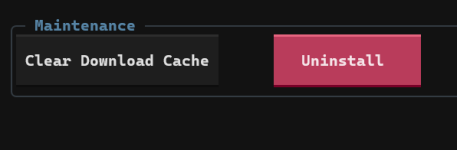
1787967513640.png

then just load it. /plugin eskay
 
redfetch handles everything.
there are no files to download and willy nilly pass around.

if you're downloading plugin files it means you're downloading live plugin files and trying to slap them in a test build.

just clear your download cache on redfetch and update again

View attachment 78589

then just load it. /plugin eskay
So I just did this, and this is what is happening on test on my SK. I load the plugin and get MQ2Eskay 1.00 Initialized.

I get no UI for the plugin so I attempt /shd show... Nothing happens. I've tried /reload. Nothing happens.
Even when I type /shd help... nothing happens. No text. No nothing
 
So I just did this, and this is what is happening on test on my SK. I load the plugin and get MQ2Eskay 1.00 Initialized.

I get no UI for the plugin so I attempt /shd show... Nothing happens. I've tried /reload. Nothing happens.
Even when I type /shd help... nothing happens. No text. No nothing
there are some 3rd party overlays that conflict with MQ's imgui overlay system

nahimic, afterburner, discord overlay, overwolf, xbox overlay, are a few.

you'll want to figure out why you're having an imgui overlay conflict and then work on resolving that (usually just not running the conflicting overlay will resolve it.

if you got red mq error message about imgui crashed, you'll want to /mqoverlay resume to resume imgui's overlay system (which includes the eskay ui window)
 
there are some 3rd party overlays that conflict with MQ's imgui overlay system

nahimic, afterburner, discord overlay, overwolf, xbox overlay, are a few.

you'll want to figure out why you're having an imgui overlay conflict and then work on resolving that (usually just not running the conflicting overlay will resolve it.

if you got red mq error message about imgui crashed, you'll want to /mqoverlay resume to resume imgui's overlay system (which includes the eskay ui window)
You are the man Sic. Thanks!!! It was afterburner! I had no idea. I appreciate your help!
 
Maybe i missed it in the many pages during the discussions and reviews but i have 2 concerns regarding mq2eskay i was hoping could be answered for me if possible. At level 85 my SK doesn't use his Malarian Skin Rk. II or his 2.0 epic. wonder if there is a fix or if this is by design. Thanks again, LOVE this plugin.
 
Last edited:
Plugin - MQ2Eskay

Users who are viewing this thread

Back
Top
Cart